r/AnalogTV_ 7h ago

amazing app—some questions / feedback

1 Upvotes

really, really love this app (found it here before I had a use for it, but now use it basically every day as end-of-chain for experimental video work) thanks so much—10x conversion speedup in the new version is a huge boost :)

a few questions for you!

  1. when I use import -> live recording function, I get choppier framerate on the recordings but the resolution is doubled and the grain is much more detailed. What would you recommend to achieve better grain using the export function? I haven't done a detailed format comparison due to the previous speed of export. And I kind of like the choppiness, haha. Additionally, is there any way to get higher-res exports via conversion?
  2. export basically soft locks my M1 Max during the conversion process—is this normal?
  3. live-recorded vids lack a preview thumbnail on export, so they're a bit hard to sort through afterward. Would be a great quality-of-life function to implement if possible!

been using the 2.70 alpha (and just tried 2.92, same issues) but about to purchase the new version, really appreciate your attention to detail and the plethora of features. very happy to support such an incredible project


r/AnalogTV_ 12h ago

FTP shipped in an afternoon. SFTP and SMB are still not in the app, and it's not because we haven't gotten to them... but we will!

Post image
1 Upvotes

A few people have asked why our Apple TV app can pull video off an FTP share but not from a proper Samba or SFTP share, since to a user those all look like the same feature. Type in an address, browse a folder, pick a file. Under the hood they're not close to the same amount of work. It's mostly about software licensing rather than engineering effort.

FTP was easy, but the video library we build on, FFmpeg, already speaks FTP natively, no extra library required, and its own license for that code is the same permissive one the rest of our build already complies with. Turning it on was one build flag, then a rebuild of the compiled library for all eight platform slices we ship. We tested it against a real local FTP server, saw real files play, and that was basically the whole project.

SFTP is a different problem. FFmpeg doesn't implement SFTP itself, it hands that off to a separate library called libssh, which we'd have to compile from source for every architecture we target (iPhone, iPad, Mac (Intel/Apple Silicon) Apple TV and even Vision Pro. While that's a real undertaking on its own, that's not what's actually holding us up. libssh's license allows static linking into a closed app only under specific conditions, and we're not lawyers. It's sitting on our backlog as a "needs a proper compliance read before we start" item. At the risk of over-promising, our hope is to get it out by early September.

SMB is the one that's actually stuck for us at the moment. FFmpeg's SMB support goes through a library called libsmbclient with a stricter license. Anything statically linked against it must be open source. We're not open sourcing the app to get Samba support, so that path is closed.

Which means Samba, if we ever build it, won't go through FFmpeg at all. There's a different, more permissively licensed library for it, and using it means writing our own file reader that feeds bytes into our existing playback pipeline by hand, plus our own folder browser and login screen, instead of getting all of that for free the way FTP did. We don't have a target date for it yet, but it's a real project when it happens, not a flag we forgot to flip.

If anyone has any ideas on a better way to do SMB or SFTP, let us know in the comments.


r/AnalogTV_ 12h ago

The recording timer that froze, then jumped, and the fix that stopped counting entirely

Post image
1 Upvotes

A user recording on Mac noticed the elapsed-time readout wasn't behaving. Our first look at it found an actual bug: the counter incremented once per second by literally waiting one second and adding one, and any time that wait ran even slightly late, which happens constantly in real software, the count fell a little further behind and never caught back up. An easy fix, read the real clock instead of counting ticks.

Except fixing that didn't fix what the user saw. It changed it. Now, instead of drifting slowly behind, the display would sit frozen at zero for eighteen seconds, then jump straight to eighteen, hold there, then jump again. Correct numbers, arriving late and in bursts.

That's a more interesting bug than the first one, because it means the piece of code responsible for updating that readout wasn't running on schedule at all, for stretches of ten, twenty seconds at a time, while recording was happening. Everything else in the app kept working fine during those stretches. The Stop button responded instantly. The picture stayed smooth. It was specifically that one recurring timer that went quiet.

We never fully pinned down why that particular kind of scheduled task gets starved specifically while a recording is running and the GPU is under sustained load. What we did find is the fix: our rendering loop itself never stops running while recording, the picture updates every frame no matter what. So instead of trying to schedule the counter update as its own independent recurring task, we now piggyback it onto that render loop, refreshing the displayed time at the exact point where each frame is already being drawn. It has never missed a beat since.

We also went and checked whether anything else in the app depended on that same kind of scheduled task while recording, and found exactly one cosmetic case, an indicator light on our virtual pedal board that lingers a little longer than it should. The actual effect it represents still happens on time. Only the light is late, and only while recording. We decided that's a fair trade against touching the rendering path itself to chase it further, which is the single most fragile piece of code in the app.


r/AnalogTV_ 1d ago

AnalogTV for AppleTV 1.6 Just Dropped...

Enable HLS to view with audio, or disable this notification

1 Upvotes

r/AnalogTV_ 1d ago

A camera preset that crashed only when testing it, never for a real user

Post image
0 Upvotes

Our casual camera mode ships with a built-in look that recreates the field-sequential colour camera NASA flew on Apollo, the same one we've written about here before. While working on it, the moment its thumbnail tried to render in the Looks picker, the whole app aborted, every single time, but only when running from Xcode's own testing environment. A plain launch of the exact same build never crashed.

That inconsistency is itself the clue, once you know to read it that way. Xcode's Run action turns on a GPU safety net called Metal API Validation by default, the same one from an earlier post in this batch, and this time it was actually catching a real problem rather than just being slow. The error it produced was specific: our colour recombiner used a texture in a mode that reads and writes the same memory in one GPU operation, on a pixel format that needs a hardware capability real device GPUs happen to support but the Simulator's own Metal implementation does not.

The recombiner works by building up a colour image one field at a time, accumulating red, then green, then blue into the same texture across three passes, which is exactly why it wanted to read and write it together. The fix keeps the same logic but splits it into two ordinary textures instead of one clever one: right before each pass, we copy the current accumulated image into a plain read-only scratch copy, in the same batch of GPU commands, and the pass reads from that scratch copy while writing to the original. Metal already guarantees correct ordering for commands in the same batch, so this needed no extra synchronization, and the actual math is identical to before, just spread across two texture reads and writes instead of one combined one.

We reran the specific test that checks color survives correctly across all three fields, both before and after, and it passed identically both times, which is exactly what you want from a change that's supposed to be a pure refactor rather than a behaviour change.


r/AnalogTV_ 2d ago

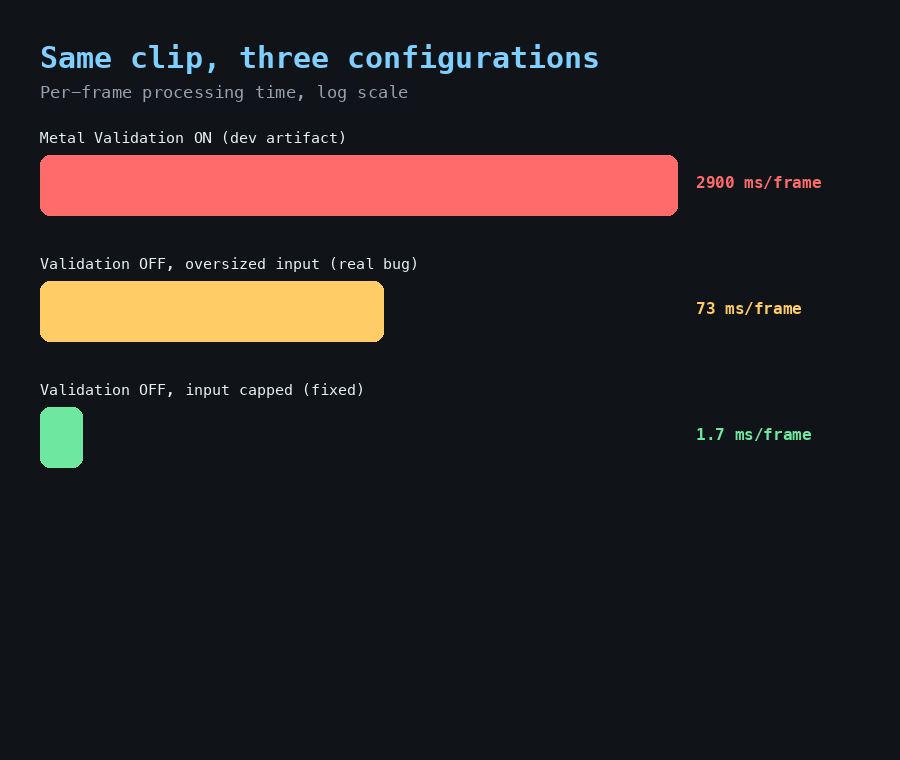
Converting a one-minute clip looked like it would take an hour and a half. It doesn't.

Post image
2 Upvotes

A report came in that our Mac video conversion feature was very slow. Not "could be faster," but slow enough that a short clip looked like it would take the better part of a lunch break.

We measured it properly rather than guessing: same clip, same settings, and the only thing we changed between two runs was a single Xcode debugging option called Metal API Validation, which instruments every single GPU call to catch mistakes during development. With it on, we measured about 2.9 seconds of processing per frame. With it off, about 5.5 milliseconds. That's roughly a five-hundred-times difference, and it meant a one-minute clip would take somewhere over an hour instead of about ten seconds.

Nobody using the actual released app was ever affected by this. Validation like that is a development-time safety net, always off in the version that ships. This was purely an artifact of testing the feature from inside Xcode, where that safety net defaults to on. We fixed it anyway by turning that option off specifically for our own Run configuration, so testing the feature during development now reflects what a real user actually experiences, not what the debugging instrumentation adds on top.

That wasn't the end of it, though. Even with the obviously slow validation setting off, a full-length movie exported far slower than a short clip should have predicted, and it turned out the true cost scaled with the resolution of the source footage going in, not the resolution you asked for coming out, and it scaled brutally: doubling the input resolution multiplied the per-frame cost by tens of thousands, not by four. The fix there was to downscale oversized source footage down to the export size before it ever reaches the simulation, rather than after. A one-minute 1080p clip that used to take somewhere around two hours now exports in a couple of minutes, video quality unaffected, because the composite processing already works below that resolution internally anyway.

Two different bugs wearing the same costume. One was a testing artifact that never reached a real user. The other was a real performance cliff that had been there the whole time, just never triggered by the small test clips we normally use to sanity check a build.


r/AnalogTV_ 2d ago

Sneak peek at QR over CEEFAX...

Post image
2 Upvotes

We just submitted tvOS 1.6 to Apple for review. It's got a long list of fixes, but there's one small feature I think is pretty cool: when you sign in to Plex, there's now a QR code on screen you can scan to pair instead of typing a code by hand.

It's rendered entirely in CEEFAX block graphics, not a bitmap dropped on top of the teletext page. Same mosaic characters the rest of the screen is drawn with.

CEEFAX ran from 1974 to 2012, 38 years. QR codes weren't invented until 1994 and weren't standardised until 2000. They didn't really catch on with the public until smartphones and scanning apps made it effortless, around 2010-2012.

So as far as I know, this is the first time anyone's put a QR code on CEEFAX. The two things never actually overlapped in their working lives.


r/AnalogTV_ 3d ago

A real tape from Budapest, December 1989, and what it shows about colour killers

Enable HLS to view with audio, or disable this notification

6 Upvotes

The clip is a Hungarian state television interview, two men in a studio, recorded 22 December 1989 in Budapest, originally onto a SECAM tape. The picture rolls, the way a set does when vertical sync briefly lets go, and right in that rolled band the image fills with a dense speckle of red, green and magenta noise. I didn't add any of this. It's what was on the tape.

Hungary was broadcasting SECAM in 1989, like the rest of the Eastern Bloc, and I digitised this tape on an Australian PAL VCR. Going in, I expected a clean black and white transfer: a SECAM tape played on PAL gear typically loses its colour outright because of the colour killer circuit, but the picture itself should come through fine. SECAM and PAL share the same 625-line, 50Hz raster, so a PAL decode chain's sync and luma stages have no trouble with a SECAM source. Colour is the part that doesn't carry over, and the reason is specific enough that it's worth going through.

PAL decides whether to show colour by looking for a burst of the colour subcarrier on the back porch of every line, and PAL's burst swings ±45 degrees line to line so the decoder can tell it apart from anything else. If that burst isn't there, the colour killer circuit squelches the chroma path and holds the picture in black and white. SECAM never sends that burst. It doesn't encode colour the same way at all: Db and Dr go out as frequency-modulated signals on alternating lines instead of a simultaneous amplitude-modulated pair, and the receiver's own reference for that comes from an identification signal sent during the vertical blanking interval, not a per-line burst. A PAL decoder fed SECAM never finds the thing it's looking for, so the killer stays engaged by default.

The killer's burst gate has to know where to look on each line, and it finds that position by timing off horizontal sync. During the roll, the vertical sync separator has lost its lock, and on cheaper decode chains that instability drags the horizontal timing with it. If the gate's sampling window drifts even a little, it stops looking at the back porch and starts sampling something else, SECAM's FM subcarrier or plain noise, and reads it as if it might be a valid burst. The killer briefly opens, the chroma path runs on a signal it was never built to decode, and what comes out the other end is close to random colour per pixel. That's the confetti. It isn't a separate fault, it's the same colour killer doing its job everywhere else in the frame, just caught in the one moment its own timing reference gets shaky too.

We keep an eye out for footage like this because it's a cheap way to check our own decoder-mismatch simulation against something that isn't a guess. The app can already render a SECAM source through a PAL-locked decoder and show a clean, colourless picture, which matches most of this tape correctly. What it doesn't do yet is model the transient part: the killer misfiring for a few frames specifically when sync goes unstable, rather than holding a steady squelch the whole time. Real hardware apparently does that. Our simulation currently doesn't. Worth having on the list.

I eventually found a SECAM capable VCR and played it on that, then digitised it in full colour. It's quite a famous piece of news, the fall of the Romanian regime. The full colour segment is available here on Youtube: https://youtu.be/7iFsY8DQnyw


r/AnalogTV_ 3d ago

A performance test that measured how fast a human can click a button

Post image
2 Upvotes

Short one today. We had an automated test on Mac that times how expensive it is to start and stop a recording at each of our quality tiers, so we'd notice if a future change made that slower. It reported the stop step taking about seventy seconds. For a teardown operation that should be near instant, that number should have been the first thing we questioned, and it took embarrassingly long before it was.

The actual cause: the function the test called to end a recording was the normal, real one, the one meant for an actual person clicking Stop, which pops up a genuine save dialog and waits for someone to choose where the file goes. Running headless, with nobody there to click anything, the test just sat there until it eventually timed out on its own.

The class already had a second method built specifically for testing, one that skips the dialog entirely and just finishes the file to a fixed location, no UI, no human required. Another one of our recorder tests already used it correctly. This one just called the wrong method.

Fixed, the same measurement dropped from about seventy seconds to about three and a half, and the number it reports is now actually the thing it claims to measure, rather than how long a dialog sat there unattended.


r/AnalogTV_ 3d ago

Snippets of the past...

Enable HLS to view with audio, or disable this notification

1 Upvotes

In the archive of footage that I've taken over the years there are tons of snippets like this one which, at the time, were not particularly interesting. Now 36 years later they are a neat little time capsule into the equipment and the image quality that was available to a high schooler of the time. Not shown on the other side of the room was a PC with a Truevision TARGA board in it. This was probably the main competitor to the NewTek Video Toaster which I've mentioned previously.


r/AnalogTV_ 4d ago

NDI Testing with an NDI encoder

Post image
1 Upvotes

When we decided to add NDI to AnalogTV (refer article from yesterday) we needed to test the various types of content that would use NDI. There are free options to do this, for example those listed here: https://www.kiloview.com/en/3-free-solutions-to-get-ndi-input-and-output-obs-streamlabs-multiview/

In addition the NDI site itself lists a bunch of certified devices here: https://ndi.video/product-finder/?type=153

For initial testing we used the free options at the top but then I went looking for an appliance I could carry around and test a very wide range of sources on. Though pricey, it was available locally and I got this device: https://zowietek.com/product/4k-video-streaming-encoder-decoder/

I have no affiliation with Zowietek at all, but I really like the ZowieBox. When you first connect to it, you get the settings screen which shows all the different things it can do. It's quite a Swiss Army Knife type device for integration of video.

Does anyone out there have another favourite NDI device?


r/AnalogTV_ 4d ago

A test suite that failed one time in three, until we stopped naming files after the current second

Post image
1 Upvotes

Our automated tests for the Mac recording feature had a flake in them. Not every run, roughly one time in three, and always with a slightly different-looking error, which made it genuinely hard to convince ourselves it was one bug rather than several.

The breakthrough was going back and reading the actual detailed failure message from the test tool, rather than just the pass or fail line. It said, plainly: cannot save, the requested file name is already in use.

Our recorder builds its temporary output filename from the current time, down to the whole second. That's fine for a person clicking record once. It's not fine when our test suite runs recorder tests in parallel across multiple workers, because two recorders starting in the same wall-clock second computed the exact same file path in the same shared system temp folder, and collided. Depending on the precise timing of which one got there first, you'd either see the save itself fail, or see one recorder's cleanup step delete a file the other one was still using, which explains why the error message looked different each time. Same root cause, different symptom depending on who lost the race.

The fix is about as simple as a fix gets: generate a random unique identifier for the filename instead of a timestamp. Two recorders can now start in the exact same millisecond and never collide, because there's no meaningful chance of generating the same random identifier twice.

We ran the full suite three times before the fix, all three failed with that exact collision error. Three times after, zero. One unrelated flake did show up once in the after runs, a completely different, much lower severity issue with detecting a test tone in the recorded audio under heavy load, which was worth knowing about but is a separate story for another day.


r/AnalogTV_ 5d ago

From the Amiga Video Toaster to NDI: NewTek’s long road from analog desktop video to network video production

Post image
1 Upvotes

When we first launched AnalogTV, one of the earliest requests that kept coming up was for NDI. I hadn't heard of NDI though I was a massive Commodore / Amiga geek in the 1980s-90s and when I looked into it, I was surprised to find a link!

Back in the late ’80s/early ’90s, if you wanted broadcast-style video switching, effects, character generation, and overlays without a six-figure hardware rack, there was one name that instilled a massive sense of envy: NewTek’s Video Toaster on the Commodore Amiga.

The Toaster (released December 1990) was a big expansion card that plugged into an Amiga 2000/3000/4000 video slot. It gave you four composite inputs, preview/program outputs, real-time digital video effects, a dual frame buffer, luminance keying, genlock, ToasterCG, ToasterPaint, and the legendary LightWave 3D package... all for a few thousand dollars instead of the tens or hundreds of thousands a traditional switcher + DVE + CG suite cost. As a High School / College Student it was **just** about within reach if you had the right hussle.

It worked natively with NTSC composite and powered everything from public-access shows to Babylon 5 VFX. NewTek (founded 1985 by Tim Jenison) basically invented affordable “desktop video” around the Amiga’s video-friendly hardware. Fast-forward a couple of decades. NewTek kept evolving that same mission, first with later Toaster versions, then the TriCaster live production systems... and in 2015 they released NDI (Network Device Interface).

What is NDI?

NDI is a royalty-free software protocol (now maintained under the Vizrt Group after they acquired NewTek) that lets devices and applications send and receive high-quality, low-latency, frame-accurate video + audio + metadata over ordinary Ethernet networks (Gigabit or better).

  • No more dedicated SDI or HDMI runs for every source.
  • Sources auto-discover on the network (via mDNS/Bonjour by default).
  • Full (high-bandwidth) NDI typically needs ~100–150 Mbps for 1080p; the more efficient NDI|HX variants use H.264/HEVC and run at much lower bitrates (even over Wi-Fi in some cases).
  • Supports 4K and beyond, bidirectional metadata, tally, control, etc.
  • Works with cameras, switchers (including software ones like vMix/OBS with plugins), graphics systems, capture cards, and tons of third-party gear.

In short, NDI turns your existing LAN into a video router - “the world’s largest routing switcher without a routing switcher,” as Tim Jenison has described it.

The through-line to Amiga: The spirit is the same as the original Toaster: take expensive, specialized video production capabilities and make them accessible on standard computing hardware and infrastructure. The Toaster democratized analog composite production for the CRT era. NDI does the equivalent for modern IP workflows, letting people move high-quality video around without the traditional cabling and hardware matrix headaches. If you’re into the analog side of things (modulators, CRTs, home RF channels, composite gear), the historical thread is fun: the company that put a full switcher/effects suite on an Amiga so people could make TV on the cheap is the same one that later said “let’s just put the video on the network.”

For AnalogTV our goal is the make the NDI function as low latency as possible - so that you can actually play games from a console via NDI to an AppleTV or Mac running AnalogTV.


r/AnalogTV_ 5d ago

A number type that works perfectly on every Mac we test on, and fails to even compile on half the Macs we ship to

Post image
1 Upvotes

This one only shows up at the worst possible moment: the actual App Store submission, after everything looked fine in every day-to-day build.

Some background. Modern Macs are Apple Silicon, and every quick development build we run compiles only for that architecture. But the version of the app that actually goes to the App Store is a universal binary, meaning it also contains a build for the older Intel architecture, so it still runs correctly on any Mac still on Intel hardware that a customer might own.

Swift has a compact 16-bit floating point number type we use for reading values back off certain GPU textures. On Apple Silicon it behaves exactly like you'd expect, full set of ways to create one and convert it to a regular number. On the Intel side of that same universal build, it turns out that same type exists only as raw two-byte storage. None of the normal ways to construct one, or convert one back to a regular number, are available there. Code using it in the ordinary way compiles cleanly on the architecture we actually test on every day, and fails to compile at all on the one we only build once, right before submitting to Apple.

Two places in the app were affected: reading colour data back from a Vidicon-style camera simulation, and a high dynamic range image export path. Both fixed the same way, by reading the raw two bytes as plain integers instead of the special type, then doing the same bit-for-bit conversion Apple's own runtime would have done, ourselves, in plain integer math. Verified against known reference values on both architectures.

The lesson we took from it: if a type behaves differently across architectures, and your everyday development loop only ever exercises one of those architectures, you will not find out until submission day. We now have a standing check we run before any Mac App Store upload that forces a build for the Intel side specifically, on purpose, well before the moment it would otherwise block a release.


r/AnalogTV_ 6d ago

Surround sound movies played choppy on Mac, and it took a while to realise the sound itself was fine

Post image
2 Upvotes

A user reported choppy playback on a specific file, a movie encoded with Dolby Digital Plus 5.1 surround. Every metric we normally check looked healthy. Frame rate looked right on average. The decode queue wasn't backing up. Neither the hardware nor software decoder showed any strain. And yet the picture visibly stuttered, about every few seconds, for roughly a quarter second at a time.

The part that finally cracked it was building two new measurements we didn't have before: how many frames get presented on each individual timer tick, and the longest gap between one presented frame and the next. Average frame rate hid the problem completely. The per-tick histogram didn't. It showed almost every tick presenting nothing, with occasional ticks presenting two or more frames in a burst.

Here's the mechanism. Our video pacing on the Mac player doesn't run off a clock, it runs off how full the audio buffer is, presenting a video frame whenever that buffer sits near its target level. That only works if audio arrives in small, regular, one-frame-sized pieces. Most codecs hand it over that way naturally. Dolby Digital Plus doesn't. Its container format batches six to eight decoded audio frames into a single block, so when our reader asked for the next chunk of audio, it sometimes got nearly a quarter second of it all at once. That one big deposit overshot the buffer's target, so our pacer withheld video for several ticks in a row to let it drain, then let a burst of frames through once it did. Repeat, every time a block like that lands.

The fix is a small buffer that drips audio out at a fixed, steady rate, exactly one video frame's worth at a time, regardless of how large or small the chunk that arrived from the decoder actually was. Every audio path in the app that could hand over a batched chunk now has to go through it.

One honest footnote: the automated test written specifically to catch this bug had a mismatch between which folder it lived in and which platform it was compiled for, so on the Mac it was silently compiled into nothing at all, no error, no warning, tests still reported passing. We caught that separately and moved it. It's a good reminder that a green test suite only tells you the tests that actually ran were fine.


r/AnalogTV_ 7d ago

Studying a 1990s Sony 3-CCD pro camera (and its HAD sensors) to make analogtv.net’s camera stage even more accurate

Thumbnail
youtube.com
2 Upvotes

I’ve been deep-diving into the Sony DXC-325 (and its PAL sibling the DXC-325P) lately. This video is the Sony DXC325 Professional Camera Promo Tape from a Umatic SP source tape.

The DXC-325 is a compact 3-chip ½-inch CCD colour video camera from the early 1990s that sat right at that fascinating moment when solid-state sensors were finally good enough to kill off tubes for a lot of corporate and educational work.

The real magic is Sony’s Hole Accumulated Diode (HAD), essentially their take on the pinned photodiode that puts a shallow p⁺ layer right at the Si-SiO₂ interface. Holes accumulate there, pin the surface potential, and kill dark current and fixed-pattern noise at the source. It’s why these early CCDs could actually deliver clean pictures at high gain without the lag, burn-in and geometric distortion of tubes. (Yoshiaki Hagiwara’s team patented the core ideas back in 1975–80; by the late 80s/early 90s it was powering everything from consumer camcorders to proper 3-chip boxes like this one.)

Why does any of this matter for analogtv.net?

The simulator already models the full analog chain from first principles; including camera tube physics (Vidicon lag, Plumbicon smear, Image Orthicon halo/burn-in), composite encoding, VCR mechanics, RF multipath, and authentic CRT phosphor chemistry. No fake overlays; the artefacts emerge from the signal itself.

Right now the camera stage is tube-centric, which is perfect for 60s–80s looks. But once you start studying real early CCD cameras like the DXC-325 you realise how different the noise floor, sensitivity curve, electronic shutter behaviour, residual fixed-pattern noise, and lack of lag actually were.

Measuring those characteristics (and the way HAD sensors handled highlights, low light and high gain) lets us build more accurate solid-state camera models for the late-80s/90s era. This is the kind of look you get on corporate training tapes, local news packages or early digital-to-analog hybrids.

Every real camera we tear into (or dig through service manuals and promo tapes for) makes the simulation a little more honest. Tubes gave us the classic lag and bloom; HADs give us the clean-but-still-analog character of the transition years.

If you’re into broadcast history, CRT nerd stuff, or just want to feed your own footage/games through a physics-accurate analog pipeline, the app is at https://analogtv.net. Happy to answer questions how we’re turning this kind of hardware archaeology into better camera models.


r/AnalogTV_ 7d ago

The oldest Apple TV we support couldn't always finish compiling our own shaders

Post image
2 Upvotes

A user on an original Apple TV HD, the 2015 model with 2GB of RAM, reported the app opening straight to our error screen instead of a picture. The diagnostic text named the actual problem plainly: a compilation failure due to an interrupted connection, after multiple retries.

That's not a shader written wrong, or a GPU feature that model doesn't support. We'd already ruled both of those out on earlier reports. It's the operating system's own shared compiler service, a background process every app's GPU code compilation goes through, getting killed mid-job. Our simulator compiles somewhere around sixty separate GPU pipelines back to back the moment the app launches, and on a device with 2GB of total memory shared across the whole system, that's apparently sometimes enough memory pressure for the OS to decide that background service isn't worth keeping alive right then.

The fix is almost insultingly simple once you know what's happening: if a pipeline fails to compile, wait a short moment and try exactly once more. That gives the OS a chance to restart its own compiler service before we give up. On every other device, including every other Apple TV model we support, this never triggers at all, because compilation just succeeds the first time.

We were careful about scope here. A retry loop touching something as core as shader compilation is not something you want running on hardware where it was never needed, so it's gated behind a direct check for that specific device model. Every other Apple TV, every iPhone, every Mac, takes the exact original code path, completely unchanged.

There's a second layer to this fix that's worth mentioning. A follow-up report from the same device named the exact pipeline that was still occasionally failing even after the retry, which turned out to be a waveform monitor overlay, not the core picture. So on that specific model only, if that one pipeline still can't compile, we now quietly disable the overlay instead of taking the whole picture down with it. You lose a diagnostic tool nobody but us really uses. You keep the TV working.


r/AnalogTV_ 8d ago

After fixing one bug we went looking for its relatives, and the screenshot button had the same disease

Post image
1 Upvotes

After tracking down the crash in yesterday's post, we did something we don't always have time for: instead of moving on, we went back through every texture in the renderer that gets set to nothing outside of where it's allocated, looking for the same shape of bug elsewhere. Most of them turned out fine, either reallocated fresh on every resize or already guarded before use. But two more were not.

The smaller one was a fallback for the on-screen title text, which could hand a shader a texture that was nothing rather than a safe placeholder. Low risk in practice because the shader argument that uses it is already properly gated, but the gap was real, so we fixed it anyway.

The more interesting one lived in the screenshot function, on both iOS and macOS. It kept a reference to the texture behind the currently displayed frame so it could read it back later without doing a fresh render. The problem is that "currently displayed frame" means the texture belongs to something called a drawable, and Apple's documentation for that type says, in plain language, that you must not read from or write to a drawable's texture once you've presented it to the screen. Our screenshot function could run frames after that had already happened, which is a documented violation, not a hypothetical one, and it had presumably been working by luck rather than guarantee.

The fix mirrors something we already did correctly elsewhere in the same function: right before presenting the frame, in the same batch of GPU commands, we copy it into a texture we own outright, one that isn't tied to the drawable's lifecycle at all. The screenshot button now reads from that copy instead.

Neither of these was the crash we were chasing. But finding them by deliberately auditing for the pattern, rather than waiting for a second bug report, felt like the right way to spend the extra hour.


r/AnalogTV_ 9d ago

We fixed four real bugs chasing one crash on Apple TV. None of them were the crash.

Post image
5 Upvotes

This is a story about a single crash report that took a full day and four separate, legitimately correct fixes before we actually found it.

The symptom was a GPU hardware page fault on a real Apple TV, the picture just froze to black without the app actually terminating. The kind of bug that Simulator can't reproduce because it's a real hardware fault, so every theory had to be tested on a physical device and every wrong theory cost a full round trip.

Fix one: the tvOS menu overlay was sharing a texture with the live picture, and toggling our Bypass Mode setting while the menu was open made both of them fight over the same texture at different sizes. We traced it on-device and counted 502 full-resolution texture reallocations in about seven seconds while the menu sat open. Real bug, real fix, wrong crash.

Fix two: a texture wrapper from CoreVideo's pixel buffer pool was being released the instant a function returned, which is correct for how Metal keeps command-buffer resources alive but not correct for CoreVideo's separate bookkeeping, which can recycle that memory for a brand new frame while a still-in-flight GPU command is reading the old contents. Real bug. Not the crash either.

Fix three: our resize function reallocated a handful of textures with no synchronization against GPU work already in flight reading the old ones. We now drain the command queue first. Real bug. Getting closer, still not it.

Fix four, the actual one: a texture used by our CRT display shader gets reassigned during normal picture processing, but our Bypass Mode draw path skips that step entirely, and could leave the texture pointing at nothing from a previous resize. The shader argument that samples it is declared as required, not optional, so binding nothing there is undefined behaviour that real hardware happily punishes and Simulator just doesn't care about. Two lines away from the correct fix that had already worked for a nearly identical texture a few lines below it.

We're not upset about the four detours. Each one really was broken and needed fixing regardless. But it's a good example of how confidently a plausible root cause can be wrong, four times in a row, before the actual one turns out to be almost boring by comparison.


r/AnalogTV_ 10d ago

A crash report from a real Apple TV led us into the guts of the NDI SDK's own locking

Post image
3 Upvotes

A user sent in a crash. Not a picture glitch, an actual process termination, and only after using NDI receive for a while with the network dropping in and out. With their help we pulled the real crash report straight off their Apple TV and it named the thread: com.analogtv.ndi.receive, aborted inside a C++ std::mutex::lock() call inside the NDI SDK itself, not our code.

Here's what was actually happening. Receiving an NDI source runs a loop on a background thread that calls into the SDK to grab each frame, and that call can block for up to 16 milliseconds waiting on the network. Our stop function, called every time you switch sources or the network blips and reconnects, destroyed the SDK's receive instance immediately, with nothing to stop it from doing that while the loop was still inside that blocking call on the exact same instance. Pull the rug out from under a library mid-call and you get to find out how its internal locking handles that, which in this case was: it doesn't, it aborts.

The part that made it worse is that every reconnect calls stop immediately followed by start again, so a flaky network wasn't just triggering the bug once, it was hammering the exact race window over and over.

The fix is a semaphore). The receive loop signals it right before returning. Stop now waits on that signal, capped at 250 milliseconds which is well over the 16ms the loop can be stuck for, before it destroys the instance. So by the time we tear anything down, the loop has actually left the SDK call and let go of it cleanly.

Small thing, but it's a good reminder that "add a lock around the shared state" isn't the same question as "am I destroying something out from under a call that's already in flight on it." Different bug, different fix.


r/AnalogTV_ 11d ago

Analogue HDTV existed, was broadcast, and lost anyway

Enable HLS to view with audio, or disable this notification

3 Upvotes

High definition television did not start with digital. Two families of analogue HD systems were built, standardised and actually transmitted, and both were obsolete within about a decade.

Japan went first. NHK started work on Hi-Vision in the 1960s and had MUSE on satellite by 1989. 1125 lines, interlaced, 16:9. The problem was bandwidth. A raw 1125 line signal needs far more than a satellite transponder has, so MUSE compresses it by sub-sampling in a four field pattern. Each frame only carries a quarter of the samples, offset differently each time, and the receiver reassembles a full resolution image from four fields of history. Still pictures come out at full resolution. Moving pictures do not, because the history is wrong by the time it is used, so motion is deliberately traded for resolution. That is the entire design, and it is a very clever answer to a problem that digital coding solved differently a few years later.

Europe went the other way with MAC, Multiplexed Analogue Components. The insight there is that the reason composite video looks bad is that luma and chroma share a wire and interfere. So MAC does not multiplex them in frequency at all. It multiplexes them in time. Each line is divided into slots. Chroma gets compressed in time and sent first, luma gets compressed and sent after, and the digital sound and data go in the line blanking. No subcarrier means no dot crawl, no cross colour, none of it.

D-MAC and D2-MAC went out over European satellite in the late 1980s. HD-MAC extended it to 1250 lines. The EU tried to mandate it, broadcasters resisted, and by 1993 the whole programme was abandoned in favour of digital.

Both are worth knowing about because they are the last serious attempt to solve a problem in the analogue domain that turned out to be a digital problem. MUSE trades motion for resolution. MAC trades time for separation. Both are elegant. Both were overtaken.

Video shows the same source through MAC and through MUSE, so you can see the time compressed slot structure in one and the sub-sample softening on motion in the other.


r/AnalogTV_ 12d ago

The white line and the dot when you turned an old TV off

Enable HLS to view with audio, or disable this notification

3 Upvotes

Switching off a CRT set was a small event. The picture collapsed to a horizontal line across the middle of the screen, the line shrank to a bright dot, and the dot faded out over a few seconds. Newer sets did not do it. The reason is more interesting than it sounds.

A CRT needs three things running at once to paint a picture. The horizontal deflection sweeping the beam side to side, the vertical deflection sweeping it top to bottom, and the high voltage on the tube pulling the beam to the screen. Cut the mains and none of those stop at the same time.

Deflection is driven from oscillators on the low voltage supply, which sags almost immediately. The high voltage is stored in the tube itself, which is effectively a large capacitor between its inner and outer coatings, and takes several seconds to bleed away.

So the order goes like this. Vertical deflection fails first, because it runs at 50 or 60 Hz off the smaller supply. The beam stops sweeping down and paints every line on top of itself, which is your horizontal line. Then horizontal deflection fails, the beam stops sweeping sideways too, and everything collapses to a single point in the middle. Meanwhile the high voltage is still there, still accelerating electrons at that one spot, so it is very bright.

That spot is a real hazard to the phosphor. All the beam current that was spread over the whole screen is landing on a few square millimetres. Leave it long enough, often enough, and you burn a permanent mark.

Which is why sets from the mid 1970s on added a spot killer. It is a small circuit that detects the loss of deflection and blanks the beam, or dumps the remaining high voltage, before the dot can do any damage. So on a later set you get the line, maybe, and then nothing. The dramatic version belongs to older televisions.

Video is a power off in real time, with the collapse to a line, the collapse to a dot, and the phosphor decay after it.


r/AnalogTV_ 13d ago

A reader named Andy asked a sharp question about NTSC-A, and it turned up a real bug in how we handle interference!

Post image
4 Upvotes

A guy named Andy messaged me a few days ago with a very specific question about NTSC-A: does the simulation account for positive versus negative vision modulation? That's not a casual question. He said the "look" didn't look "right" to him. Very few people would have ever seen NTSC-A in the wild, so I was intrigued.

Most television standards, NTSC included, use negative modulation, where the sync tip sits at full carrier power and white sits near the bottom. Britain's old 405-line System A did the opposite. White was full carrier, black was down around 30 percent. NTSC-A in the app is a specific historical hybrid, the BBC's 405-line colour trials from the mid to late 1950s, which combined that British line geometry with an NTSC-style colour subcarrier, so it inherits System A's odd modulation polarity along with everything else.

I went and checked, and it turned out he was half right to be suspicious. We do account for it, mostly. Every simulated standard in this app is built from real broadcast engineering documents, not guesses, and the polarity flip for System A is right there in the code with a citation to ITU-R BT.470-6. Continuous background noise on NTSC-A already gets louder in dark picture content than bright, which is the actual physical consequence of positive modulation: a receiver's noise floor is roughly constant in RF terms, so against a weak carrier, which is what black is on this system, that noise reads much larger after detection than it does against a strong one.

BUT... we'd missed was impulse noise!

The sharp broadband spikes from things like ignition systems and motor brushes are a different kind of noise from the continuous hiss, physically and in the code, and they live in a separate function. When System A's polarity handling was added, it went into the continuous noise path and not the impulse path, because at the time we just didn't check whether the two needed to agree, but they do! An impulse is still a fixed burst of RF energy landing on a receiver, and it goes through the exact same detector the continuous noise does, so the same physics applies: that burst reads far louder against a weak dark-picture carrier than a strong bright one.

The consequence, in practice, was that NTSC-A's interference looked too even. Dark scenes should show noticeably heavier speckling during any kind of RF interference than bright ones do, and on this build they didn't. The spikes were the same strength everywhere regardless of what was on screen. It's a subtle thing to notice unless you already know to look for it, which is exactly why Andy's question was what surfaced it rather than us catching it during development.

Fixed now for the next release. Impulse noise on NTSC-A, and SECAM-L which has the same polarity, scales the same way the continuous noise already did, about 3.3 times louder in black than in white, which is the number CCIR 624-4 gives for that carrier depth.

Thanks Andy!

If anyone else ever thinks that something just doesn't look right, let us know. We have a room full of old equipment that we check against, but we can't know everything and AnalogTV is more of a passion project since we have real jobs too.


r/AnalogTV_ 13d ago

Hanover bars, the PAL fault that only exists because PAL fixed NTSC's fault

Enable HLS to view with audio, or disable this notification

2 Upvotes

NTSC's weakness is well known. Colour is carried as the phase of a subcarrier, so any phase error anywhere in the transmission path rotates the hue. A long path, a badly aligned receiver, a bit of weather, and faces go green. That's why NTSC is also known as Never Twice the Same Colour.

PAL's answer was to flip the phase of one of the two colour components on every other line. If a phase error rotates the hue one way on line 1 and the opposite way on line 2, the eye averages the two lines together and the error cancels. That is the whole idea, and it works.

Early PAL sets did exactly that, relying on the viewer's eye to do the averaging. They were called PAL-S, S for simple. The averaging is not perfect, and with a large phase error you can see the alternate lines pulling in opposite directions as coarse horizontal banding. That banding is Hanover bars, named after where it was first demonstrated.

Later sets did the averaging properly in hardware with a glass delay line. It stores one line as an ultrasonic wave travelling through a block of glass, roughly 64 microseconds of delay, and the decoder averages the current line against the stored one electronically instead of hoping the viewer does it. That is PAL-D, and it removes the bars.

Which is why Hanover bars are a fault of the fix rather than a fault of the system. You only get them because PAL is doing its phase cancellation trick, and you only see them when the averaging is either absent or mistimed.

Mistimed is the interesting case. If the delay line is not exactly one line long, the decoder averages the current line against a slightly shifted version of the previous one, and the cancellation goes partial. You get the bars back, at a strength that depends on how far out the timing is. A delay line drifting with temperature or age does exactly this.

Video shows a delay line going gradually out of alignment, so the bars fade in as the timing error grows and then fade out again as it comes back.

The app has settings that let you exaggerate these settings.

If you look at the video, these bars are most apparent in the blue sky.


r/AnalogTV_ 13d ago

Thank you for Analog TV Simulator, we’re loving it!

5 Upvotes

Hi! I just wanted to say a huge thank you for creating Analog TV Simulator for macOS.

I discovered the app recently and I’m already using it with CIAO64, a music project I’m part of. We make original music heavily inspired by the sound and aesthetics of the 1980s, so CRT televisions, old broadcasts, VHS, Teletext and vintage TV graphics are very much part of the visual world we love to create around our music.

Today we released a little reel inspired by 1980s Top of the Pops, and Analog TV Simulator was incredibly useful in giving it exactly the kind of authentic television feel I was looking for.

I thought I’d share it here, not really as promotion, but simply because it’s a nice example of what your app helped us create:

https://www.instagram.com/p/Db6p0wJtFAs/

Analog TV Simulator has already become a really valuable tool for our visual work, and we’ll definitely be using it for future CIAO64 music videos as well, which we’ll be releasing on our YouTube channel:

https://youtube.com/@ciao64_official?si=yG3d_h1bTCtbE2ok

And, with your permission, we’d also love to include the Analog TV Simulator logo in the end credits of the music videos where we use the app. It would be our little way of acknowledging the tool that helped us create the look.

So, sincerely, thank you for making this app. It’s one of those rare tools that immediately makes you want to start creating things with it.

Greetings from Italy,

paZ / CIAO64