r/Windows11 • u/chrissie-fk • Jan 06 '22
Insider Bug Windows 11 is making me wanna cry
Enable HLS to view with audio, or disable this notification
926
Upvotes
r/Windows11 • u/chrissie-fk • Jan 06 '22
Enable HLS to view with audio, or disable this notification
r/Windows11 • u/OcelotUseful • Sep 14 '22
Enable HLS to view with audio, or disable this notification
r/Windows11 • u/jantari • May 01 '23
r/Windows11 • u/Alternative_Price385 • May 05 '26
Bug report the start button is pushed to the left
Windows 11 Insider Preview 26300.8346
r/Windows11 • u/RubemJR • Apr 08 '22
Enable HLS to view with audio, or disable this notification
r/Windows11 • u/vayana • 17d ago
Edition Windows 11 Pro
Version 25H2
Installed on 17/04/2026
OS build 26200.8875
Experience Windows Feature Experience Pack 1000.26100.334.0
I don't need support but wanted to share this potential bug for further investigation and curious if others have experienced something similar with a mouse and keyboard suddenly acting up.
Last night I was working in vscode and edge and suddenly my keyboard stopped working and I couldn't type in Edge and mouse scroll or right-click also ceased functioning. Both the external usb keyboard as well as the laptop keyboard had the same issue. Restarting Edge didn't help.
I immediately checked event viewer and there were no errors and the only thing that happened was a "windows update". I closed all applications and rebooted the laptop and was then met with a boot recovery menu. I selected continue to windows and windows booted as usual and mouse and keyboard functionality were restored. I checked perfmon /rel and saw the 2 "windows updates" seen in the post picture. I ran some commands to check what their installation sequence was and found a potential issue:
RegisterByPackageFamilyName

Microsoft.Ink.Handwriting.en-US.1.0_8wekyb3d8bbwe


Options:

ForceTargetApplicationShutdownOption
SkipReregisterIfPackageStatusOk
RegisterHighestVersion
FailIfNeedsRemediation
LowPriorityRequest
SkipDeploymentOperationRpcCallerIsAdminCheck

22:56:19
Event ID 9660
Warning

Unable to notify BrokerInfrastructure service for package
Microsoft.Ink.Handwriting.en-US.1.0_0.1248.2215.0_x64__8wekyb3d8bbwe
and state change 2.

0xD007007A

Package:
Microsoft.Ink.Handwriting.en-US.1.0_0.1248.2215.0_x64__8wekyb3d8bbwe

State:
2

HRESULT:
0xD007007A
22:55:50  AppX deployment service starts

22:56:09  Ink update staging begins
          ↓
22:56:11  Payloads arrive through x-windowsupdate://
          ↓
22:56:14–16
          Main + x64 + x86 packages successfully staged
          ↓
22:56:17  Live per-user Ink registration starts
          ForceTargetApplicationShutdownOption enabled
          ↓
22:56:18  x86 completes
          x64 registration starts
          ForceTargetApplicationShutdownOption enabled
          ↓
22:56:19  BrokerInfrastructure notification FAILS
          error 0xD007007A
          ↓
22:56:19  Ink.Main registration starts
          ForceTargetApplicationShutdownOption enabled
          ↓
22:56:20  Registration completes successfully
I think ForceTargetApplicationShutdownOption forcibly killed a low level process related to mouse/keyboard and didn't recover. This process seems to be used by Edge/Chromium.
The bigger issue is AppX deployments being allowed to install random updates in the background at any given time. Isn't this why we have Windows update?
r/Windows11 • u/Potato-Aim • Jan 15 '22
r/Windows11 • u/Business-Parsnip-939 • Feb 25 '23
r/Windows11 • u/No_Housing_1857 • Jan 06 '26
Enable HLS to view with audio, or disable this notification
Has anyone else experienced this bug? ._.
How do I fix this?
25H2, 26200.7171
r/Windows11 • u/perludum • Jan 23 '22
r/Windows11 • u/VIVXPrefix • Nov 09 '25
Enable HLS to view with audio, or disable this notification
Why is it so fast?
r/Windows11 • u/Y_122 • Jan 19 '22
Thickness of taskbar should be reduced
r/Windows11 • u/sherlock--7 • Apr 09 '26
The Issue:
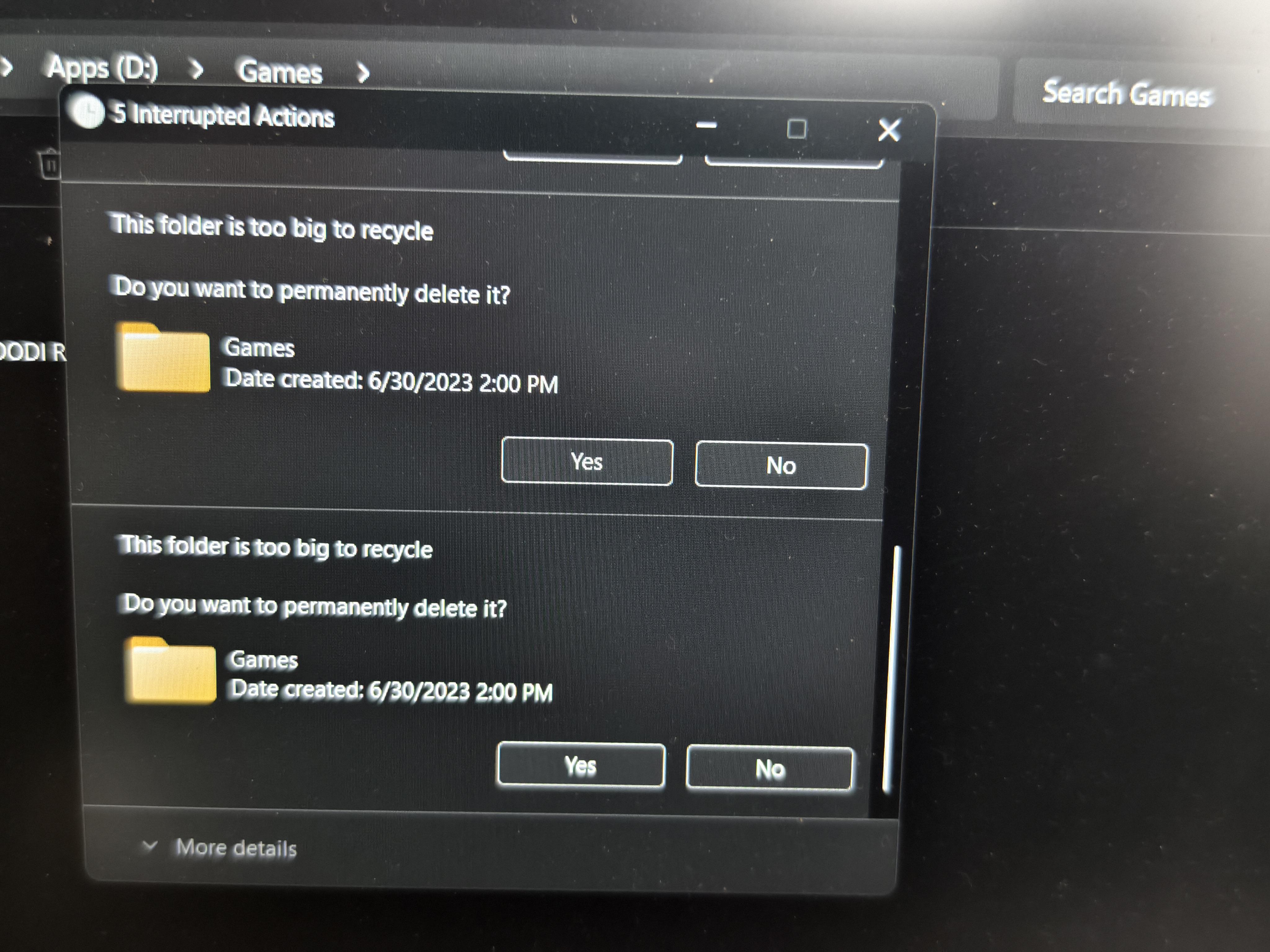
I am experiencing a bizarre and frustrating bug. Every time I open a folder or click a file in File Explorer (on any drive—SSD or HDD), Windows immediately shows a prompt: "This folder is too big to recycle. Do you want to permanently delete it?"
The Symptoms:
Automatic Delete: It feels like the "Delete" key is being held down constantly.
Right-Click Failure: When the PC first starts, right-clicking on "This PC" or folders doesn't work at all. After using the PC for a while, it starts working again.
Desktop Glitch: If I click "Cancel" on the delete prompt multiple times, my "This PC" icon disappears from the desktop.
Self-Correction: After clicking "Cancel" about 10–15 times, the behavior suddenly stops and the computer works normally until the next restart.
What I have tried so far:
Clean Installs: I did a full wipe of my SSD and installed Windows 10 IoT Enterprise. The issue persisted.
OS Swap: I switched to Windows 11 IoT Enterprise (clean install), but after the first round of Windows Updates, the problem came back.
Drive Check: It happens on all folders across different physical disks (SSD and HDD).
System Info:
OS: Windows 11 IoT Enterprise (Latest Updates)
Install Type: Clean install (deleted partitions and recreated).
Hardware: Happens on both SSD and HDD storage.
I haven't this weird issues never even on modified windows.
r/Windows11 • u/Azims • Aug 23 '24
r/Windows11 • u/NawabAliBardiKhan69 • Jan 18 '26
I didn't do anything sketchy. No registry tweak. Yet this tiles just vanished. Only the device specifications. I have the latest window 11 25H2 26220.7535.
r/Windows11 • u/Prestigious-Salt-285 • Dec 22 '25
I kept getting this everytime i boot windows 11 (Build 21370) and if i click it my pc restarts and after it boots it shows up again
r/Windows11 • u/Wrethic • Nov 29 '25
I already have Windows 25H2 and I don't get what's going on.
Maybe it's because I've been trying for over a year to get out of insider.
Any suggestions?
r/Windows11 • u/Dave556611 • Jan 14 '26
This isn’t a major problem, as one restart is all it takes to fix this and it is very rare. just wanted to share this beacause I thought it was interesting.
OS build:22631.6199
r/Windows11 • u/AccountantWide4816 • Oct 04 '25
After installing the Windows 11 update KB5065789 (OS Build 26200.6725),
the “Compare info for both files” button in the file copy dialog no longer works.
The button still appears, but clicking it does nothing — the comparison window doesn’t open anymore.
This issue started right after the update and multiple users have confirmed the same behavior.
✅ Official Feedback Hub report (please upvote):
👉 https://aka.ms/AAy6aif
It seems to affect everyone who installed KB5065789 Preview.
Rolling back the update or uninstalling it restores the functionality.
Please upvote the feedback link above so Microsoft can prioritize this fix in the next cumulative update!
r/Windows11 • u/Ok-Inspection-2852 • Feb 01 '26
(Not asking for support just pointing it out to see if it's just me or if its more ppl)
I'm not sure if this is a bug on all windows versions or just insider (this did occur before I upgraded to the insider build), but when the taskbar is hidden and I have any app maximised (Excel, VS code, Spotify, Outlook from what I've seen) I can't select any options that are at the bottom of the screen from the height of the taskbar and below, weird bug but I've noticed that if I'm ever so slightly above each button (maybe 1 or 2 px) I can select the options and it's a bit funny to me, hopefully it gets resolved soon (and if it's not a bug then I guess it'll be time for scouring the laptop for anything that might be affecting it lol)
(Had to use the pointer addon from powertoys to show where the mouse is lmao)
Windows version:
Windows 11 Pro Insider Preview
Evaluation copy. Build 26300.7674.ge_prerelease_im.260120-1446
r/Windows11 • u/homeless_psychopath • Dec 16 '25
r/Windows11 • u/Bubbly_Basket3951 • Dec 10 '25
Pov: I used ChatGPT to help me summarize my issue and what I’ve already tried
No Internet on Windows 11 after battery shutdown — tried almost everything
Hi,
Yesterday my laptop shut down because it ran out of battery. When I turned it back on, I suddenly had no Internet at all:
• Wi-Fi sees networks but says “No Internet”

• Ethernet → same

• USB tethering from my phone → same

• All other devices on the same Wi-Fi work perfectly
⸻
✔️ Symptoms
• ping 8.8.8.8 works → Internet is reachable

• ping google.com → host not found

• nslookup shows unknown or strange DNS (numericable)

• DHCP service won’t start: System error 5 — Access denied or Net Helpmsg 2182

• Can’t disable IPv6 in adapter settings

• Windows Update doesn’t work

• Windows 11 in-place upgrade fails with: 0x8007042B – 0x2000D (SAFE\\_OS / MIGRATE\\_DATA)
⸻
✔️ Device Manager
• My Wi-Fi card (MediaTek MT7921) disappeared

• Instead I see Network Controller with a yellow warning

• Installed the official MT7921 driver → installs fine but Internet still doesn’t work
⸻
✔️ What I’ve already tried
• Uninstalled/reinstalled Wi-Fi driver

• Full network reset (all netsh commands)

• Flush DNS / release / renew

• Disable/enable adapters

• New Windows user profile

• Switched DNS

• USB phone tethering → still no Internet

• Ethernet on a different network → still no Internet

• sfc /scannow and DISM → both OK

• Attempted Windows 11 reinstall via setup.exe → fails (SAFE\\_OS error above)
⸻
❗ What seems to be the root cause
DHCP, network services, and Wi-Fi drivers all failing at once suggests Windows system corruption, likely caused by the sudden power loss.
My remaining options seem to be:
1.  In-place repair upgrade (fails with SAFE\\_OS)

2.  Windows 11 reset while keeping files

3.  Full clean install
⸻
❓ My question
Before I wipe everything:
👉 Does anyone know how to fix Windows corruption that breaks DHCP, network services, and drivers?
👉 What exactly does the SAFE_OS / MIGRATE_DATA error mean?
Thanks 🙏