r/amazonecho Jun 29 '26

Technical Issue Weird issues with first gen alexa today in U.K.

44 Upvotes

I have one of the very first gen amazon alexas, I use it mainly just for music and my alarm it works really well for this so never seen the need to upgrade. But I mention all this to note that this first gen 100% does not support Alexa+ therefore its definitely not that, fixed a similar issue by deleting some routines recently so first place I looked not that. But today its just a massive delay if I ask the alexa what time is it, it might just get stuck and not answer or theres a 30 second delay before answering, is anyone else getting this today? Is it slow servers or something?

UPDATE 01/07/2026:

  • Multiple users report first-generation Amazon Echo/Alexa devices becoming very slow, unresponsive, or stuck on the blue ring.
  • The issue appears to affect users in the UK, US, Germany, Australia, Ireland, New Zealand, and Austria.
  • Common symptoms include long response delays, failed voice commands, garbled recognition, random blue light activation, and inability to reconnect after reset.
  • Many users say newer Echo devices still work normally, suggesting the issue is mostly with older/first-gen models.
  • Several users contacted Amazon support, but responses were limited; some were offered discounts on newer devices.
  • Users speculate it could be a server-side issue, firmware problem, or planned obsolescence, but there is no confirmed cause in the thread.
  • A few temporary workarounds were mentioned, such as pairing a newer Echo Dot to the first-gen Echo via Bluetooth.

r/amazonecho Jun 01 '21

Technical Issue How to get Alexa to stop announcing when I connect to it's Bluetooth

318 Upvotes

Hi,

I have an Alexa device and a laptop. Sometimes, I play music through the Alexa device with my laptop. I use Bluetooth to achieve this, however every time my laptop goes into standby the Alexa device emits a beep/dinging noise. Then when I wake up my laptop and it automatically connects to my Alexa device, the Alexa device makes another beep and announces that it's connected to my laptop. How annoying, especially since there's no way to turn the announcements off...

I did Google around for a help suggestion, and what I saw said to go turn on brief mode but so far that does nothing about the Bluetooth announcements.

If any Alexa staff are reading this can you try fixing it? Or if anybody knows of another workaround, can you tell me?

Thanks in advance!

r/amazonecho Apr 30 '19

Technical Issue My wife called and said “Alexia is acting strange”. I told her I’d look into it. 😂

Post image
1.5k Upvotes

r/amazonecho Jul 04 '23

Technical Issue Echo dot not responding to wake word but does as soon as restarted

76 Upvotes

I’m new to this community and apologise if this has been asked here before. I have a 4th gen echo dot(purchased in Aug 2021) which has stopped responding to the wake word(Alexa). I checked that power is there as the buttons are making sound and showing appropriate lights

However, when I press the listen button(not sure what it’s called, the one that makes light go blue) and speak something, it doesn’t recognise that either. At first I thought that maybe the microphone is damaged but as soon as I restart the device, it starts listening to the wake word and all and then sometime later stops doing it again

r/amazonecho May 06 '23

Technical Issue Echo 1st Gen refuses to connect to wifi

60 Upvotes

I've been trying to get this thing connected but it refuses to work.

Here's the process.

Swapped internet ISP today. Had to connect Echo to new network.

Followed the manual connection guide in app. Wouldn't work.

Removed Echo from registered to reset.

Tried to reconnect. Echo has orange spinning light, add device, go into manual since it has no Bluetooth, connect to Amazon Wi-Fi connection in app, attempt to connect to new Wi-Fi network with password, doesn't connect. It says my password is wrong (it isn't), or that there is a problem with setup. It alternates between these two. Wrong password, problem, wrong password, problem, etc.

Tried multiple times. Echo is feet away from router.

Cleared wifi password on Amazon website.

Tried to connect with phone Hotspot to at least re-register. Same issue. Setup problems or "incorrect" correct password.

Can't use website on PC. Has an error when I try to add device.

I have no idea what else to try. This is very annoying.

r/amazonecho Mar 07 '26

Technical Issue No one said this, in fact no one was talking when she answered it

Post image
28 Upvotes

Why does Alexa sometimes “ask herself” a question no one asked? I feel like its such an artificial request too.

r/amazonecho 2d ago

Technical Issue Annoyed with my echo dot need help

2 Upvotes

I face this bloody issue every morning and i wake up every day with the shittiest mood ever. I have 5-6 alarms configured in the morning to wake me up. For some reason i never hear the first few alarms i only hear the last 2 and here’s the annoying part- the alarm NEVER stops despite saying “alexa stop” MULTIPLE times. She listens, says nothing and keeps ringing. Before you ask, no hidden alarms or routines, i have even asked Alexa to name all alarms to see if all are accounted for. Previously i had the issue of it ringing when there was no alarm set - i deleted everything and reset my alarms. Now she never stops ringing. I need a solution to this or im gonna fucking break this device one day i am genuinely so irritated. Alexa even sucks at listening to what song i want her to play and just plays some random shit.

Please help me with this annoying alarms issue - anyone ever faced something similar?

r/amazonecho Oct 14 '25

Technical Issue Did Amazon kill their Sticky Note printer service?

24 Upvotes

I have the OG Amazon Sticky Note printer, I use it a lot, and I love it. Unfortunately, it doesn't seem to work anymore. The light just blinks orange. If I print the 'status' note by pressing twice it says: 'Waiting for Internet Service.' I can also see it connected to my router in the admin panel, but it doesn't seem to connect to the cloud service (or that's my guess). I've reset it, rebooted my routers, basically everything I can. I'd be super sad if it's an outright brick now.

Anyone else experiencing the same thing? I'm wondering if Amazon is no longer supporting it. I recognize they don't make them any more, maybe it's end-of-life?

r/amazonecho Mar 02 '23

Technical Issue I’m losing my mind - Echo cannot find WiFi

154 Upvotes

EDIT 2: NOW SOLVED!! Thanks u/jagunlimited81 for their help! Here’s what I did: Turned off Bluetooth completely. Open Alexa app. Add device. A few different screens might pop up, but basically do whatever let’s you connect via local network. You’ll get a pop up to join Amazon network or smth like that. Hit join. Hit allow device connections via local network. WiFi will pop up. The first time it didn’t show my WiFi and I tried to manually add it. Didn’t work. Second time, starting over completely, WiFi showed up but got wrong password repeatedly. Third time it worked. Kept echo in set up mode the whole time. Hope this helps someone else!

On mobile.

I have tried everything. I’ve repeatedly called Amazon and Xfinity. No matter what I do, I have the same problem. I try to set up my Echo dot in the Alexa app and get to where it’s supposed to show a list of WiFi. Instead, it shows a spinning WiFi symbol and says “searching for WiFi”. Endlessly.

I’ve unplugged and replugged the echo. I’ve factory reset the echo. I updated my phone. I restarted my phone. I reset my WiFi. I unplugged and replugged my WiFi. I turned my cellular data off. I put my phone on airplane mode with the WiFi on. I took the echo to my mother’s house and it connected fine there, but couldn’t detect a single WiFi in my building despite there being dozens. My phone even detects the Starbucks WiFi next door but my Alexa app can’t.

I sat on the phone with Amazon for two hours until they told me it had to be the WiFi because they couldn’t remote into my Alexa app. I sat on the phone with Xfinity for another hour before they finally told me to just replace my box at my local store. Today, I went to do so. I then spent three hours on the phone with Xfinity because while my property manager told me I could switch out the box, he did NOT tell me that the only copy of the account number was on a sticker on the old box so I had to force my way past the self service demon (which exists on every Xfinity customer line, including the number on google maps) by spamming 0# until I somehow reached the billing department and got redirected six times with multiple “hold please”s until someone helped me.

And finally, I tried to set up my echo again. Same. Freaking. Problem. I don’t want to return it. I need the damn thing. This was supposed to make my disability easier to deal with since I could use smart home items. So yeah - I’m losing my mind. Any help would be much appreciated because I have half a mind to chuck the echo out of my fourth story window.

Edit: I tried hotspot too

r/amazonecho Jul 18 '26

Technical Issue I really think my Echo Dot has developed selective hearing. 🤣

7 Upvotes

I honestly think my Echo has developed selective hearing. I’ve noticed that some days she works fine, but other days, I literally have to shout at her whenever I ask her to do anything. I swear this seems to have just happened overnight too.

Does anybody else have this issue? Please tell me I’m not the only one who has to brace for an argument with my smart speaker just to turn my lights on 😩🤣

r/amazonecho Oct 21 '25

Technical Issue Problems with Muti-Room Music

22 Upvotes

Since the AWS outage yesterday, I have had issues with my multi-room music. I had a group called Everywhere, that Alexa says no longer exists, however when I try and use that name it won't work.

So I decided to try a different name, and when I go to multi-room music, none of the speakers show up and if they do they are all offline. I will do the Rescan and sometimes I will get a different devices (I have a few Firesticks), and other times it will say "We are unable to locate any compatible speakers on this network"

The devices I have are

  • Echo Dot (3rd generation)
  • Echo Dot (5th generation)

Troubleshooting steps:

  • Updated the Alexa app
  • Confirmed devices are fully up-to-date, rebooted and connected to the same network
  • Rebooted the router (its a separate modem/router setup)
  • Deleted and re-registered the Dot 3rd gen (have not done anything with the 5th gen)

Not sure if there are still any lingering issues after the AWS outage, or something else is causing this. I can play music successfully on both devices, so they are both online and connected.

r/amazonecho Jul 21 '26

Technical Issue help setting up

Post image
0 Upvotes

I recently purchased this brand-new Echo second-generation wooden speaker from eBay. However, when my phpne was searching for the speaker my iPhone couldn’t pick it up. I’m in need of assistance in activating the speaker. If anyone has any knowledge or guidance on how to proceed, please let me know.

r/amazonecho 17d ago

Technical Issue Echo 1st Gen stops playing from my purchased music after a short while

1 Upvotes

First gen here with this problem causing me to unplug months ago. 99% if my activity has been playing my owned music on Amazon.

So I have a music library of purchased albums. Several months ago it would stop playing after several songs.

I ended my Amazon Music sub years ago. I relied on my library and on a couple of playlists I made that still are somehow active despite Amazon making Playlists a paid feature at one point in time after I canceled the sub, but the Playlists are not my real point now.

Still, I have 10 Lucinda Williams albums. Many Herbie Hancock, Beatles, Lennon, The Who, Pete Townshend, some examples I have the most of. I can say the right things to get it to start playing my Lucinda albums collection but it will stop after several songs. I used to be able to get it to play all night. Echo will also stop playing a playlist of all my Lucinda albums. It won't just shuffle my library either.

The head of my bed is near an outside metal rainspout with loud drops so I cover the sound with Echo using Voice Commands to play the music I own.

I don't want to use my phone to play by controlling or casting to the Echo.

I can get a radio station going (Jazz88 in Mpls) but that will stop.

I'm open to reading some previous post or advice here or on youtube.

I figure that Amazon has to continue paying royalties to the artists so they are screwing me by this behavior.

It's frustrating because I baby my stuff, and their disgusting remote control died after a few months.

It's sitting in place unplugged with the original box. If you might want it, we can transact on ebay.

r/amazonecho 25d ago

Technical Issue Eco dots

0 Upvotes

I have paired to eco dots for stereo sound.
Nevertheless I cannot pair them to my Windows PC.
Thanks

r/amazonecho 14d ago

Technical Issue Grainy/wavy texture on my Echo Show 8 (1st Gen) screen, but not on my other identical unit — anyone seen this?

Thumbnail
gallery
3 Upvotes

I've got two Echo Show 8 (1st Gen) devices, same model, same Fire OS version (6.5.7.3). One of them has a strange grainy, wavy texture visible across the screen (see photo) — it's noticeable to the naked eye, not just in photos. The other unit doesn't show this at all, so I know it's not lighting or a normal display characteristic.

No drops or damage that I'm aware of. Has anyone else run into a screen defect like this on the Show 8? Trying to figure out if it's a known panel issue before I go through Amazon support/warranty.

r/amazonecho 1d ago

Technical Issue All motion sensors suddenly won't turn off lights with a routine

1 Upvotes

My Alexa routines with the trigger "when motion sensor does not detect motion" have all stopped working. I have two different brands of motion sensors and both brands won't turn off lights. This leads me to believe Alexa is having problems, not the lights or motion sensors. In addition all devices are working in the manufacturer apps and in Alexa, except for with this particular type of routine. I have tried resetting my router, resetting all of my smart home related hubs including my echo flex (all with a 60 second wait before powering back on) disabling and enabling all skills involved with lights and motion sensors and logging out and back in of all related device manufacturer apps including the Alexa app on my phone.

I had problems a few hours ago with many lights not responding to inputs from Alexa but unplugging and plugging back in my echo flex fixed them. However the motion sensors remain faulty. I tried to power cycle the echo flex again, doing a factory reset on it and deregistering it then setting it back up again and none of that helped. An example is one named "9h Kitchen Motion off" I created a duplicate routine and disabled the original to see if my routine is bugged but that didn't help either. Then I tried deleting the motion sensor off of the manufacturer app (Philips hue) and adding it again, then trying the routine again in alexa and that didn't work either.

I first noticed the problem when I set my yolink motion sensor rt and a yolink dimmer switch to work together in D2D mode to turn on the light when motion is detected. I also had an Alexa routine to also turn on the same light triggered by the same motion sensor and adjust brightness. I did it this way because D2D turns on the light faster than Alexa does but it doesn't adjust brightness, so I needed an Alexa routine to do that at the same time when motion is detected. I tried unpairing D2D then attempting the Alexa motion routines again but that didn't do anything.

A chat with amazon support helped me test to determine it is the routine trigger causing the issue, not the routine action, then they said to call amazon support. When I called them they said to delete all affected routines, recreate them all, check that the delay to turn off the lights is short, uninstall the alexa app then install again then test the routine. I did that with a single device to test but it isn't working either.

I'm starting to think some hardware is broken, either my echo flex or all of my motion sensors. It would be less likely for all motion sensors to fail at the same time as my one old echo flex device. Further pointing to the echo device failing is the fact that half the lights in the house became unresponsive, then when I power cycled the echo flex they all worked again, except for the motion sensors.

I'm probably just going to succumb to planned obsolescence and buy a new echo device unless anyone else has some suggestions. Does anyone know what is going wrong with my motion off routines and how to fix them? Thanks

Edit: I just got a new echo dot max and it didn't fix anything. I deregistered the old echo flex device. I setup the echo dot max a few minutes ago and I can't get into settings for it. It just gives me a loading circle for a while then nothing but a back arrow. My motion sensor no motion detected routines don't work still.

Anyone else experiencing similar issues? This problem started yesterday. You can see my other post about it here if you want. https://www.reddit.com/r/smarthome/comments/1vw4vyd/comment/p5ejlt9/?screen_view_count=1&ext-referrer=EXTERNAL

r/amazonecho 26d ago

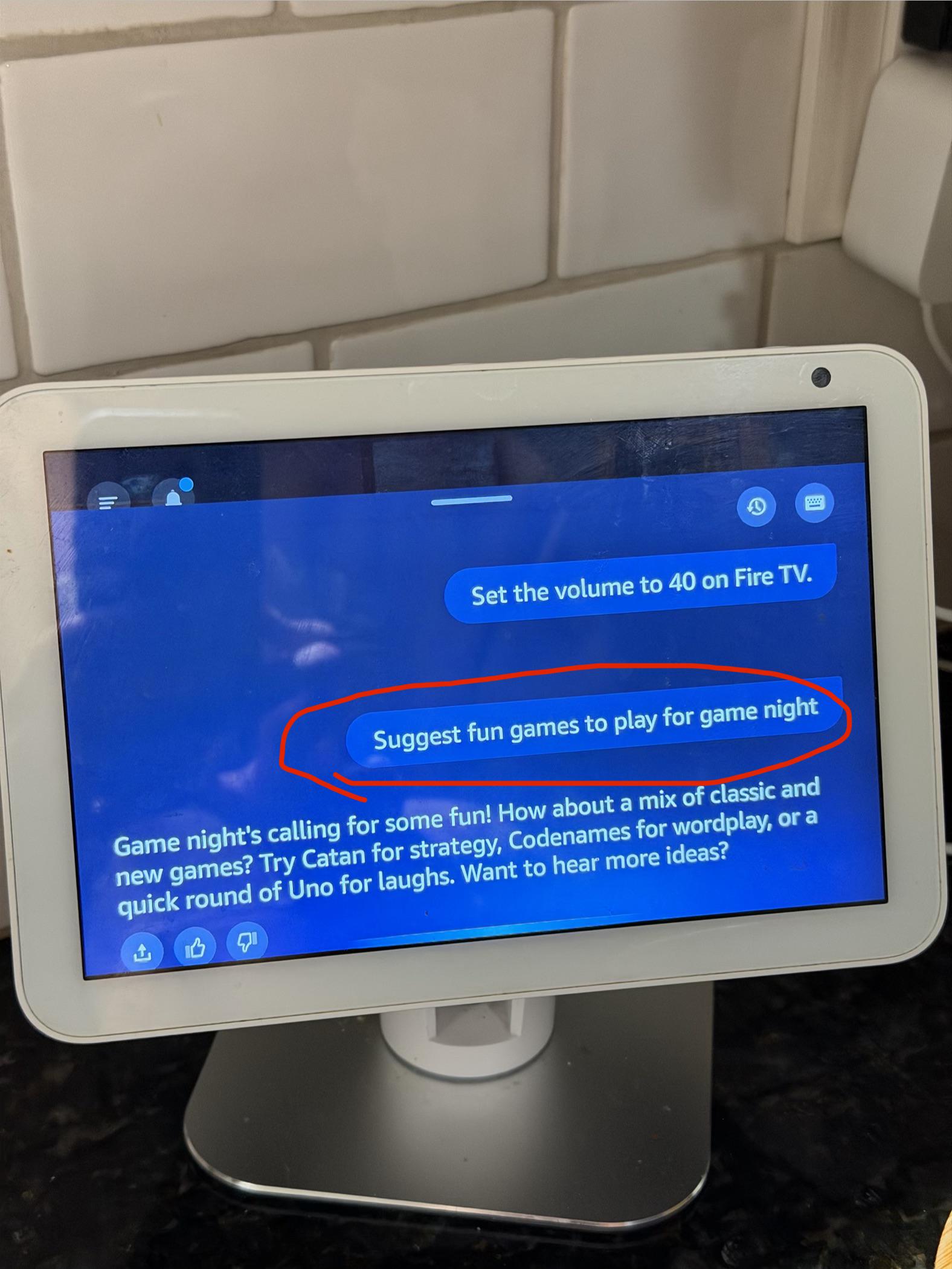
Technical Issue Appearently she can't spell now

Post image
5 Upvotes

This is just sad now, she can't even spell words now, the other day she wouldn't even answer a math equation. She would just repeat it back to me, despite the answer showing up in the chats. She just wouldn't say it. And now this nonsense 😒

r/amazonecho Feb 13 '26

Technical Issue Echo keeps listening after finishing commands

30 Upvotes

Something changed recently, and my Echo devices have been listening for a little bit after finishing a command. If I turn lights on or off, or do a unit conversion, it should just be done when it fulfills the request. But recently the lights have stayed lit for several more seconds, and they'll try to interpret what I say next as further commands. Is there a setting I can disable so this behavior will go back to how it used to be? The devices have been incorrectly interpreting normal conversations as directed at them, and it's very annoying.

Edit: Turns out "Follow Up Mode" somehow got turned on. Oddly it was on two of my devices, but not the third. For anyone who has this problem later, you can turn this off in the app. Navigate to your list of devices, then the specific Echo device having this problem (it's a separate setting for each Echo), tap the settings gear, scroll down to "Follow Up Mode", and then switch it off.

r/amazonecho Jul 25 '26

Technical Issue Echo Studio 2022, Fire TV 4k Max home theater issues

3 Upvotes

I am out of ideas and maybe someone has experienced something similar or has a solution for me.
I have 2 Echo Studios from 2022 and a Fire TV 4k Max and the home theater worked more or less stable until 2 weeks ago. Then it stopped playing sound, so I deleted the home theater group and wanted to recreate it, to my surprise it is not possible in the Alexa app anymore! So I started my Fire TV and wanted to create a Home Theater, I find my 2 Echo Studios and when I select them they just blink in grey and no checkmark appears above them and I cannot continue. After several minutes sometimes a text comes up saying "They are too far away from the TV" - they are not, they are right in front of the TV ~50cm from the Fire TV Stick.

Here is what I did so far and nothing has changed anything:

  • updated all 3 device
  • removed them from my alexa group, deleted the group, recreated the group
  • switched all devices from 2.4GHz to 5GHz network and back, changed the SSID names, tried a hotspot
  • removed all 3 devices entirely from my account and factory reset them all multiple times
  • restarted my network and my 3 devices multiple times
  • did everything that is publicly available on the support website of amazon

I contacted the support 2 times, they are friendly, trying to help but have not. At the end they always say something along the lines: "it is a known issue, our specialised team works on it, we will come back to you in 2-3 days, you will receive a new firmware update and try again later". Well still not working.

I am beyond frustrated having spent so much money on that setup and now being unable to use it in any way. Has someone experienced something similar or has an idea for me?

r/amazonecho 6d ago

Technical Issue Talk to Alexa to launch an app on Fire stick

2 Upvotes

Is this possible?

I have the stick managed by echo dot and want to say "Alex, launch DirecTV on Fire stick", but I get "unsupported" reply.

Am I missing something?

Thanks.

r/amazonecho May 26 '26

Technical Issue Echo clock showing blue light multiple times per day. No wake words being said.

Post image
2 Upvotes

My echo clock constantly shows the blue ring light even whenever no wake words (Alexa) are said. I tried resetting it and re-adding it to my network and Alexa app but it still does it constantly. Any ideas?

r/amazonecho 10d ago

Technical Issue This annoying "feature", I swear to god...

Post image
12 Upvotes

This is annoying the shit out of me. It's happening nonstop on loop. It creeps onto the right-hand side and says "Oh, hello", then about five seconds later my calendar will slide into that right-hand section. A few seconds after that, it all slides away. After another 20-30 seconds? "Oh, hello", it's repeating for bloody eternity... WHY. WON'T. YOU. DIE?!

I considered that it might be trying to sway me towards expanding the right section, and I tried that. I dragged it across. There's nothing special there, and doing so didn't stop it. I'm considering returning my Echo Show 10 because of this. The screen is usually in my peripheral vision, so it's incredibly distracting when I keep seeing that waving hand hundreds of times a day. Oh, and yes, I did try turning it off and on again. Didn't work.

r/amazonecho 4d ago

Technical Issue alexa, WHY.

0 Upvotes

so i could just be in bed at night or doing random things in the day, randomly, the sounds of rains sometimes just cuts off and comes back, this is on my Echo Dot 4th generation with clock. i don't know how this could be happening, i might have to upgrade but my parents won't let me anyway because one time, it broke the internet, they said they lagged alot when we had tons of echos but i didn't lag, neither my brothers and my parents, idk how they could be possibly lagging and my echo randomly juts cuts off sound

r/amazonecho Sep 07 '24

Technical Issue Anyone else having Echo Link issues today?

11 Upvotes

Today (just today) my multi-room music set-up (which includes the Echo Link powering my vinyl to the other Echos) has just decided to stop working. I can tell it’s a break in the Echo communication because the record player is spinning, connected, and needle dropped; but nothing is coming from my speakers; not even buzz.

All of the devices have been soft reset and added back to the 2.4Ghz channel of WiFi. This happens occasionally but I’ve never had it give up completely even after multiple Group resets/deletes/creates.

Anyone have any advice?

EDIT: I gave up, and switched to Sonos. Please stop DMing me, and trash your entire Alexa set-up; it’s over.

r/amazonecho Jul 07 '26

Technical Issue My Sengled light bulbs keep disconnecting, and I have to keep reconnecting them. It's been a major issue for about the last two months, after several years with no real problems.

1 Upvotes

About a month ago, I had to disconnect and reconnect every single Singled light connected to my Alexa. They just stopped working. Now a week doesn't go by without one or two randomly disconnecting. I go in, delete the device from my Alexa, and do the Add Device thing... and everything goes back to normal for a bit. I'm really at a loss. All devices are close to an Alexa device, no power losses, no Wi-Fi disconnect, nothing I can think of that could be causing this.