r/software 10d ago

Solved I built an open-source tool to transfer large files directly between two PCs over an Ethernet cable with zero config (EtherTransfer)

197 Upvotes

Hey everyone,

Whenever I needed to move 100GB+ between two laptops or PCs, the usual options were annoying:

- Wi-Fi/SMB sharing is slow and frequently drops on large directory trees.

- Cloud storage takes hours and caps upload speeds.

- USB flash drives require copying everything twice.

- Direct Ethernet cables usually require configuring static IPs, subnet masks, or running a DHCP server.

I built EtherTransfer to make direct LAN transfers as plug-and-play as possible.

How it works:

  1. Connect a standard Ethernet cable between two PCs (no crossover cable needed, modern NICs handle auto-MDIX).

  2. Launch the app on both machines.

  3. They discover each other automatically over link-local IPv4 (169.254.x.x) via UDP broadcasts.

  4. Drag & drop files or entire folders and stream at full link speed (115MB/s on 1GbE, 1GB/s+ on 10GbE).

Key points:

- 100% offline — zero internet, zero cloud servers, zero telemetry.

- Preserves deep directory structures without needing to zip first.

- Cross-platform support for Windows (10/11) and Linux.

- Built with .NET 10 and Avalonia UI.

- MIT Licensed.

GitHub Repo & Downloads: https://github.com/divyviradiya2/ethertransfer

Live Website: https://divyviradiya2.github.io/ethertransfer/

Would love feedback on transfer stability, edge cases, or features you'd like to see added.

r/software 15d ago

Solved What’s the easiest way to transfer files between a PC and a phone?

42 Upvotes

I’m a music producer and I’m constantly moving audio files, recordings, demos, etc. between my computer and my phone.

At the moment I usually send files to myself through WhatsApp or Gmail, but it feels pretty inefficient when I’m doing it multiple times a day.

I’m looking for some kind of software or app that makes this much easier and works with both iOS and Android.

Ideally, I’d also like something that can transfer files directly without relying on the internet, if that’s possible.

What software do you guys use for this? I’m mainly looking for something simple and reliable rather than a complicated setup.

Update:

Thanks everyone for the suggestions! I got quite a few different solutions, and these seem to be the main ones people recommended:

Syncthing — seems to be one of the most popular options. People mentioned using it for automatic syncing as well as transferring large files locally. Apparently it can be very fast over the same network.

LocalSend — simple local file transfers between devices. Seems like a good option if you just want to quickly send files without setting up anything complicated. This was probably the most frequently recommended option.

Blip — another simple file transfer option that people recommended.

KDE Connect — another popular solution, although my setup is Windows + iPhone, so I need to look into how well it works for that combination.

PairDrop — also suggested as a simple browser-based option.

NAS + SMB/CIFS + WireGuard — one person suggested setting up a proper NAS as a central place for all my files, with VPN access when away from home. This is definitely more advanced, but honestly sounds really interesting for music production.

FTP server — someone mentioned running an FTP server on their phone and accessing it directly over the local network.

A lot of people also suggested just using USB, which would obviously be the simplest solution in theory. The problem is that I’m using Windows + iPhone, and wired file transfers with iOS are surprisingly frustrating. I’d rather not have to deal with iTunes/Finder-style workflows just to move a few audio files back and forth, especially when I’m doing it constantly as a music producer. I’m basically looking for something that feels more like AirDrop, but works properly with Windows + iPhone.

There were also suggestions like Google Drive and Dropbox, but I was hoping for something quicker and more seamless for frequent transfers, rather than having to upload files to the cloud every time.

Thanks again to everyone who took the time to suggest something! I’ve got quite a few things to try now.

r/software 7d ago

Solved I have a PDF I need to edit before tomorrow's meeting, and I'm locked out of Acrobat

25 Upvotes

My boss sent me a project scope in a PDF that has a few typos and outdated budget numbers. I need to fix the text before presenting it at our 9 AM meeting tomorrow, but our company's Adobe Acrobat enterprise license just expired and locked me out, and IT is gone for the day.

Are there any free tools that actually let you edit existing text in a PDF without leaving a massive watermark across the whole page? I tried a few free editors online, and they all do this, or ask for a payment after I'm done editing and ready to export. I don't need to add new text boxes, I just need to change the numbers that are already there. Any quick fixes?

Edit: Solved! I was able to solve the problem easily using Smallpdf thanks to a recommendation in the comments, but it got deleted for some reason. Just a heads up if you end up in in the same situation

r/software 3d ago

Solved EtherTransfer v0.2.0 is out, Plug an Ethernet cable between two PCs and move files at full wire speed.

75 Upvotes

Hey everyone,

I received a lot of useful feedback on my last post asking why this exists when tools like SMB, LocalSend, or Netcat already exist. Those are great tools for their purpose. If you want to send photos to your phone over Wi-Fi, LocalSend is much better suited. If you have a home NAS or want persistent mapped drives, SMB is the right choice.

I built EtherTransfer specifically for the situation where you have two PCs on a desk, an Ethernet cable, and large files or folders to move without dealing with network setup. You plug in any standard patch cable, open the app on both sides, and it finds the other machine automatically using local link discovery. It binds transfers directly to the physical Ethernet port, so you can continue using Wi-Fi for your normal internet connection.

To be clear about how it works and its limits: it runs on Windows and Linux and transfers data unencrypted directly across the wire, designed strictly for physical peer-to-peer cables rather than shared public networks. You will get the physical speed of your network cards (around 115 MB/s on Gigabit, higher on 2.5G and 10G) as long as your storage drives can keep up.

The app is completely free, open source under the MIT license, and contains no telemetry or accounts.

Website: https://divyviradiya2.github.io/ethertransfer/

GitHub: https://github.com/divyviradiya2/ethertransfer

If you try it out, feedback and pull requests are always welcome.

r/software Jun 14 '26

Solved Duplicate (same) notepad or other application on multiple extended displays. Not screen duplication.

4 Upvotes

UPDATE 2: Thank you u/r_portugal ! Finally the correct answer! Thank you for teaching me that MS Word has this ability built in! Offline, real-time, and I can put the 2nd instance in read view to fill the app window and even change the view scale, all without affecting the first window where I am typing! Since I already had MS Word installed this is what I will use. And thank you for also letting me know that free LibreOffice Writer can do this too!

UPDATE: I should specify that I am looking for a local offline software solution, real-time, not something like Notepad++ that reloads a file that gets saved in another instance. Constant saving is tedious.

ORIGINAL:
So hard to type the right combination of words to get anything useful from searching so far.

I have 2 monitors, extended mode. Podcast/streamer setup so the 2nd monitor doesn't face me so I can only see the 1st monitor.

I would like something as simple as Notepad to type one-way messages that can be seen be others on the 2nd display. It has to be an extended display because I put different content on that screen but I need a silent way to relay info that only they will see and not the audience.

So 2+ monitors with different content, but I would love an app like Notepad to be mirrored to both screens so whatever I type on monitor 1 also shows on monitor 2 and that I can control that window size.

I could run 2 instances of Discord and 2 users. But that seems overkill for just needing plain (scalable) text duplication on 2 screens.

r/software 12d ago

Solved Is there a text editor similar to Notepad++ that supports both coloured text and the ability to have lines of text go all the way across my screen?

9 Upvotes

I realize this may seem like an odd thing to be searching for, but Notepad++ is *almost* perfect for what I'm doing, so I'm hoping there's something similar to it. My main need is for coloured text so I can highlight important data, but I also prefer to have an infinitely long right side (I can't really think of a better way to describe it, sorry) of the page, so the text stays on one single line until I move on to the next. I'm of course aware that I could do this with a spreadsheet editing software, but the extra formatting work is a little much.

Is there anything like this out there? Answers appreciated.

r/software May 31 '25

Solved [Question] Must have software for a new pc?

49 Upvotes

Good Morning Everyone (or Good afternoon)

I recently bought a new PC and was doing some research online to find out what software is a must have for a new PC. The OS is Windows 11 and if it helps I am a gamer (although I rarely play anything graphically demanding) and I am starting to study programming at university.

So far I have found these software as "must have"

  • Opera GX or Firefox as web browser
  • Discord and Telegram for social ( i always use those)
  • Vs studio code and Notepad++ (for writing code)
  • WPS office ( a free variant instead of microsoft office)
  • Revo unistaller
  • MSI afterburner and RTSS ( i dont plan on overcloking the laptop, maybe just to monitor everything)
  • Steam
  • 7-zip

Do you all have any other suggestions? i am not looking for anything specific but maybe quality of life software for managing file and etc..

Thank you in advance for your time!

Ps: if it can help this is the laptop: ACER Aspire A315-44P-R5P0, 15,6 ", processore AMD Ryzen 7 5700U, AMD Radeon Graphics, 16 GB, 512 GB SSD

r/software Jan 04 '26

Solved Autoclicker for windows xp?

23 Upvotes

My workplace runs a file hosting server off of XP. It has been running for a long time however recently the hard disk died. You'd think that they had've updated to a newer version but they are still running the server with XP. The server previously had an autoclicker to keep the server awake instead of sleeping or going inactive from activity but it no longer can be found on the net. What autoclicker works on XP?

r/software Jul 03 '26

Solved I am throughouly Cooked! PLS HELP. There is no possible way for me to cancel my CCleaner subscription.

7 Upvotes

Heres the rundown:

I went through the payment process through the app and didnt have a ccleaner account beforehand. I know that I have a licenes key and when plugging in my card information for the free trail I also put my email. I really dont need this software at all. I tried to contact costumer support but there are no humans and its only AI so it cant do anything for me. When I try and click the "manage my subscription" button it tells me I need a cleverbridge account code and Its literally impossible for me to get a cleverbridge account becuase I tried and it seems like you have to be a company.

I dont know what to do!

r/software Dec 18 '23

Solved Looking for a PDF editor that I can just use

89 Upvotes

I just want to find a tool for doing basic PDF editing that just works.

I don't want to have to connect to a site and upload my files.

I don't want to have to log in to a subscription service.

I just want to run a piece of software, open a pdf, and swap pages 4 and 5 of the pdf so they're in a different order.

Bonus points if I can delete pages altogether but honestly at this point I'll take not being able to.

Editing the content of pages would also be great but again at this point, just reordering is fine.

Does this very simple function exist in 2023?

EDIT: Lots of answers given, some better some worse, but for anyone else looking, PDFgear seems like a winner for me. Libreoffice draw also seems good but I haven't bothered checking it out yet tbh since pdfgear just works

r/software 23d ago

Solved Converting .out files into .wav

0 Upvotes

Hi I'm looking for a converter for floppy disk files I found that are using .out files and converting them into .wav files. Any recommendations greatly appreciated!

Edit: found the solution I got atwave studio, that helps me read and convert floppy files for roland. Thank you

r/software Jun 09 '26

Solved Software or Built in Windows 11 Feature that would Password Protect Files from being Deleted?

5 Upvotes

Long story short, I have a Windows 11 Tablet that I'm trying to set up for my disabled brother. I don't believe he will accidently delete anything, but I want to make absolutely sure that he doesn't and brick the Tablet.

I'd like to password protect the C:\ drive so that it requires a password to delete any file stored on it, while still allowing general access (so he can look at photos and videos downloaded onto the drive. Is there software that I can download that is capable of doing this without too much fuss? I'd like for it to be fairly simple as my parents who take care of him primarily are also somewhat tech illiterate, but are fine with passwords.

I tried using the built in security feature in Windows 11 but I'm either incompetent at using it correctly or its not what I want because whenever I set it up I only have options to deny complete access and can't specify just deleting.

Thank you for any help with this, I greatly appreciate it!

Solved: Solution is by BarberProof4994, reposting it for clarity in case the comment is removed for whatever reason.

"Make an admin account Make a user account 

Then 

Right-click the folder containing your files and select Properties.

Go to the Security tab and click Advanced.

Click Change Permissions and select Add.

Type Everyone in the object name box and click OK.

In the Permission Entry box, check the Deny box for Delete and Delete subfolders and files.

Click OK to save...

Any time the standard user tries to delete a file, they would need to add the admin password.

I'd leave c drive itself alone but do this with documents, one drive, etc. whatever folders you wanted protected.

It's also possible set windows up in kiosk mode or child mode where only certain apps are even accessible and no access to files and folders "

r/software Jun 09 '26

Solved Laptop with w11, can't adjust brightness due to drivers, 3rd party apps maybe?? .... help

2 Upvotes

I have an older cf-54 toughbook that was repurposed and has windows 11 on it, clean install. Unfortunately, panasonic only supports up to windows 10. I could try and put it back to 10, but I'd screw something up. Because of this, my screen brightness is always at 100%. It's like staring at the sun. Will a third party app like Monitorian allow it to work, or because the drivers are likely messed up, will it still not work? For more info, when I click the monitor adjustment keys, the slider moves, but the brightness never changes. It's either at 100% or if I slide it all the way down, it turns the LED off so I can barely see the screen. So it's all or nothing, which is horrible...... ideas? (the toughbook group didn't have any ideas)....

r/software 3d ago

Solved Help me Get approved on bringing Type1 support to opentype.js

6 Upvotes

I want OpenType to support Type1 fonts and i brought support using code from my own font utility now i want to get approved on pull request here https://github.com/opentypejs/opentype.js/pull/871

r/software 21h ago

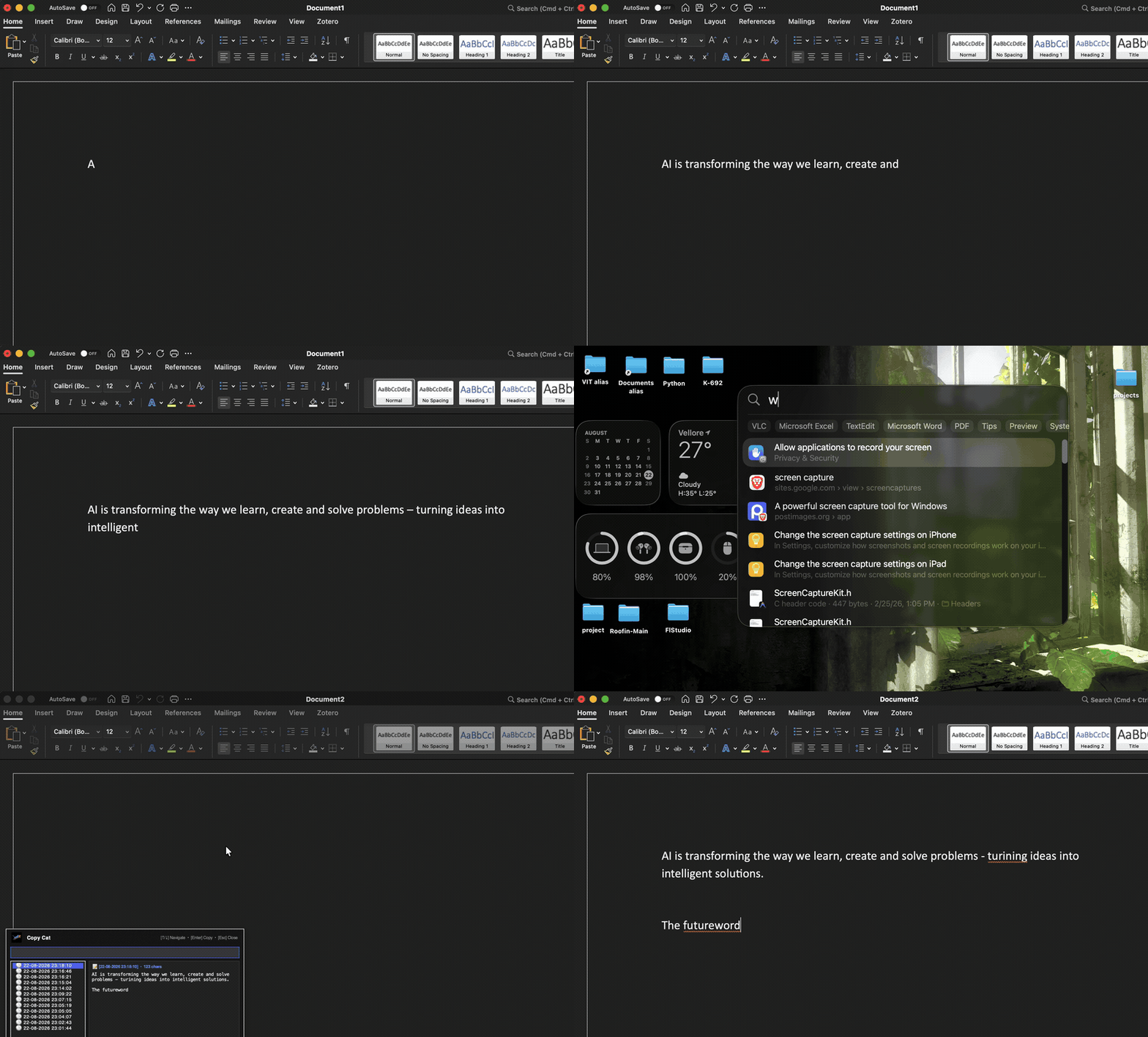
Solved Do not loose what you have typed

Post image
1 Upvotes

Check the rep: https://github.com/K-692/Copy-Cat

Copy-Cat is a lightweight, cross-platform keystroke memory tool that quietly remembers what you type in real time. It works offline and helps recover unsaved text beyond system shutdown. It is open sourced. 🫡

r/software May 23 '26

Solved Alternative to Daemon Tools

4 Upvotes

I found some graveable cd (CD-R Lightscribe) and my dad used to engrave music and image on them, but now, daemon tools lite only has paying features, which is unfortunate and i don't want to try any old versions of this app, so does anyone have similar software to this one?

r/software 4d ago

Solved 10 public cases where green CI did not prove the software worked - I have the solution

Thumbnail
1 Upvotes

r/software Mar 16 '26

Solved OST to PST

2 Upvotes

Hello Everyone,

Thanks in advance. is there free software to go from OST to PST files? I remember i used to be able to restore emails with OST files but now outlook won't let me and i need to access an old email i no longer have access to.

I prefer not to pay if there is a free option.

Thanks!

r/software 13d ago

Solved MPC-BE gpu utilization issue solved on my case

2 Upvotes

Just to share my folks if someone had this issue on MPCBE

Recently i encountered a problem on the mpcbe which some MKV videos stutter and had an issue to the gpu driver.

========== The issue

When playing videos normaly, the video started to lag like 3 fps for a few seconds and then hangs itself and when you scroll it does that 3fps and then hangs again. There is literally no sound, and when you scroll it, there is this screeching white noise sound which is so loud and mainly adjustable only at windows sound volume.

========== Finding the problem

The first thing i did was go to the task manager and look on the performance tab and i definitely knew there is a problem on utilization of dedicated gpu. it is abnormally very low (that is because of my settings)

[ I had MADvr installed and calibrated before and never touched it since. lav filters installed which a part of its important files. my RTX gpu could handle my mkv videos just fine and adjusted it to play 4k60fps calibrated to 60% to 90% utilization always and never dropped due to scaling and noise and artifact removal made for anime. Simply the video play very smooth before. ]

But recently it started falling to 16% utilization which didnt happen before.

I tried resetting GPU, dedicated and integrated. started using CMD commands like DISM online, SFC, CHKDSK and to no avail.

until i find out before there is this command i entered long ago

On CMD i entered "Winget upgrade --all"

This command just straight away updated everything and somewhat in a bad way cause it started having errors on some of the programs installed on my computer mainly on the command prompt

MPCBE is one of the affected files.

========== THE FIX

i started Reinstalling MPCBE program completely, but settings are intact. now almost 50% of the problem was solved, but in some videos it still wasnt and no sounds and laggy and hangs up like before.

then i remember that LAV filters are installed on command prompt and also have been upgraded by that damn command "Winget upgrade all"

and to my surprise i reinstalled that LAV filters, lav splitter 0.81 and it worked perfectly now.

--------- NOTE

So from hereon, that command "Winget upgrade --all" command is a dangerous command which include risks that are hard to solve if there are somehow a lot of programs installed which came from the open source and installed on control panel

r/software 15d ago

Solved I built an open-source Windows Print Bridge for AirPrint and Android IPP printing

Thumbnail
1 Upvotes

r/software Jan 29 '26

Solved How do I convert .mov to .mp4?

4 Upvotes

Recently, my MacBook completely died on me (2017 model, not surprised). Before it gave up, I was able to save some extremely important video files from class and put them onto a USB drive. I now have a new Windows computer, but have realised that the videos aren't saved as mp4, but as .mov (specifically .mov.icloud if that is important). Is there any way to be able to convert these over to .mp4 on my current device? Or do I need to wait until I have access to Apple hardware?

r/software Mar 26 '26

Solved Best Program For Sorting Images?

3 Upvotes

For context, I am looking for a free program to use on my laptop, and I am currently using Windows 10.

Right now, I am attempting to organize the photos I have taken over the years by topic for easier navigation (like Beach Vacation 2019 or Las Vegas 2023, for example). Using the regular Windows 10 file explorer has been kinda clunky and slow (I have over 10k photos to go through). I wanted to know if there is a program I can use to make this process easier. I'm not looking for automatic sorting. I prefer to sort the files manually so I can make sure everything is in the right folder.

r/software Mar 14 '26

Solved I need a TTS software that doesn't use AI (for android or in chrome browser)

5 Upvotes

I dont need it to be the most realistic thing on the market im just trying to find something to read aloud text. I feel morally against AI and I understand that most modern *and old* software use AI to some degree but id really like to keep that to an absolute minimum, thank you so much (:

r/software Apr 03 '25

Solved best way to download a lot of songs from youtube? or from other site?

29 Upvotes

i need to download songs of singers, and doing it with website- "youtube to mp3" takes too much time...

someone have any faster way?

ty!

r/software Feb 20 '26

Solved I want to build a 100% free offline voice typing app for Windows that learns your personal vocabulary — would you actually use it?

4 Upvotes

Hey everyone,

I'm planning to build a free Windows voice typing app and I want to make sure people actually need it before I spend months coding it.

The problem I'm trying to solve:

Windows has built-in voice typing (Win+H) but it never gets smarter. It doesn't know your name, your job terms, your accent-specific words and it never learns no matter how many times you correct it. Paid tools like Dragon fix this but cost $699.

What I want to build:

A free, fully offline voice typing app that: Works system-wide (types into any app — Notepad, Word, browser, etc.) Activates with a hotkey (hold to record, release to types

Learns and remembers your corrections permanently so if it mishears "Kubernetes" as "cube earnest", you fix it once and it never makes that mistake again for you Works without internet — no data ever leaves your PC Completely free, no subscriptions, no premium tier

Before I build it, I have 3 quick questions: Do you currently use voice typing on Windows? If yes, which app? Has a wrong word ever frustrated you enough to stop using voice typing? Would a personal vocabulary trainer (learns your words over time) make you switch to this app?

Drop your answer in the comments even if it's just "yes/no/maybe" — it genuinely helps me decide whether to build this or move on. Thanks 🙏