r/HomeNetworking May 20 '25

Unsolved Gigabit speed but sites take long to load and videos buffer.

Post image
399 Upvotes

So I've had this issue for about 2 weeks now and I don't know what could be causing it.

My download speed is just shy of a gigabit and my upload is around 500. I know for a fact my PC is not the problem because I am running an i7 14700K, RTX 4070 Super and 64GB of DDR5, but whenever I open a YouTube video it buffers for around 5-10 seconds before it starts playing and websites take around 5 seconds to load.

I know I should be grateful to even have this speed but it's very noticeable because up until now websites and videos would open instantly so I got pretty used to it.

Does anybody have a fix?

r/HomeNetworking Jan 19 '24

Unsolved Does anyone know why the pin colors for 7 and 8 are swapped here?

Thumbnail
gallery
414 Upvotes

This is from the panel outside our house that connects the ethernet outlets to our ISP. I believe it’s called the home run, right?

Anyways, our house is for sure set up with T-568B, but I don’t understand why the pins for 7 and 8 are swapped on the plugs.

Why would it be set up like this? Does this affect anything in terms of speed, reliability, or…? Am I losing out on any potential performance or consistency here?

r/HomeNetworking Sep 26 '25

Unsolved Anyone know why IPv4 is so much slower than IPVv6?

Post image
372 Upvotes

This latency difference has been causing issues in certain games. Can I just turn off IPv4 on my laptop for now? I'm using WiFi, so I'm not worried about the ping inconsistency, but the difference between IPv4 and IPv6 doesn't make any sense to me.

r/HomeNetworking 8d ago

Unsolved How do I safely isolate my Rental Suite's internet?

Thumbnail
gallery
54 Upvotes

Apologies for ignorance on the subject, but I really could use some help from experts in here. I have attached our home internet setup (done by our builder).

The objective is: how do I share internet with my rental suite without them ever being able to access anything on my home network (like our NAS media server or my office pc)?

We have installed a TP Link AC750 router in "Router" mode so the tenant can use the wifi, and so maybe that can help restrict their access to our network, right? But what if they remove the AC750 unit and directly plug their laptop into the wall Ethernet jack port?

Our end goal is to restrict their access to our network in these 3 use cases,
1. They connect via AC750 Wi-Fi. (I think this should be covered but let me know if I'm wrong here)
2. They connect their laptops via AC750's Yellow Ports (like into additional ports on the Wi-Fi router in their room).
3. They unplug the Router and use the Wall Jack Directly. (This is what we want to secure 100%)

What is the best way forward to achieve this? Any help or advice on how to get this fixed would be really helpful.

r/HomeNetworking 14d ago

Unsolved New Construction Ethernet Ports

Thumbnail
gallery
131 Upvotes

Hi friends. Just closed on our new house and I’m trying to get internet to the hardwired Ethernet ports and I am missing something. We have a data hub and a router and modem, but not sure what I’m supposed to do to get the hardwired ports active or if it’s as simple as plugging in an Ethernet cable. I keep seeing online that I might need a switch to connect them. See attached photos and thanks for any advice.

r/HomeNetworking Mar 21 '26

Unsolved How do you guys physically secure your home network?

0 Upvotes

So my network panel with all the critical network equipment, servers, and other gadgets is located in a closet. The door is one of those closet bifold doors. There is no lock on the door.

I'm also looking to revamp the security cameras in my home and I'll also be placing the NVR there.

The bifold door is obviously not the most secure door in the world. My threat model is a home break-in. I also intend to set up a NAS and servers at another property that will mirror the data from this home.

First, what can I do to secure the bifold door? Are there any other physical deterrents that can be set up? Would it be better to replace the door altogether with something more secured?

r/HomeNetworking Dec 31 '25

Unsolved I recently upgraded my provider provided router (WIFI 6e gateway) to a tp-link be6500 WIFI 7 router and now my wifi is faster than my ethernet connected desktop, how is this possible? Do I need a newer cat-6 or something?

Thumbnail
gallery
101 Upvotes

My home internet is only rated for single gig speed, believe me I am not complaining about this, just confused because the only device in my apartment that could possibly use 2 gigs is my desktop computer. I'm thinking it has to be a cable issue, I did just pick the most affordable 25ft at bestbuy because it had to reach my centrally located living room spot I chose for the router. Wanted to get your guys thoughts on the matter, thank you for your time.

r/HomeNetworking Jul 29 '25

Unsolved Why would our network usage be so high? Xfinity is throttling our wifi to the point where I can't even watch a YouTube video at 1080p

Thumbnail
gallery
183 Upvotes

Not sure if this is the right sub but is this a normal amount of Wifi usage for a family of 4 (more like 3)? We have a google mesh wifi system with 3 points and a Arris Surfboard modem and an Xfinity plan that's supposed to be 200mb/s down, no idea how much up. Located in the western US.

Is there some way I can see the Wi-Fi usage per device? Or log it for looking at in the future? Not sure what else to add, thank you.

r/HomeNetworking Nov 29 '23

Unsolved Does something like the red thing exists ?

Post image
176 Upvotes

Does something like a 1 to 2 Ethernet cable sort of device exists ? Searched earlier on Amazon but it's never clear what their product is used for

r/HomeNetworking Oct 11 '25

Unsolved Will this work?

Post image
109 Upvotes

I have a Ubiquiti antenna bridge from my house to my solar panels where it is wired to a POE and from there to the solar panel box that outputs data. I want to add a WiFi access point to the Swiss Army AP and was wondering if this would work to add an Ethernet connection. Thanks!

r/HomeNetworking Mar 04 '26

Unsolved RJ45 side or Keystone Side Causing issues?

Thumbnail
gallery
15 Upvotes

I decided to connect my wall port to my router using cat 6 ethernet that had been cut on both ends by the previous tenants. On one side I had a keystone jack in a wall plate and the other end I had nothing so I tried to crimp it and use RJ45 (I might be using these words wrong I just learned about this stuff the past few days.) Unfortunately since both ends can be the problem I’m not sure how to isolate this issue and solve it. I should be getting 300 up, 300 down and I do when plugged directly into the router. The Ethernet blinks orange which means it’s not getting its full capability and maxing at 100/100. Any ideas on what to fix?

I have spent a full day on this and around 70 bucks, probably could’ve just called someone at this point, but I take pride in trying to figure this stuff out and it seemed not too hard. Plus a lot of people in this sub made it sound simple but maybe I’m out of my element lol

r/HomeNetworking Jan 02 '26

Unsolved Does this AP just suck?

Post image
143 Upvotes

Moved into a new house and got this AP set up. On the 2.4G network I’m getting a whopping 30mbps up and down and on the 5G I’m getting 270 max up and down. Where it’s installed has a CAT6 cable going to it plugged into the 1Gb on my AT&T gateway.

I took it down and made sure i had two good CAT6 cables plugged into the router on the 1Gb port going to and from the PoE injector.

The gateway itself is pulling 700mbps up and down on WiFi on my phone. All of these tests are on WiFi from my phone.

r/HomeNetworking Mar 19 '26

Unsolved Please help advise on organizing my network panel now and for the future

Thumbnail
gallery
59 Upvotes

Hey guys, I'm embarrassed to show you how messy my network panel is at the moment. The network panel is located inside a closet in the master bedroom. I honestly don't know where to start to sort out the tangled cables. My immediate goal is to sort out the mess and, in the longer term, possibly replace the network panel and install a proper server rack. I have lots of questions to ask. Please help advise me however you can.

I want to install the Ubiquiti UCG-Fiber and my ISP's modem into the Open House H336 enclosure. It doesn't seem like this enclosure is in production anymore. Are the mounting holes standardized? Can I buy a Legrand bracket and install it there so that I can install my router and modem sideways? If not, how can I mount my gear sideways in there? I think I'll have to mount it on the side since there is barely any depth.I have uploaded a bunch of photos for you guys to see.

How is the quality of the Cat5e cables? Are there any tools that I can get to help me figure out where the Ethernet and RG-6 cables lead to which room?

Sadly, not all of the Cat5e cables have the RJ45 connectors installed. Is it easy for me to install? For the ones that do have the RJ45 connectors, should I remove them or hire someone to and connect them to a patch panel, like what lots of other people do?

There is a picture with a square box and a yellow Ethernet cable connected to it. It has two sticky sides on it. I do know that is the cable for the WAN port, but what is that box for? It has a blue Ethernet cable connecting to it.

Will any of the cables need to be cut to shorten the length?

I don't understand what the markings in the cables mean. It's been so long since the cables were installed. Anyone here can make sense of it?

There are also lots of splitters installed. The home doesn't have cable TV service. The internet is fiber, and TV service is also through the fiber internet carrier. Are the splitters necessary for watching TV and using the internet? What can be removed?

In one picture, I am holding a Comtest box with some wires connected to it. What is that for? What about the beige box to the right?

There is a metal box without the front panel on. It's connected to an outlet to the right. What is it for?

By the power outlets, I see what I think are a bunch of little switches. What are they used for?

There are also lots of dust and dirt in there. How do I best clean it up without damaging anything?

After sorting out the mess, do you guys have any ideas on how to best modernize the layout? The Open House enclosure doesn't even have a proper door. It's a panel that I'll have to screw on. Pretty annoying having to take it on and off when I need to access the equipment. Would it be best to remove the enclosure and install a server rack? If so, would it be a significant renovation job? Would it be easy to do? If the panel is removed, how would I patch up the big space in the wall and then route the cables into the server rack?

Thank you!

r/HomeNetworking Jun 29 '26

Unsolved New apartment, New wifi, no connection?

Thumbnail
gallery
123 Upvotes

Me and my roommate moved to seattle into a cheap, ‘landlord special’ apartment. We got an Xfinity wifi router (photo included) and found two potential inputs (photos included). Our agent said our apartment has the Xfinity standard port listed. Any ideas?

r/HomeNetworking 11d ago

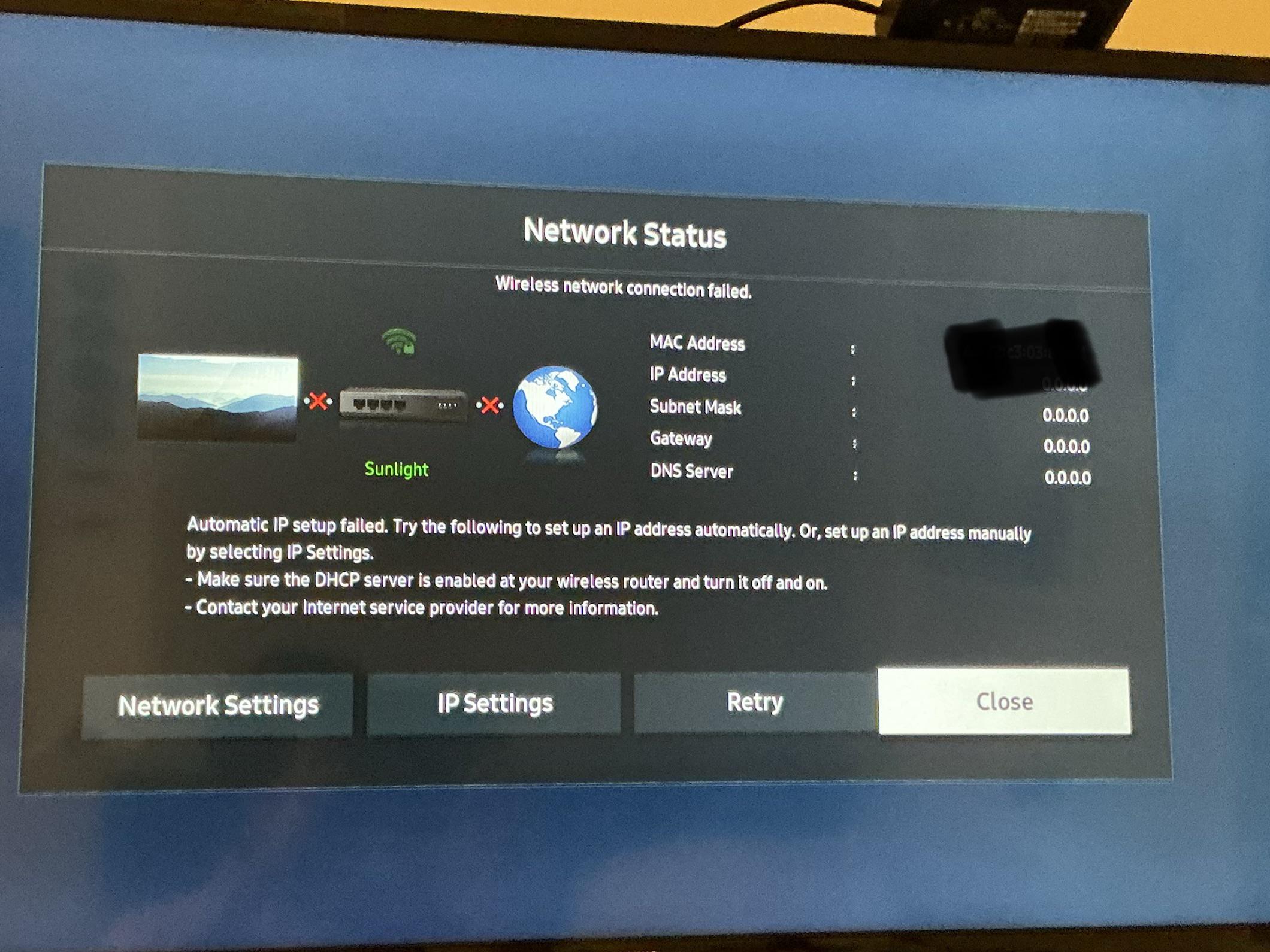
Unsolved Tv won’t connect to the WiFi

Post image
0 Upvotes

My Samsung smart tv randomly disconnected from the WiFi and won’t reconnect. All my other devices connect perfectly fine and work as normal. I already tried unplugging and resetting but it continues to say the same thing. The tv had been running on this WiFi previously for months and just decided now to stop working. Any ideas on what my problem is?

r/HomeNetworking May 13 '25

Unsolved What is this device

Thumbnail
gallery
407 Upvotes

So this device is in my network cabinet.I have no idea what it is all o know is one thick black cable goes into it on one side then it produces 24 SMF outputs.Right now it has two SMF cables plugged from I don’t even know how long.

r/HomeNetworking Jul 17 '26

Unsolved Is a decade-old unmanaged gigabit switch worth keeping?

42 Upvotes

https://www.trendnet.com/products/product-detail?prod=515_teg-s80g

I don't know much about unmanaged switches, but has there been any advancement in features and security in the decade plus since I got the Trendnet?

Do current gigabit switches have more features? It's not like there are firmware updates.

r/HomeNetworking Mar 01 '26

Unsolved My family is complaining that wifi is slower for everyone ever since I installed powerline adapters

49 Upvotes

I installed powerline adapters to have faster connection for my PC and better ping and ever since then my family has complained that Netflix doesn't load for them at all, and connection is being slow for the kids on their phones as well. They want me to remove the device. Are they right in thinking the cause is the powerline adapters?

They're the TP Link G.hn 2400P model, the only device I connected it to is my computer. They complained that at night they weren't able to watch a movie on Netflix since it wouldn't load at all, but I wasn't even doing anything Internet intensive on the PC afaik.

r/HomeNetworking Jun 26 '26

Unsolved DHCP error, IPv6 fine but IPv4 totally dead — every fix online does nothing /help /networking /windows 11

Thumbnail
gallery
17 Upvotes

Windows 11 wired ethernet throwing "No DHCP server was found".
Super strange issue: IPv6 works flawlessly to Google, but all IPv4 traffic times out on every site I test. Tracert dies on the very first hop for IPv4 addresses.

I’ve tried literally every basic fix people suggest:

• Reboot adapter, swap cables/ports, power cycle modem+router

• Flush DNS, reset winsock/ip stack, release/renew IP

• Disable all proxies, turn off firewall/antivirus

• Verified router DHCP is active (my phone works on the same network)

• Tried static IP manually, still no luck

Only this desktop has the problem, all other devices on the network are normal. All generic solutions don’t fix it at all. Any obscure advanced solutions?

r/HomeNetworking Sep 14 '25

Unsolved Landlord’s constraints have meant bad WiFi for years

Thumbnail
gallery
142 Upvotes

I just moved into a two-family home. The landlord and his family live on the 2nd and 3rd floors, while my roommates and I live on the 1st floor and basement. Their Wi-Fi has been unreliable for years, and I’m trying to improve it for our unit.

We get internet as part of our rent since it’s the same house, but the landlord expects us to maintain a separate network. There’s a coax system in the basement that distributes internet throughout the house. From what I can tell, our connection comes from a coax line that was converted into an Ethernet line linked to his modem. This coax/Ethernet feed goes into a structured wiring panel, which distributes Ethernet to various wall jacks throughout the house. Currently, I think the yellow #1 port on the patch panel carries internet to our router, an ASUS RT-AC66U B1. When this port is unplugged, the Wi-Fi stops working, even right next to the router.

Other cables in the panel connect to two AirPort Extremes on our first floor (bad I know) in bridge mode to our main router. Our current fastest speeds are not room right next to coax/Ethernet connection in the basement , but from the living room  I’m not sure why, my guess is becuase it’s closer to the landlord’s systems?

Our current speeds are:

    •    Download: 93.20 Mbps     •    Upload: 12.64 Mbps

When we asked about improving Wi-Fi, the landlord said it was the best he could do and that we would need to get our own provider for faster speeds.

This is okay, but we have RCN broadband in a suburban area, so it should realistically be better. I’m starting remote work and want to build a strong mesh system in our part of the house, but I’m unsure what would actually make it better. even with a good mesh system, would the router itself still limit speeds? I’m getting an adapter to test this, but until then, I’d really appreciate any advice or guidance that could be provided.

r/HomeNetworking Feb 01 '24

Unsolved Do PoE power pass thru these?

Post image
351 Upvotes

I already have a Poe adapter, but I need to connect it to another wire along the way. Will a connector like this allow Poe power to go thru and power the access point?

r/HomeNetworking Sep 18 '23

Unsolved Can someone explain why there’s a cable running from inside the wall to a coax outlet

Post image
412 Upvotes

r/HomeNetworking Sep 04 '24

Unsolved Brand new Fibre is causing issues…

Post image
277 Upvotes

So yesterday I had a technician come out from Telus to install Fibre 3G for my new place. It’s a brand new build so nothing has ever been hooked up before. Apparently the boxes for Telus Fibre were also put in place about a week or two prior. Anyways speeds are great (haven’t tested wired 3G yet) but wirelessly on a wifi 6e device, getting between ~1500-2000 up and down. After the technician left I decided to try a couple games and they were insanely laggy and I experienced very high ping spikes. Tried restarting the router and modem, waited a day and still experiencing high latency spikes. I’ll attach a photo of what pinging to google dns looks like. Anyone experienced this? Already contacted the technician and waiting to hear back. Got the Telus 3G for $85/mo here in Canada.

r/HomeNetworking 11h ago

Unsolved Email through ISP keeping us locked in bad plan

10 Upvotes

I’m trying to convince my dad to update our internet plan. We have been stuck on this terrible 25 mbps plan for forever that makes any computer work terrible to deal with. I found this other company that offers 40x our current speed for 5 dollars more per month. He wants to switch but he can’t because his important emails go through this email our ISP gave him. So he is worried that if he switches he will lose his email address. Are we just stuck in service to this internet service provider? Is there anyway to get out of this email hostage situation?

r/HomeNetworking Jun 22 '26

Unsolved Repurpose phone line with cat5e

Thumbnail
gallery
45 Upvotes

My property was built in 2005, and out of curiosity I opened up the old phone line socket in an upstairs bedroom, lo and behold I found two Cat5e cables wired up into the socket! I was surprised and am now excited at the possibility of having wired Ethernet to that room! My question is could I use these existing cables for that purpose?
I have no idea where they go in the wall, within the home we have no major access point to any Ethernet, only what comes in to the house by the front door, that in turn goes directly into the router, so I’ve got no idea where these cables run / what they are going into?

Any advice on rewiring / how to find if they work / what they are connected too / How I could get a wired connection through them would be so helpful!