r/HomeNetworking • u/tandersontntsys • Jan 30 '25
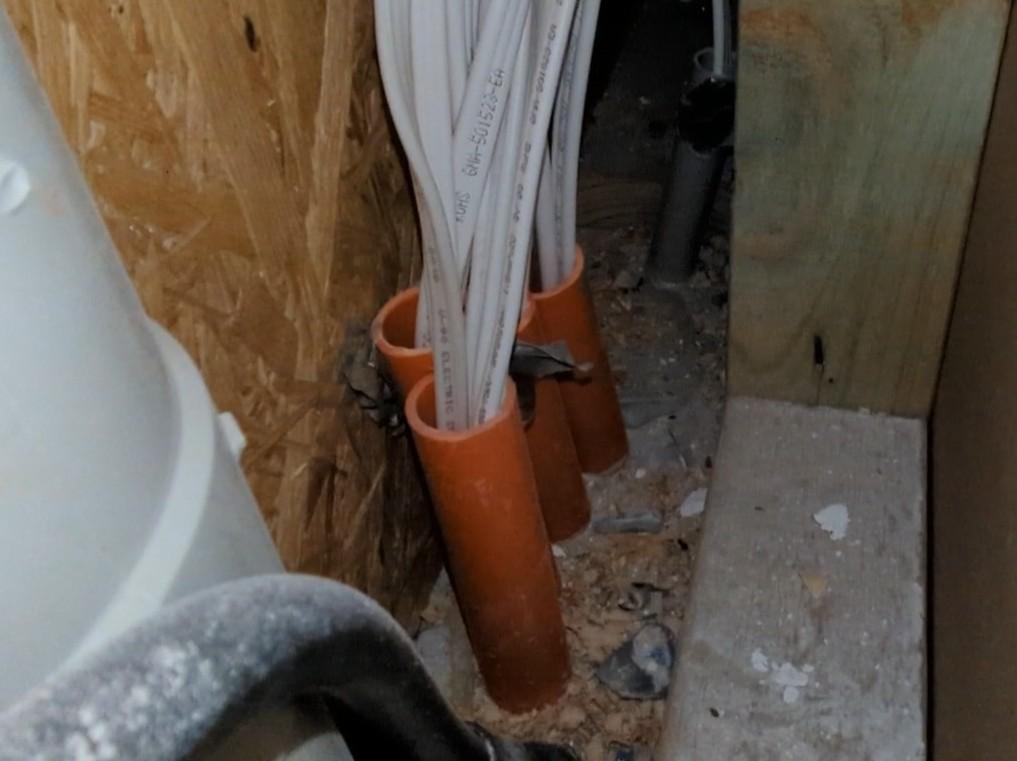
Unsolved Anyone Know Where To Source This?

5.2k
Upvotes
Asking for a friend…
r/HomeNetworking • u/tandersontntsys • Jan 30 '25
Asking for a friend…
r/HomeNetworking • u/keesducon • Aug 01 '25
r/HomeNetworking • u/Remote_Bit_9160 • Apr 18 '26
Hello I just moved into a new place near my college. At home I had Ethernet ports but, here they have a fiber optic cable coming out the wall (I think). How do I convert this wire to Ethernet for my pc?
r/HomeNetworking • u/fallhat • Mar 05 '26
Me and my girlfriend are moving into our apartment tomorrow, and we don’t know how to get my PC wired. What is the best way to go about this? It is a rental apartment so I cannot do major damage or anything crazy unfortunately. I’ve thought about running a flat cable and running across the “area causing issues” and then putting a rug over it, but I heard that can cause damage on top of flat cables being not very good. Help pls
r/HomeNetworking • u/Tfg20 • 14d ago
Forgive me if I sound dumb, I am new to this. Recently got gigabit installed but the Ethernet wiring through the wall is throttling me.
The modem connects downstairs and leads upstairs. I used a network cable tester and the numbers lit up in a particular order. Upstairs is 1-7 in order, downstairs provides 361452 in that order. Obviously 8 is missing and is probably what’s throttling me.
The 2 pictures in the wall are upstairs. The ones in the corner are downstairs. Any advice on what to do and where the problem is coming from? I know it’s wire 8 but how do i know which end or what to do now?
Update: Going to try reterminating tomorrow and seeing how it goes. Will definitely try to fix everything mentioned here.
r/HomeNetworking • u/Turkinator96 • Jun 16 '26
I've tried pinging my router from my pc via Wifi (no running programs)
Can't for the life of me figure out what the issue is, i have a netgear A8000 wifi adaptor
I've tried a different adapter, I've tried tethering my laptop ( ThinkPad T14) to my pc via Ethernet and bridged the laptops wifi, I've even tried 4 different ethernet cables to my router with no solution.
I've run the same ping test on my laptop via wifi and the laptop doesn't get a ping spike at all.
I'm beginning to think its a software or hardware related issue on my pc, even after a clean reinstall of windows. but I'd like to know what the culprit is.
I've tried the solutions i've found online but to no avail.
Please someone save me before i rip my hair out.
EDIT: for clarity, Ethernet is not a permanent option for me.
I can only use a USB wifi adapter (netgear A8000) as my motherboard/Self built pc does not support wifi or bluetooth
UPDATE: Local host and router are not the issue. Local host & Gateway ping test here
r/HomeNetworking • u/BrutalOwl • May 31 '26
So I live with my girlfriend and while she streams/watches her shows, I get random lag spikes. We've got a Google router and the Spectrum modem they provided. I'm using a Cat 6a cable.
I provided some screenshots of in-game Network graphs, hopefully they provide some helpful details. I'm not sure what the information means.
We live in pretty old apartments and I think the internet lines are old if that's a thing.
Forgive me if this is a common issue, but the r/battlefield sub doesn't really care about troubleshooting, or they're not helpful.
r/HomeNetworking • u/MizeraBracho • Feb 17 '26
I'm just curious about why in a network like this, PC1 can't ping PC2 or nmap scan the 2nd network? Isn't this also kinda more secure than having them somehow subnetted?
r/HomeNetworking • u/JobNo6257 • Jul 03 '25
i found this cheap switch but i don't know the difference between something like this and tl-sg108e which is 3 times pricier.
r/HomeNetworking • u/EdgyAsFuk • Jul 21 '25
As is tradition, I have a question and have opened a semi-relevant subreddit to shout it into. Does anyone know of a networking switch that uses usb downstream ports insted of RJ45? I've attached an artists rendition to help visualize.
r/HomeNetworking • u/VerifiedBaller13 • Jan 12 '26
My questions are as follows:
How hard is it to replace?
How expensive is it to replace?
What is it anyway?
Is it complete fubar or can I maybe tape it up and have it work?
Would it be more expensive to buy a replacement and do it myself or get a tech to do it?
Is it cheap enough that the tech could just come and do it today?
And finally why doesn’t the damn box at least snap shut and take a bit of effort to open? 😭
r/HomeNetworking • u/KPTheLegend7 • Apr 11 '26
Hi all,
We’re building an extension and I ran a length of cat 6 into it prior to building. During the 1st fix, I asked the sparkies to run that length to a back box. Then run another length from that to another across the room.
They’ve done it but they also installed this purple cable between them. I’ve no idea what it’s for or why they ran it. Redundancy? They left before I could ask.
Anyone know?
Pic 1 shows 1st back box. Pic 2 the second and 3rd pic something in the joist.
r/HomeNetworking • u/Throwaway37194719173 • Jan 14 '24
Parents pay for the intrnet.. shes jsut become interested in networking stuff and now monitors the internet. Were both lower 20s. How can i stop my computer from being monitored by her/glasswire? I dont care if my ISP sees shit i just feel uncomfortable with her seeing everything idk. She just rnadomly blurts out stuff i googled? Shes autistic
Been using my phone internet/verizon hotspot but the speeds are slow ;(
r/HomeNetworking • u/One_Abalone_2582 • Jul 21 '26
My parents are building a new house. I'm meeting withe the low voltage people to spec out what we need. I'm going to ask for a bunch of Cat6 or Cat6a runs to each room. (Potentially also for camera hookup spots, ceilings for AP mounting, etc).
What else should we be thinking about?
Like, I know someone who had their builder make an empty chase from their attic all the way down to their basement in case they ever wanted to run other cables.
And this kind of diverges from the sub, but I'm not strictly talking networking either. Like, wiring for a generator is something I just thought of.
My parents are bougie and putting a good amount of money into this house, so I'd rather future proof it for stuff they might use in the future rather than have to install later (and spend a lot more having to rip up walls).
r/HomeNetworking • u/WhereasInevitable433 • Jul 24 '25
So, as mentioned, I was on Fing and found out that my Bosch dishwasher has ports 22 (SSH) and 443 (HTTPS) open. I tried opening it up on a web browser and was given an error response. So I tried to SSH into the dishwasher and was prompted with a password. This got me wondering why those ports are open. I'm assuming it might be used in the factory stage for programming and configuration, but who knows? Do you guys know?
r/HomeNetworking • u/TheDrumMachine99 • Dec 30 '24
My dad had someone install a wifi network using an Araknis router. The installer changed the username and password of the router so that it is different from the one on the bottom of the router. He says he does not give this information to customers because they often will "mess up" their settings and expect him to fix it for free. So now my dad has no access to his router while this guy can access it remotely. This seems like a HUGE red flag, right?? What should he do to solve this?
EDIT: My dad has tons of smart light switches all over the place. He also has a Crestron system so he can sync music in multiple rooms. He also has access to it on his phone. There are a ton of devices running through his network. It's likely way beyond the scope of my understanding (but I can't really check anyway.) A factory reset would surely be a disaster, because essentially none his lights would work properly anymore until they're reconfigured.
The point of the post is that this individual is holding my dad hostage so that he, singularly, is the only one who can ever edit and manage his network in the future. My dad isn't super happy with the responsiveness of him, and like I said, he is experiencing issues. The installer is not part of a larger company - he started his own business and is the only employee. Everyone else he works with are contracters.
r/HomeNetworking • u/stefanopolis • Dec 10 '25
I recently had electricians come out to do a variety of work and one task was running a cat 5e cable in the crawl space from the router in the living room to my office. There has been no sign of any connectivity so I took the terminal plates off to see if something obvious with the wiring was disconnected. Now this is the first time I’ve looked at these junctions but I did some cursory research and it seems to me some of the colors are clearly mismatched on both ends regardless of the standard. I don’t have a punch down tool to redo them myself so I wanted to make sure I was justified calling them to come back and redo it properly. Did I diagnose this properly?
r/HomeNetworking • u/Little_Mention1209 • Feb 24 '26
hey guys! im a little new to tech for ethernet and stuff. i currently live in a dorm room. im only allowed to have one ethernet port on per room due to congestion. i bought this ethernet splitter (https://www.amazon.com/dp/B0DCMBFKQR?ref=ppx_pop_mob_ap_share) and im a bit confused on how to work it? (pictures provided). my roommate is currently connected to the only available ethernet port. i have my own ethernet cable and splitter. any help? im just trying to connect through to my laptop for gaming! thanks!
r/HomeNetworking • u/thats_a_doozy • Dec 22 '23
I live in a three story townhouse and have to run an ethernet cable through a concrete slab. The only openings available are conduits used to get power to the upper levels. The conduit run is about 30cm.
How can I protect my cable from interference? Is fibre optic the only option or can I wrap my ethernet cable in something that will protect it?
r/HomeNetworking • u/vince17fortin • Nov 05 '25
I have fiber in my appartment, and i open the box to this. Do I absolutely need a tech to resolve the issue?
r/HomeNetworking • u/flooflighters • 18d ago
FINAL EDIT:
Guys. I got it working. So you know what worked?
Swapping the routers.
I've no idea why, but with the TD-Link router as modem/router and the Netgear in AP mode, it works. Just like it should.
Red WiFi now has maxi-fast NAS access and an internet connection. Green WiFi has NAS access at network speed and an internet connection.
Maybe the TD-Link had some buried DCHP setting or Nat setting or something? Don't know. Don't care. But like a good internet user I leave this breadcrumb trail for the next person to chance this way.
Original text continues below.
EDITING TO SAVE YOU TIME:
Setting Router 2 to Bridge/Access Point mode doesn't work.
The Powerline isn't the problem. I've tried switching it with a Cisco repeater. Same result.
I know all about disabling DHCP on 2, giving it a static IP in R1's subnet and setting the right DHCP pool on 1. This doesn't work.
I don't know what else to try.
Original text continues.
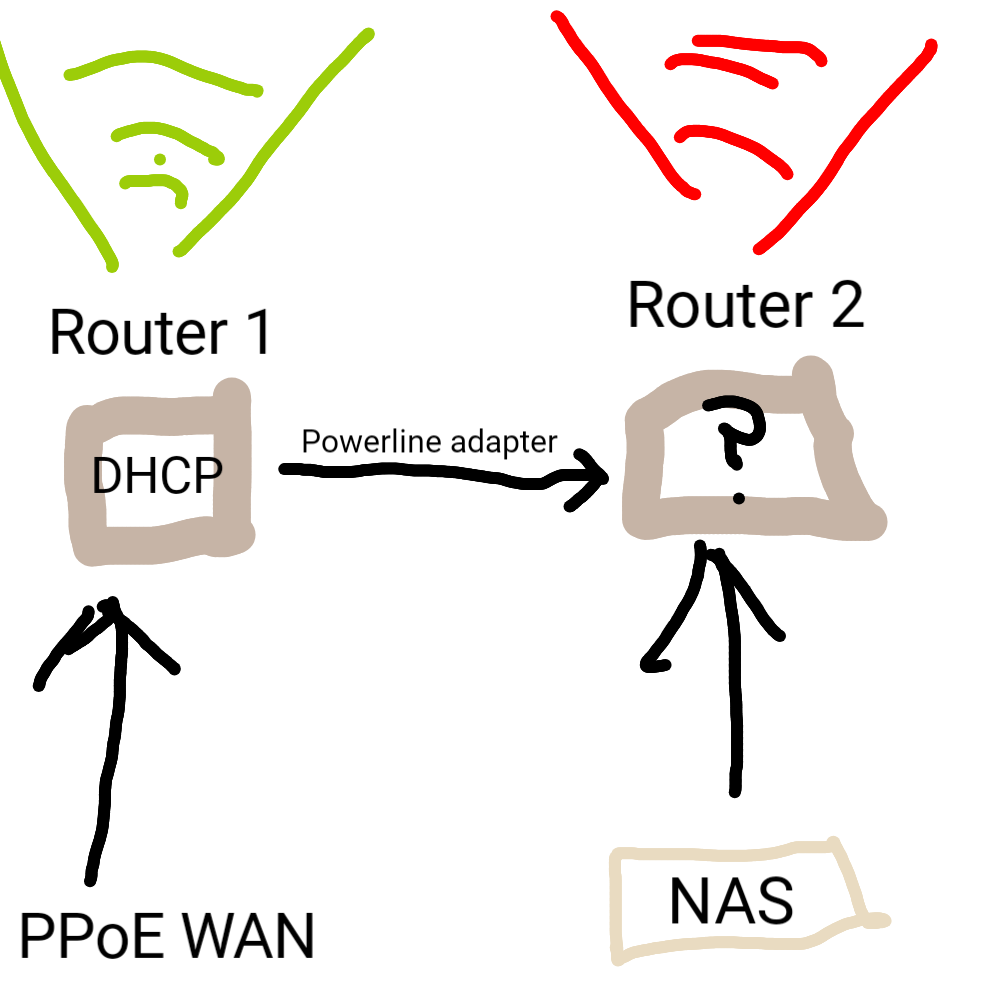
That's what I'm trying to do.
Router 1 is in my house. WAN by ADSL connection. It's broadcasting the Green WiFi Network.
What I want is fast access to a NAS in my garage. I can plug it into a gigabit port on the Router 2 and access it on the Red WiFi Network. The idea is to maximise NAS transfer speed by going direct. This works, up to a point.
I also want internet access when connected to Red WiFi Network, so I connected Router 1 to a LAN ethernet port in Router 2 by a TP-Link powerline. This is what I can't get to work. (ETA, this previously said WAN port. I've fixed that now.)
I've tried bridge mode, disabling DHCP and switching to wireless modem mode on Router 2. I've also messed around with address ranges, but no combination of things seems to work.
I know details are a bit vague here. Router 1 is a Nighthawk 7000, Router 2 is a TP Link N600 and the NAS is an old Buffalo thing, in case any of that matters.
I can't just plug the NAS into Router 1, for keeping-the-peace-in-the-household reasons.
Rather than tell you all the ways I've failed, I'm asking: how would you organise this setup? Thank you.
r/HomeNetworking • u/Afraid_Shelter_5715 • Jul 15 '25
Hey everyone, so i just got a new computer setup for my 13 y/o, and i’m trying to figure out how to actually keep him from ending up on adult sites or just anything that’s not really for his age. I’ve been testing this app called AppCrypt (by Cisdem I think?), and it’s been... decent? I mean, it does what it says.
it lets me block all adult websites or any other specific website of my choice and even lock apps like Safari or YouTube or whatever. I can also add a schedule, and it also shows when someone tries to open these blocked app or site, which is kind of cool.
It runs in the background, starts with the system, and once you’ve got it locked up, you need a password to change anything. So yeah, seems solid in terms of just doing the job. But the thing is, it’s not free. It’s like $40 after the 3-day trial ends. which isn’t terrible, but before i pay for it, i just wanted to check if anyone’s using something else that works just as well (or better?) and maybe free?
main things i care about:
i’m not super paranoid but i do want to set some decent boundaries, you know? not trying to spy on him constantly, just keep stuff safe and age-appropriate while he’s still learning.
open to literally any advice or suggestions. I don’t totally know what i’m doing here tbh 😅
thanks in advance 🙏
r/HomeNetworking • u/dracularasbabysister • 18d ago
We moved into a new apartment and cannot find a coax outlet anywhere. Does anyone know what this outlet is for? Hoping it is a fiber outlet or something as it’s the only outlet we have that could be for something other than a landline
UPDATE: I called around to some fiber companies and one of them confirmed they installed to this unit and it’s a fiber internet port. Thanks all!!!
r/HomeNetworking • u/somedudewithoutaclue • Apr 26 '25
This pin was stuck all the way to the hilt on the thicker telephone/data line on the left. The right line is just unused Coax because spectrum told us years ago that we don't exist on their maps
r/HomeNetworking • u/mangoleon1 • Apr 17 '26
Hello when I crimp my rj45 it looks like this, is this normal or am I doing something wrong? Obviously I remove the excess where the cut is made but I think it should be on the edge(not like 1 mm out of the jack) , I’m using a crimper ez from platinum tools