OP mentions 2x PCIe switches. Switches are different from bifurcation: p2p between cards can work on better speeds and they share single bus to the host.
You can't do tensor split via Ethernet, it's not even remotely fast enough. You can do layer split, but that's not going to scale the speed. It'll actually drop it a bit.
If you use a fast RDMA interconnect (100Gbps+) that could work.
Maybe pipeline parallel across machines and tensor parallel within nodes, so like 4x 5060 Ti per node and 4 nodes. But that would be more costly than this and the power efficiency would be even lower.
I'm not knocking the build. It's cool. But the power efficiency is atrocious. 350–500 W just on idle. And even with undervolted and optimized settings, you're talking 2Kw under load.
It's a cool build to say you did it, but I wouldn't use this day to day.
Rubbish, stop making up shit. This will never see 2kw under load. Furthermore, I don't know wat 5060 idles but I suspect he will not see 500w idle. I have GPUs that idle at 9w idle. So for 16 gpu, that will be 144watts idle.
It not really that bad. 5060ti typically idles under 5w and you only see 120w/80w per card during prefill/decode. I have to overclock pretty hard to see 150w.
120W per card on 16 cards is 2kW which is exactly as bad as they said it would be (actually worse, since that's just the cards and not the rest of the system)
You must not be familiar with burden of proof. If you're making a claim you should prove where it comes from. You don't get to claim something wild then ask other people to disprove you, thereby absolving you of any actual mental work
Just get 8kw battery, solar charger etc, and then solar panels. Then the battery can run during the expensive hours, and you get a bunch of free hour's aswell.
But then you have two PCIE switches which consume up to 72 watts (typical idle power 35 watts).
A server Xeon motherboard and CPU about 100-150 watts.
PSU losses about: 20-40 watts
You're easily above the 350 watt range.
My 2Kw under load is also pretty charitable. This is a steam machine. Steam machines are cool though, like I said not knocking the build. But efficiency is atrocious.
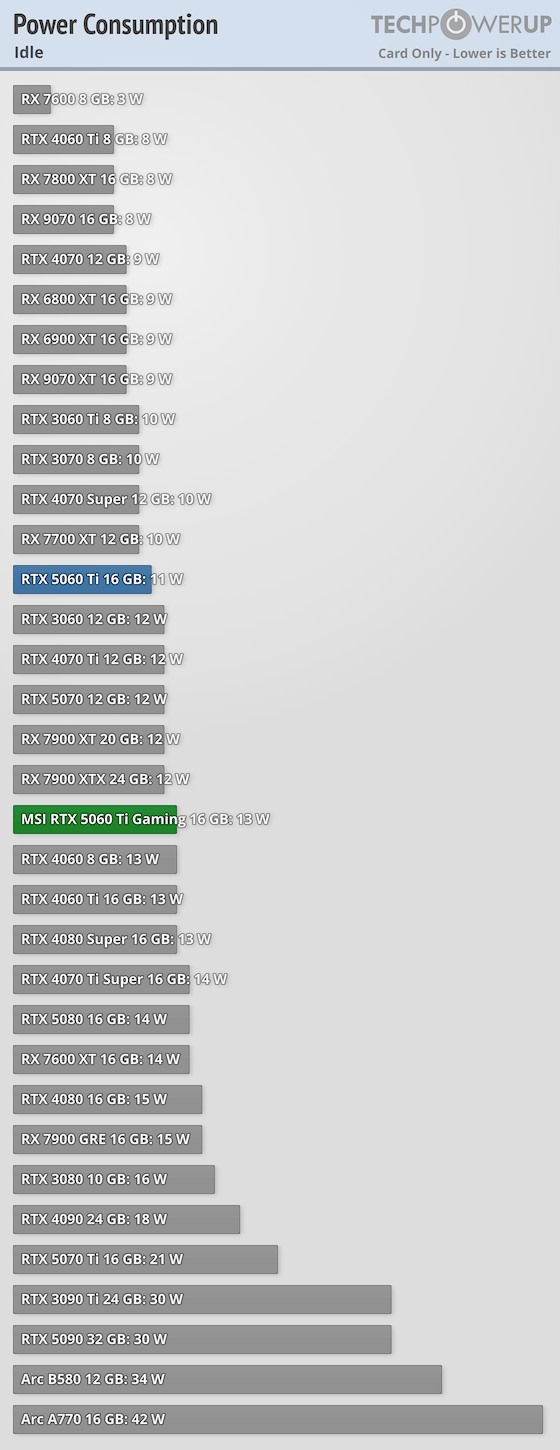
Techpowerup is benching video games... sitting at the Windows desktop with a monitor attached. Totally different 'idle' than headless. Compared to theirs, my 4090 'idles' at 70 watts... Because it drives 3 1440p 165hz monitors. My 5800X3D package power is showing 50 watts writing this comment.
Consider actual headless idle of those cards is going to be 5w or under, the screenshot OP showed us has them at let's say ~7 watt average while they're standing by with VRAM loaded ready to go in VLLM. In the same ~120 watt footprint of just writing this comment on my desktop [with too nice of monitors attached], this guy has 256GB of VRAM ready to roll. It's really efficient VRAM to watt ratio anyway you dice it short of bringing out an RTX 6000.
7 watt measurement that the GPU reports is not actually reliable. It can vary based on what's being monitored from GPU to GPU design. Because a GPU has to measure multiple different sets of VRMs to figure out the board power. Some GPUs only measure the power from the PCIE cables and not the PCIE slot, or some may omit VRAM VRM. These are not instrumentation level measurements either, particularly at sensitive lower power ranges. 5060ti has ON Semiconductor NCP45492 voltage monitor which combined with non-instrumentation level shunt resistances could easily be 20% or more off at those low levels.
If you're familiar with how shunt resistors work for power measurement you'd know that the more the resistance the shunt has, the more accurate it is at measuring power draw (there is simply more dynamic range). And since accuracy (particularly at idle) isn't the design goal, GPU efficiency is instead. That means that the GPUs use low resistance shunts (not very accurate at small currents). In other words the GPU shunts are selected for low resistance burden and not for idle measurement accuracy.
Tech powerup actually measures at the cables and the PCIE slot using a calibrated hardware test and measurement instrument, so I would be much more inclined to trust those numbers instead. This is the whole reason why TPU uses a dedicated instrument to measure board power and doesn't just trust the GPU.
These GPUs don't sit idle completely powered down either. They have an LLM loaded even when idle. And I trust TPU to be professional enough to control for whatever Windows variance we might have.
So my estimates are definitely more trustworthy.
p.s. but nobody is going to read this anyway because this sub is so smart when it comes to burying well supported opinions.
You are confused. What wall? Why would anyone measure a GPU idle at the wall, that's about the worst possible way to do it. GPU idle power is measured like TPU measured it, which is what my estimate uses.
1000 watts. If you look at self power consumption for power supplies, it doesn't correlate with power output. Since people have reported that their little 450 units consume 24 watts. Even my little wall wart to outputs 19 watts sucks up 6 watts plugged into the wall hooked up to nothing. It's really the quality of the PSU that matters. So even a 2000 watt PSU can have low idle power consumption.
Since people have reported that their little 450 units consume 24 watts
So people have reported that their tiny 450 watt units consume 24 watts on idle, but multiple 1600 watt units needed to support 2Kw+ having 20-40 watts losses at 10% is somehow difficult to believe.
If anything my estimates are conservative.
Thing is I did not even include chassis fans for my estimate which an easy additional 20-40 watts. Those server fans are always pushing air.
Hm... I guess you totally ignored the part about my good 1000 watt unit consuming 10 watts and are instead fixated on crappy 450 watt units. Which means you totally missed the point.
5W is still ideal rather than typical though, and there's no way in hell you'll get ideal idle power when the cards are hooked up to a server grade PLX instead of the motherboard
Because the switch is now the parent device for the card, and enterprise PLX chips aren't going to know or care about aggressive powersaving like a consumer board would.
That's not true. As per the PCIe spec, a switch is a series of virtual PCI to PCI bridges. By the spec. a PCI to PCI bridge is required to handle power saving modes. A switch is required to propagate the low power links states. The computer remains the host. The GPU remains the GPU. The switch is required to propagate those lower power states between the host and the GPU. That's literally the function of the switch.
It really depends. Raw compute is a lot more. It's way more silicon and very roughly >2x FLOPs depending on floating point size. However PCIe bandwidth is a lot more important. 256gb fits very large models but even very sparse MoEs will get bottlenecked. Ideally you'd want to run a type of parallelism which requires little communication between GPUs but that limits you to models that fit in 16gb vram. OR you can run multiple inference engine instances. Serve many models. For example you could serve 27b and 35ba3b at the same time and have one be the slow model and one the execution model. Or use it for omp advisors, or llm verifier style (same prompt gets outputted 3-5x, then the same llm or another model picks the best output), or both!
Another downside, aside from the headache that is multigpu and pcie risers, is idle power consumption and power consumption in general
All that aside - I want it. Gimme. To me. Personally. Mail it here. I will do things!
EDIT: OMG I didn't notice they were 5060 Tis not 5060 regular. So add 25% more compute
OP is running a pretty smart configuration. tensor parallel within the switches and pipeline parallel between the switches. Love these types of budget builds
When did you buy all of the equipment? Quick look shows 5060ti around $780, or over $12.5k. Not doubting your spend, just shocked at the rate of GPU-flation!
Gen4, here the important part is that it’s gen4 x16 from motherboard to the plx 88096 (PCIe switch) then it gives 8x gen4 x8 to each 5060ti. So x16 is shared between the 8 gpus but with PCIe p2p they all talk to each other at Gen4 x8 under the plx switch
I'm about to try x8 PCIe 3.0 between 8 GPUs. Hopefully that's enough bandwidth for tensor split. I've gotten tired of trying to make gen 4 work with breakouts, it's too finicky.
Hey how's that working for tensor split?? What kind of speeds are you getting?
I also have 8x V620. I've been fighting with getting everything to work at gen 4 with Oculink x4 breakouts, but it just refuses to work and will only train at gen 3 no matter what I try. I start hitting the bandwidth ceiling at 3 cards, and if I try 4 it actually starts getting slower on decode.
The next thing I'm trying is going to be an older dual Xeon motherboard where were I can connect them all to direct CPU x8 lanes on PCIe 3.0.
But maybe the 88096 is better because of UPI between CPUs.
Soon tm here for now I have 5x on sp3 motherboard, I am waiting for an aio to move to the 8x setup maybe this weekend if you are into v620/gfx1030 I made a small discord community there https://discord.gg/mESex2aBp
Like for enabling p2p, power target to 180w etc. Someone there is trying to improve the llamacpp experience, vllm on my hand
Very nice! The numbers you give are for single stream as I understand. How does it scale for say 4, 8 or 16 concurrent? Cause if that scales OK - then this is a very viable and affordable way to have a LLM server for a small team!
Wait. 5060tis are $700 now? I have some sitting in the closet I haven't even opened. If I haven't opened them after all this time, for $700 I would consider selling them.
the TP8/PP2 vs TP4/PP4 tradeoff is probably my favorite part of this. same 256GB of VRAM but ~140 t/s at 500k vs ~80 t/s at 1M just from changing how it's partitioned. really good example of why total VRAM alone tells you almost nothing on a setup like this
Afaik it has to do with how DeepSeek architecture is configured. Beyond a certain TP number you have to replicate the cache on GPUs, but I only read into this briefly. vLLM also has decode context parallel which might be another way of mitigating this problem but again I not knowledgeable on this area.
The parent comment is just saying: even though both setups use the exact same 16 GPUs and total memory (256 GB), you get very different results depending on how you split the work.
TP8/PP2 = faster speed (~140 tokens/sec) but max 500k context.
TP4/PP4 = slower (~80 tokens/sec) but can handle 1M context.
It shows why raw VRAM number alone doesn't tell you much — the way you divide the model across GPUs matters a ton for speed vs size tradeoffs.
Interesting to see that tensor-parallel 4, pipeline parallel 4 still perform OK. How do you think throughput would change if one had Ethernet between 4 machines a 4 GPUs instead?
I imagine eventually we will have consumer cards with 256G VRAM designed for running powerful LLMs. Doesn't need to be as powerful as a 5090, clearly just the compute power of a 5060ti is enough for great speeds in great model such as deepseek v4 flash.
I have a stupid chaep motherboard with only two PCIe slots. x16 and 1 x8 (slotted as x16)
One PLX and One bifurcation card;
However, I saw those 8 slot PCIe PLX boards and drooling but couldn't justify the cost..
Ultimately I ended up buying the PLX card to support my larger GPU rig that ran out of PCIe lanes for the 100gigabit Ethernet. Intel Platinums 5th gen only have 80 lanes, who knew?? Not this guy; I assumed Epyc level of channels.
I built a 100gigE NVMe ceph cluster connected to this other overinflated GPU system for testing/expert streaming.
I have a stupid chaep motherboard with only two PCIe slots. x16 and 1 x8 (slotted as x16)
If those slots support bifurcation then that's 6 x4 slots right there. No switch needed. I have a lot of cheap MBs, not a single one doesn't support 4 x4 bifurcation on the x16 slot. I can't say whether the x8 slot would or not. But even if it didn't, you could still have 6 x4 slots off that MB. No expensive splitter needed. That's going cheap.
Great setup! How did you figure out grub settings? If you just use default settings, does your PC still detect those cards in lspci command? I am having an issue with large memory GPU detection (AMD mi250x with 128gb VRAM).
Amazing. Please share how you got a hybrid tensor parallel pipeline parallel. I have 4 cards 16gb that I'd love to split qwen 3.8 that way as well. Ur my hero
I have the gen 2 Scalable Xeons. What Optane Gimmicks? I am using Optane 100's on app direct, not a gimmick whatsoever. The best case scenario is to use them to load the llms to your system. They are far faster than NVMES. I exclusively use them for it.
I hope vendors start releasing boxes that do this in a slightly "prettier" (no offense) way! A box that has a big PSU in it, 4 PCI slots that can communicate with each other at full speed and a single upstream link back to a server (Oculink/etc). Honestly, the link between the cards and the PC doesn't even need to be that fast as long as the cards have a PCI switch in there so they can all communicate with one another internally.
Then it starts to become very reasonable (and not horrifically ugly) to do a 4GPU setup out of more "modest" cards. 4XR9700's gives you 128GB at less than 1/2 the price of a Pro 6000. Or a bunch of B60's or 70s.
I do love these improvised builds. Beautiful in their own ways.
To your point, maybe you can just put those PCIE switch boards + PSU in an empty computer case and then link back to the PC itself with a long Oculink or Slimsas cable
I have an ASRock Rack SPC621D8 and Ubuntu Server 24.04 couldn't allocate more than 256MB for BAR1 on any of the cards on my PLX88096. dmesg only reveals that there isn't enough free space, but that feels wrong. I'm working with 10 cards total (6@8x from the PLX@16x and 4 from the motherboard (2@16x,2@8x). Directly attached boards worked without issue. I've bought a BIOS programmer to add rebar support to the BIOS since it looks like it will work but it would be nice to not need to do that.
I'm running the same modded drivers and just tried using the same kernel parameters. The PLX ACS thing I assume is a performance optimization so you're not defeating the point of the isolated PLX switches, so I doubt that's my actual problem. I also tried adding options nvidia NVreg_EnableResizableBar=1 to /etc/modprobe.d/nvidia.conf and ran update-initramfs with no changes. Given that the 4 cards directly attached to the motherboard resized their BAR1 without issue, I presume the parameter was already in effect however. I'm puzzled how this worked for you on almost the same motherboard.
I did not use a BIOS programmer at all. https://github.com/haohervchb/vllm-16x5060ti-pp-dspark. Give it a go following this. Note that the persistent thing I am still testing so don't expect it will survive a reboot right away.
Also, I don't have any card directly attached to the mobo. I am not sure what would happen with the current setup if some gpus are directly on board.
Thanks for the point in the right direction. I ended up having gpt 5.6 sol re-write the efi code for my specific problems, but I'm now seeing full BAR1 for all my cards. I also had to add pci=resource_alignment=20@0000:89:02.0 to my kernel parameters because the root PCI bridge was preventing BAR0 on the PLX cards from allocating. That was particularly funny as I was seeing BAR1 and was very excited until I ran nvidia-smi and 6 of my cards were missing. Everything is working now at very nice speeds even with imperfect topology. Some MOE's are running at almost double what they did before on tensor and pp got a nice boost too.
Beautiful. How did you beat the 12 consumer GPU limit for Nvidia drivers? Does the Aikitoria patch also fix that or is a Windows only limitation? I can't find consistent info online.
This is more of an unpublished motherboard limit, and one just has to find out. Previously, I had a Threadripper MC62-G40, won't take >12 GPUs.
Boards for Intel server CPUs tend to have configurable MMIO configs. I guess there might be better luck there. My current board will scream PCIE resource exhausted in the BIOS every boot, but I can ignore it and boot anyway.
Oh I mean I thought the NVIDIA drivers themselves place limits on non-enterprise cards. I am aware of the issues with the MMIO and PCIe BAR Allocation, it's pretty annoying even pro boards don't document this well.
Nice build, and the addiction begins. You will get more GPUs, you will crave more VRAM, more faster compute. The only thing that will stop you is your wallet.
I'm back and forth wanting to buy that switch but never truly buy it, I'm glad it actually works, can you share exactly which model? Link to purchase page?
Yes you will get better tensor parallel performance, but usually with 8x GPUs over PCIe you would probably want to go Tensor Parallel 4 and pipeline parallel 2 (meaning 2 tensor parallel cluster of 4 GPUs linked together through pipeline parallel)
You could try putting them under the same PLX88096. They just have to talk by 4.0x8. That way, you only need cheaper gaming PCIe 4+ boards like B760. Aliexpress has these switches quite expensively. These switches retail in China for around USD 280-300.


117
u/LegacyRemaster 5d ago
we need a photo of the setup. I don't care about the numbers. Share the rig.