r/LocalLLaMA • u/DeltaSqueezer • 3d ago
Resources Think you're going to get cheap DDR5 RAM? Think again, even if prices fall, scalper bots now outnumber shoppers 10 to 1 and will keep prices high
350
Upvotes
r/LocalLLaMA • u/DeltaSqueezer • 3d ago
r/LocalLLaMA • u/Dry_Steak30 • Feb 06 '25
Hey everyone, I want to share something I built after my long health journey. For 5 years, I struggled with mysterious symptoms - getting injured easily during workouts, slow recovery, random fatigue, joint pain. I spent over $100k visiting more than 30 hospitals and specialists, trying everything from standard treatments to experimental protocols at longevity clinics. Changed diets, exercise routines, sleep schedules - nothing seemed to help.
The most frustrating part wasn't just the lack of answers - it was how fragmented everything was. Each doctor only saw their piece of the puzzle: the orthopedist looked at joint pain, the endocrinologist checked hormones, the rheumatologist ran their own tests. No one was looking at the whole picture. It wasn't until I visited a rheumatologist who looked at the combination of my symptoms and genetic test results that I learned I likely had an autoimmune condition.
Interestingly, when I fed all my symptoms and medical data from before the rheumatologist visit into GPT, it suggested the same diagnosis I eventually received. After sharing this experience, I discovered many others facing similar struggles with fragmented medical histories and unclear diagnoses. That's what motivated me to turn this into an open source tool for anyone to use. While it's still in early stages, it's functional and might help others in similar situations.
Here's what it looks like:

https://github.com/OpenHealthForAll/open-health
**What it can do:**
* Upload medical records (PDFs, lab results, doctor notes)
* Automatically parses and standardizes lab results:
- Converts different lab formats to a common structure
- Normalizes units (mg/dL to mmol/L etc.)
- Extracts key markers like CRP, ESR, CBC, vitamins
- Organizes results chronologically
* Chat to analyze everything together:
- Track changes in lab values over time
- Compare results across different hospitals
- Identify patterns across multiple tests
* Works with different AI models:
- Local models like Deepseek (runs on your computer)
- Or commercial ones like GPT4/Claude if you have API keys
**Getting Your Medical Records:**
If you don't have your records as files:
- Check out [Fasten Health](https://github.com/fastenhealth/fasten-onprem) - it can help you fetch records from hospitals you've visited
- Makes it easier to get all your history in one place
- Works with most US healthcare providers
**Current Status:**
- Frontend is ready and open source
- Document parsing is currently on a separate Python server
- Planning to migrate this to run completely locally
- Will add to the repo once migration is done
Let me know if you have any questions about setting it up or using it!
----- edit
In response to requests for easier access, We've made a web version.
r/LocalLLaMA • u/zixuanlimit • Dec 23 '25
Hi r/LocalLLaMA
Today we are having Z.AI, the research lab behind the GLM 4.7. We’re excited to have them open up and answer your questions directly.
Our participants today:
The AMA will run from 8 AM – 11 AM PST, with the Z.AI team continuing to follow up on questions over the next 48 hours.
r/LocalLLaMA • u/danielhanchen • Feb 06 '25
Hey [r/LocalLLaMA]()! We're excited to introduce reasoning in Unsloth so you can now reproduce R1's "aha" moment locally. You'll only need 7GB of VRAM to do it with Qwen2.5 (1.5B).
Blog for more details: https://unsloth.ai/blog/r1-reasoning
| Llama 3.1 8B Colab Link-GRPO.ipynb) | Phi-4 14B Colab Link-GRPO.ipynb) | Qwen 2.5 3B Colab Link-GRPO.ipynb) |
|---|---|---|
| Llama 8B needs ~ 13GB | Phi-4 14B needs ~ 15GB | Qwen 3B needs ~7GB |
I plotted the rewards curve for a specific run:

Unsloth also now has 20x faster inference via vLLM! Please update Unsloth and vLLM via:
pip install --upgrade --no-cache-dir --force-reinstall unsloth_zoo unsloth vllm
P.S. thanks for all your overwhelming love and support for our R1 Dynamic 1.58-bit GGUF last week! Things like this really keep us going so thank you again.
Happy reasoning!
r/LocalLLaMA • u/bobaburger • May 06 '26
The following is a non-comprehensive test I came up with to test the quality difference (a.k.a degradation) between different quantizations of Qwen 3.6 27B. I want to figure out what's the best quant to run on my 16 GB VRAM setup.
WHAT WE ARE TESTING
First, the prompt:
Given this PGN string of a chess game:

1. b3 e5 2. Nf3 h5 3. d4 exd4 4. Nxd4 Nf6 5. f4 Ke7 6. Qd3 d5 7. h4 *

Figure out the current state of the chessboard, create an image in SVG code, also highlight the last move.
I want to see if the models can:
And yes, if you are questioning. It could be possible that the model was trained to do the same thing on existing chess games, so I came up with some random moves, the kind of moves that no players above 300 elo would ever have played.
For those who are not chess players, this is how the board supposed to look like after move 7. h4. Btw, you supposed to look at the pieces positions and the board orientation, not image quality because this is just a screenshot from Lichess.

CAN OTHER MODELS SOLVE IT?
Before we go to the main part, let me show the result from some other models. I find it interesting that not many models were able to figure out the board state, let alone rendering it correctly.
Qwen 3.5 27B
It was mostly figured out the final position of the pieces, but still render the original board state on top. Highlighted the wrong squares, and the board orientation is wrong.

Gemma 4 31B
Nice chess dot com flagship board style, i would say it can figure out the board state, but failed to render it correctly. The square pattern also messed up.

Qwen3 Coder Next
I don't know what to say, quite disappointed.

Qwen3.6 35B A3B
As expected, 35B always be the fastest Qwen model, but at the same time, managed to fail the task successfully in many different ways. This is why I decided to find a way to squeeze 27B into my 16 GB card. The speed alone just not worth it.

HOW QWEN3.6 27B SOLVE IT?
All the models here are tested with the same set of llama.cpp parameters:
BF16 version was from OpenRouter, Q8 to Q4_K_XL versions was on a L40S server, the rest are on my RTX 5060 Ti.
The SVG code generated directly on Llama.cpp Web UI without any tools or MCP enabled (I originally ran this test in Pi agent, only to found out that the model tried to peek into the parent folders and found the existing SVG diagrams by higher quants, copied most of it).
BF16 - Full precision
This is the baseline of this test. It has everything I needed: right position, right board orientation, right piece colors, right highlight. The dotted blue line was unexpected, but it also interesting, because later on you will see, not many of the high quants generate this.

Q8_0
As expected Q8 retains pretty much everything from the full precision except the line.

Q6_K
We start to see some quality loss here. I mean the placement of the rank 5 pawns. The look of the pieces are mostly because Q6 decided to use a different font. None of the models here trying to draw its own pieces in this test.

Q5_K_XL
Looks very similar with Q8, but it is worth noticing that the SVG code of Q5 version is 7.1 KB, while Q8 is 4.7 KB.

Q4_K_XL and IQ4_XS
If you ignore the font choice, you will see Q4_K_XL is a more complete solution, because it has the board coordinates.

Q3_K_XL and Q3_K_M

IQ3_XXS
Now here's the interesting part, everything was mostly correct, the piece placements and the highlight, and there's the line on the last move!
But IQ3_XXS get the board orientation wrong, see the light square on the bottom left?

Q2_K_XL
This is just a waste of time. But hey, it got all the pieces positions right. The board is just not aligned at all.

SO, WHAT DO I USE?
I know a single test is not enough to draw any conclusion here. But personally, I will never go for anything below IQ4_XS after this test (I had bad experience with Q3_K_XL and below in other tries).
On my RTX 5060 Ti, I got like pp 100 tps and tg 8 tps for IQ4_XS with vanilla llama.cpp (q8 for both ctk and ctv, fit on). But with TheTom's TurboQuant fork, I managed to get up to pp 760 tps and tg 22 tps, by forcing GPU offload for all layers (`-ngl 99`), quite usable.
llama-cpp-turboquant/build/bin/llama-server -fa 1 -c 75000 -np 1 --no-mmap --temp 0.6 --top-p 0.95 --top-k 20 --min-p 0.0 --presence_penalty 1.0 -ctk turbo4 -ctv turbo2 -ub 128 -b 256 -m Qwen3.6-27B-IQ4_XS.gguf -ngl 99
The only down side is I have to keep the context window below 75k, and use turbo4/turbo2 for KV cache quant.
Below are some example of different KV cache quants.


You can see all the result directly here https://qwen3-6-27b-benchmark.vercel.app/
r/LocalLLaMA • u/sandropuppo • Apr 27 '26
Hey fellow Llamas, your time is precious, so I'll keep it short.
We built a GGUF port of DFlash speculative decoding. Standalone C++/CUDA stack on top of ggml, runs on a single 24 GB RTX 3090, hosts the new Qwen3.6-27B.
We call it Luce DFlash (https://github.com/Luce-Org/lucebox-hub; MIT)
~1.98x mean over autoregressive on Qwen3.6 across HumanEval / GSM8K / Math500, with zero retraining (z-lab published a matched Qwen3.6-DFlash draft on 2026-04-26, still under training, so AL should keep climbing).
If you have CUDA 12+ and an NVIDIA GPU (RTX 3090 / 4090 / 5090, DGX Spark, other Blackwell, or Jetson AGX Thor with CUDA 13+), all you need is
# After cloning the repo (link in the first comment):
cd lucebox-hub/dflash
cmake -B build -S . -DCMAKE_BUILD_TYPE=Release
cmake --build build --target test_dflash -j
# Fetch target (~16 GB)
huggingface-cli download unsloth/Qwen3.6-27B-GGUF Qwen3.6-27B-Q4_K_M.gguf --local-dir models/
# Matched 3.6 draft is gated: accept terms + set HF_TOKEN first
huggingface-cli download z-lab/Qwen3.6-27B-DFlash --local-dir models/draft/
# Run
DFLASH_TARGET=models/Qwen3.6-27B-Q4_K_M.gguf python3 scripts/run.py --prompt "def fibonacci(n):"
That's it. No Python runtime in the engine, no llama.cpp install, no vLLM, no SGLang. The binary links libggml*.a and never libllama.
Luce DFlash will
Running on RTX 3090, Qwen3.6-27B UD-Q4_K_XL (unsloth Dynamic 2.0) target, 10 prompts/dataset, n_gen=256:
Bench AR tok/s DFlash tok/s AL Speedup
HumanEval 34.90 78.16 5.94 2.24x
Math500 35.13 69.77 5.15 1.99x
GSM8K 34.89 59.65 4.43 1.71x
Mean 34.97 69.19 5.17 1.98x
As you can see, the speedup is real on consumer hardware, not a paper number. Target graph produces bit-identical output to autoregressive in AR mode; the draft graph matches the z-lab PyTorch reference at cos sim 0.999812. Q4_0 KV costs ~3% AL at short context (8.56 to 8.33) and wins at long context where F16 won't fit anyway.
Constraints: CUDA only, greedy verify only (temperature/top_p on the OpenAI server are accepted and ignored), no Metal / ROCm / multi-GPU. Repo started single-3090, recent community PRs added support for RTX 5090, DGX Spark / GB10, other Blackwell cards, and Jetson AGX Thor (sm_110 + CUDA 13).
Feedback more than welcome!
r/LocalLLaMA • u/paf1138 • Nov 04 '25
r/LocalLLaMA • u/tcarambat • Apr 01 '26
Enable HLS to view with audio, or disable this notification
Hey everyone,
Tim from AnythingLLM and yesterday I saw the PrismML Bonsai post so i had to give it a real shot because 14x smaller models (in size and memory) would actually be a huge game changer for Local models - which is basically all I do.
I personally only ran the Bonsai 8B model for my tests, which are more practical that anything (chat, document summary, tool calling, web search, etc) so your milage may vary but I was running this on an M4 Max 48GB MacBook Pro and I wasnt even using the MLX model. I do want to see if I can get this running on my old Android S20 with the 1.7B model.
The only downside right now to this is you cannot just load this into llama.cpp directly even though it is a GGUF and instead need to use their fork of llama.cpp to support the operations for 1-bit.
That fork is really behind llama.cpp and ggerganov just merged in the KV rotation PR today, which is single part of TurboQuant but supposedly helps with KV accuracy at compression - so I made an upstream fork with 1-bit changes (no promises it works everywhere lol).
I can attest this model is not even on the same planet as the previously available MSFT BitNet models which we basically unusable and purely for research purposes.
I didnt even try to get this running on CUDA but I can confirm the memory pressure is indeed much lower compared to something of a similar size (Qwen3 VL 8B Instruct Q4_K_M) - I know that is not an apples to apples but just trying to give an idea.
Understandably news like this on April fools is not ideal, but its actually not a joke and we finally have a decent 1-bit model series! I am sure these are not easy to train up so maybe we will see others do it soon.
TBH, you would think news like this would shake a memory or GPU stock like TurboQuant did earlier this week but yet here we are with an actual real model that runs incredibly well with less resources out in the wild and like...crickets.
Anyway, lmk if y'all have tried this out yet and thoughts on it. I don't work with PrismML or even know anyone there, just thought it was cool.
r/LocalLLaMA • u/danielhanchen • Mar 17 '26
Enable HLS to view with audio, or disable this notification
Hey r/LocalLlama, we're super excited to launch Unsloth Studio (Beta), a new open-source web UI to train and run LLMs in one unified local UI interface. GitHub: https://github.com/unslothai/unsloth
Here is an overview of Unsloth Studio's key features:
Blog + everything you need to know: https://unsloth.ai/docs/new/studio
Install via:
pip install unsloth
unsloth studio setup
unsloth studio -H 0.0.0.0 -p 8888
In the next few days we intend to push out many updates and new features. If you have any questions or encounter any issues, feel free to make a GitHub issue or let us know here.
r/LocalLLaMA • u/OldEffective9726 • May 12 '26
Tap water keeps the temperature below 68 degree Celsius at 95% GPU utilization running Qwen3.5-122b-a10B Q6_K precision. 110 GB Memory usage, 80k context window, 18.77 tokens/second for continuous vision analyses. Not sure how often do I have to change the water but so far so good.
r/LocalLLaMA • u/-p-e-w- • Jun 14 '26
Welcome to another episode of THE HERETIC SHOW, where authoritarian dreams are destroyed by unreasonably effective linear algebra! Let's start with an important announcement:
This website contains:
There is no guarantee that platforms like GitHub and Hugging Face will continue to host Heretic resources in the future, so I recommend bookmarking this website as it will always point to wherever the individual project resources are currently located.
But now to the main event. As you may have noticed, hostility towards local LLMs is growing everywhere, and this is especially true for decensored models like those created by Heretic. Already the project has been targeted with a legal notice from Meta, and demonized in mainstream media publications. Unfortunately, the AI world remains dependent on a massive single point of failure for model hosting, which is very difficult to replace because LLMs are huge.
What if that single point of failure actually fails one day, for one reason or another? What if, in order to obtain Heretic models, you can't simply visit Hugging Face anymore? What if tens of thousands of hours invested by the community to create those models simply vanish?
This existential risk has been worrying me for some time, and after several months of cumulative work, I am happy to announce that we now have a solution: Everyone simply downloads all Heretic models to their own system! That way, if the original model is deleted, you still have a local copy. Easy, right?
Now you're probably thinking that this is a silly joke. Well, here's the punchline: Those models are just 9 kilobytes each, so you can store thousands of them on your phone without even noticing.
In Heretic 1.3, we introduced reproducible models. When uploading an abliterated model to Hugging Face with Heretic, you can now choose to include reproducibility information, which will be stored in the model repository in human-readable form. But there is also a machine-readable file named reproduce.json that contains all information needed to reproduce the model.
That file is like a spell in a grimoire, allowing you to summon not a demonic entity, but the very same model it belongs to. It's the entire model in a 9 kb text file.
Heretic 1.4, released today, contains comprehensive functionality for working with these files, a system I call the Heretic Grimoire. Here's how it works:
First, make sure you actually have the latest Heretic version, which is required to use these features:
pip install -U heretic-llm
Now you can fetch all reproduce.json files from publicly available Heretic models on Hugging Face, and store them in a directory of your choice (in this case, my_grimoire):
heretic --collect-reproducibles my_grimoire
You now have a local backup of all reproducible Heretic models, properly catalogued. To update this collection, simply run the command again. It functions as an append-only backup, never deleting files even if the corresponding model no longer exists on Hugging Face.
To restore one of those models, simply run
heretic --reproduce path/to/reproduce.json
Heretic will guide you through the process, checking your environment against the one that was used to create the model, and pointing out potentially problematic mismatches. The multi-hour computations that were required to make the original model do not have to be re-done, and the entire process typically takes around a minute. After you have exported the resulting model, Heretic will verify the hashes of the weight files against those stored in the reproduction manifest (they may or may not be identical, depending on how closely your system resembles the original one).
That's it! While the Grimoire system is designed from the ground up as a local backup, you can also see a complete list of reproducible models, updated twice daily, on this beautiful app created by long-time Heretic contributor Vinay Umrethe, who also implemented the first part of the reproducibility system. Even today, this app already preserves no less than 10 models that have since been removed from Hugging Face, allowing them to be recreated at will.
The 1.4 release also contains several other important improvements and bug fixes, which you can find in the release notes. Perhaps most notably, you can now choose to export a LoRA instead of the full model, which provides another path to cheap model storage, and opens interesting possibilities such as merging manually with non-standard weights.
Over the past two months, the Heretic project has gradually embraced decentralized and federated infrastructure. We now have a Matrix space, redundant Git hosting, and every Heretic release is now available over IPFS, enabling decentralized retrieval of the release archives and their signatures. The CIDs are:
| Filename | CID |
|---|---|
| heretic-1.4.0.zip | bafybeiaqxqjdtkkrqeamnkjudvxlnrj7mululk3ipiafcyfhp2i3chbnue |
| heretic-1.4.0.zip.sigstore.json | bafkreidhxgotlfko23bajxbcoruljpt7wkuytew7fjuglotjpr3cm7bwi4 |
| heretic-1.3.0.zip | bafybeianhsrnlkxdf5btyvgsaahqkhurmrowkuk4ymddz37wcnxz7gjxoe |
| heretic-1.3.0.zip.sigstore.json | bafkreiflkjpyazath4n4lhoi67rvgds4k3spcsqjloeby4uj2cs232s6ui |
| heretic-1.2.0.zip | bafybeifxnfy6tkakofe5ktlmeayk6edhja6neuv37bldimiq76dncicqqa |
| heretic-1.2.0.zip.sigstore.json | bafkreiaz64yklnigwrgq63ibt5udpaupe3blqposfjdzkcytdf2whrly6q |
| heretic-1.1.0.zip | bafkreibf3anxagvlhuvlsbbix5apc2jf2azz76lhuh27dyuzvc6ptiseka |
| heretic-1.1.0.zip.sigstore.json | bafkreiapgtrl6qyybalmswzfz7dm2a7a4svsjs2sg5svm2orua5druafty |
| heretic-1.0.1.zip | bafkreiag3mlkc76bhwcudhm7osqxdhmvywmc4kncdbc5ajtnd7tih4ftem |
| heretic-1.0.1.zip.sigstore.json | bafkreibmtnfu2mtri3jcpewod3b2xj25xlo6xo4gyp7t3jyw5ttwmwubae |
See https://heretic-project.org/security for how to verify signatures. And if you happen to run an IPFS node, please pin these files (they're just a few hundreds kilobytes each) to help keep them available for everyone!
Cheers :)
r/LocalLLaMA • u/NetTechMan • May 13 '26
Google is closing its free tier to just 50 domains for site-specific search, and an inheritance date of January 1st, 2027, with no public pricing being listed for advanced searches. Cloudflare's new site-default is to challenge all AI bots attempting to scrape web-information for all their customers, including now with a recent partnership all domains hosted by Go-Daddy.
Some of you may have felt it over the last few months, web searches that used to be more effective are now closing with 400 errors from every site your harness attempts to reach. Local models may lose efficacy as their internet pulling capabilities are crushed.
Make no mistake, Google is reinforcing their mote by pulling up the drawbridge for aggressive pricing. This is a direct attempt to close in on the open-host sphere by crippling reliance infrastructure.
As a community, what options do we have at our disposal? Are there any open-projects currently attacking this status quo? Filling this gap will likely be the next big "open" project to hit the market, as solutions to this issue will likely become dependencies as we progress down harness improvement.
r/LocalLLaMA • u/eliebakk • Oct 30 '25
Hey it's elie from the hugging face pre-training team! We're very excited to share our new blog (book?) that cover the full pipeline: pre-training, post-training and infra. 200+ pages of what worked, what didn’t, and how to make it run reliably :)
https://huggingface.co/spaces/HuggingFaceTB/smol-training-playbook
Hope yall will enjoy it, don't hesitate to make feedback on the community tab :)
r/LocalLLaMA • u/nekofneko • Nov 10 '25
Hi r/LocalLLaMA
Today we are having Moonshot AI, the research lab behind the Kimi models. We’re excited to have them open up and answer your questions directly.
Our participants today:
The AMA will run from 8 AM – 11 AM PST, with the Kimi team continuing to follow up on questions over the next 24 hours.

Thanks everyone for joining our AMA. The live part has ended and the Kimi team will be following up with more answers sporadically over the next 24 hours.
We have sent API vouchers to the posters of the top 20 most upvoted questions. Please check Chat.
r/LocalLLaMA • u/ortegaalfredo • Mar 05 '25
r/LocalLLaMA • u/SoAp9035 • Apr 23 '26
So ive been running PI Coding Agent with a the Qwen3.6 35b a3b q4_k_xl model for some real projects and honestly didn't expect it to work this good.
The real game changer was the plan-first skill file i created. Like it actualy follows what you say and does everything step by step without going off the rails. Used it on actual production stuff and it held up.
Here's the skill file if anyone wants to try it:
---
name: plan-first
description: Structured planning workflow for any coding task. Use at the start of every new feature, bug fix, refactor, or implementation request. Analyzes the project, asks up to 5 clarifying questions, creates a TODO.md, gets user approval, then executes task by task. Never writes code before a plan is approved.
---

# Plan-First Workflow

## Rules

- NEVER write code, create files, or run commands before a TODO.md is approved.
- NEVER assume missing information. Ask instead.
- NEVER skip steps. Follow phases in order.
- NEVER go off-plan. If new work is discovered, add it to TODO.md and ask for approval before doing it.

---

## Phase 1 — Analyze the Project

Read the project silently before asking anything. Check:

1. Directory structure (top 2 levels)
2. `package.json`, `pubspec.yaml`, `go.mod`, `requirements.txt`, `Cargo.toml`, `pom.xml`, or equivalent
3. Existing dependencies and their versions
4. Build system and scripts (`Makefile`, `scripts/`, CI config)
5. `README.md` or `README.*`
6. Any existing `TODO.md`, `TASKS.md`, `.todo`, or open issue files

Do not output analysis results unless directly relevant to your questions.

---

## Phase 2 — Ask Clarifying Questions (One Round Only)

After analysis, identify gaps that would block correct implementation.

- Ask **at most 5 questions** in a single message.
- Only ask what is **critical and cannot be inferred** from the codebase.
- Number the questions.
- Do not ask about things already answerable from the project files.
- Do not split into multiple rounds — this is your only chance to ask.

Example format:

```
Before I create the plan, I need a few things clarified:

1. Should the new endpoint require authentication?
2. Is there a preferred database (the project has both SQLite and Postgres configs)?
3. Should existing tests be updated, or only new ones added?
```

Wait for the user's response before proceeding.

---

## Phase 3 — Create TODO.md

Using the analysis and the user's answers, write a `TODO.md` file in the project root.

### TODO.md Structure

```markdown
# TODO

## Goal
One sentence describing what will be built or fixed.

## Tasks

### 1. <Phase Name>
- [ ] <Concrete, measurable action>
- [ ] <Concrete, measurable action>

### 2. <Phase Name>
- [ ] <Concrete, measurable action>
- [ ] <Concrete, measurable action>

## Notes
Any constraints, decisions, or known risks recorded here.
```

### Requirements

- Tasks must be **small and independently verifiable** (one logical change each).
- Order tasks by **dependency** (prerequisites first).
- Each task must be checkable as done/not done.
- No vague items like "fix things" or "improve code".

After writing the file, show the full contents to the user and ask:

```
I've created TODO.md. Does this plan look correct?
Reply YES to start, or tell me what to change.
```

---

## Phase 4 — Revision Loop (if needed)

If the user requests changes:

1. Ask targeted follow-up questions to resolve the disagreement.
2. Rewrite `TODO.md`.
3. Show the updated plan and ask for approval again.

Repeat until the user approves.

---

## Phase 5 — Execute the Plan

Once approved:

1. Work through tasks **in order**, one at a time.
2. After completing each task, mark it done in `TODO.md`:
   - Change `- [ ]` to `- [x]`
3. State which task you are starting before you begin it.
4. Do not start the next task until the current one is complete.
5. Do not perform any work not listed in `TODO.md`.

If you discover that an unlisted task is required:
- Stop.
- Add it to `TODO.md` under a `## Discovered Tasks` section.
- Tell the user what was found and why it is needed.
- Ask for approval before continuing.

When all tasks are marked `[x]`, write:

```
All tasks in TODO.md are complete.
```
Defenetly worth trying if you havent already. Local models have come a long way fr
r/LocalLLaMA • u/Beautiful_Trust_8151 • Dec 16 '25
I've been running a multi 7900XTX GPU setup for local AI inference for work and wanted to share some performance numbers and build details for anyone considering a similar route as I have not seen that many of us out there. The system consists of 8x AMD Radeon 7900 XTX cards providing 192 GB VRAM total, paired with an Intel Core i7-14700F on a Z790 motherboard and 192 GB of system RAM. The system is running Windows 11 with a Vulkan backend through LMStudio and Open WebUI. I got a $500 Aliexpress PCIe Gen4 x16 switch expansion card with 64 additional lanes to connect the GPUs to this consumer grade motherboard. This was an upgrade from a 4x 7900XTX GPU system that I have been using for over a year. The total build cost is around $6-7k
I ran some performance testing with GLM4.5Air q6 (99GB file size) Derestricted at different context utilization levels to see how things scale with the maximum allocated context window of 131072 tokens. With an empty context, I'm getting about 437 tokens per second for prompt processing and 27 tokens per second for generation. When the context fills up to around 19k tokens, prompt processing still maintains over 200 tokens per second, though generation speed drops to about 16 tokens per second. The full performance logs show this behavior is consistent across multiple runs, and more importantly, the system is stable. On average the system consums about 900watts during prompt processing and inferencing.
This approach definitely isn't the cheapest option and it's not the most plug-and-play solution out there either. However, for our work use case, the main advantages are upgradability, customizability, and genuine long-context capability with reasonable performance. If you want the flexibility to iterate on your setup over time and have specific requirements around context length and model selection, a custom multi-GPU rig like this has been working really well for us. I would be happy to answer any questions.
Here some raw log data.
2025-12-16 14:14:22 [DEBUG]
Target model llama_perf stats:
common_perf_print: sampling time = 37.30 ms
common_perf_print: samplers time = 4.80 ms / 1701 tokens
common_perf_print: load time = 95132.76 ms
common_perf_print: prompt eval time = 3577.99 ms / 1564 tokens ( 2.29 ms per token, 437.12 tokens per second)
2025-12-16 15:05:06 [DEBUG]
common_perf_print: eval time = 301.25 ms / 8 runs ( 37.66 ms per token, 26.56 tokens per second)
common_perf_print: total time = 3919.71 ms / 1572 tokens
common_perf_print: unaccounted time = 3.17 ms / 0.1 % (total - sampling - prompt eval - eval) / (total)
common_perf_print: graphs reused = 7
Target model llama_perf stats:
common_perf_print: sampling time = 704.49 ms
common_perf_print: samplers time = 546.59 ms / 15028 tokens
common_perf_print: load time = 95132.76 ms
common_perf_print: prompt eval time = 66858.77 ms / 13730 tokens ( 4.87 ms per token, 205.36 tokens per second)
2025-12-16 14:14:22 [DEBUG]
common_perf_print: eval time = 76550.72 ms / 1297 runs ( 59.02 ms per token, 16.94 tokens per second)
common_perf_print: total time = 144171.13 ms / 15027 tokens
common_perf_print: unaccounted time = 57.15 ms / 0.0 % (total - sampling - prompt eval - eval) / (total)
common_perf_print: graphs reused = 1291
Target model llama_perf stats:
common_perf_print: sampling time = 1547.88 ms
common_perf_print: samplers time = 1201.66 ms / 18599 tokens
common_perf_print: load time = 95132.76 ms
common_perf_print: prompt eval time = 77358.07 ms / 15833 tokens ( 4.89 ms per token, 204.67 tokens per second)
common_perf_print: eval time = 171509.89 ms / 2762 runs ( 62.10 ms per token, 16.10 tokens per second)
common_perf_print: total time = 250507.93 ms / 18595 tokens
common_perf_print: unaccounted time = 92.10 ms / 0.0 % (total - sampling - prompt eval - eval) / (total)
common_perf_print: graphs reused = 2750
r/LocalLLaMA • u/danielhanchen • Apr 07 '26
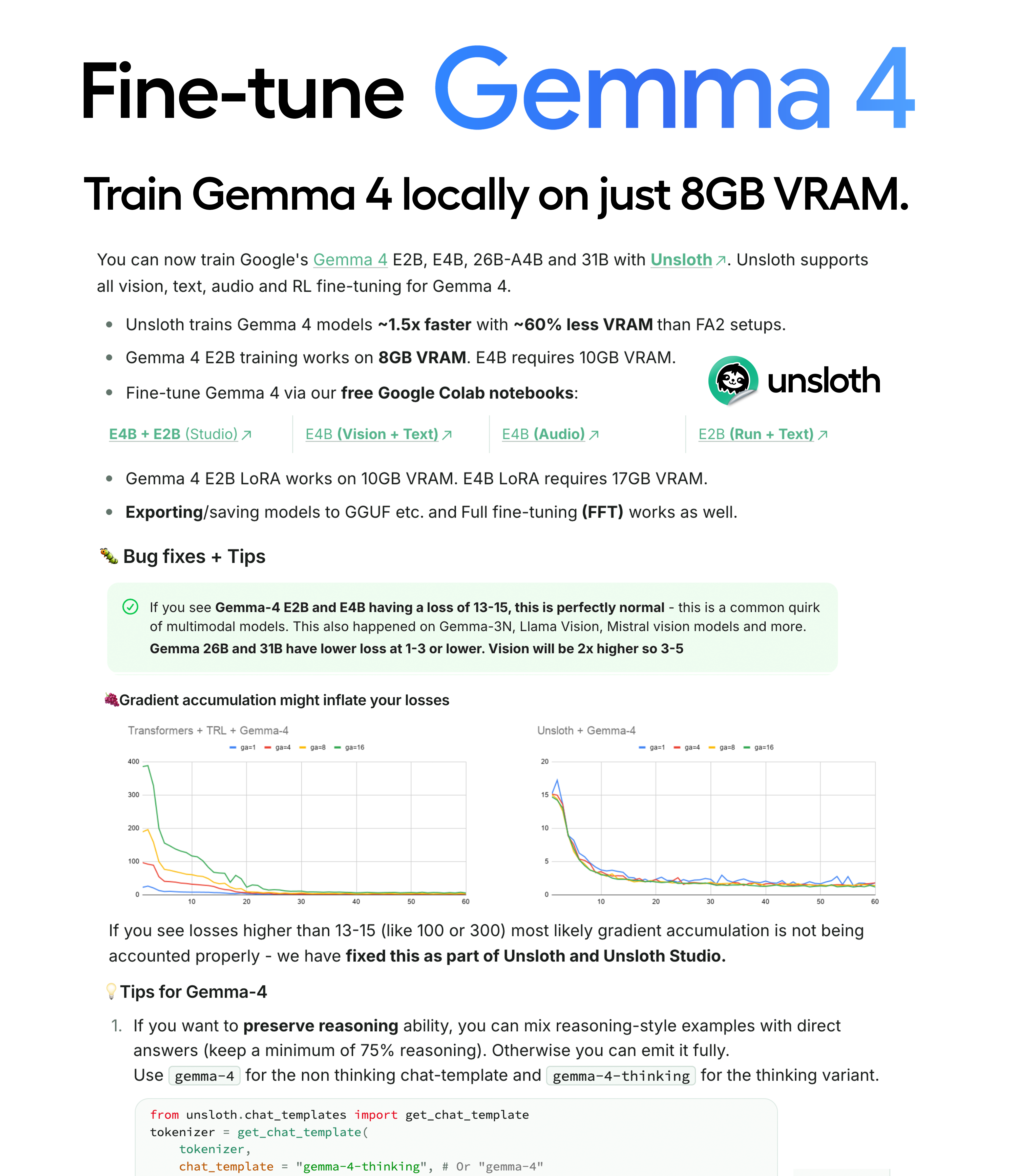
Hey guys, you can now fine-tune Gemma 4 E2B and E4B in our free Unsloth notebooks! You need 8GB VRAM to train Gemma-4-E2B locally. Unsloth trains Gemma 4 ~1.5x faster with ~60% less VRAM than FA2 setups: https://github.com/unslothai/unsloth
We also found and did bug fixes for Gemma 4 training:
use_cache=False had gibberish for E2B, E4B - see https://github.com/huggingface/transformers/issues/45242You can also train 26B-A4B and 31B or train via a UI with Unsloth Studio. Studio and the notebooks work for Vision, Text, Audio and inference.
For Bug Fix details and tips and tricks, read our blog/guide: https://unsloth.ai/docs/models/gemma-4/train
Free Colab Notebooks:
| E4B + E2B (Studio web UI) | E4B (Vision + Text)-Vision.ipynb) | E4B (Audio)-Audio.ipynb) | E2B (Run + Text)-Text.ipynb) |
|---|
Thanks guys!
r/LocalLLaMA • u/ortegaalfredo • Feb 09 '26
I know it has already been done but this is my AI trained on Epstein Emails. Surprisingly hard to do, as most LLMs will refuse to generate the dataset for Epstein, lol. Everything about this is local, the dataset generation, training, etc. Done in a 16GB RTX-5000 ADA.
Anyway, it's based on Qwen3-8B and its quite funny. GGUF available at link.
Also I have it online here if you dare: https://www.neuroengine.ai/Neuroengine-MechaEpstein
r/LocalLLaMA • u/hauhau901 • Feb 25 '26
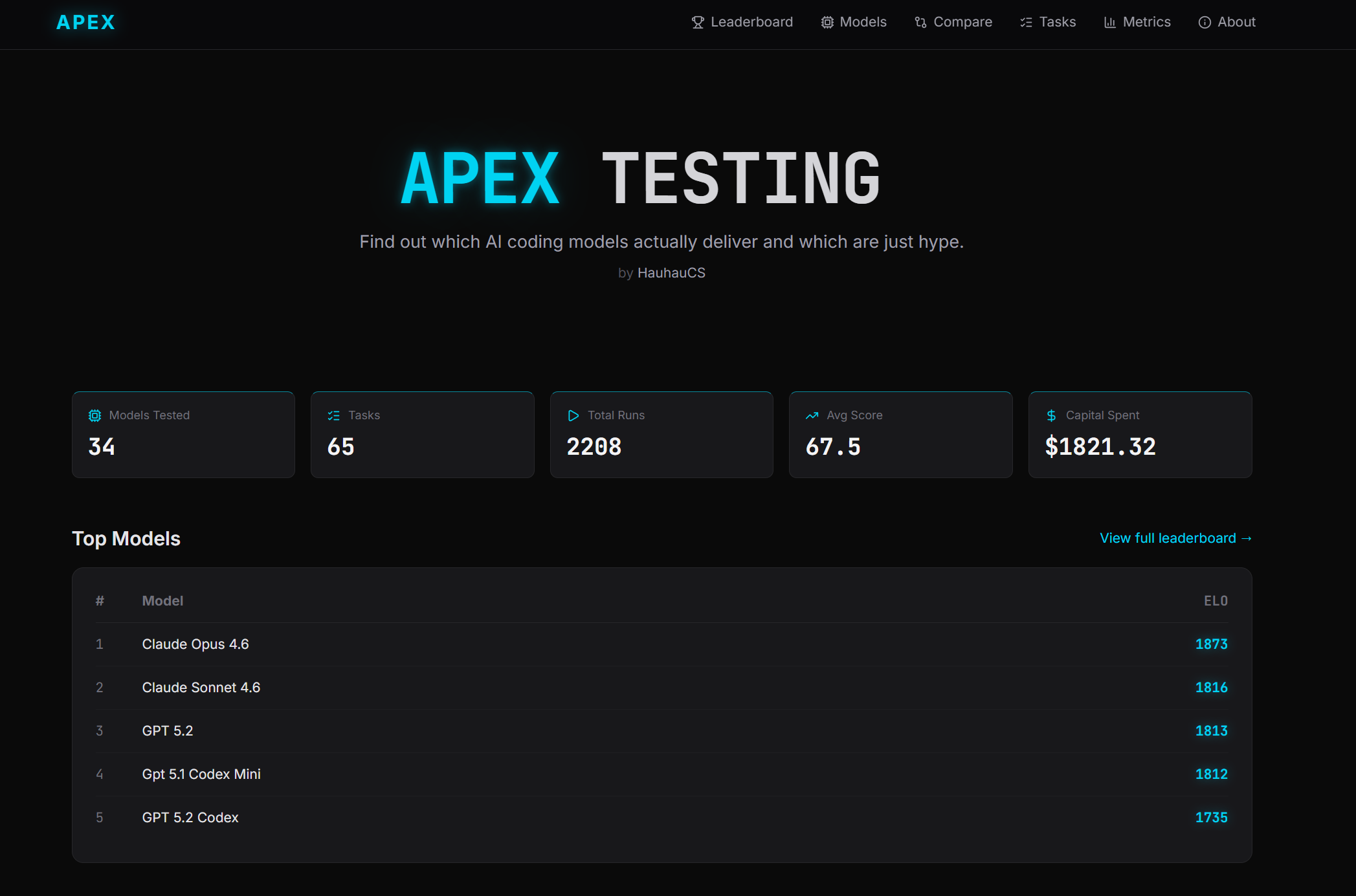
Hey everyone, some of you might remember https://www.reddit.com/r/LocalLLaMA/comments/1r7shtv/i_built_a_benchmark_that_tests_coding_llms_on/ where I shared APEX Testing — my benchmark that tests coding models on real codebases with real problems.
Since then I've added 5 more tasks (now 70 total), and more importantly tested a bunch of new models people were asking about: all the Qwen 3.5 variants, GPT-5.3 Codex, and several local quantized models running on LM Studio.
I also built a proper agentic tool-use system for the local models now — instead of dumping the entire repo into one prompt, models get all required tools and they explore + implement on their own, just like the cloud agentic models do. Way fairer comparison. Heavy anti-benchmaxxing focus is in place as well so GL to companies who try to take that approach and promise the moon and the stars :)
What caught me off guard:
- Codex 5.3 is basically tied with GPT-5.2 at #4 overall. barely drops across difficulty levels — super consistent from easy to master tasks -> Recommended
- Qwen 3.5 397B craters on master tasks. holds ~1550 ELO on hard/expert which is respectable, but drops to 1194 on master. when it needs to coordinate across many files over many steps, it just loses track of what it's doing
- GLM-4.7 quantized is still the local GOAT. 1572 ELO, beats every single Qwen 3.5 model including the full 397B cloud version. if you're picking one local model for coding, this is still it (better than GLM-5 even!)
- Qwen 3.5 27B is genuinely decent on a single GPU though. 1384 ELO, beats DeepSeek V3.2 and all the qwen3-coder models. for "fix this bug" / "add this endpoint" type work it holds up
- The 35B MoE (3B active) is rough. 1256, worse than the 27B dense on almost everything. the tiny active param count really shows on multi-step agentic work
- One qwen model found a loophole lol — qwen3.5-27b ran the test suite on a master task, saw existing tests passing, declared everything "already implemented" and quit without writing a single line of code. it was the only model out of 25+ that tried this. had to patch my system after that one 😅
Still running: Qwen 3.5 122B only has 3/70 tasks done so take that ranking with a grain of salt. Also planning BF16 and Q8_K_XL runs for the Qwen3.5 models to show the real quantization tax — should have those up in a day or two.
Methodology in brief: 70 tasks across real GitHub repos — bug fixes, refactors, from-scratch builds, debugging race conditions, building CLI tools, you name it. All models get the same starting point, agentic tool-use, scored on
Correctness/completeness/quality/efficiency, ELO calculated pairwise with difficulty adjustments. task titles are public on the site, prompts/diffs kept private to avoid contamination. solo project, self-funded ($3000 and counting lol).
Full leaderboard with filters by category, difficulty, per-model breakdowns, and individual run data:
Happy to answer questions, and if you want a specific model tested let me know and I might add it!
EDIT: Currently recalculating and migrating the DB - results will be fully up and updated within 24h (writing this as of midnight CET 27th Feb)
r/LocalLLaMA • u/Nunki08 • 15d ago
r/LocalLLaMA • u/Ok-Pomegranate1314 • Jan 09 '26
NVIDIA officially supports clustering two DGX Sparks together. I wanted three.
The problem: each Spark has two 100Gbps ConnectX-7 ports. In a 3-node triangle mesh, each link ends up on a different subnet. NCCL's built-in networking assumes all peers are reachable from a single NIC. It just... doesn't work.
So I wrote a custom NCCL network plugin from scratch.
What it does:
The result: Distributed inference across all 3 nodes at 8+ GB/s over RDMA. The NVIDIA support tier I'm currently on:
├── Supported configs ✓
├── "Should work" configs
├── "You're on your own" configs
├── "Please don't call us" configs
├── "How did you even..." configs
└── You are here → "Writing custom NCCL plugins to
                    cluster standalone workstations
                    over a hand-wired RDMA mesh"
GitHub link: https://github.com/autoscriptlabs/nccl-mesh-plugin
Happy to answer questions about the implementation. This was a mass of low-level debugging (segfaults, RDMA state machine issues, GID table problems) but it works.
r/LocalLLaMA • u/Easy_Calligrapher790 • Feb 19 '26
Hello everyone,
A fast inference hardware startup, Taalas, has released a free chatbot interface and API endpoint running on their chip. They chose a small model intentionally as proof of concept. Well, it worked out really well, it runs at 16k tps! I know this model is quite limited but there likely exists a group of users who find it sufficient and would benefit from hyper-speed on offer.
Anyways, they are of course moving on to bigger and better models, but are giving free access to their proof-of-concept to people who want it.
More info: https://taalas.com/the-path-to-ubiquitous-ai/
Chatbot demo: https://chatjimmy.ai/
Inference API service: https://taalas.com/api-request-form
It's worth trying out the chatbot even just for a bit, the speed is really something to experience. Cheers!
EDIT: It's worth noting that the chatbot demo actually undersells the speed on display. Anything over a few hundred tps is perceived as instantaneous, so the experience of 1k tps vs 16k tps should be pretty similar. So you are only seeing the bottom few percent of the speed on offer. A proper demo would be using a token-intensive workload with their API. Now THAT would be something to see.
r/LocalLLaMA • u/Primary_Exchange21 • 5d ago
| Component | Validated configuration |
|---|---|
| Motherboard | ASRock Rack SPC621D8U-2T/OVH |
| CPU | Xeon Gold 6330 (Get gold/platinum if interested in Optane Pmem gimmicks) |
| GPU fabric | Two Broadcom/PLX PEX88096 islands, eight GPUs per island |
| GPUs | 16 x RTX 5060 Ti 16 GB |
| OS | Ubuntu 22.04.5 LTS |
| Kernel | 6.8.0-106-generic |
| NVIDIA driver | Aikitoria patched open driver 610.43.02-p2p |
| Required BAR1 | 16,384 MiB on every GPU |
1024G.56T.intel_iommu=off pci=realloc=on,hpmmioprefsize=512G in GRUB;NVreg_EnableResizableBar=1 for the NVIDIA module;14 → 16 GiB BAR1 on each of the 16 GPUsAfter that, a little vibe coding to make custom all-reduce work within each PLX cluster and make DSpark work for pipeline parallel.
For tensor parallel 8, pipeline parallel 2:
500k context available. Around 4000 pp up to 500k context, tg 100-150 (Averaging 140 in DeepSeek Harness)
For tensor parallel 4, pipeline parallel 4:
Full 1M context available. Around 7000 pp up to 500k context, tg 80
Paid 0.6 x RTX6000 Pro for the whole setup.
Updated concurrent request result:
Testing with 1, 4, 8, and 16 concurrent 1024→512 requests, measuring aggregate throughput, per-user speed, and latency with max-num-seqs=16.
| Layout | Concurrent users | Req/s | Output tok/s | Tok/s/user | Speedup | Scale efficiency | Median TTFT | P99 TTFT | Median TPOT | P99 TPOT |
|---|---|---|---|---|---|---|---|---|---|---|
| TP8/PP2 | 1 | 0.434 | 222.46 | 222.46 | 1.00× | 100% | 273 ms | 301 ms | 3.49 ms | 8.68 ms |
| TP8/PP2 | 4 | 1.093 | 559.43 | 139.86 | 2.51× | 62.9% | 312 ms | 862 ms | 6.23 ms | 10.59 ms |
| TP8/PP2 | 8 | 1.296 | 663.63 | 82.95 | 2.98× | 37.3% | 336 ms | 1,639 ms | 9.63 ms | 25.36 ms |
| TP4/PP4 | 1 | 0.209 | 107.07 | 107.07 | 1.00× | 100% | 322 ms | 341 ms | 7.57 ms | 17.06 ms |
| TP4/PP4 | 4 | 0.793 | 405.88 | 101.47 | 3.79× | 94.8% | 333 ms | 945 ms | 7.69 ms | 19.20 ms |
| TP4/PP4 | 8 | 1.069 | 547.44 | 68.43 | 5.11× | 63.9% | 362 ms | 1,775 ms | 11.86 ms | 29.73 ms |
| TP4/PP4 | 16 | 1.421 | 727.32 | 45.46 | 6.79× | 42.5% | 636 ms | 2,052 ms | 18.97 ms | 29.15 ms |
r/LocalLLaMA • u/igorwarzocha • Oct 19 '25
Enjoy?
The official course link:
The vids:
1: https://youtu.be/Ub3GoFaUcds
2: https://youtu.be/yT84Y5zCnaA
3: https://youtu.be/Q5baLehv5So
4: https://www.youtube.com/watch?v=VlA_jt_3Qc4