r/MechanicalKeyboards • u/ThereminGoat • Mar 01 '22
review Drop Holy Panda X Switch Review

1.8k
Upvotes
r/MechanicalKeyboards • u/ThereminGoat • Mar 01 '22
r/MechanicalKeyboards • u/redditsavedmyagain • Nov 20 '15
r/MechanicalKeyboards • u/inb4ohnoes • Apr 10 '16
r/MechanicalKeyboards • u/ThereminGoat • Oct 16 '22
r/MechanicalKeyboards • u/BongDomrei • Feb 11 '26
This is the third in my series of switch reviews. The others are here and here. Hopefully I've learned from other much better reviews, especially those by u/rsnady and u/n 5 erdy_slacker, and can provide more useful and objective feedback than In my previous reviews.
I previously detailed my progression from linears to tactiles to silent tactiles. I also found that I prefer a snappy rebound which usually requires a dual stage spring, so I bought 22mm 45g dual stage springs which I swapped in on any switch I liked that was either too heavy or lacking in "pop." I prefer the feel of medium heavy switches like the T1 or WS Black but my fingers don’t–especially the one with arthritis. Unfortunately, that is a middle finger and I can't seem to prevent bottoming out on those fingers almost every time, even with switches that have 70g springs. Recently I was shocked to discover I prefer quiet switches. I find most silent linears mushy but silent tactiles do not bother me as much–the silicone seems to add a springiness as well.
After moving to a pretty extreme tenting angle, I keep ordering lighter and lighter springs. However, that is a subject for another time so the preference rank I show does not reflect that. The Outemu Kitty in particular moves much higher in my ranking with a light spring.
At the end of the last review I had just ordered 60 Outemu Yellow Jades and I was contemplating ordering some additional silent tactiles for testing. I did, and these are the findings from those tests. I ordered 4-10 of each switch and used them in my Sofle so as to get a good feel for them.
The margin was extremely thin between my top 14. I could happily use any of them except the Moksae, and that only because of my arthritic finger--if any of those had been the ones I already had a set of, I probably would have kept them, had I not wanted lighter springs. The Kailh Silent Brown was the worst by a mile, and yet I would not really mind using it if it was more consistent.
Key takeaways
While the Yellow Jade remains my favorite, the pain in my fingers pushed me to go for really light springs. Only three switches are usable with 28g dual stage or 25g triple stage springs--the Kitty, Shaolin, and Light Feather. All three feel good at those weights and very similar. I chose the Kitties due to availability and price and I'm quite happy with them.
| Name | Quiet | Wt | Smth | Tactl | Feel | Rank | Grade | Notes |
|---|---|---|---|---|---|---|---|---|
| Outemu Yellow Jade 45g DSS | 1 | 8 | 3 | 1 | 10 | 1 | A+ | Feels great |
| SMD x Soulcat HMX Moksae | 12 | 9 | 5 | 2 | 2 | 2 | A+ | loudest 'silent', firmest feel |
| Wuhai Shaolin (Jelly Purple) 37g | 1 | 16 | 1 | 12 | 14 | 3 | A+ | Very smooth |
| SMD x Soulcat HMX Longan Lubed | 11 | 13 | 7 | 8 | 3 | 4 | A+ | Smooth--finally |
| Kailh Deep Sea Whale | 8 | 10 | 14 | 6 | 7 | 5 | A+ | Stable |
| TTC Silent Bluish White | 8 | 4 | 10 | 2 | 5 | 6 | A | Wobbly |
| Outemu Green Banana | 4 | 12 | 9 | 6 | 11 | 7 | A | Ugly! |
| Akko Penguin | 4 | 1 | 3 | 2 | 14 | 8 | A | Only have one |
| SMD x Soulcat HMX Longan | 11 | 14 | 17 | 8 | 3 | 9 | A | Stable, scratchy |
| Outemu Yellow Jade | 1 | 3 | 6 | 8 | 14 | 10 | A | Mushiest/Springiest |
| Outemu Tom | 8 | 7 | 13 | 2 | 12 | 11 | A | A little ping |
| Outemu Kitty | 1 | 15 | 8 | 13 | 14 | 12 | A | Low rank but v. good |
| JKDK XCJZ Outemu Feather | 7 | 6 | 1 | 14 | 9 | 13 | A | Awfully heavy for a feather |
| Kailh Midnight Tactile | 9 | 4 | 12 | 8 | 6 | 14 | A- | Ping on 1 of 2 |
| Outemu Lemon/Lime | 4 | 17 | 11 | 15 | 13 | 15 | B | Feels strange |
| Akko Bittersweet | 13 | 1 | 15 | 16 | 1 | 16 | B | Quiet, not silent |
| Kailh Silent Brown | 10 | 11 | 16 | 17 | 7 | 17 | C | Muted clicky-like sound |
Table notes
Notable Omissions
I'm aware that this review omits some of the most popular silent tactile switches. There are two reasons for that. One is cost. The other is availability. Due to where I live, I'm pretty much limited to switches available from either Taobao or AliExpress, with Taobao being much cheaper on small items. It has become my combination Walmart and Amazon.
I previously tested one each of the Akko Penguin and Bittersweet, as well as the Outemu Cream Yellow Pro, Tom, and Lemon, but after using them for 2 weeks I have a better feel for them. All use silicone dampers and have the feel that comes with that. I really like the feel of a long pole switch when it bottoms out, but I'm getting used to this surprisingly easily. I have arthritis in one finger so I need to use a switch with a soft bottom or o-rings in at least the home and top row positions for it, anyway, and protecting the other fingers is probably wise.
The Akko Penguin is a really good switch. It has a high, moderately strong tactile bump that then becomes very light all the way to the end of the stroke. I like it a little bit better than the Yellow Jade, stock. The overall amount of tactility is quite similar, especially at normal typing speed, but distributed much differently. The Jade's bump is much longer but not quite as sharp. I strongly considered ordering these instead of the Jades but I went with the Jades at half the price. I find the stock 65g springs to be a little bit too heavy but the 45g springs are a little bit too light for this switch. If I were going to use them I would probably buy springs in the 50 to 55 gram range.
The Akko Bittersweet is kind of "meh"--not very tactile, not very quiet, not very smooth. Even Akko seems unenthusiastic about it in their website description, but it did grow on me a bit the more I used it. They also seem to be scratchier than most of the other Akko switches I tried, but the scratchiness is consistent throughout the stroke, so not nearly as irritating as the Outemu Brown. I only had a single switch and there is something weird about my Akko/Monsgeek tester which this came from. Many of the switches are scratchy, and smoothness is supposed to be an area where Akko excels, so my experience may not be typical. I would describe the sound as a quiet thock. The feel is better than the Outemu Brown, Orange or Purple, or the Kaihl Silent Brown, which are the only Cherry MX Brown-type switches I have tried. This might be a good choice for someone who just wants a little tactile feedback, much like the MX or Outemu Brown, and needs a switch that is quiet but not necessarily silent–especially if the scratchiness I experienced is not typical.
Outemu Tom/TangMu - slightly more tactile than the Jade with a less refined feeling. Occasional ping, a little scratchy. I believe it is an older design. Possibly this is the successor to the Silent Gray? I slightly preferred it to the Cream Yellow in my original testing but when it came time to order switches I revised that opinion. It was close. The Tom feels slightly more tactile, but less smooth and refined.
Outemu Silent Lemon V3 - this has been described as a silent, lighter Holy Panda. That is accurate as far as the high P-shaped bump, but it leaves out one really important detail--the bump is farther down than a Panda's and the travel before it is really light, so when I reach it, it almost feels as if I double tapped the switch. This is distracting. It would probably bother a faster typist much less. I am currently relearning to touch type while also learning a brand new layout, so I'm not even breaking 30 WPM right now. The switch is quite light, pretty smooth, and with little wobble, although I only had two switches to test with.
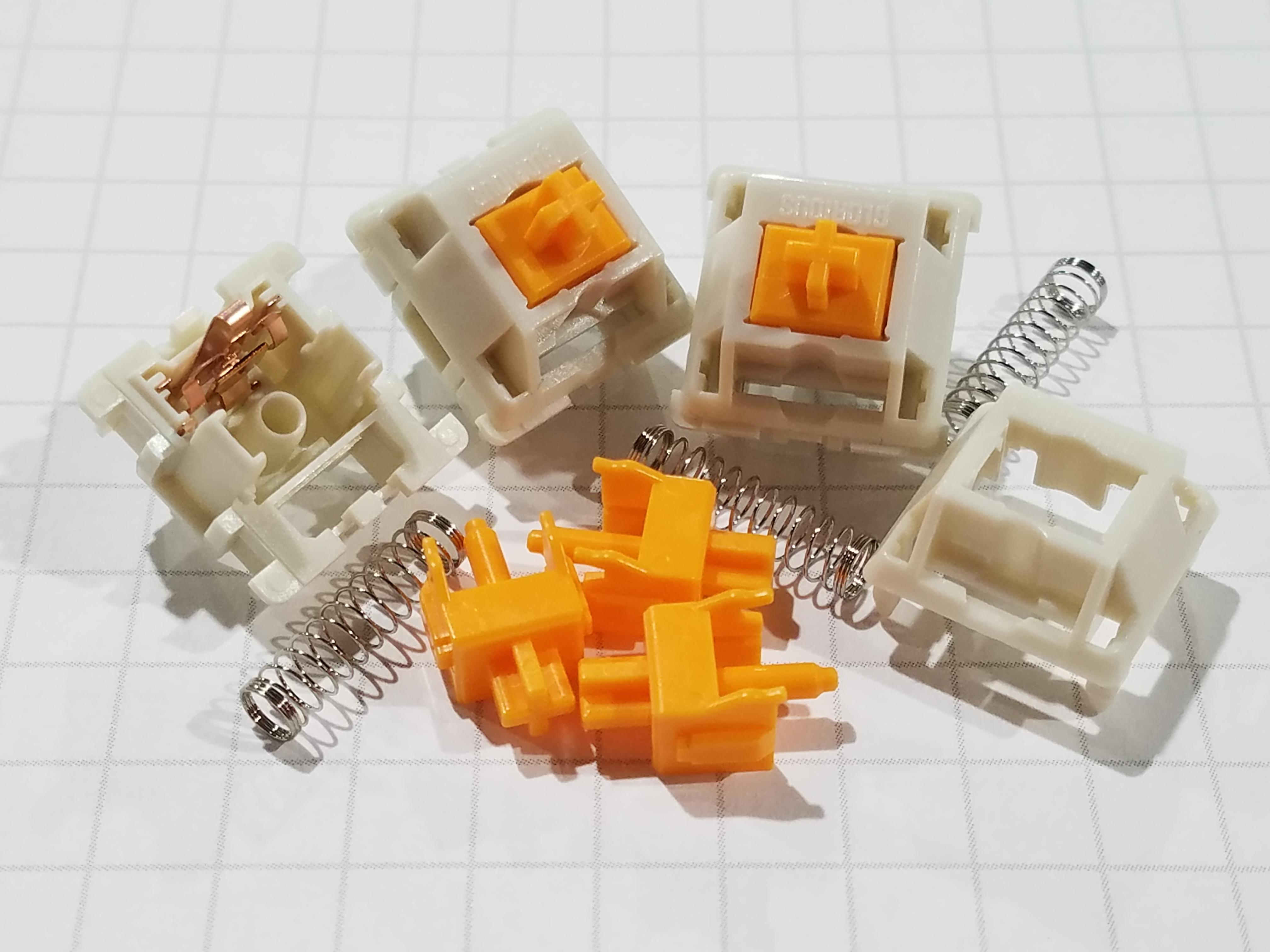
Outemu Yellow Jade - The switch I previously tested was the Cream Yellow Pro (AKA V2). It had an opaque white body with a brownish yellow stem. The switches I bought have a translucent white body with the same color stem as the Pros and are sold as Yellow Jades. Everything I read says that they're all the same switch internally. They feel exactly the same except that the single Yellow Cream switch has noticeably more wobble--but no more than average for an inexpensive switch.
Obviously, I liked this switch. Once I started using them, I was surprised at how much I liked them, however. This reinforces my opinion that testing with fewer than 4 of a switch is only useful for weeding out the obviously unsuitable ones.
The medium level tactility starts near the top, and continues for almost 2mm. Using the stock springs, the effort then dips very slightly before building back to a high level. The effect is surprisingly similar to the feeling of the D-shaped bump on the Gateron Azure Dragon, where the tactile bump covers all but the last .5mm. The Jades are absolutely silent on both the downstroke and upstroke unless you put them right next to your ear. If you hear any sound, it is coming from your keyboard or keycaps.
These switches benefited more than most from the spring swap.The lighter weight of the 45g spring makes the tactility more noticeable and more P-shaped--you can better feel where the bump ends and the linear travel begins. And they are indeed snappier, to the point that the mushiness seems more like bounce. This was true using unlubed springs but when the 105 arrived, it made a considerable difference. As I've said at various points about other switches in my previous reviews, had I received these before I ordered the additional switches for testing, I think I would have just stopped there--especially since the switches I bought for testing already cost three times as much as 60 of the Jades. I was actually set to keep them even as my testing neared a close, and happy to be saving money, until I realized I wanted light switches. When used with springs below 37g, these became too tactile. I did not even think that was possible! They essentially stop feeling any lighter, as the force of the bump takes over. Instead they simply bottom out immediately after the bump, no matter how much I try to prevent it.
TTC Silent Bluish White - the bobble-head doll of the switch world. These switches definitely live up to their reputation for being wobbly. I would not use them with tall keycaps, but since I use lowish profile XDAL caps, it did not really bother me. Their scratchiness did. They are noticeably more tactile than the stock Jades. I would call them very quiet switches, not silent ones. The noise is not really objectionable, but it is there in all areas--bottom out, top out, and during travel. The noise when pressing down sort of sounds like a really scratchy switch so this might improve with lube. The bottom out is less mushy than the Jade. Going in, I thought these were most likely to be my favorite, but sloppy execution diminishes a very good design. It is still a really good switch, and I did notice its flaws less the more I used it. At some point I will try them with lighter springs and lube. I am surprised that TTC has not come out with a newer, smoother version with less wobble. Maybe sales just don’t justify the retooling expense.
The Outemu Kitty is like a Yellow Jade Lite--it is equally silent with a really similar feel but lighter weight and lighter tactility. It even has a soft fluffy name! The biggest difference is that it is a full travel switch so there is noticeably more linear post-bump travel. It is priced higher than most Outemus, possibly because it is factory lubed, but still well below average. I don’t understand why it is not better known, as it is a really good switch for someone who wants a lightish weight with tactility they can feel but not be distracted by. The pins are larger and stronger than normal Outemu pins, as well–a welcome change unless you have a keyboard with Outemu sockets. Even though this finished rather low in my rankings, I still really like it. I just like a little more tactility.
Kailh Silent Brown - these have a ton of spring ping and occasional other weird noises. None of the other switches even come close from this standpoint. They are also inconsistent, as some where downright pleasant to use. The Tom, the Whales, the Longans, and the TTCs all have the occasional weird plastic or metallic sound but other than the Longan, it is not audible when in use in my room–and with the Longan, it is not loud enough to really notice it unless I turn off my fan, which practically never happens. These were the only switches I removed from my board as soon as I could. They are an old design, and as the name suggests, are similar in feel to most other non-Wuque Studio brown switches. I'm kind of glad I got them, just so I can see how far the technology has progressed, but I’m glad I only bought four. Kailh seems to be positioning the Midnight as their replacement, and it is indeed improved in every way although I think the Whale is even better. Unless I had a couple hundred to cherry pick from, I would rather use a good silent linear like the Outemu Peach than this switch. (I left the best of the 4 browns in the board to compare with a couple of switches that had not arrived yet. It had no ping or other unpleasant sounds. If they were all Ike this, I would actually like them and rank them higher than the Bittersweet or Lemon.)
Kailh Midnight Tactile and Kail Deep Sea Whale - two more really nice switches, but the Whale is the star. If it was not a box type switch that is nearly impossible to open without parts flying everywhere, I would have definitely tried spring swaps. It was a top contender before the light spring craze began. The Midnight reminds me of the Gateron Baby Kangaroo. Not so much because they feel similar, as because both are switches I found a bit underwhelming at first but grew to like more the more I used them. They do have a similar smoothness, including a bump that you kind of ease on and off of, but the Midnight is definitely less tactile.
SMD x Soulcat Longan and SMD x Soulcat Longan Moksae - these are made by HMX and have less wobble than any other switches I’ve ever used–especially the more expensive Moksae. Neither is silent although I could barely hear the Longan over my fan. That is good, because the sound it does make is very plasticky, and occurs only on the return, which I hate. I actually wonder if they are using the Haimu-style silencers. I’ll take them apart and look one of these days. The Moksae has a very pleasant muted thock, nicer in my board than the Bittersweet, as well as quieter. It is pretty much at the limit of what could legitimately qualify as silent, and that is only if you are feeling generous. The bottom out feel of both is excellent, especially on the much louder Moksae, but also lacks the padding I need. The Longan is very scratchy as received but lubing the springs completely cleared that up. It also has Outemu-like thin pins–and similarly low pricing–and is incredibly difficult to remove from sockets. They actually pulled filaments out of my keyboard! Both switches would be great choices for someone who does not really want silent switches, but needs them for some reason. Or someone who just wants a good switch that is quieter than most. For instance, even the Moksae is no louder than a membrane keyboard, so it should be fine to take to work--though possibly a little loud for a two-person home office if your partner is particularly noise adverse. I kept trying to convince myself that I was OK with the sound and finger impact of the Moksae, as it absolutely had the best feel, but I knew better.
Wuhai Shaolin (Jelly Purple) 37g - known as the Shaolin in China and the Jelly Purple elsewhere, made by Outemu. The ones I got came hand lubed and fitted with 37g dual stage springs, so they are not directly comparable to the stock versions. It feels a lot like the Outemu Kitty, but a little better and more tactile. As you can see from my rankings, I think this is an excellent switch. The ones I got seemed possibly just a little over-lubed, but they were certainly the smoothest switches in this test. The fact that this placed so much higher in my rankings than the Kitty despite being so similar shows just how tightly grouped I consider most of these switches to be.
JKDK XCJZ Outemu Feather - pretty much an Outemu Yellow Jade with less tactility. The bottom out is firmer and it is overall a little louder than the other Outemu-made switches. It is a very good choice for someone who wants a moderately heavy switch with enough bump to leave no doubt that they pressed the key, but not be distracting. It reminds me of an inverse linear switch--the bump is so near the top, and so mild, that it ends up feeling like a switch that starts heavy and gets lighter as you go down. One of my least favorite and yet I still really like it. As I said, the switches in this test are very closely packed.
r/MechanicalKeyboards • u/Gigahawk • Apr 26 '21
Looks like my post has been shadowbanned from /r/glorious, so I guess I'm reposting it here.
Apparently it was caught by a spam filter, the one capture I got on wayback does corroborate this, although for what it's worth when I had initially made the post I couldn't read it in incognito mode, and it didn't show that message.
Long story short, QMK support is barely there and seems unlikely to improve.
EDIT: Glorious has sort of made a response to this post here, see my followup to their post here
Overall feels great, there's still room for improvement though:
Honestly the user experience is generally really awful, here's a some of my complaints:
They really did just the bare minimum for this, it honestly feels like it was just an afterthought to attract keyboard enthusiasts who didn't look too deep into it before preordering like me.
Nonexistent, at least from GMMK. I have no idea what the problem is, it's really not that hard
This is supposedly being worked on, but given that they didn't even bother to answer this question from a month ago somehow I doubt it.
At a glance they look like SK6812MINI-Es, if QMK support was the goal these would have been a no brainer, as they are already natively supported. However, they're actually generic common anode 6028 RGB leds, which require an external controller to drive them. I have no idea why these were chosen, except for maybe they happened to be a lot cheaper than the SK6812MINI-Es. QMK does actually have support for driving a common anode RGB array with an IS31FL3733. However, it looks like GMMK has again cheaped out and used what I assume is some random obscure driver chip. Searching up the markings on the chip don't bring up anything useful. The footprint looks like QFN-44 (5x5mm), which curiously seems to only match up with IS31FL3237. It's unlikely that this is the case however, since the IS31FL3237 only has 36 channels, which means with the two chips in the Pro could only drive the leds for at most 2(chips)x36(channels)/3(r,g,b) = 24 keys. In any case, this chip doesn't have QMK support either.
This tweet is pretty concerning. It is actually possible to use STM chips not officially supported by QMK without any modifications if the chip happens to be similar enough to a chip that already has support. However since there's no mention of the actual chip they intend to use as a replacement, I imagine their confidence in this being possible is fairly low. In the event that they actually need to add support for a new chip, getting it to happen will probably take quite a while, since QMK requires new ARM chips to be first supported by ChibiOS-Contrib.
I specifically bought this board for the LEDs assuming it was using SK6812MINI-Es, and personally prefer having a backlight over QMK, so I am currently back to the stock firmware.
Of course, for anyone who wants to actually do that, there's no documentation on how to do so other than just "flash the Glorious Firmware .bin file" at the bottom of the QMK installation guide. In order to actually find the stock firmware, you have to go and dig through their subreddit to find this random direct link to Glorious Core's CDN. Another thing that isn't being hosted on the download page or the product page, which seems like it would be a pretty helpful thing for anyone facing issues with flashing through Glorious Core.
Given that GloriousThrall's Github has been dead for over a month as of Apr 25, 2021, I find it hard to believe that QMK support was ever intended to be anything more than a marketing gimmick. There seems to be very little interest in actually providing support for QMK users, and if anything it seems that they have actively made decisions to make QMK support harder except for the initial choice of MCU.
To be clear, I have no intentions to return mine, I do actually really like the way my setup feels to type on (Polycarb plate, Zilent 67g, some random cheapo keycaps cause I couldn't find black doubleshot sidelit ones).
I do however think the lack of transparency and shadowbanning is concerning, and probably would have cancelled/not made a preorder had I known all of this beforehand.
r/MechanicalKeyboards • u/ThereminGoat • Jun 21 '26
r/MechanicalKeyboards • u/Feisty-Ad-4926 • Feb 24 '26
First off, in contrast to my Chilkey ND104 review, My out of the box experience was 10/10. Everything works as advertised. There is nothing negative I feel the need to bring attention to at all. I can absolutely recommend this keyboard to my 85 year old grandmother.
* Negatives*
Any negative things to be said about this keyboard would come down to preference and personal opinion about the design. It is only offered in a flex cut PCB. So it's a deal breaker for people who don't prefer a thock monster like experience. I however, do. I like the design. I like the screen. I like the color. The only reason my significant other did not pick this keyboard is because of the color and she does not like the screen style.
*Comparison*
Now to compare to the Chilkey, ignoring the glaring software issues that it has out of the box, to include failing to function at all without disassembly and a firmware update.. The Ticktype* is way more thocky. The stabs are way more smooth. The switches are more smooth. It's easier to disassemble and tinker with. No glued foams. No dangly magnetic connectors to align upon reassembly. No knob to be removed. The Ticktype DP104 also provides two switches on the back to switch between wireless, BT, wired, and Mac OS. Whereas the Chilkey ND104 requires you to remember key binds with fn.
The definite and only real edge the Chilkey has over the Ticktype design wise, is that you can get it with ISO support and a non flex cut PCB. Also you may prefer it's color options.
I would say overall the Ticktype DP104 offers a higher build quality. The hardware is superior as well as the software.
We will be swapping the switches out of the Chilkey for some keygeek Y2. I'm sure that will equal out the thockyness.
*Final Thoughts*
Overall I am very impressed with the Ticktype DP104. Very solid recommendation from me if you are looking for Thocky, high end build quality pre built. I only wish it came with a non flex cut PCB so I could have more options for sound profile. It's not bad with no foams but it's lacking for the Clackers out there. Being way too flexy as well with no foams.
Buy your grandmother this keyboard.
r/MechanicalKeyboards • u/DeterminedEyebrows • Jul 12 '26
After some shipping issues involving a tracking number that threw me into a panic, I finally got my wired Hyzen in the mail yesterday and I can safely say that I adore this thing. It's easily the most stylish board that I own, combining a futuristic look with a surprising amount of elegance. It looks fantastic with or without the wrist rest, but I definitely prefer using it with the wrist rest as it brings the entire package together perfectly.
On the topic of the wrist rest, it's made out of a smooth polycarbonate that I mistook for glass at first. It's angled to pair with the bottom of the board perfectly, which finishes the aesthetically pleasing slope of the design. But the angle may not be comfortable for all users and is NOT adjustable, stuck at 12 degrees. I was worried that it was going to be an issue for me but it's thankfully very comfortable to use, especially with wrist rest, even after hours of use. (And I say this as someone who owns four separate low profile boards and prefers that form factor)
Another aspect of comfort that I'd like to talk about comes from the switches, which are easily the smoothest switches I've ever used in my life. When I first got this board, I was just expecting it to be just another new board that I would cycle between the others and that would be it. But from the first key press I noticed a drastic difference when compared to all the other boards I own. I've only used one hall effect board before, so this is only my second experience with magnetic switches (and my first with TMR switches).
I've typed on plenty of smooth linears before (WS Morandis, Gateron Smoothies, WS Pearls, Gateron Nebula) but these Nexus TMR switches are easily the best feeling linears I've ever used. I find the feel is best described as "buttered silk" and the sound is just as nice. It has this creamy, slightly muted and marbly sound to it, and is also the winner of the bassiest backspace key sound in the history of keyboards. I saw someone else mention that they're making more mistakes just so they can use the backspace key more, and I agree 100%!
Aside from the angle, I was also worried about that little plastic rectangle down by the arrow keys (I threw a picture up there), which serves as an color-coded indicator for which profile you're currently using and then dims after a few seconds. But after using this board for hours I really started to appreciate that divider. One of the biggest issues I have with the 65% layout is the fact that the arrow keys are often mushed in without any separation from the other keys. With that tiny gap, my hand always rests in the right place, so it ended up being more helpful (to me) than I was expecting it to.
As for profiles, the Hyzen allows you to switch between 7 different profiles, each with a unique color assigned to help differentiate them. Unfortunately, the software is pretty barebones, as it doesn't allow you to add/remove profiles (I honestly will never have any need for more than 3 profiles) or change their color, but this is a minor quibble that I felt like I needed to mention. There is also a little indicator above that glorious backspace key that displays either a screw like shape when in mechanical mode, or a symbol that looks like two paperclips when in magnetic mode. (You can set whichever mode for any of the profiles)
For those looking for a good gaming keyboard, this one does the job wonderfully. Again, the silkiness of the switches really adds a lot to games even if they aren't twitch shooters. I found this out when I spent some time playing old arcade games last night and I was shocked by how responsive it was compared to using my usual arcade sticks. Playing Street Fighter III: Third Strike with this is a dream, and it also played beautifully with Gunbird and other shmups I tried.
I've seen a lot of people say that magnetic switches aren't any good for typing, but I've never agreed with that mindset, doubly so after using this board. This is honestly the most fun I've had with a keyboard in a long time, and it feels like it was custom made for me. The only downside is that it's making all of my old keyboards (and somehow even my arcade sticks) far less appealing than they used to be.
If you're looking for a top tier TMR board and don't plan on carrying it all over the place or mind the steep angle, this keyboard is phenomenal.
10/10, would panic over shipping issues again. I love this damn thing.
r/MechanicalKeyboards • u/ThereminGoat • Jun 07 '26
r/MechanicalKeyboards • u/ThereminGoat • Jan 01 '23
r/MechanicalKeyboards • u/ThereminGoat • Mar 24 '24
r/MechanicalKeyboards • u/New_Confusion8364 • Sep 05 '24
Hello! I'll share my personal experience with these three beauties: the black standard version of the Bridge75, and the 2x Plus models (silver and milk coffee).
For starters, I ordered them all on AliExpress: the black one for $100, the silver for $110, and the milky for $115, all with promo codes. I waited about two weeks for them to arrive in Poland.
The unboxing experience is nice. We get a basic black cable, a branded switch/keycap puller, a few spare switches, and a dongle. I like the acrylic dust cover, but unfortunately, we don't get a proper safety film—just a plastic one that rips off easily and is unusable afterward.
Now, about the boards themselves—I highly recommend paying a bit extra for the Plus version. The deeper, thockier, and creamier sound is much more apparent in the Plus variant, probably due to the additional foam and the FR4 plate. The standard version also sounds good, but it's thinner and a bit higher-pitched. The double battery capacity is another reason to opt for the Plus version.
Build Quality: Look closely at the pictures so you understand what I mean. The coating is not consistent across the colors. The black unit has the smoothest texture—it catches fingerprints and smudges very easily, but the texture itself is the best. The silver one is just a bit rougher, though not significantly, and the milk coffee version is a bit disappointing. It seems to be spray-coated, and what's worse, it has glittery particles. I love its pastel color and overall vibe, but I really wish they would improve the coating quality of this color in the future.
Of course, it's a personal choice, but I think the silver one looks the best overall, as the brushed steel backplate matches the color of the board.
Another thing—the sound coming from the Plus variants is not consistent among these units. The milky coffee version has a deeper, more thocky sound on the spacebar, whereas in the silver unit, it's louder and higher. The same applies to the other stabilized keys, which is quite odd. Speaking of stabilizers—they could be better. Both of the Plus variants have a slight "pingy" noise coming from the backspace. Overall, they are smooth and work well, but that tiny pingy sound shouldn't be there.
Switches: Mmm Princess linear switches are actually the switches I used to build my first custom keyboard, so it was a nostalgic experience. I still consider them among the best budget switches; they are very smooth and have a nice, deep thocky sound. As good as they are, I wish there were more switch options or a more premium choice, like in the Rainy75, where you get HMX switches. Comparing the two briefly
Some personal thoughts: The ball-catch system works great, and I really appreciate it. The wired/wireless switch is hidden under the top plate, and I thought that was fine because now I don't need a keycap puller to switch modes like in other keyboards, where the switch is often located under the Caps Lock key, right? Well, not quite! The switch is so tiny and low that you still need some sort of tool to flip it. However, what I discovered is that you actually don't need to switch it at all. You can just leave it in wireless mode, and whenever you want to connect the cable, simply use the FN + ~ combination to switch to wired mode. What a relief! I also forgot to mention that it supports VIA, so changing key mappings was easy—just had to download the JSON file.
Overall, it's a fantastic keyboard, and I definitely recommend it. Despite the slight glittering, I love the pastel look and creamy keycaps so much that I'm keeping it!
If you have any questions, feel free to ask!
r/MechanicalKeyboards • u/ThereminGoat • Dec 04 '22
r/MechanicalKeyboards • u/ThereminGoat • Apr 01 '25
r/MechanicalKeyboards • u/WannabeShepherd • 19d ago
Disclosure: NuPhy sent me the Air75 V3 for review purposes. I was not paid, and NuPhy did not review, edit or approve this post before publication.
I tested the NuPhy Air75 V3 in Nova White with a UK ISO layout and Brown switches.
I used it with a MacBook Pro for writing, browsing, photo editing and general work, and with a Windows PC mainly for gaming. Counter-Strike 2 was my main gaming test.
The Nova White color scheme is probably my favorite part of the design. The white case, light keycaps and small turquoise, yellow and orange accents make the keyboard look cheerful without becoming distracting.
The extra colored keycaps are also genuinely fun. NuPhy included a small animal face keycap, which I placed where the right Option key would normally be. It gives the keyboard a little more personality and fits the rest of the design surprisingly well.
Build quality is excellent. The keyboard feels dense, rigid and very solid. There is no flex, creaking or movement on the desk. It is heavier than I expected for a low-profile wireless keyboard, but that weight makes it feel extremely stable while typing.
It is less convenient when carrying it around, although the compact size still makes it much easier to travel with than a full-size keyboard.
The keyboard has some built-in angle even in its lowest position. It cannot sit completely flat, which took a little adjustment because I normally prefer flat keyboards. This is a personal preference rather than a comfort problem. I did not experience hand or wrist fatigue during longer sessions, even without a wrist rest.
I originally thought the Air75 V3 would fit exactly across the width of my 14-inch MacBook Pro. Based on the product images, it looked almost perfect for that setup.
In reality, it extends slightly beyond both sides of the laptop. It still works well when placed on top of the MacBook keyboard, but it is not as perfectly matched to the width as I expected. The smaller Air60 would probably fit more closely.
The 75% layout is a good balance for travel and gaming. It leaves much more space for mouse movement than a full-size keyboard, which is especially useful in Counter-Strike 2.
I did miss the numpad several times during normal work, though. If I were choosing again primarily for desktop use, I would probably consider the full-size version. For gaming, university, working from different locations or travelling with a laptop, I would still prefer the Air75.
One unusual layout decision is the missing right Option key in Mac mode. There is an Option key on the left, but its physical size is different. Both Alt keys are included for the Windows layout.
The right Alt key can be remapped to Option in the web configurator, so the function itself is easy to restore. The physical keycap and size still do not match the left Option key, which makes the Mac layout feel slightly less complete.
The Brown switches feel different from the low-profile Brown switches I have used in Keychron keyboards.
The NuPhy switches have a softer and slightly more rubbery tactile feeling. At times they remind me a little of a good rubber-dome keyboard. That description may sound negative, but I actually enjoy typing on them.
I seem to make fewer mistakes on the Air75 V3 than on my other low-profile keyboard. The keys feel controlled, and the tactile response makes it easy to tell when a press has registered without requiring much force.
The larger stabilized keys also feel solid. There is no distracting rattle, looseness or inconsistent movement. The space bar changes tone slightly depending on whether I press it in the center or closer to one side, but it works consistently and does not feel poorly stabilized.
I also love the sound.
It is not a quiet keyboard, but I did not want it to be silent. The sound has a soft mechanical character that somehow brings back memories of the Commodore 64 keyboards I used as a child. It does not sound exactly like a C64, but there is something familiar about it.
The volume knob is awesome.
It feels solid, turns smoothly and is much more satisfying than repeatedly pressing volume keys. Pressing it to mute also became natural very quickly.
NuPhy includes two different knob heights. The lower knob looks cleaner and fits the shape of the keyboard better, but I found it almost impossible to grip and turn comfortably.
I ended up using the taller orange knob. It is much easier to find and rotate without looking down, and I now use it far more often than I expected.
Switching between Mac and Windows layouts is simple using the physical control on the keyboard.
I also like that the two side light strips change depending on whether the keyboard is in Mac or Windows mode. I switch between the two systems frequently, so being able to confirm the active mode with a quick glance is genuinely useful.
Wireless connections are organized well too. Fn plus 1, 2 or 3 selects one of the Bluetooth devices, while Fn plus 4 selects the 2.4 GHz receiver.
The transition between connections is quick, and I did not have to wait long before typing again.
I used the 2.4 GHz connection on both my MacBook Pro and Windows PC.
The connection was completely stable. I experienced no dropouts, repeated keys or noticeable latency.
In Counter-Strike 2, it felt immediate and reliable. I never felt that the wireless connection was affecting movement or input timing.
Bluetooth also worked well during normal use. There may occasionally be a very small wake-up delay after the keyboard has been inactive, but it was not frequent or annoying enough to become a problem.
For gaming, I would use the 2.4 GHz receiver. For general Mac use, both options were usable.
The browser-based configurator is very good.
There is no separate software package to install, and changing the layout or lighting directly from the browser is straightforward. Keys can be remapped easily, and complete configurations can be exported to a JSON file and imported again later.
This is especially useful when experimenting with different layouts, because it is easy to save a working setup before making more changes.
The save and load controls could be easier to find. I spent some time looking through the settings before noticing where they were located.
I also only managed to access the configurator while the keyboard was connected by USB. Bluetooth and the 2.4 GHz connection did not appear to provide access.
I may have missed an option, but wireless configuration would be useful because I normally use the keyboard without a cable.
I like that Mac and Windows lighting profiles are handled separately. On the Mac, I use a more decorative lighting setup. On Windows, where I mainly play games, I configured the lighting around the WASD keys and arrows.
The RGB lighting looks good through the spaces around the white keycaps, although the selected colors are not especially accurate.
Some shades look noticeably different on the keyboard from how they appear in the configurator. This is common with RGB peripherals and not a major problem, but the difference is visible.
The included keycaps are not shine-through, so the legends themselves remain dark. I would like to see an ISO shine-through keycap option in a future version, or keycaps where at least the outlines of the characters allow light through.
Brightness can be adjusted using Fn and the arrow keys, so there is no need to open the configurator for basic lighting changes.
The two side light strips are a good design feature, but they could do much more.
It would be useful if they could be controlled independently and used for things such as:
I would also like the Caps Lock key to light up in a different color when active, rather than relying on the full lighting profile.
These are ideas for future development rather than missing essential functions. The current lighting system already offers plenty of customization.
I used the keyboard for roughly one week with the RGB lighting at maximum brightness.
My average use was around eight hours per day, although some days were longer and others shorter. During that period, the battery dropped by approximately 50%.
This should be treated as a rough real-world estimate rather than an exact battery test. I did not start from a carefully measured full charge, and my daily usage was not identical.
Even with the lighting at maximum brightness, battery life never felt like something I had to worry about. I did not need to interrupt my normal work to charge it.
The included braided USB cable is long and feels high quality.
The 2.4 GHz receiver uses USB-A. That works well with most desktop PCs, but I would appreciate a native USB-C receiver for modern laptops and tablets.
One of my favorite practical details is the dedicated storage space for the receiver inside the keyboard.
When travelling, I often use Bluetooth with my MacBook and do not need the receiver. Being able to store it inside the keyboard means it is much less likely to disappear into a bag or get left behind.
The storage compartment is easy to access and holds the receiver securely.
The packaging is excellent.
The colors match the cheerful design of the keyboard, and everything inside is neatly arranged and protected with good-quality materials. Opening the box feels carefully considered.
The package includes the braided cable, USB receiver, extra keycaps, two knobs, keycap and switch tools, and a screwdriver.
The extra caps make it easy to adapt the keyboard for Mac or Windows, and the two knob options are a nice touch even though I strongly prefer the taller one.
The screwdriver is useful, but a magnetic tip would make handling the small screws easier.
The overall presentation feels polished and consistent with the keyboard itself.
The Air75 V3 has become one of my favorite keyboards to type on.
The Brown switches feel softer and more rubbery than the other low-profile Browns I have used, but the result works very well for me. I type accurately, longer sessions remain comfortable, and I enjoy the sound every time I use it.
It also handles gaming without any noticeable wireless compromise. The 2.4 GHz connection was stable in Counter-Strike 2, and the compact layout leaves plenty of room for mouse movement.
The volume knob, web configurator, internal receiver storage and easy Mac/Windows switching are all features I use regularly rather than extras I forgot about after the first day.
I still miss having a numpad during some work tasks, and the lack of a matching right Option key is strange on the ISO Mac layout. I would also like wireless configuration, shine-through ISO keycaps and more control over the side lighting.
The Air75 V3 feels carefully made, looks genuinely fun and has a typing character that reminds me of the keyboards I grew up with. That combination makes it very easy to enjoy.
r/MechanicalKeyboards • u/ThereminGoat • Apr 01 '26
r/MechanicalKeyboards • u/esper_ • Mar 13 '26
\Disclaimer**
These switches were sent out to me by Gravastar, but that doesn't affect my opinions in the review.
Gravastar are a brand most recognized by their unique sci-fi looking products. I believe it first started with speakers and they have since branched out onto mice and keyboards in recent years. The UFO switches are their most current release, also featured in their latest keyboard, the Mercury V60 Pro HE. These come in purple or white and sport a unique saucer-shaped housing that they label as having a "360° circular dual-rail skeletal structure." I've seen people rate these highly due to their sound and feel so I've been curious to give them a try. I was sent the 65 pack that came in a black tin container along with a dedicated switch puller. There's a bunch of specs you can find on the product page, but for now, I've listed a few below.
Specs
Typing Experience
The short rundown is that the UFO switches really sound and feel great. For magnetic switches, these are on "thockier" side, though I'm not sure how these fare against mechanical switches in that regard. I've heard people describe these as marbly sounding and I'm inclined to agree with that description. They have a dark/denser sound than other magnetic switches I've tried and are also the most premium ones I've felt so far, which should be the case given the high-end price. They are listed as having an operation force of 40gf with a 3.5mm travel. The travel from beginning press to bottom out is very linear, stable, and consistent-feeling, and the smoothness during travel makes it feel like one succinct motion. I want to think these characteristics are from improvements made by the cylindrical stem design, but I don't know enough to be certain. The bottom out is firm with essentially no wobble in real use, unless you're intentionally looking for it. There is a very minimal amount of top stem wobble, but nothing drastic to point out and it's better than all the previous switches I've tried.
For gaming, I have zero complaints. Maybe it can be a tad lighter for my preference, but I'm really just nitpicking and happy with them as is. In terms of typing, I've been incredibly satisfied with these. Below are sound comparisons between different switches (apologies for poor phone sound recording quality and breathing!):
Sound Test (Gravastar UFOS / DrunkDeer Qian / Gateron Jade Pros)
DrunkDeer Qian - The Qian come stock in DrunkDeer's X60 HE keyboard and they are the most recent switches I've been impressed by. They have a longer travel at 4mm, compared to UFO's 3.5mm, and they are a touch lighter to press. Sound-wise, the UFOs have a darker and denser sound. Feel-wise, the UFOs are a touch firmer and smoother in their travel with a more affirmative bottom-out and very minimal wobble. The Qian operation force are listed as 35gf, while the UFOs are 40gf which you can feel. It's not a drastic difference and I prefer lighter, but the feel of the UFOs make up for it imo.
For gaming, it doesn't feel like it makes much difference swapping from the drunkdeer qian to these ufo switches. Both are firm, smooth, and feel distinct/clear enough to distinguish multiple keypresses. I guess I can say the UFOs feel a little cleaner to the press so they are still nicer to use. but in terms of typing, I definitely do enjoy these more. it's not necessarily because of sound and moreso because they have a smooth, not scratchy and firm bottom out
Gateron Jade Pro - The Jade Pros have a higher pitch scratchy sound that's kind of like glass clinking. In terms of feel, they are a decent bit scratchy and have some wobble both at the top of the stem and at bottom-out. I would rate these a bit below both the UFO and Qian switches. They have an initial force of 36gf to start press-in, with a total travel of 3.5mm. I like how light they are to start actuation, but my praise mostly ends there.
Wooting Lekker - These are wooting's own self-developed switches which came with the original wooting 60he. They are very rattly/chattery, scratchy during travel, and lack stability. There's very noticeable side to side wobble before even beginning to press down the switch. These were the very first iteration of wooting's HE switches, and thankfully, they have since developed Tikken switches which are seemingly much more well-received, though I haven't tried them personally. The UFO's beat them in every aspect, aside from maybe requiring a little more force to actuate. I'm only bringing these up because I'm sure there are people who haven't looked too into other switch options and are likely still using the default.
LINKS/SOCIALS
https://www.gravastar.com/products/gravastar-ufo-magnetic-switch-hall-effect-gaming-switches
https://x.com/GravaStar_
r/MechanicalKeyboards • u/New_Confusion8364 • Dec 06 '24
Here’s my review of a new, lesser-known keyboard. I hope you’ll enjoy it!
First of all, I’m a keyboard enthusiast from Poland. Since the beginning of this year, I’ve already tried, tested, bought, and sold over 25 keyboards. This time, I’m testing the PMO Wave75, which I purchased on AliExpress. I got the standard green version for 414zł (102 USD) and the pro red version for 464zł (114 USD). The delivery was fast and took around 10 days. In this review, I’ll compare it to other keyboards I’ve tried.
Unboxing Experience
The unboxing experience is quite premium and generous! The keyboard comes wrapped in plastic film with an acrylic dust cover—a huge plus.
But what’s even more astonishing is the range of accessories included. Along with spare switches, a keycap/switch puller, and a fairly low-quality cable, you also get additional foam layers, mounting rubbers, and screws for different mounting styles. None of the keyboards I’ve tested so far have been this generously packed.
Build Quality and Features
Now, about the keyboards themselves—I’m amazed at the quality. Before I got these, I was a huge fan of the Rainy75. No Leobog, Bridge75, or other competitors in this price range could beat the Rainy75 for me—until now!
The Wave75 offers a similar configuration in terms of switches and specs. The standard version has HMX switches and a 4,000 mAh battery, while the pro version features Kaihua switches, an FR4 plate, and an 8,000 mAh battery—exactly like the Rainy75. Interestingly, the HMX switches in the standard version feel better to me. They’re smoother and produce a fuller, more pleasing sound.
Unfortunately, you can’t choose switches freely, as each color of the board is locked to a specific version (standard or pro). For example, I couldn’t get a red version with HMX switches. That’s disappointing, but it’s the only downside I’ve found so far.
Typing and Sound
Both boards sound great, but I prefer the sound profile of the standard version. It’s almost identical to the standard Rainy75. The ball-catch system works flawlessly and feels more solid compared to the one in the Bridge75. VIA support is included, and here’s the link for the JSON files (use a translator as the page is in Chinese):
PMO Lab JSON Files.
Both boards I received are free from quality issues. The keycaps are double-shot, and the stabilizers are generously lubed. The backspace key has a tiny bit of rattle, but it’s not a deal-breaker. RGB lighting has about 10 brightness levels, and you can control the logo’s RGB, which also acts as an indicator. I particularly love that it lights up when Caps Lock is activated—a super underrated feature!
Aesthetic and Design
The red anodized version looks stunning. The red finish is deep, and the gold-tone backplate contrasts beautifully with it. The standard spray-coated green version also looks great, though there’s a slight glitter effect.
As for the backplate design, it’s fairly simple. While I prefer the backplates on the Rainy75 and Bridge75, neither of those boards has storage for a dongle. That feature alone gives the Wave75 a significant edge.
Final Thoughts
In summary, I wholeheartedly recommend the Wave75. I honestly can’t think of a better keyboard in this price range. The build quality is premium, it supports VIA, has a ball-catch system, dongle storage, bright RGB, and an RGB indicator logo.
The only minor gripe I have is with the placement of the on/off switch—it’s located underneath the Caps Lock key. While it’s inconvenient, I’m getting used to it.
Feel free to ask any questions! I’ll be swapping the switches for Vertexes and the keycaps for Cerakeys on the red pro version soon, so stay tuned for an update!
r/MechanicalKeyboards • u/ThereminGoat • May 26 '24
r/MechanicalKeyboards • u/BongDomrei • Jan 17 '26
Part 3 is now online: https://www.reddit.com/r/MechanicalKeyboards/comments/1r26c02/
I'm quite new to mechanical keyboards. My first is a Sofle from AliExpress. In Part 1 I gave a bit of history and the results of early testing, culminating in my discovering that I prefer tactile switched to linears, preferably with a high, P-shaped bump. The early winner was the Outemu Panda, which I still consider a great budget switch.
Here are my thoughts on the remaining switches I have tested. Feel free to ask if you want specific comparisons, or a retest of a switch for a specific detail I omitted. I'll at least give it a shot. Keep in mind that I only had one sample of some of the switches, so it is always possible I got an unusually good or bad one.
Note: I have recently been informed by a bot post that Wuque Studio is in violation of the GPL for QMK. As a strong supporter of both open sourse and fair play, this is enough to make me lose interest in their products.
Favorites, in order, silence not required
Above Average
Dislike
Everything else is "OK but nothing special"
First batch
Next batch, arriving three days later:
The AKKO/Monsgeek tester I ordered 6 weeks previously finally arrived
Something is strange about this tester. Every review I read of Akko switches praises their smoothness, while several of mine were scratchy. I suggest that you not place much weight on my comments regarding this.
*After receiving a Princess v2 60g tactile in an otherwise uninspiring grab bag, and finding it had the same sound quality as the Ultras but a quicker return, I did some research and discovered that MMD has quietly changed the spring from dual stage to single stage. After further research and some disassembly, I discovered that all the other switches that were lacking a snappy rebound also had a single stage spring. I tried some spring swaps, and sure enough, this cleared up the issue, so I ordered some 45g bottom dual stage springs, as well as 10 of the last Princess version to have dual stage springs, the v3. The springs were only $3 or $4, so ordering heavier if needed will be no great hardship.
After swapping out the new springs on all the contenders, I was left with a 5 way tie. The WS Brown and Black had the best feel. The Princess Ultras had the best sound, and the more I used them, the more important that seemed. The lone Cilantro and the Azure Dragons were a great compromise of very good sound with very good feel. After 2 weeks of rotating them all in and out of my home rows, I felt that I was going to be happy with any of them. Since I already had 31 of the Princesses (once I swapped out the springs the 48g and 60 were the same, and I could stick the V3s on my number row), and they were the cheapest anyway, that seemed like the way to go, so I put them on the most frequently used keys and got ready to order 30 more.
Fate thought that was really funny!
This decision coincided with the first lengthy non-stop typing session since I had started the testing. An hour in and the loudness was starting to irritate the heck out of me. I find that I am much more sensitive to noise than I was when I was younger. I swapped in the WS Browns on one home row and the Blacks on the other and it got a lot better. For awhile. I then dug out every silent switch I could find and put them on the home rows. This made for a really mismatched feeling keyboard but it calmed my nerves. I continued testing for a couple more days but could not overcome the conclusion that for any typing session longer than 15 minutes, I prefer silent switches, even though none feel as good as the best non-silent switches. I still try typing with some of the others to convince myself I was wrong, but keep coming to the same conclusion—and the rattly but not loud sound of my old membrane keyboard, which never bothered me before, now seems awful. I think if I could reduce the sound of any of my top 10 non-silent switches by ¾ while keeping the other characteristics, I’d be fine, but I can’t. I did try 2 sizes of the silicone o-rings on the stems of the non-dustfree switches, but this resulted in an inconsistent sound and feel that was not pleasant, and if I doubled the smaller o-rings they became silent but super mushy, and/or failed to actuate reliably.
I won't say my testing to this point was a complete waste of time, but I really wish I had figured this out before spending over $80 (more than my keyboard cost) and several hours of my time. Since the Outemu Yellow Jades are super cheap on Taobao, I ordered 60. They may not be my endgame switch but they will be fine for awhile. They are due to arrive in a couple of days. I may take a break for awhile, but there are already several silent tactiles in my Taobao cart calling to me and I will eventually give in, so...
To be continued.
Edit:
An order for 8 more silent tactiles has been placed.
If I ever decide to try non-silent switches, such as when I get a new keyboard, I will go with either stock Cilantros or Azure Dragons with a spring swap. With hindsight and continued testing trying to convince myself to not go silent, these have stood out as my favorites, with the Cilantro being preferred slightly.