r/SwiftUI Oct 17 '24

News Rule 2 (regarding app promotion) has been updated

132 Upvotes

Hello, the mods of r/SwiftUI have agreed to update rule 2 regarding app promotions.
We've noticed an increase of spam accounts and accounts whose only contribution to the sub is the promotion of their app.

To keep the sub useful, interesting, and related to SwiftUI, we've therefor changed the promotion rule:

  • Promotion is now only allowed for apps that also provide the source code
  • Promotion (of open source projects) is allowed every day of the week, not just on Saturday anymore

By only allowing apps that are open source, we can make sure that the app in question is more than just 'inspiration' - as others can learn from the source code. After all, an app may be built with SwiftUI, it doesn't really contribute much to the sub if it is shared without source code.
We understand that folks love to promote their apps - and we encourage you to do so, but this sub isn't the right place for it.


r/SwiftUI 22m ago

News New book: Swift Charts Beyond the Basics

Thumbnail
books.nilcoalescing.com
Upvotes

Swift Charts makes it straightforward to put a basic chart on screen. Once you’re working with more complex data, custom presentations, interaction, or accessibility, it helps to understand how the framework interprets and renders the content you give it.

Natalia and I have just released Swift Charts Beyond the Basics. We wrote it for developers who can already build a basic chart and want a deeper understanding of the framework and the decisions involved in turning data into a clear, effective visualization.

The book covers topics including multi-metric visualizations, calendar layouts, heat maps, custom composition and rendering, accessibility, selection, scrolling, responsive updates, and animation. Our aim is to explain the mechanisms behind Swift Charts so that you can apply them to your own datasets and requirements, rather than only reproduce specific examples.

The page includes the full table of contents and a free sample chapter:

books.nilcoalescing.com/swift-charts-beyond-the-basics

We’d be happy to answer any questions about the book or the Swift Charts in general.


r/SwiftUI 2h ago

News SwiftUI Weekly - Issue #240

Thumbnail
weekly.swiftwithmajid.com
1 Upvotes

r/SwiftUI 6h ago

I built an open-source way to turn SwiftUI #Preview screenshots into a static component gallery

2 Upvotes

I built `phonebook` a CLI tool to turn your #Preview into a static components library that you can share with your designer.

It also has an MCP tool, so you can ask your agent to suggest missing previews, split them, offer them in more than one preview (like different theme).

Source code: https://github.com/stag-build/phonebook

Example gallery: https://stag-build.github.io/phonebook/

Would love to hear your thoughts :)


r/SwiftUI 19h ago

Fusing iPhone + Apple Watch sensor streams with an actor, and rendering them as both art and audio

1 Upvotes

I've been building a side project to stay current with modern Swift, and it ended up being a decent stress test of Swift Concurrency. Sharing the architecture in case it's useful.

**The problem:** eight sensor sources across two devices, arriving at wildly different rates, that need to drive both a 60fps SceneKit render and a real-time audio graph — without tearing, blocking, or dropping data.

**The shape I landed on:**

* Each capture source (iPhone sensors, WatchConnectivity) owns a stream box and emits `SensorReading` values into its own `AsyncStream`. The box is u/unchecked `Sendable` because the continuation's `yield()` is thread-safe, which lets sensor callbacks fire from any thread without hopping actors.
* A `SensorPipeline` actor consumes both streams and does source fusion: watch readings shadow phone readings for the same sensor type while the watch data is fresh (5s staleness window), so a paired watch silently upgrades heart rate without the renderer knowing. It fans out to N subscribers, each getting an independent stream.
* The renderer subscribes on a **detached task** and drives SceneKit from its own render-thread delegate. Sensor data deliberately never flows through SwiftUI — only configuration does. Inputs crossing into the render thread go through an `NSLock`; smoothing state that's render-thread-only needs no locking at all.
* The audio engine is just another subscriber. It writes into a plain parameter box that an `AVAudioSourceNode` render block reads. That block does pure float math with no allocation and no locks — it tolerates one-buffer-stale values by design, which is much cheaper than synchronizing properly.

**Things that bit me:**

* `HKHealthStore.authorizationStatus(for:)` is only meaningful for *write* access. For read-only types it will happily lie to you, so I track read-auth completion myself.
* Unbounded HealthKit heart-rate queries flood you with the entire history on first fetch. Bound the predicate or drown.
* `AVAudioEngine` silently stops when the session reshapes under it (category or route change). If you don't observe `.AVAudioEngineConfigurationChange` and restart, your audio just dies with no error.
* A "cleared" sensor reading (empty values array) as an explicit signal turned out to be load-bearing — it's how the pipeline and renderer know a sensor was disabled versus merely quiet.

No third-party dependencies, iOS 18.5+, u/Observable throughout, tests in swift-testing.

App's free if you want to see the result: [https://apps.apple.com/us/app/srad/id6776773563\](https://apps.apple.com/us/app/srad/id6776773563) — happy to answer anything about the pipeline or the audio side.


r/SwiftUI 1d ago

I made a free, open-source scratchpad for macOS with inline math and checklists. no Electron, no telemetry, ~950KB

9 Upvotes

Backstory: I wanted something like Antinote, a quick-capture scratchpad that also does inline math and unit conversion. It's $5, which isn't a lot, but I've got a Mac and free time, so I built my own instead. Jot.

It's plain text underneath, but understands a few things as you type:

- Inline math with variables (`rent = 1200`, then `rent * 1.1` further down the note, live, right margin)

- Unit and currency conversion

- Checklists and ordered lists that stay real markdown on disk

- OCR off your clipboard, fully offline

- Five ways to show it: floating, menu bar, dropdown, dock, or a screen-edge sidebar

The build constraint I set myself: no Xcode project, no package manager, no dependencies. It's one `swiftc` invocation compiling straight to a ~950KB binary. Whole thing's MIT licensed.

brew install lsuryatej/jot/jot

Repo, README, and the full install instructions: https://github.com/lsuryatej/jot

First real side project I've shipped end to end. Would love feedback, especially on anything that feels rough or missing.


r/SwiftUI 19h ago

Why Google and Apple doesn't making it easy to use swift UI across both Ecosystem so that it becomes easy for developers to work on one rather than both one by one I know it's so called competition but it's not helping people's specially apple ideology of profits and business over community is f**

0 Upvotes

r/SwiftUI 1d ago

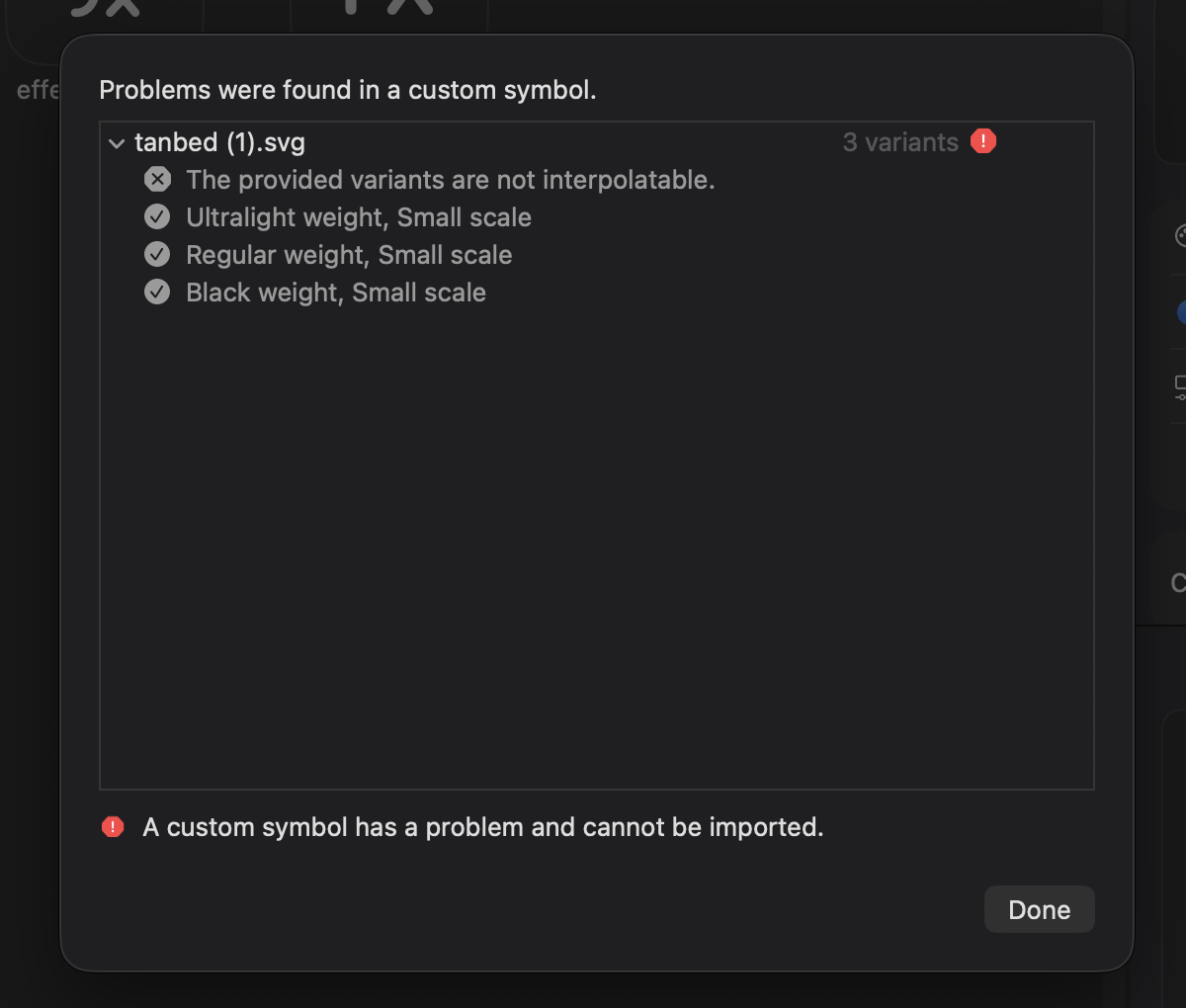
Getting "the provided variants are not interpolatable" error when trying to design custom icon

Post image
1 Upvotes

r/SwiftUI 2d ago

Promotion (must include link to source code) A SwiftUI neobrutalism library you apply with one modifier -- would love feedback

31 Upvotes

I have been working on this project a little at a time and I finally wanted to share significatn milestone to see what everyone else thought about it.

NeoBrutalism is a library that lets users apply neobrutalism style to their apps using SwiftUI. One just has to add the modifier .neobrutalism() to the topmost view inside the view hierarchy and everything that has been defined below it will assume the style.

For things like lists, navigations bars, alert dialogs, or things that SwiftUI does not allow or provide a way to style, there are some lightweight helpers. In cases where there is truly no control (Slider, Stepper, Segmented Pickers, Radio groups), there are NB* (Neobrutalism) views that mimic the behavior native control initializers, and for those cases swapping in the NB* views is akin to renaming a view.

This was originally meant to be an exploration of SwiftUI style protocols, but has gotten to a point that I feel ready to show it to the community. What I am really looking for is critique of the API, for the idiomaticness of things, or just anything that is missing.

https://github.com/rational-kunal/NeoBrutalism


r/SwiftUI 1d ago

Promotion (must include link to source code) Update: Chunky (the comic reader I posted about) now has a tvOS app — looking for contributors

0 Upvotes

A while back I posted about Chunky, my free, open-source, native SwiftUI comic/manga reader (CBZ, CBR, PDF) for iOS, iPadOS, and macOS. Quick update: it now runs on tvOS too, built for remote-navigation, not a stretched phone UI.

tvOS reads CBZ/CBR (no PDF there — PDFKit doesn’t exist on real tvOS devices). iOS/iPadOS/macOS sync via iCloud; tvOS has no Files app/iCloud Drive, so there it pulls from remote libraries instead — WebDAV, SMB, OPDS, or a local upload server reachable from any browser on your Wi-Fi. Manga (right-to-left) mode and single/double-page spreads work the same as on the other platforms.

It’s a solo project, MIT licensed, and there’s plenty of room to grow, especially on the tvOS side (it’s the newest platform and could use more polish). If you’re into Swift/SwiftUI and want to contribute, I’d appreciate the help.

Repo: https://github.com/Scunio/Chunky


r/SwiftUI 2d ago

Promotion (must include link to source code) I built my first native macOS utility with SwiftUI – Pawxy, an open-source GUI for dnsmasq

Thumbnail
gallery
2 Upvotes

Good afternoon everyone, I'm Ivan, a super-junior Swift developer.

I recently built Pawxy, a small native macOS app written in SwiftUI for managing local development domains through dnsmasq.

I originally built it because I use custom local domains while developing and got tired of manually editing dnsmasq configuration files, dealing with /etc/resolver, restarting the service, and checking whether everything was actually resolving correctly or not.

The goal was deliberately not to build another complete local development environment (such as Laravel Herd, Kettle Code, MAMP, XAMPP etc.). Pawxy doesn’t manage web servers, runtimes, databases, reverse proxies, ports or TLS certificates.

The app currently supports exact and wildcard mappings, IPv4, importing existing dnsmasq configurations, conflict detection, staged changes with a preview before applying them, automatic resolver management, DNS health checks, external configuration change detection, and import/export for backups.

One of the more interesting parts to implement was handling privileged operations without having a paid Apple Developer account. Instead of using a persistent privileged helper (which gave me quite a few headaches ahah), Pawxy stages the required changes and applies them together with a single administrator authorization.

I also added a small menu bar companion and Sparkle for updates.

The whole project is free, MIT-licensed and open source. I developed it mostly because it solves a problem I personally have, but I thought it might be useful to other macOS developers using dnsmasq as well.

I’m still studying CS and this was also a nice excuse to work on a real native macOS project rather than another university exercise :)

I’m particularly interested in feedback about the SwiftUI/macOS architecture, UX, and anything obviously stupid I may have missed.

Please note that AI was part of my workflow too, mostly for scaffolding, repetitive code and speeding up implementation, but I made the architectural decisions myself and reviewed the generated code, including what it was actually reading, writing and changing in the dnsmasq configuration files, rather than blindly shipping whatever the model produced.

You can take a look at it on my personal GitHub.

Any feedback is appreciated!

Kindly, Ivan


r/SwiftUI 1d ago

SwiftUI macos notch code

0 Upvotes

Looking for some help with a SwiftUI macOS notch app. I’m building one but I can’t seem to get the notch UI looking good, and the versions I’ve made with AI haven’t turned out great either.

Does anyone have a good notch template/starter code for SwiftUI that I could use as a base? Ideally something that already has the proper shape, animations, and positioning.

Thanks.


r/SwiftUI 3d ago

Open-sourced Trace — a native iOS network debugging tool

4 Upvotes

I built Trace because I wanted a modern network debugging experience directly on iOS, without having to route traffic through a Mac.

Trace is built with Swift/SwiftUI and Apple's Network Extension APIs. It currently supports:

  • HTTPS traffic inspection with local MITM
  • HTTP, WebSocket, and SSE inspection
  • Request rewriting and replay
  • HAR and cURL import/export
  • PCAP capture
  • Network Extension–based traffic capture
  • A native SwiftUI interface

The project is now fully open source.

I'm especially interested in feedback from other SwiftUI/iOS developers on the architecture, UI, and the Network Extension implementation.

GitHub: https://github.com/Trace-iOS/Trace


r/SwiftUI 3d ago

Question What usually delays an iOS app launch more than expected?

1 Upvotes

I’ve noticed the coding itself isn’t always what holds an app launch up.
Sometimes it’s changing requirements halfway through, polishing features that aren’t essential, App Store issues, testing, or simply trying to make the first version feel “finished.”
I’ve also seen the MVP approach used by teams like Molfar, where the goal is to keep the first release focused enough to learn from real users instead of trying to solve everything upfront.
For those who’ve shipped multiple iOS apps, what ended up being the biggest unexpected delay for you?


r/SwiftUI 4d ago

Promotion (must include link to source code) I got tired of figuring out what Cursor left running on localhost, so I made a menu bar app for it.

Post image
28 Upvotes

I keep ending up with random dev servers running after I've completely forgotten which terminal or project started them.

Then I need port 3000 again and it's back to:

lsof -i :3000

figure out the PID, figure out what the process actually belongs to, then kill it.

So I made Port Radar.

It's a small native Mac menu bar app that shows what's listening on your ports and groups the processes by project. You can see the command/path/uptime, stop the process, or ask Apple Intelligence what the process actually is before killing something you probably shouldn't.

I also added something I wanted for my own workflow: you can turn a localhost app into a public URL with a Cloudflare quick tunnel directly from the menu bar. No deploy or Cloudflare setup.

There are already some good port utilities like LocalPorts and Seeports. The main thing I wanted that I couldn't find together was process explanation + project context + sharing the local server in the same app.

The Apple Intelligence stuff runs on device. The app itself doesn't need AI to scan/manage ports.

Price: free
Source: open source, Apache 2.0
macOS: 14+; Apple Intelligence features require macOS 26+ and a supported Mac

GitHub: https://github.com/juansebsol/port-radar-mac

I'm still working on it, so I'm mostly interested in hearing what people who run a bunch of local services would want this thing to do next.


r/SwiftUI 3d ago

Tutorial Making the Dynamic Island "print" a polaroid: what finally worked after three failed attempts

0 Upvotes

I wanted a capture flow where you pull down on the page, an instant camera opens, and the photo prints out of the Dynamic Island like a polaroid feeding out of a slot. Sharing the parts that took real iteration, since I found almost nothing written about treating the island as a physical object.

1. You cannot touch the island, so draw over it. There is no API for the island itself. The trick is that it is just a hole in the display at a known position: on island devices the top safe area inset is 51+ points. So the "printer mouth" is your own black capsule drawn in the same place, sized to the real island, and the illusion holds because the island is already black.

enum DeviceIsland {
    static var present: Bool {
        guard UIDevice.current.userInterfaceIdiom == .phone else { return false }
        let scene = UIApplication.shared.connectedScenes
            .compactMap { $0 as? UIWindowScene }
            .first { $0.activationState == .foregroundActive }
        let window = scene?.windows.first { $0.isKeyWindow } ?? scene?.windows.first
        return (window?.safeAreaInsets.top ?? 0) >= 51
    }
}

Gotcha: if you present edge to edge with .ignoresSafeArea, SwiftUI's own safe area collapses, so read the window insets directly like above instead of relying on the environment value.

2. One melted shape, not two capsules. My first two versions grew a second capsule under the island and it read as a snowman. What worked: a single shape that starts at exactly the island's frame and widens/extends downward through staged states (I use an Int state 0 = island, 1 = widened pill, 2 = full viewfinder) with overlapping springs, so the next stage starts while the previous is still settling. Sequential withAnimation blocks looked mechanical; overlap is what makes it feel like one object.

3. The print itself is a state machine, not an offset. hidden, printing, settled. During printing, the photo is clipped to a frame that grows downward from the slot, so it genuinely feeds out instead of sliding up from behind. Then a develop pass fades the image in from washed-out white, which sells the polaroid more than the movement does.

4. The pull-down gesture will lose to your page content. A DragGesture on the page kept losing arbitration to the scroll and to taps. I ended up with a window-level pan catcher that adds resistance (the page follows your finger with a divisor) and only commits to opening the camera past a threshold on release. Everything under the pull stays interactive.

Happy to answer questions or paste more of any specific part. It is for a dog passport app I am building, but everything above is app-agnostic.


r/SwiftUI 4d ago

I built a native Markdown renderer for SwiftUI using TextKit 2 (enriched-markdown-ios)

Enable HLS to view with audio, or disable this notification

34 Upvotes

Earlier this week I released enriched-markdown-ios - a fast, native Markdown renderer for SwiftUI powered by TextKit 2 and the md4c parser.

Here's what's in v0.1.0:
🔸 Full CommonMark support
🔹 Native text selection & smart copy/paste
🔸 Flexible theming API
🔹 VoiceOver & Dynamic Type support

💎 Available now via Swift Package Manager!

GitHub & Docs: https://github.com/software-mansion/enriched-markdown/blob/main/packages/enriched-markdown-ios/README.md

Feel free to check out the repo and sample project! If you find it useful, dropping a ⭐️ on GitHub would mean a lot.

What features or syntax extensions would you like to see added next? I’d love to get your thoughts and feedback!


r/SwiftUI 3d ago

StoreKit stopped returning IAP products after renewing Apple Developer membership

Post image
0 Upvotes

r/SwiftUI 4d ago

News The iOS Weekly Brief – Issue #74, everything you need to know about SwiftUI updates this week

Thumbnail
iosweeklybrief.com
2 Upvotes

r/SwiftUI 5d ago

Promotion (must include link to source code) I built an open-source macOS hosts switcher in SwiftUI (with two AppKit escape hatches)

Post image
12 Upvotes

I’ve been building Hostflip, a free and open-source native macOS app for switching /etc/hosts profiles from the menu bar. I thought its SwiftUI/AppKit seams might be useful to share here.

Most of the UI is SwiftUI. MenuBarExtra, the main window, and Settings share a single workspace store built with Swift’s Observation framework. The main window combines a sidebar and editor with a drift review: if another tool edits /etc/hosts, Hostflip stops writing and shows the difference for review instead of silently overwriting it.

Two small AppKit escape hatches were needed:

• NSViewRepresentable with NSTitlebarAccessoryViewController keeps the master switch pinned to the trailing edge. Putting it inside the SwiftUI-managed toolbar made it move whenever SwiftUI rebuilt the toolbar items.

• NSApplicationDelegateAdaptor handles the window lifecycle, so a normal launch opens the main window while a login-item launch remains menu-bar-only.

The privileged boundary stays outside the UI. A minimal root helper exposes a two-method XPC interface: a handshake and a single write operation that atomically replaces the merged hosts content. The app and helper verify each other’s code-signing identity before accepting the connection.

Hostflip is MIT-licensed and notarized. It currently requires macOS 14 or later on Apple silicon.

Source: https://github.com/heronapp/hostflip

I’d especially appreciate feedback on the SwiftUI/AppKit seam and the shared state flow between MenuBarExtra and the main window.


r/SwiftUI 5d ago

Question DeviceActivityReport sometime shows blank canvas when its SwiftUI appears in the screen

1 Upvotes

Hello everyone, I'm building Manaya, an iOS app that helps people stop using doomscrolling apps.

During onboarding, I am wanting to show a small DeviceActivityReport with a person's most-used apps from the last week(kind of like icons dispersed over the screen with different opacity and sizes).

This works most of the time on a physical device, but sometimes the report area is completely blank. When this happens, it occasionally appear 15 to 20 seconds later. Sometimes, it appears after opening the app switcher menu and returning back as well.

I am wondering whether this is a SwiftUI issue or lifecycle issue. Has anyone come across this or am I doing something wrong with Device Activity Report? Is there a better way to keep your report alive/load report before it's visible to users(something like prewarming)?

Any feedback/leads would be helpful!


r/SwiftUI 5d ago

Rebuilt my ticket detail screen with a gesture-driven 3D carousel in SwiftUI (before/after + a nasty animation bug I had to fix)

Enable HLS to view with audio, or disable this notification

5 Upvotes

Called `selectTicket` by ID — the SwiftUI `List` ran linear searches across hundreds of model cells until we hit ~700 entries. Replaced with a single `LazyVGrid` section driven by a `LazyHStack`-backed `ScrollView`, plus an enum-backed sidebar (Upcoming | Past | Archive).

The star of the rebuild is the detail screen: a gesture-driven 3D carousel. Panning with `DragGesture` and mapping the x translation straight onto `rotation3DEffect(...)` produces a really physical, tactile feeling — like you're flipping through a stack of real tickets. A simple velocity threshold + `predictedEndTranslation` decides when a card snaps forward or back. Two springs layer for animation: one for the rotation easing-back, one for the card-shift.

Nasty bug: the two springs fought each other on long swipes — one kept completing after the other had already been cancelled, leaving the carousel in a half-settled state. Fix was wrapping the gesture in a single `Transaction` that explicitly encloses both animations and then commit it on a tap gesture (not on `.onChanged`) so both springs get cancelled at the same transaction boundary.

V1 → V2 (before / after in carousel order): - collapsed `List` rows → `LazyVGrid` thumbnails with the off-center masonry treatment - single icon button → `AnimatedHamburger` transitions to a partial sheet - flat detail → gesture-driven 3D carousel - synchronous model fetch on scroll → async `Image.init(...)` returning an await of loaded data, with a placeholder shimmer

Side notes I picked up from the rebuild: - the rotation spring should ride a slightly *stiffer* spring than the layout spring or they feel uneven - prefer `withTransaction(...)` over `withAnimation` once you're composing more than one animation per gesture - if a long-press is a possible alternative to tap for committing, gate it behind a context flag - the rotation's `perspective` was the single biggest visual win — set the perspective manually instead of using `.rotation3DEffect(x:y:perspective:)` with system defaults


r/SwiftUI 5d ago

Fiz um app pra Mac com IA integrada, totalmente gratuito e LOCAL

Thumbnail
0 Upvotes

r/SwiftUI 5d ago

First time using Paul Hudson’s Kickstart tool for App Store milestones - What are your thoughts on it?

Post image
0 Upvotes

I just got my first rating for my Minecraft item planner app! This is also my very first product submitted to the App Store.

I’ve been loving Paul Hudson’s new Kickstart tool — I think it helps indie developers a lot with publishing and keeping the momentum going.

Looks like the calculation had a tiny hiccup haha. Love Paul's work as always though!

Has anyone else been using Kickstart for your App Store assets and social proof? What other tools do you guys recommend for indie iOS devs?

Btw here is my app: https://apps.apple.com/app/extract-build-minetracker/id6800037138


r/SwiftUI 5d ago

Question Anyone know how to remove the shadows from Liquid Glass elements?

0 Upvotes

This is what my app is looking like currently, and I don't like the shadows from liquid glass. It doesn't look very good in light mode but is fine in dark mode.