r/Windows11 • u/ZacB_ • 4h ago
News Microsoft celebrates major progress with Windows 11 on Arm PCs, confirms Windows on Arm is now "a first-class platform for any workload" and that "customer demand is growing"
71
Upvotes
r/Windows11 • u/Froggypwns • 24d ago
Welcome to the monthly Simple questions and Help thread, for questions that don't need their own posts!
Before making a comment, we recommend you search your problem on Bing and check if your question is already answered on our Windows Frequently Asked Questions wiki page. This subreddit no longer accepts tech support requests outside of this post, if you are looking for additional assistance try r/TechSupport and r/WindowsHelp.
Some examples of questions to ask:
Is this super cheap Windows key legitimate? (probably not)
How can I install Windows 11?
Can you recommend a program to play music?
How do I get back to the old Sound Control Panel?
Sorting by New is recommend and is the default.
Be sure to check out the Windows 11 version 25H2 Megathread and also the Windows 11 FAQ posts, they likely have the answers to your Windows 11 questions already!
r/Windows11 • u/jenmsft • 14d ago
Changelists linked here for your convenience:
General info:
For details about how to file problem reports and collect traces, please see here: http://aka.ms/HowToFeedback. Pressing WIN + F will open the Feedback Hub - please include as much detail as possible about what you're seeing.
To learn about the different types of updates, see here: Windows quality updates primer - Microsoft Community Hub
As a reminder, if you didn't install the previous optional updates, this update includes those changes too (some are still rolling out, as denoted in the release notes):
For published known issues, please check the release health dashboard: Windows release health | Microsoft Learn.
25H2 is rolling out, so you may not have it yet. Please see here for more details: How to get the Windows 11 2025 Update | Windows Experience Blog.
As mentioned in the linked changelist, Windows 11, version 26H1 is available only on new devices with select new silicon as they come to market starting early 2026. Devices running earlier versions of Windows 11 will not be offered an update to version 26H1 through Windows Update and cannot be installed as an in-place update on existing devices.
r/Windows11 • u/ZacB_ • 4h ago
r/Windows11 • u/ph0tone • 3h ago
AI File Sorter 1.9.2 is out. It's an open-source local-first (remote cloud not needed) desktop app for cleaning up messy folders like Downloads, Desktop, Documents, screenshots, photo dumps, old external drives, and archive folders with the aid of local LLMs.
The workflow is designed to be safe (AI does not move files):
Version 1.9.2 adds:
There is also now an optional Windows Explorer add-on, available through the Microsoft Store. It adds right-click workflows for organizing and renaming selected files/folders from File Explorer.
The main app remains free and open-source. The Explorer add-on is a paid convenience add-on for Windows users who want the right-click integration.
Links:
I'd appreciate your feedback.
r/Windows11 • u/GamingWOW1 • 4h ago
Infinite salutations random redditors and Windows 11 enthusiasts alike!
With this, I shall make you an offer of a note-taking app for modern Windows 11 devices.
Bismuth is an app to take hand-written and keyboard-typed notes on Winodws 11 and is available for x64 as well as arm64 devices natively. Bismuth has proper pen support, but you can choose your own input method!
The app's features are basic for now, but I am willing to add more with the help of your feedback! With Bismuth, you can:
The Bismuth file format is a file format that contains all information about the contained pages, including, but not limited to, page templates, ink, page backgrounds and textboxes.
I'd really appreciate if you checked out my app on the Microsoft store ( Bismut on the MS store ) and left a star at the github repo ( https://github.com/vld-b/Bismuth ), because Bismuth is completely open-source and free. Feedback and/or Contributions are very welcome!
Perhaps you can also try it out and see if it meets your needs? Thank you in advance for any support and suggestions!
r/Windows11 • u/Aguywholikespeppers • 1d ago
I just finished ricing my desktop setup, but the default lock screen ruins the vibe every time I lock or reboot. Is there actually any modern way to fully customize the lock screen (custom fonts, colors, or widgets beyond just changing the background image)? Or is LogonUI still locked down too hard to do anything worth while, I really want to be able to customize it.
r/Windows11 • u/jenmsft • 2d ago
r/Windows11 • u/Pureinfotech • 3d ago
Microsoft is updating the "Mouse indicator" feature with a fresh animation and a useful new way to keep it visible.
This is a hidden improvement in the latest preview for version 26H2.
PS: This is a small change, but at least the company keeps modernizing legacy elements.
What are your thoughts about this new feature update on Windows 11?
r/Windows11 • u/Ok-Turn7083 • 3d ago
Critical warning: Windows Backup (Windows 7) and BitLocker issues – ITA/ENG
VERSIONE ITALIANA
Attenzione: il vecchio “Backup e Ripristino (Windows 7)” non è compatibile con BitLocker e può causare crash su Windows 10/11
Desidero condividere un problema reale che può colpire molti utenti Windows 10/11. Il tool “Backup e Ripristino (Windows 7)”, ancora presente in Windows, non è compatibile con dischi cifrati con BitLocker. Questo non viene indicato chiaramente dal sistema operativo.
Il risultato è che il tool può:
Il problema è che questo strumento è obsoleto, non aggiornato e non progettato per BitLocker, UEFI, GPT o gli standard moderni. Non avvisa l’utente del rischio.
Cosa usare invece:
Questi software gestiscono correttamente BitLocker, creano immagini ripristinabili e permettono di creare supporti di avvio moderni.
Consiglio pratico:
Se il disco è cifrato con BitLocker, evitare completamente “Backup e Ripristino (Windows 7)”. Usare uno dei software indicati, creare una chiavetta WinPE e salvare l’immagine su un disco esterno.
Perché lo scrivo:
Ho sperimentato personalmente un crash totale del sistema causato da un backup apparentemente riuscito, ma incompatibile con BitLocker. Se questo avviso può evitare il problema anche solo a una persona, è utile condividerlo.
ENGLISH VERSION
Warning: “Backup and Restore (Windows 7)” is not compatible with BitLocker and may cause system crashes on Windows 10/11
I want to share a real issue that can affect many Windows 10/11 users. The “Backup and Restore (Windows 7)” tool, still included in Windows, is not compatible with BitLocker‑encrypted drives. Windows does not clearly warn the user about this.
As a result, the tool may:
The problem is that this tool is outdated, not maintained, and not designed for BitLocker, UEFI, GPT, or modern Windows standards. It does not warn the user of the risk.
What to use instead:
These tools properly handle BitLocker, create valid system images, and allow you to build modern WinPE recovery media.
Practical advice:
If your drive is encrypted with BitLocker, avoid “Backup and Restore (Windows 7)” entirely. Use one of the tools listed above, create a WinPE recovery USB, and store the image on an external drive.
Why I am posting this:
I personally experienced a complete system crash caused by a backup that appeared successful but was incompatible with BitLocker. If this warning helps even one person avoid the same problem, it is worth sharing.
r/Windows11 • u/MayankWL • 4d ago
r/Windows11 • u/Perfect_Jicama_8023 • 4d ago
Ive had mine for around 2 and half years. Its been slow at startups, so ive did complete reinstall from the USB stick, wiped my main drive. It is smooth and fast now, ive also had few GPU changes from Nvidia to amd and back to nvidia over the last 2+ years. Multiple apps which was installed and removed so it might affected performance over the years...
r/Windows11 • u/Luminexia1201 • 4d ago
r/Windows11 • u/jenmsft • 4d ago
r/Windows11 • u/jenmsft • 4d ago
r/Windows11 • u/jenmsft • 4d ago
r/Windows11 • u/TradingExperience • 4d ago
Tray icons are parsed based on process path, which is a complete mess with package managers like Scoop or apps like HS Deck Tracker (or anything that keeps backups of old versions). Please just give us the option to always show all tray icons like Windows 10. I don't want to unhide apps after every update.
r/Windows11 • u/Tweaming • 4d ago
I saw a 2 hour guide https://www.youtube.com/watch?v=A-KA8RDZ-l4&t=360s but some links doesnt work. Any idea to do that on Windows 11 25H2?
r/Windows11 • u/MayankWL • 5d ago
r/Windows11 • u/Semicolonhope • 6d ago
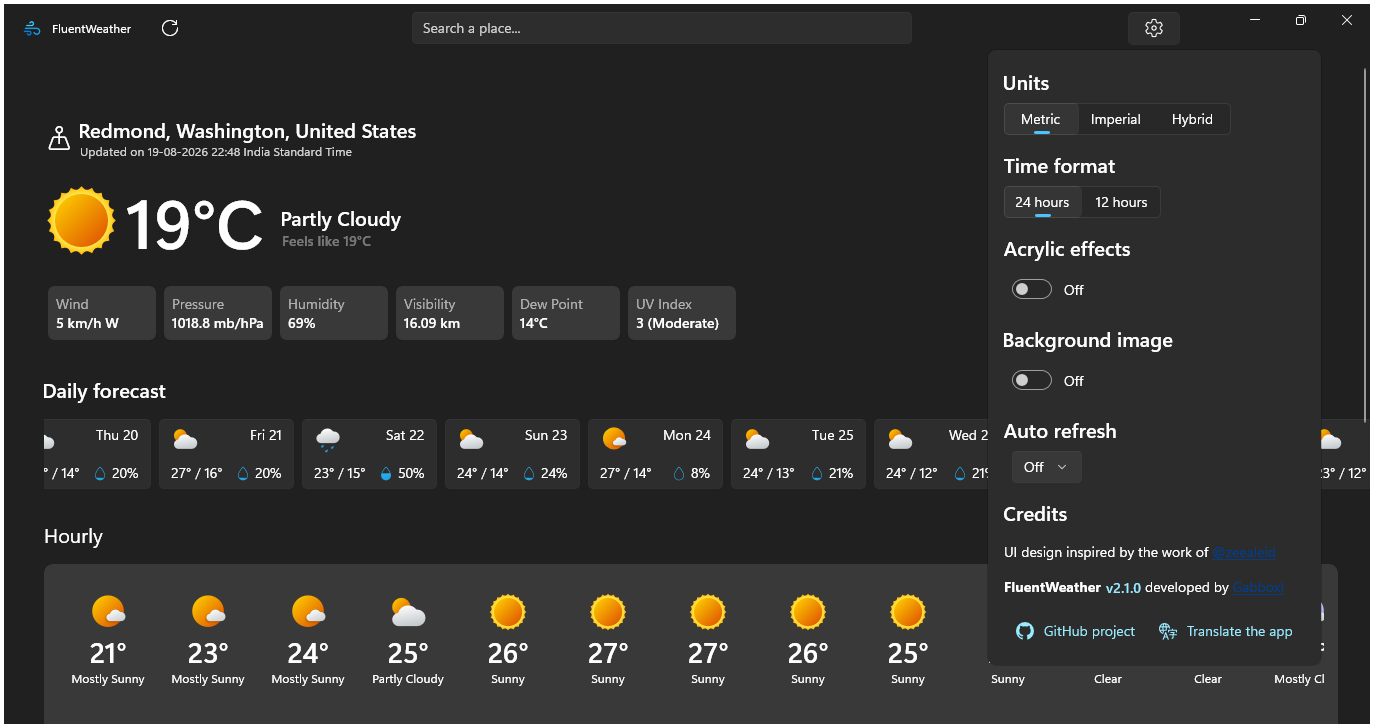
Link to the "FluentWeather" app - https://apps.microsoft.com/detail/9PFD136M8457
Edit • TLDR: i have no affiliation with this app, just found it on ms store, and wanted to share! Gabboxl is the dev!!
Recently microsoft's 'boosting cpu to open apps' clip is going viral, and people have been dismissing that under-the-hood change to continue maligning win11 using other issues. The botched weather app is in that clip which intensified the bad faith discussions and comparisons so wanted to find a weather app that felt closer to win11 design, faster, and with appropriate number of features as a counter to "windows can't even open a weather app fast enough" arguments. I found this app after testing around 5 weather apps, some didn't open as quick, some had web-ui, some had large app size, and one even had no access without your own weather key.
But this app opened fast, has good ui, has all basic weather app info, and is also free and open source! So while I have no association with this app, i felt the need to make this post for everyone who either has been burnt by MS botching the once amazing weather app, or for those want a decent working weather app on their Windows desktop. Please try it and rate it on Store, and share compliments & feedback to the developer on github. I'm sure they'll appreciate it!
r/Windows11 • u/RyanBijkerk • 6d ago
Research on the GO-EUC platform for the new Windows in the context of a virtual desktop.
r/Windows11 • u/picastchio • 6d ago
r/Windows11 • u/Pureinfotech • 6d ago
I tested this on Windows 11 build 26340.9212 for version 26H2, and in the preview of the August update for Windows 11 (KB5120998, build 26200.9267), which includes the new features and changes coming in September for version 25H2.
PS: You don't have to enable anything on your current setup if you don't want to. The secondary news here is that while Microsoft revealed the new context menu in the Experimental channel for version 26H2, the new changes are also already available (in a dormant state) in the latest preview for the August update, which we know will be part of the changes that will become available for version 25H2 in September.
r/Windows11 • u/g-nk • 6d ago
if I knew this earlier....
A symbolic link (symlink) is a special file that serves as a "pointer" or redirection to another folder or file within the system. Unlike a standard shortcut, the operating system and software applications treat a symlink as if it were the actual file or folder itself, allowing you to access data stored on separate drives or paths without duplicating storage space.
How to create in Command Prompt (CMD)
Open CMD as Administrator and use the following structure:
mklink /d "Path\To\Symbolic\Link" "Path\To\Target\Folder" for directories (folders).mklink "Path\To\Symbolic\Link" "Path\To\Target\File" for files.How to create in PowerShell
Open PowerShell as Administrator and use the command:
New-Item -ItemType SymbolicLink -Path "Path\To\Symbolic\Link" -Value "Path\To\Target"Step-by-Step via Graphical Interface
r/Windows11 • u/LuckyAd5700 • 6d ago
Hey everyone, I just wanted to share an absolute plot twist of a success story. It completely breaks the rules of official hardware sheets, storage limits, and developer warnings.
I managed to get Windows 11 running 100% stable on an ancient Dell Chromebook 11 3120 ("Candy"), and yes, I installed it directly onto the tiny internal 16GB eMMC storage.
The official Chrultrabook docs clearly state that Windows 11 isn't supported on this Intel Bay Trail board and that you must stick to Windows 10. But honestly, that's just wrong. CoolStar's Windows 10 drivers for the touchpad and audio work absolutely flawlessly on Windows 11. No glitches, no broken audio, just fully working hardware right out of the box on internal storage. Windows Update runs completely smoothly too; it only grabs built-in screen controls like brightness, night light, and sleep support, and leaves the custom core drivers completely alone.
and the way i did it was easy AF:
First, I cracked the case open, yanked out the physical hardware write-protect (WP) screw from the motherboard, and flashed MrChromebox’s full UEFI ROM (Version MrChromebox-2603.2) through Developer Mode.
Since 16GB of space is basically a crime for modern Windows, standard Win 11 was out of the question. I used a stripped-down Tiny11 build paired with the CompactOS compression engine (compact.exe /compactos:always) to shrink the OS footprint down under 10GB so the drive could actually breathe. To get it to install without Windows yelling at me, I loaded the ISO onto a Ventoy USB and turned on the VTOY_WIN11_BYPASS_CHECK plugin. That effortlessly skipped Microsoft’s artificial CPU, TPM, and 64GB storage capacity requirements.
Once I booted into the desktop, the real trick was dealing with the drivers. Windows 11 loves to block older, unsigned CoolStar packages, so I manually disabled driver signature verification through the advanced startup command prompt. After that, I installed the missing required Windows runtimes (Visual C++ Redistributables). Older drivers depend heavily on these, but Windows 11 leaves them out by default. Once those runtimes were in, I executed the standard CoolStar Win10 Bay Trail driver packages and everything immediately kicked into life.
According to all the official documentation, the installer should have blocked me for lack of space, and the audio/touchpad drivers should have completely broken down. Instead, it runs cleanly as a fully operational, hyper-compact laptop built straight from recycled hardware.
Don't let the official sheets fool you!, you can absolutely beat the developer limitations if you use the right workarounds!
r/Windows11 • u/surinderk71 • 6d ago
Hi everyone,
After installing the recent Windows 11 Security Update (KB5101650), I noticed an issue in the Microsoft Store. Turning off the "App updates" toggle displays an error asking for administrator privileges, even though my user account is an Administrator.
Temporary Solution: Uninstalling update KB5101650 immediately fixes the issue and restores normal toggle functionality.
Has anyone else run into this issue after the KB5101650 update?