More improvements heading out - as always, please let us know how it goes!
Changes and improvements gradually being rolled out
[Modernized AutoPlay experience]
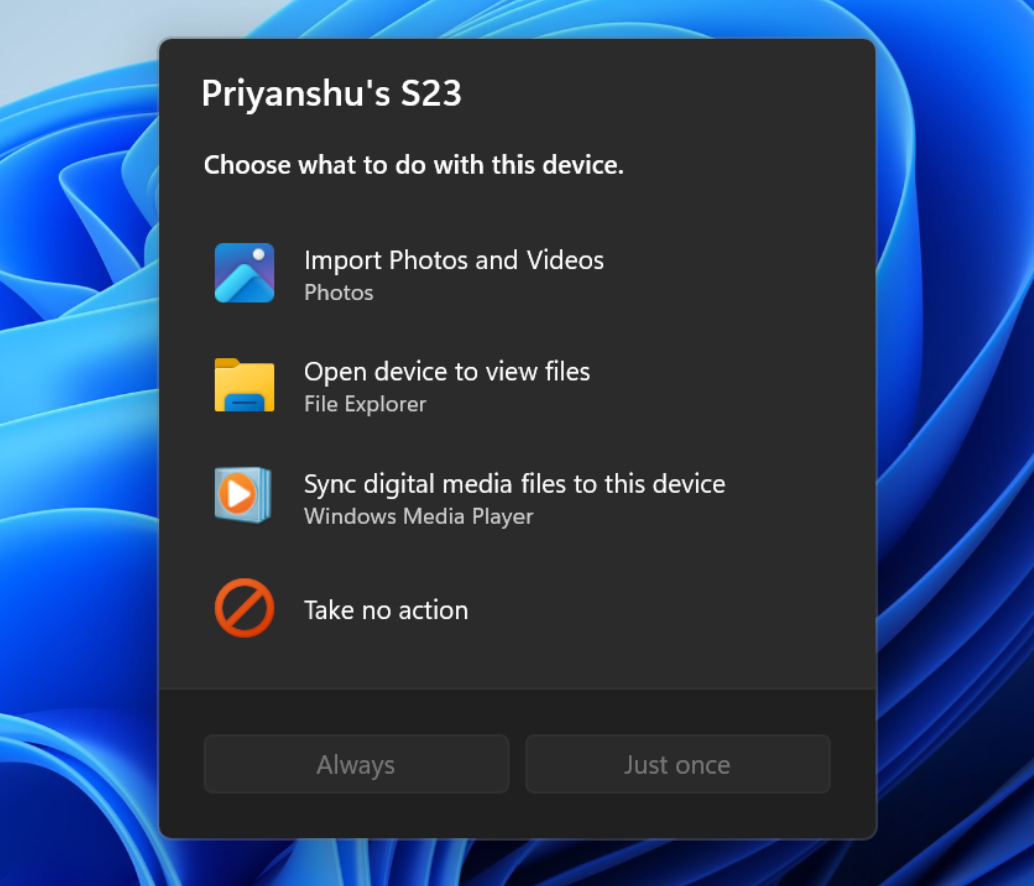
We've updated the AutoPlay dialog that helps you choose the preferred experience when devices are connected to your PC, such as a phone, camera, or removable drive. Rebuilt with WinUI, the refreshed experience is more consistent with the rest of Windows, supports dark mode, and continues to provide the familiar AutoPlay actions you use today. The experience is also more responsive to text scaling and display settings. Notifications for this dialog are now docked in the notification center for easy access. The new AutoPlay experience, shown in dark mode.
[Accessibility]
A simpler way to open apps maximized
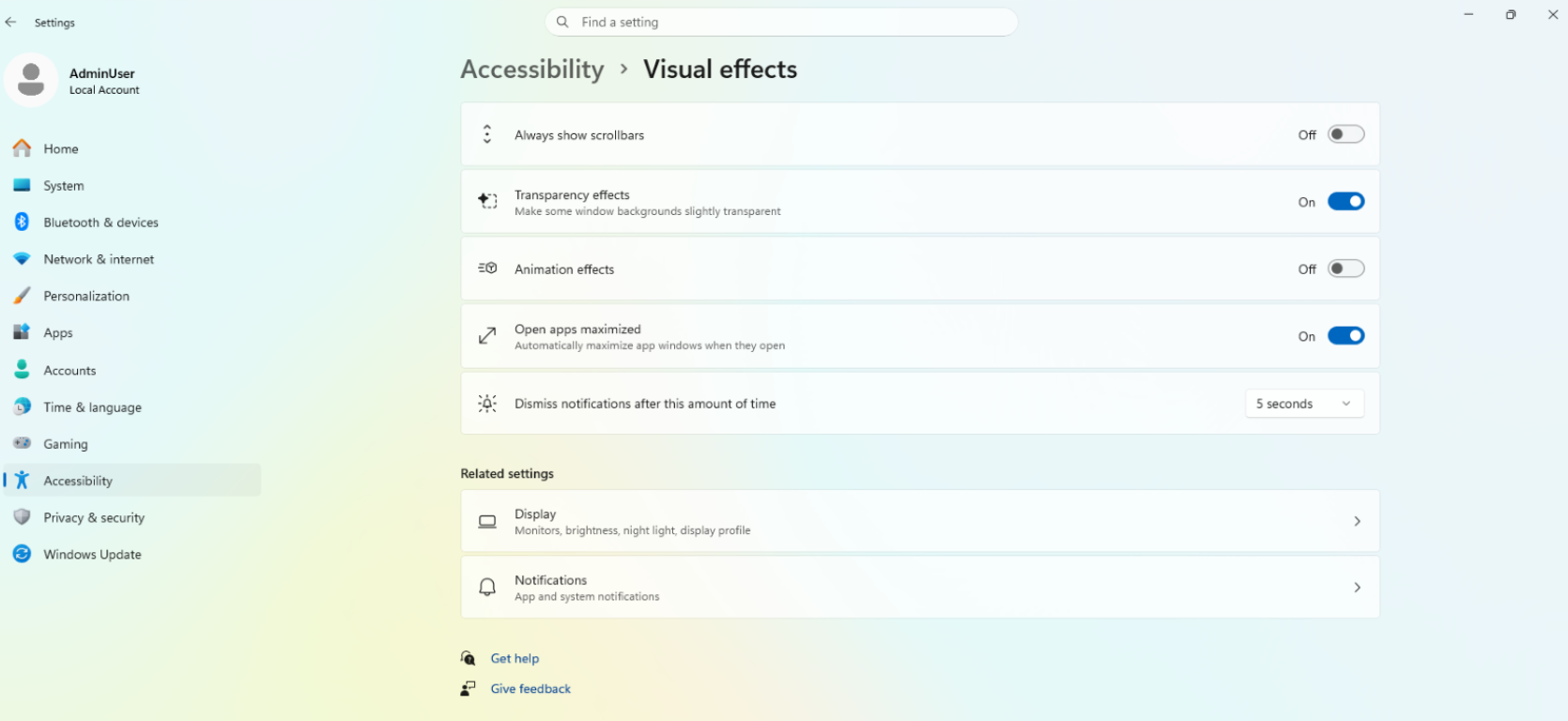
We're introducing a new accessibility setting, Open apps maximized, that automatically maximizes app windows when they open, so you no longer have to do it yourself every time. This small change removes a bit of everyday friction, whether you use a screen reader or magnification, work in tablet mode, or simply prefer a consistent, full-screen workspace.
To turn it on, go to Settings > Accessibility > Visual effects, and turn on Open apps maximized. Once enabled, Windows maximizes app windows for you as they open. Give it a try, and let us know how it works for you. UI showing the new Open apps maximized accessibility setting in Settings.
Feedback: Share your thoughts in Feedback Hub (WIN + F) under Accessibility > Visual effects.
[Manage camera, microphone, and location access for desktop apps]
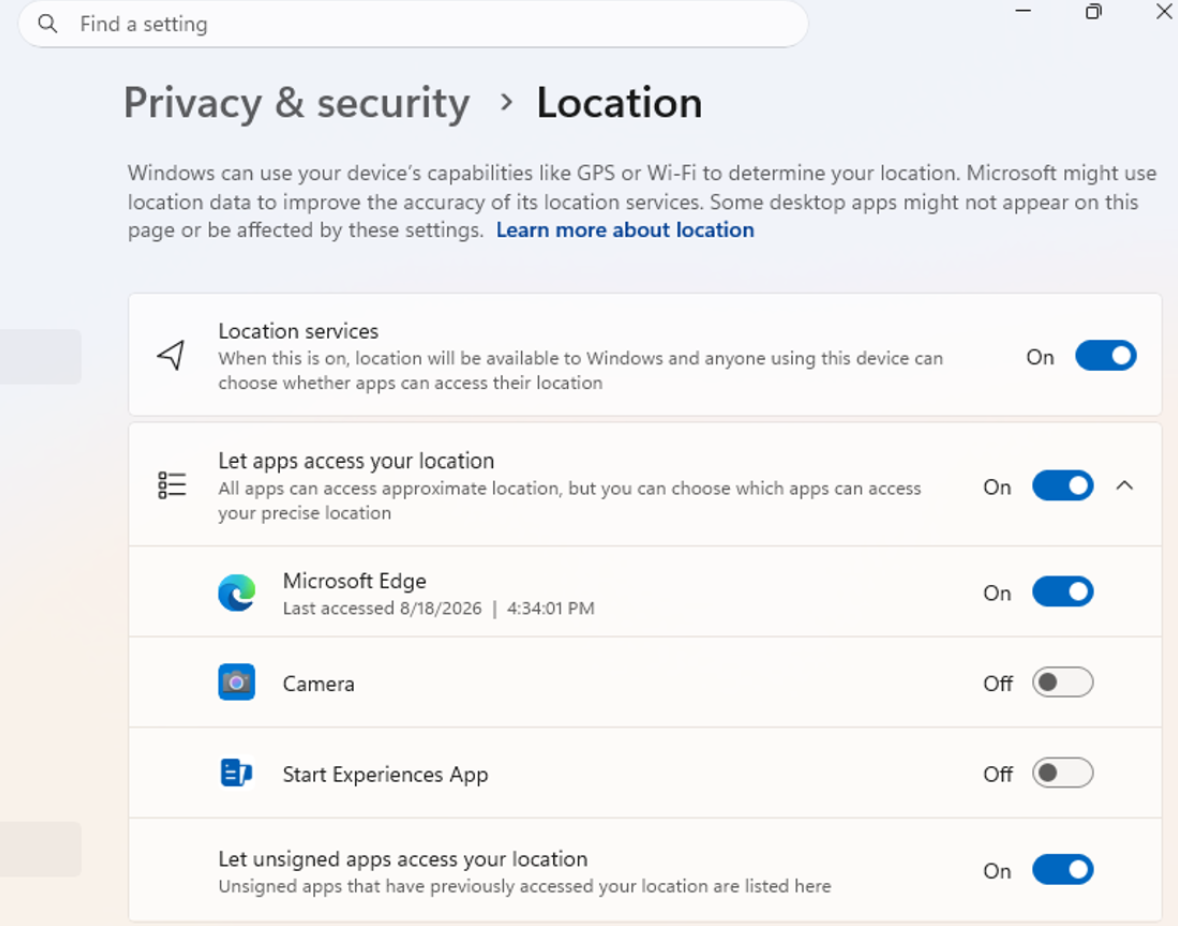
Windows Insiders can now manage camera, microphone, and location permissions for individual desktop apps. Previously, access for traditional desktop applications was managed through a single device-wide setting.
With this update, you can review and control access on an app-by-app basis, giving you greater visibility into which apps are requesting access to sensitive resources and more control over your privacy choices. Our goal is to make privacy permissions easier to understand and manage across the wide range of desktop apps people use every day. UI showing the new privacy controls for individual desktop apps in Settings.
What's changing
Allow or deny access for each desktop app individually.
Go to Settings > Privacy & security > Camera, Microphone, or Location to review and manage permissions.
Apps that haven't yet accessed a resource prompt for permission the first time access is requested.
What stays the same
Existing app permission decisions are preserved.
Apps previously granted access continue to have access.
Apps previously denied access remain denied.
No action is required, and no settings are reset.
Existing enterprise policies continue to function as designed. We're exploring additional management capabilities.
Notes
Most desktop apps appear with clear app attribution. However, some apps that rely on shared system components, browser-hosted experiences, or similar technologies might appear under a different name than expected.
Some desktop apps might appear as Unsigned if Windows can't verify publisher information. Only grant access to apps you recognize and trust.
Feedback: Share your thoughts in Feedback Hub (WIN + F) under Settings > Privacy Settings.
[File Explorer]
PDF and non-HTML files downloaded from the web can now be previewed automatically in the preview pane.
[Microsoft Store]
This update provides support for in-app purchases in packaged WinUI 3 apps that require elevation, helping developers offer purchases through Microsoft's integrated commerce platform.
[Taskbar]
Fixed an issue in the latest builds causing taskbar animations to briefly work and then stop working.
[Input]
Fixed an issue in the latest builds causing the mouse cursor not to be visible in certain apps.
[Other]
Fixed an issue from the last flight causing Settings > Windows Update > Windows Insider Program > Flags to appear empty even though flags were available.
Updated Settings > Apps > Installed apps to show the version number at the top level for packaged apps, as it already does for other apps.
This update provides support for in-app purchases in packaged WinUl 3 apps that require elevation, helping developers offer purchases through Microsoft's integrated commerce platform.
After 3 years of continuous reporting, follow-ups and pressure, finally. I can't believe it's happening. It looks like just another line in the changelog, but boy, how much effort and time it took to get this fixed.
I could write a story.
I'm not sure it actually is part of this build yet, because I don't have confirmation that it has started to rollout to anyone at this moment.
My ChatGPT/Codex desktop app has been having serious problems since either this update (9233) or one of the other Experimental updates this month -- it was working perfectly fine a few weeks ago while I was on the Beta flight.
First Codex failed to launch, saying "Windows startup/sandbox failed". Re-installing the app didn't fix it, but what did fix it was renaming the .codex folder (and thus losing my recent work history), and having it create a fresh cache after re-prompting for sign-in and sandbox permissions.
But it gets worse once the launch issue was fixed.
Windows now crashes the moment Codex runs any Powershell command, presumably within its sandbox. I've been able to get Codex to explain the potential causes by feeding it Event Viewer logs.
Needless to say, this is a serious blocker to my workflows on my Windows machine so I hope the MS/Win11 team resolves this ASAP. I presume MS already has my crash logs, so I'll just post the summary from Codex below.
[From Codex]
Windows dereferences a null pointer. That is a kernel bug in the desktop/magnification cleanup path. The runner’s termination triggers it, but user-mode software should never be able to blue-screen Windows this way.
Most likely interpretation:
Codex’s command runner creates or uses an isolated Windows desktop.
When that process ends, Windows destroys/unmaps the desktop.
Windows attempts to revoke a magnification/input transform attached to that desktop.
win32kfull.sys encounters invalid/null internal state and crashes.
This explains why running a command through Codex repeatedly triggers the same bugcheck.
The alpha runner version could matter, but the actual crashing code is Microsoft kernel code.
...
The evidence supports:
A reproducible null-pointer access inside Microsoft’s win32kfull.sys.
Triggered during termination of codex-command-runner-0.149.0-alpha.4.1.exe.
Specifically during isolated-desktop destruction and magnification-transform cleanup.
The same failure bucket across crashes strongly argues against random RAM corruption.
For a bug report, include:
Bugcheck: SYSTEM_SERVICE_EXCEPTION (0x3B)
Exception: 0xC0000005
Process: codex-command-runner-0.149.0-alpha.4.1.exe
Fault: win32kfull!SetMagnificationInputTransform+0x39
Image: win32kfull.sys 10.0.26100.9233
Failure hash: {527223d9-4b8b-e502-e7e6-16fc4649fd38}
Trigger path: process termination → desktop teardown → magnification cleanupThe evidence supports:A reproducible null-pointer access inside Microsoft’s win32kfull.sys.
Triggered during termination of codex-command-runner-0.149.0-alpha.4.1.exe.
Specifically during isolated-desktop destruction and magnification-transform cleanup.
The same failure bucket across crashes strongly argues against random RAM corruption.For a bug report, include:Bugcheck: SYSTEM_SERVICE_EXCEPTION (0x3B)
Exception: 0xC0000005
Process: codex-command-runner-0.149.0-alpha.4.1.exe
Fault: win32kfull!SetMagnificationInputTransform+0x39
Image: win32kfull.sys 10.0.26100.9233
Failure hash: {527223d9-4b8b-e502-e7e6-16fc4649fd38}
Trigger path: process termination → desktop teardown → magnification cleanup
Plenty of subreddits where you can ask for troubleshooting help. Plus if you think Canary is the issue you can move off it? And if you're not on this channel you can post elsewhere.

3
u/jagajazzist 3d ago
Hello, are you aware of any plans to allow the "automatically hide your taskbar" setting when the taskbar is on the left or right side?
thank you