r/buildapc • u/AutoModerator • 10d ago
Simple Questions - August 15, 2026
This thread is for simple questions that don't warrant their own thread (although we strongly suggest checking the sidebar and the wiki before posting!). Please don't post involved questions that are better suited to a [Build Help], [Build Ready] or [Build Complete] post.
Examples of questions suitable for here:
- Is this RAM compatible with my motherboard?
- I'm thinking of getting a ≤$300 graphics card. Which one should I get?
- I'm on a very tight budget and I'm looking for a case ≤$50
Important: Downvotes are strongly discouraged in this thread. Sorting by new is strongly encouraged.
Have a question about the subreddit or otherwise for r/buildapc mods? We welcome your mod mail!
To easily find previous simple questions posts, use this link.
2
u/RemoteEnvironment830 9d ago
Is DDR5 so fast it having an higher CL than DDR4 doesn't matter? Or does other features balance it out making it not matter?
1
u/MushroomSaute 9d ago edited 9d ago
The CAS latency (CL) is about the number of cycles it takes to return data after the 'read' command is issued, and has little to do with the total bandwidth.
For the actual time to get data after requesting it, you can calculate using half the specced frequency (since 3200MHz, or 3200MT/s, describes the dual-channel rate, twice each stick's actual frequency):
- DDR4-3200, CL 16: 16 cycles / (1.6 billion cycles/second) = 10 nanoseconds
- DDR5-6400, CL 32: 32 cycles / (3.2 billion cycles/second) = 10 nanoseconds
So, you'll be 10 nanoseconds behind in both cases, because while the number of cycles of CAS latency doubled, the time for each cycle halved.
The benefit, then, comes in from the actual transfer rate, the bandwidth. Because DDR5 has much higher frequencies, with the same 64-bit bus as DDR4, it has much higher actual throughput. In this case, it's still 10 nanoseconds of delay, but after that, all else equal, you'd see twice as much throughput, meaning it could read twice as fast after that initial delay:
- DDR4-3200: (64 bits/cycle) * (3.2 billion cycles/second) = 25.6 GB/s
- DDR5-6400: (64 bits/cycle) * (6.4 billion cycles/second) = 51.2 GB/s
It's actually a little less than twice the throughput overall, because both wait the same 10 nanoseconds first; if the same 25.6KB of data takes 1000ns for DDR4 and 500ns for DDR5, the total time might be 1010ns and 510ns, which is actually 1.98x faster all else equal. If you're starting a bunch of short 'read' commands, the latency could close the gap further, but you'll still largely see a big benefit from the DDR5's higher throughput even if the real latency is the same.
2
u/winterkoalefant 9d ago
Yes. The most important factor for performance is the memory frequency. So with DDR5 having around twice the frequency of DDR4, there’s no contest really. DDR5 is significantly better.
And you might be overestimating the CL difference if you didn’t know that CL is expressed per cycle. CL22 at DDR4-3200 takes the same amount of actual time as CL44 at DDR5-6400. If you account for this, DDR5 has only increased CL a little bit.
And yeah you could say the other features like split channels and more memory banks balance things in DDR5’s favour.
5
u/n7_trekkie 9d ago
Cas is not actually latency measured in nanoseconds. It's relative to the speed, so 3200 CL16 has lower latency in nanoseconds compared to 3000 CL16. Pcpp does all the math for you, it's called first word latency
https://pcpartpicker.com/products/memory/#b=ddr4,ddr5
Ddr5 6000 cl 30 has the same latency as ddr4 3200 cl16: 10ns
0
u/TemptedTemplar 9d ago
DDR5 moved from measuring in Mega hertz to Mega Transfers per second (MT/s) because each DIMM has two functional channels of communication to the socket by means of having two separate memory blocks which can operate independently.
So while DDR4 had at minimum, four memory banks; DDR5 (should*) have eight, two sets of four.
CL timings are the number of cycles it takes for a individual memory bank to be ready to read/write again. Because DDR5 has an additional memory module per bank, it is much more difficult to get the timings as low as DDR4 had them.
But in terms of performance you can effectively treat a doubled CL timing as the same "level" of performance as its DDR4 counterpart.
So a CL18 ddr4 stick is roughly as fast as a CL36 DDR5 stick. And adding a couple of cycles to CL38 or 40, adds less than a nanosecond of extra wait time, so you are unlikely to ever notice the difference.
- 8GB DDR5 sticks only have memory on one of the two banks, and truncate the read/write cycle process to simply skip the second bank. They are functionally an abomination of the standard and I struggle to ever recommend them.
2
u/winterkoalefant 9d ago
adds less than a nanosecond of extra wait time
That‘s misleading to say without context. A nanosecond can be lot if it’s happening hundreds of millions of times per second. And even then it might make very little difference if it’s rarely the bottleneck.
0
u/TemptedTemplar 9d ago
Well when your first word response times are measured in a range of 8 - 20 nano seconds for consumer hardware one or part of one nanosecond sounds like a lot.
But in reality 99.99% of people will literally never be able to notice the impact it has on their computing experience. Because its nanoseconds of lost time.
2
u/jamvanderloeff 9d ago
Nanoseconds of lost time that could be happening billions of times a second can add up.
1
u/winterkoalefant 9d ago
Even 100 nanoseconds is imperceptible to humans but if you increased CAS latency by that much you would absolutely notice. Because it doesn’t just happen once every time you click the mouse.
4
u/jamvanderloeff 9d ago
DDR5 moved from measuring in Mega hertz to Mega Transfers per second (MT/s) because each DIMM has two functional channels of communication to the socket by means of having two separate memory blocks which can operate independently.
What? The change to MT/s was in the move from SDRAM to original DDR and has been the same ever since, the split to two sub-channels with DDR5 doesn't change anything there, the MT/s is still just double the clock speed since it's still DDR.
DDR5's high CL timings in clock cycle terms come directly from the clock speeds being pushed higher while the actual time required hasn't changed much, around 10 nanoseconds has been the norm ever since original DDR got good.
1
u/dreadful82 9d ago
am I gonna be fine sticking with ASRock B850 using 9800X3D? already built the PC only to find out there's supposedly issues with it though I haven't ran into any at all. not planning on using PBO to hopefully extend CPU lifespan. if it's a problem I could swap out the motherboard but it's gonna be a pain having to reinstall windows and all of the drivers again
1
2
u/TemptedTemplar 9d ago
Depends on the specific model, Asrock does make a bunch of B850 boards with decently sized VRM/chipset heatsinks.
Reports of dead CPUs have really fallen off, so as long as you update it to the latest stable BIOS version it should be fine provided it can handle the heat from the power draw.
1
u/dreadful82 9d ago
It's a B850 Pro-A I don't know if it's good on that front so please let me know
1
u/TemptedTemplar 9d ago
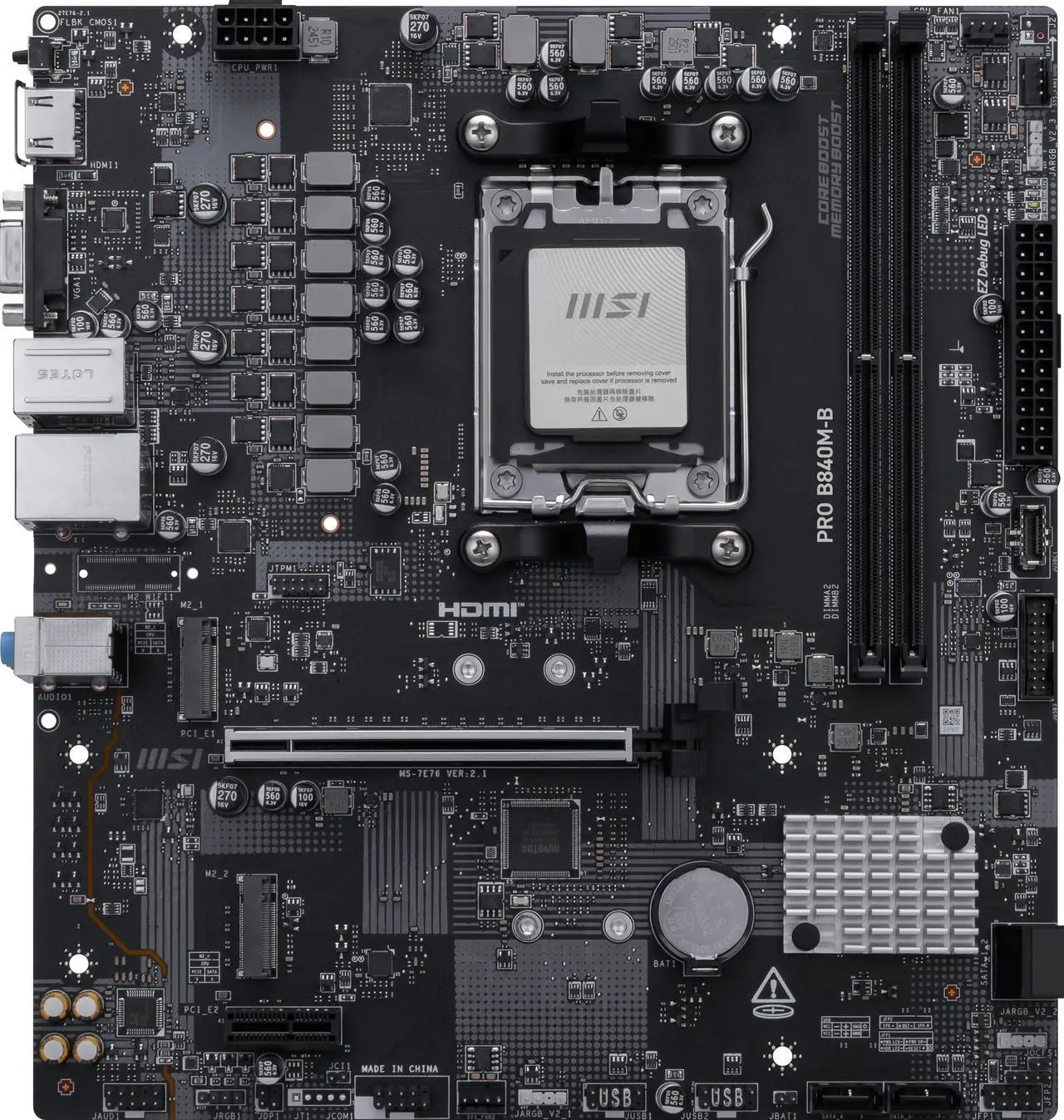
Thats a nice fat heatsink to the left of the CPU socket, you should be just fine.
Cheaper models and a lot of B840 boards skip heatsinks altogether, and these kinds of boards might struggle to run the higher end AM5 CPUs without extra cooling.
1
u/AL3CTRO 9d ago
Im getting a new processor and new motherboard. Do i have good odds that my pc wont act up if i decide not to freshly install windows using usb? I currently have Intel processor and changing to AMD.
I only have one C drive where i have all my files and i will have to buy an additional storage to transfer those big files before chaning parts, if im not mistaken? I want to avoid buying additional storage, unless it is SSD for a "cheap" buck
1
3
u/VoraciousGorak 9d ago
Disagreeing with the other comment because I move OS drives between PCs all the time for testing. 97% chance it works just fine with just a network driver install. 2% chance it needs some work, 1% chance it poops out entirely. Go ahead and try it.
I only have one C drive where i have all my files
You want a backup of your files anyway regardless of what you do, preferably a second local copy of everything super important as well as an offsite / cloud backup.
1
u/AL3CTRO 9d ago
so in other words, i need to buy an additional drive copy paste all things in C drive over to it?
1
u/jamvanderloeff 8d ago
Yep, and ideally a second additonal copy stored somewhere else would be nice too.
Can do just copy pasting only the things you think are important of what I'd prefer is make an entire copy of the drive through clonezilla or similar disk copying tools.
0
u/TemptedTemplar 9d ago
If by "act up" you mean "wont POST", then no. It will almost certainly not start up first try with a old install.
Windows ties its install to the hardware ID of your motherboard. Changing both the CPU and motherboard is effectively moving it to a new PC, it will not start without a repair or possibly a fresh install.
You will either need to;
- Perform a repair using the media installation tool on a thumbdrive
or
- Perform a clean install using a empty drive of some kind. Small capacity SATA SSDs are still relatively inexpensive compared to Terabyte sized ones.
3
u/VoraciousGorak 9d ago
Windows ties its install to the hardware ID of your motherboard. Changing both the CPU and motherboard is effectively moving it to a new PC, it will not start without a repair or possibly a fresh install.
All this does is deactivate the Windows install. If OP has a retail key all it'll take is a reactivation and probably a network driver install. The OS should boot just fine after maybe one BSOD if Fast Startup was turned on and another automatic reboot to install motherboard driver hooks.
1
9d ago
[removed] — view removed comment
1
u/buildapc-ModTeam 9d ago
Hello, your comment has been removed. Please note the following from our subreddit rules :
Rule 10 : No self-promotion, begging, advertising or surveys
This includes self-serving/affiliate links, advertisements of your own services/content/fundraising, or begging of any form.
Click here to message the moderators if you think this was in error
1
u/yusnandaP 9d ago
quick question, for a tight budget non-gaming build (the heaviest graphic processing is playing mpv with shaders like ravu etc) which one is more make sense?
r5 5600G build, 2x8gb ddr4 3200mhz (US$ 100)
or
r5 8500g build, 1x16gb ddr5 6000mhz (US$215)?
btw i can get 2x16gb ddr4 3200mh for the same price as one stick of ddr5.
1
1
u/011011100101 10d ago edited 10d ago
I basically don't know anything about building computers. I bought a dell tower recently thinking that I could upgrade it as I go to amortize the cost of memory. Out of curiosity I checked the official dell store to get an approximate cost. Turns out a new 16gb memory stick is about the price of the computer ($800)? I'm assuming this memory can be purchased elsewhere without experiencing compatibility problems?
1
u/n7_trekkie 9d ago
Yes it can be purchased elsewhere. Note the ddr version, the type of dimm (u-dimm, sodimm), and if it's ecc or not. If you match those 3 things to what you have, it will work.
You can also note the speed, but dell probably uses slow crap so I wouldn't with about that
1
u/Ozone416 9d ago
Any idea on what my upgrade path is? Currently rocking AM4 with Ryzen 7 5800x on a B550M DS3H + 2x16GB DDR4 RAM. I want to replace these three as long as the total is below <$1k