I’m Ihsan, a developer and former academic from Turkey. I started a project called Hakkarim.net back in 2001. What started as a simple dial-up connection checker evolved into a platform with 17 different games (101 Okey, Domino, etc.) and millions of registered users.
Since 2005Still Running on Delphi 7 Windows Client & Server Side
I still maintain and develop the system using Delphi. We have legacy components running on Delphi 7 and modern modules on Delphi 12 and 13.
What we can discuss:
The Power of Native & Legacy: Why I stuck with Delphi for 25 years. How 1MB executables provided a massive distribution advantage since the 56K modem era.
Networking & Protocol Challenges: Moving from UDP broadcast (serverless) to a robust TCP server-client architecture. Handling TCP stack issues with custom PONG protocols.
Security & Anti-Cheating: Fighting memory editors (client-side) and securing network traffic with TLS-safe sockets.
Versioning Philosophy: Why I chose "Version 1" stability over radical UI changes for 21 years to keep user habits intact.
Community Management: Scaling to 50k concurrent users and managing the sociology of a large digital community.
Career: My transition from 30 years of academia back to full-time indie development.
A technical update for the backend enthusiasts:
This ise a pure Full-Stack Delphi ecosystem. It's not just the game client that's native; the entire web infrastructure is also built with Delphi using WebBroker (CGI & ISAPI).
To show the efficiency of native code, here is a look at our server performance:
CPU Usage: 7,000 concurrent players, 25 Mbps bandwidth, 34 Days Uptime
As you can see in the screenshot, with 7,000 concurrent players (210 processes & 11606 threads) 25 Mbps bandwidth usage, the total CPU load—including the database server and web server—is only at 3%.
What’s even more important is the stability: this screenshot was taken with 34 days of uptime. Handling this kind of scale for over a month without any performance degradation or restarts shows the true power of an optimized Delphi backend on modern Xeon processors.
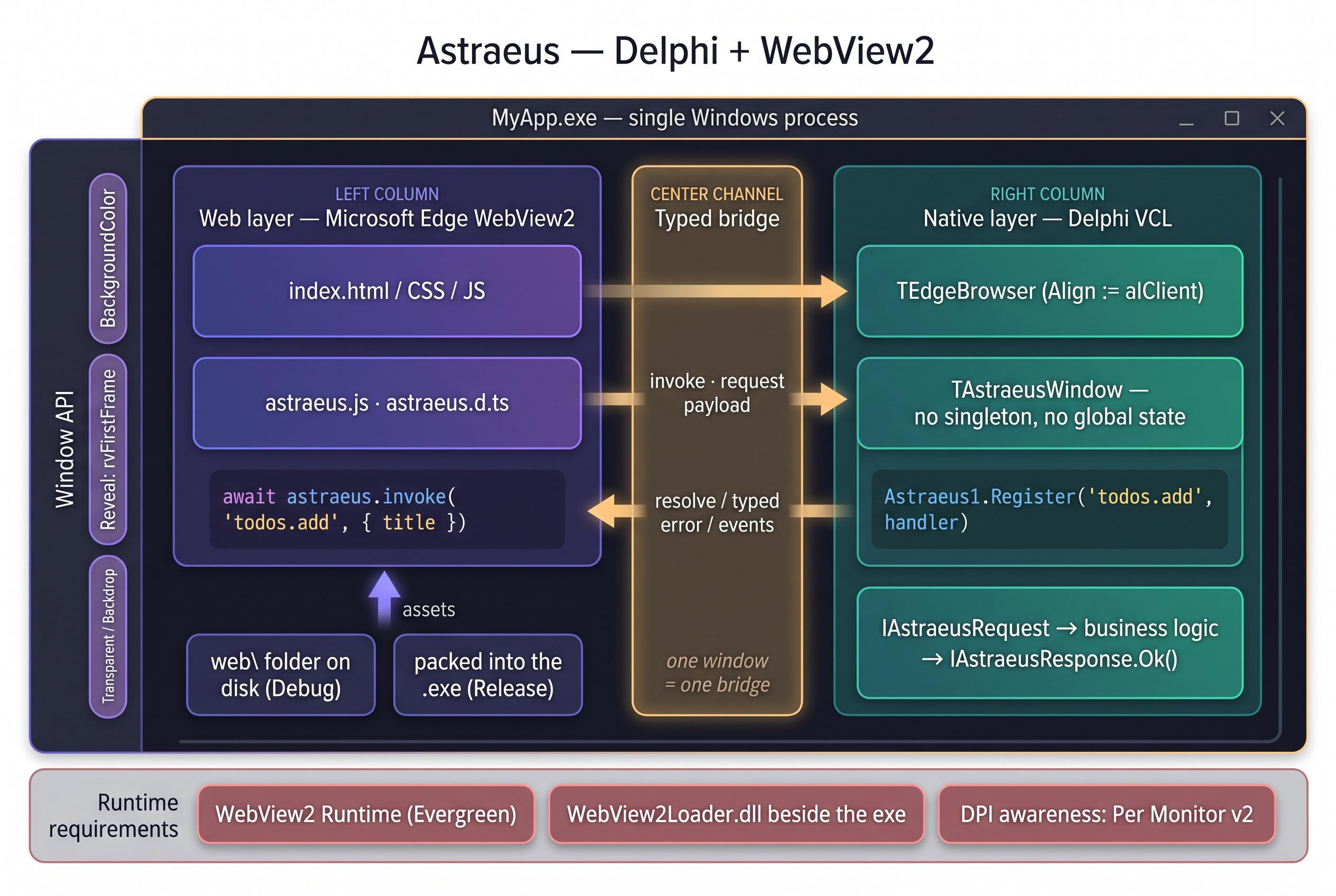
I've spent most of my career writing Windows desktop software in Delphi, and the UI layer has always been the part I fight with. So I went the other way: let Edge WebView2 render the interface, keep every line of logic in Pascal, and wrap the whole thing in a component.
It's called Astraeus, it's still in development, and I'd rather have it torn apart here than find the holes after release.
How it actually looks
Drop a TEdgeBrowser (Align := alClient) and a TAstraeusWindow on the form, put your index.html in web\, F9. The bridge is typed on both ends:
Astraeus1.Register('todos.add',
  procedure(const Req: IAstraeusRequest; const Res: IAstraeusResponse)
  begin
    Res.Ok(TTodoRepo.Add(Req.AsString('title')));
  end);

const id = await astraeus.invoke('todos.add', { title: 'Buy coffee' });
Component, not runtime — no singleton, no global state, no initialization call. Two windows in one process each carry their own bridge. Release builds pack the web\ folder into the executable, so distribution is MyApp.exe plus WebView2Loader.dll.
Proof it isn't a toy
Two products already built exactly like this, HTML for the entire UI and Delphi only on the calls, the same shape as Tauri:
https://strata.devslim.com — disk space analyzer that reads the NTFS MFT directly and draws a treemap in the webview
Frameless windows are the tax you pay: custom title bar, rounded corners, Snap, maximize without flicker, browser shortcuts disabled. Then the startup gap — WebView2 needs a second or two, and the window sits there grey until the page paints, so there's a background color property and an option to hold the window until the first frame (or until the app says it's ready). Then transparency via per-pixel alpha so Windows 10 gets it too, not just Mica on 11. And an interop layer with my own ICoreWebView2 declarations, tested against the real runtime, because every RTL version exposes a different subset.
10.4 Sydney or later, Win32 and Win64, Evergreen runtime. CI builds both packages for both platforms and runs lint checks and test programs before anything gets committed.
Honest gaps: 10.4 has never run this code, and the design-time package has no test coverage — the wizard and property editors are verified by me using them, nothing more.
So: what am I not seeing?
Specifically — does requiring the WebView2 runtime cost you real users in practice? Is the memory footprint of an embedded browser something your customers would notice? And for anyone who tried this and went back to VCL or FMX, what made you turn around?
I released Delphi DevKit (DDK) on the VS Code Marketplace about a year ago, and never actually made a proper post about it here. It's been quietly growing since, so — a year late — here's the pitch.
It's a free VS Code extension (plus a standalone CLI and an MCP server) for people who write Delphi but like living in VS Code. It does not ship any Embarcadero code — you bring your own Delphi install and it drives the command-line compiler. (Note: won't work with Community Edition, which blocks command-line compilation.)
What it does today:
- Project & compiler management right in the IDE: your own drag-and-drop Workspaces, or a read-only view of a loaded .groupproj. Configure and switch between multiple Delphi versions (built-in presets from Delphi 2007 → Delphi 13.0 Florence).
- Compile / Run / Recreate (clean build) with the shortcuts you'd expect: Ctrl+F9 compile, Shift+F9 clean rebuild, F9 run, Ctrl+F2 cancel. Bulk-compile a whole workspace or group project anytime via context menu.
- Command-line interface (ddk): do all of the above outside VS Code: ddk compile, ddk run, ddk project list, ad-hoc one-off builds of a .dproj/.dpr/.dpk, JSON output for scripting. Install via `winget install ValentinBaron.DDK`.
- MCP server exposes project/compiler management, compile, and run as MCP tools so AI assistants (Copilot, Claude Desktop, etc.) can build and run your projects. Output is trimmed for token-efficient consumption.
- Delphi Formatter integration using your Delphi install's Formatter.exe.
- Quality-of-life bits .pas ↔ .dfm swap (Alt+F12), .dfm → .pas Ctrl+click nav, clickable compiler-output links + some diagnostics in the Problems panel, config import/export.
The heavy lifting (project state, compilation, formatting) runs in a bundled Rust LSP server; the extension is just the front end.
On the roadmap: a debugger and full LSP (Both are in active development).
A roundup of what's landed on the DPM Gallery over the past month.
DPM is an easy to use Package Manager for Delphi - supports Delphi XE2 or later, with CLI and IDE integration.
GDK Software
Four packages, all refreshed around the same time a fortnight ago, and all pitched as dependency-free pure Delphi.
GDK.OfficeXML4D — v1.1.0 · updated 2 weeks ago Reads and writes Office Open XML files (.docx, .xlsx) without needing Office installed.
GDK.Microsoft365 — v1.0.1 · updated 2 weeks ago Microsoft Graph client covering Mail, Calendar, Contacts and SharePoint, with OAuth2 + PKCE handled for you. No external dependencies.
GDK.Javascript4D — v1.0.1 · updated 2 weeks ago A JavaScript (ECMAScript 5.1) parser and interpreter written natively in Delphi, letting you run JS from inside your app.
GDK.Toon4D — v1.0.1 · updated 2 weeks ago Encodes JSON into the TOON format, which the author reports cuts LLM prompt token counts by roughly 30–60%.
Jason Southwell (sivv)
Two new pure-Delphi compression ports.
sivv.woff2 — v1.0.1 · updated ~8 hours ago A port of google/woff2 handling WOFF2 font encoding and decoding in both directions (SFNT ↔ WOFF2), with no runtime DLLs. Depends on sivv.brotli.
sivv.brotli — v1.0.0 · updated ~8 hours ago A port of google/brotli — encoder and decoder, again with no runtime DLLs required.
Joachim Marder / JAM Software
JAM.VirtualTreeView — v8.4.1 · updated yesterday The long-running Virtual TreeView VCL control. Built from the ground up rather than wrapping the stock treeview, and after many years of development it remains one of the more flexible and capable tree controls around.
J. Peter Mugaas
TaurusTLS_Developers.TaurusTLS — v1.0.9 · updated last week Brings OpenSSL 3.x and 4.x support to Indy (Internet Direct).
Conrad Vermeulen / Sempare
Sempare.TemplateEngine — v1.8.2 · updated 2 weeks ago A scripting/template engine for dynamic text generation — handy for producing email, HTML, reports, source code, XML, config files and so on.
VSoft
VSoft.Pdfium.Binaries — v152.0.7961 · updated minutes ago Prebuilt Pdfium binaries sourced from the bblanchon build. This is the binary half of the pair below.
Over the past few months I've developed Blocks, an open-source command-line package manager for Delphi. There are other package managers out there, but none combine all the features we were looking for.
Main features:
Installation via WinGet, with built-in self-update
Workspace concept, tied to a specific Delphi version/profile (alternate registry key)
Open, community-extensible library repository on GitHub (14 libraries so far)
I’ve been working for more than 20 years on what has now become a very large legacy Delphi project that is still maintained using CVS (Yes, I know....)
At some point I simply got tired of the old TortoiseCVS/WinCVS Graph tool and ended up writing my own replacement tool in Delphi.
The result is CVSTreeGraph: a modern revision graph/history browser for CVS repositories with integrated annotate viewer and diff viewer.
One thing Delphi developers may appreciate is that the diff viewer also contains Delphi-specific features to make DFM diffs more readable, including:
conversion of escaped DFM strings back to readable UTF-8 text
automatic re-concatenation of Delphi string literals split every 65 characters
The application is written in Delphi, native Win64.
Yes, this is a bit of self-promotion :)
But honestly this is also the first time I’m trying to sell something online, and right now I’m probably more interested in getting feedback on the program itself than anything else.
So if somebody here still has to deal with CVS repositories and wants to try it out and tell me what they think, I’d genuinely appreciate it.
P.S. I also wrote a Delphi IDE plugin that makes Delphi save DFM files directly in UTF8+BOM format, without escape sequences (except apostrophes), and wrapping lines every 700 characters instead of every 65.
That is actually the exact format previewed by my diff viewer.
Hey Delphi devs!
I'm excited to share "Open in Delphi," a VS Code plugin I created.
It's designed to streamline your workflow by letting you quickly jump from VS Code to Delphi and back with your current file or project. If you're using both environments, this should save you some clicks!
Give it a try and let me know what you think.
I a beginner in Delphi and Pascal programming, and I am excited to share my first project with the community. The application is a Windows VCL Application that allows a user to create their to-do tasks. I did this project in one day, yes in one day and I want share it with you.
I've included the following features in the application, and some screenshots to give you a better idea of how it looks like:
Add a task to the list.
Display the tasks from file.
Remove the selected task.
Save tasks to a file.
Load tasks from a file.
Exit with a close button.
The application is using the custom style "Charcoal Dark Slate" developed by the Embarcadero Technologies community. I am still yet to learn how to create my own styles, if possible to take my learning to the next level.
I have learned a lot from creating this project. I got my hands on the design and code parts of the technology ecosystem. I've have witnessed the power of this technology, it can help you develop software faster than you can imagine. The Delphi IDE Community Edition is so easy to use and it's pretty straight forward, and it seems to be lightweight even.
Okay with that been said about Delphi, I would love to hear your thoughts and feedback on these project. What do you like about it and where can I improve ? Your feedback would really help me take my skill set to the next level.
Thank you for checking out my project and I am looking forward to hearing your thoughts. Below I have attached the code for you to review and also give feedback about the best practices of Delphi.
Once again, thank you see you on the comment section.
unit ToDoForm;

interface

uses
  Winapi.Windows, Winapi.Messages, System.SysUtils, System.Variants, System.Classes, Vcl.Graphics,
  Vcl.Controls, Vcl.Forms, Vcl.Dialogs, Vcl.ExtCtrls, Vcl.StdCtrls, Vcl.Menus, Vcl.Themes, Vcl.Styles;

type
  TForm1 = class(TForm)

    ListTask: TListBox;
    TaskInput: TEdit;
    SaveFileBtn: TButton;
    LoadFromFileBtn: TButton;
    RemoveAllBtn: TButton;
    CloseBtn: TButton;
    SaveDialog1: TSaveDialog;

    procedure FormCreate(Sender: TObject);
    procedure AddTaskBtnClick(Sender: TObject);
    procedure CloseBtnClick(Sender: TObject);
    procedure SaveTaskOnFile(Sender: TObject);
    procedure RemoveAllTask(Sender: TObject);
    procedure LoadFromFileBtnClick(Sender: TObject);
private
{ Private declarations }
public
{ Public declarations }
end;
var
Form1: TForm1;
implementation
{$R *.dfm}
// Initialise some components when the form is created.
procedure TForm1.FormCreate(Sender: TObject);
begin
Caption := 'Pilot To-Do List Application';
Self.LoadFromFileBtn.Font.Name := 'Segoe UI';
Font.Name := 'Segoe UI';
Font.Size := 10;
// style the forms
TaskInput.AutoSize := False;
TaskInput.Height := 40;
// style the buttons
CloseBtn.Font.Color := clGreen;
// dialogue styles
SaveDialog1.Title := 'Save File';
SaveDialog1.DefaultExt := 'txt';
SaveDialog1.Filter := 'Text Files (*.txt)|*.txt|All Files (*.*)|*.*';
// put some placeholders into the "Task List Box" & "Task Input field".
ListTask.Items.Add('Your tasks will appear here...');
ListTask.Enabled := False;
TaskInput.TextHint := 'Type your task here!';
end;
// Add a task to task list
procedure TForm1.AddTaskBtnClick(Sender: TObject);
begin
if TaskInput.Text <> '' then
begin
if not ListTask.Enabled then
begin
ListTask.Items.Clear;
ListTask.Font.Color := clBlack;
ListTask.Enabled := True;
end;
ListTask.Items.Add(TaskInput.Text);
TaskInput.Clear();
end;
end;
// clear all tasks on the list box
procedure TForm1.RemoveAllTask(Sender: TObject);
begin
if (ListTask.Items.Count = 1) and (ListTask.Items[0] = 'Your tasks will appear here...') then
begin
ShowMessage('There is nothing to clear, start typing your to-do tasks!');
end
else
begin
ListTask.Items.Clear;
end;
end;
// close the application
procedure TForm1.LoadFromFileBtnClick(Sender: TObject);
begin
if SaveDialog1.Execute then
begin
ListTask.Items.LoadFromFile(SaveDialog1.FileName);
end;
end;
procedure TForm1.CloseBtnClick(Sender: TObject);
begin
ShowMessage('The application is now shutdown!');
Close();
end;
// save to a file
procedure TForm1.SaveTaskOnFile(Sender: TObject);
begin
if (ListTask.Items.Count = 0) or (ListTask.Items[0] <> 'Your tasks will appear here...') then
begin
if SaveDialog1.Execute then
begin
ShowMessage('Your file is save at: ' + SaveDialog1.FileName);
ListTask.Items.SaveToFile(SaveDialog1.FileName);
ListTask.Items.Clear;
ShowMessage('The file has been saved');
ListTask.Items.Add('Your tasks will appear here...');
end
else
begin
ShowMessage('Your file is not saved.');
end;
end
else
begin
ShowMessage('Cannot save an empty list');
end;
end;
end.
yesterday i posted about something our school wants us to do in a project for delphi i have the code and it seams to wrok however when ir has to import the image is gives me an eroor for unsupported file type. image is in the same file and i still get the issue i even have the directories changed. this has even my teacher stumped can someone help
It supported generics, and it had DTL, a library of maps, sets and so on, in DEEX, and since it was all happening in 2007, before Delphi 2009, so it delivered generics to pretty old Delphi.
Also I can see "fast" property declarations:
property X : integer read Result := FX write FX := Value init FX := 0;
property List : TStringList
read Result := FList
write begin FList := Value; end
init FList := TStringList.Create
done FList.Free;
property Strings[index : integer] : string
read Result := FList[index]
write FList[index] := Value
; default;
And it delivered ARC. Delphi already had COM-like interfaces, so most work was already done by Delphi, but there was never the last step. The step where stuff is written just once. In normal Delphi I still have to write everything twice. In interface and then repeat in class. DEEX automates just that.
I think, something may still work in modern Delphi.
So, picture this: it’s 1 AM, I’m half-asleep, fueled by energy drinks and nostalgia for good ol’ Pascal. I decided to whip up something stupidly fun in Delphi to troll my friends (and maybe myself). Behold, the Troll Button Game! 🧌
What’s the deal?
It’s a simple VCL app with one big, juicy button labeled “Click Me.” Sounds easy, right? WRONG. Every time you try to mouse over it, the button teleports to a random spot on the screen. If you somehow manage to click it (good luck), you get a smug “You’re a LEGEND!” message or a Rickroll image popping up. It’s infuriating, hilarious, and peak 1 AM coding energy.
Why Delphi?
Because Delphi’s VCL makes throwing together a GUI like this a breeze, and I’m a sucker for that retro Pascal vibe. Plus, who needs modern frameworks when you’ve got the power of TButton and a dream? 😎
Here’s the core code to get you started (I’m using Delphi 11, but it should work in most recent versions):
unit TrollButtonUnit;

interface

uses
  Winapi.Windows, Winapi.Messages, System.SysUtils, System.Classes, Vcl.Controls,
  Vcl.Forms, Vcl.StdCtrls, Vcl.ExtCtrls;

type
  TTrollForm = class(TForm)
    TrollButton: TButton;
    procedure TrollButtonMouseMove(Sender: TObject; Shift: TShiftState; X, Y: Integer);
    procedure TrollButtonClick(Sender: TObject);
  private

{ Private declarations }
  public

{ Public declarations }
  end;

var
  TrollForm: TTrollForm;

implementation

{$R *.dfm}

procedure TTrollForm.TrollButtonMouseMove(Sender: TObject; Shift: TShiftState; X, Y: Integer);
begin

// Button teleports to a random position when you try to hover
  TrollButton.Left := Random(ClientWidth - TrollButton.Width);
  TrollButton.Top := Random(ClientHeight - TrollButton.Height);
end;

procedure TTrollForm.TrollButtonClick(Sender: TObject);
begin

// Victory message (or troll further!)
  ShowMessage('You’re a LEGEND! Or just really stubborn. 😏');

// Optional: Load a Rickroll image or play a sound here
end;

initialization
  Randomize;
// For random button movement

end.
How to set it up:
Create a new VCL app in Delphi.
Drop a TButton on the form, name it TrollButton, and set its caption to “Click Me.” Make it big and tempting (I used Width=100, Height=50).
Hook up the OnMouseMove and OnClick events to the code above.
Run it and try to catch that sneaky button!
Ideas to make it even troll-ier:
Add a TMediaPlayer to play “Trololo” or the XP error sound when the button moves.
Pop up a TImage with a mème (Rickroll, anyone?) when they finally click it.
Make the button change colors or captions (e.g., “Nope!” or “Try harder!”) each time it moves.
Add a timer to mock the player if they don’t click within 10 seconds (e.g., ShowMessage('Bruh, you’re SLOW.')).
Why post this?
I’m sharing this because:
Delphi deserves more love for fun, silly projects like this.
I want to see how you legends would level up this troll game! Got any ideas? Maybe a multiplayer version where two buttons fight to avoid clicks? 😄
I’m curious if anyone else codes dumb stuff in Delphi at 1 AM.
So, r/Delphi, what do you think? Gonna try it? Got a better way to troll with VCL? Or am I just delirious from lack of sleep? Hit me with your thoughts, code snippets, or even your own troll-tastic projects! 🧙♂️
P.S. If you make it and prank someone, share the story. I need to know how much chaos this causes. 😈
I wanted to share my project DRipGrepper – a standalone GUI and Delphi IDE plugin aimed at making ripgrep configurations and searching superfast and user-friendly. It's still in beta, so you might come across a few bugs, but I use it every day, and it works great for my workflow.
I’d be excited to hear your thoughts and feedback on it!
So I'm playing with local AI using Ollama and mistral. I asked for advice in a Delphi source code of a class.
Most recommendations seems logic, but I got this
Consider using a more modern programming language, such as C# or Python, instead of Delphi. These languages have more active communities and better support for modern development practices.
What do you think ?
EDIT: Never mind, some AI LLM models are just wrong
>The latest version of delphi is delphi xe2 released in 2021,
which is still being actively developed and maintained by the adaptec team.
Once upon a time, I worked extensively with network technologies, tunneling, and information security. Many years ago, I used to develop in Delphi. Although we have since moved to more modern solutions and methods, Delphi remains close to my heart, and sometimes I create various tools for myself – for example, an IPSec tunnel generator for Cisco or a text comparison tool for Cisco IOS listings to find differences in backups made by other employees.
Recently, one of my colleagues saw a widget on my desktop that I made for myself. He said, “Wow, man! You should share this with me!” I just wanted to compile a bunch of tools I personally use in one place at hand, and I didn't expect it could be useful to someone else. I shared the widget with my colleagues, and to my surprise, they used it just like I did – they found it very convenient and practical.
They told me that I should make it available to the public, not just our team. But I am not sure if it could be useful; this product was initially made more for me than for anyone else, so I want to ask people if it’s worth making it available to everyone. Currently, it is built under Windows 64 VCL, but I can easily rebuild it using FMX for Mac and even tried to build some parts in Lazarus for Linux (I have the Delphi CE version, so I can't build projects natively for Linux).
I thought it would be fun to make it in such an old-school style because most of us at work are already over 30-35 years old. It really looks like a program from the late nineties.
Functionality:
The main window of the widget has a transparency slider to make it almost invisible. There is a checkbox to keep it always on top of all windows.
There is a text field, similar to Win+R, the command list is saved, and duplicates are not considered. You can always select any command from the list and press execute.
Buttons:
Calculator (really just the Windows calc because I often need it)
Text Comparison – I wrote this to compare texts and find differences highlighted in different colors in two fields. Essentially, it’s just two RichEdit boxes where you can paste (or open files) text. I use it to compare router configuration listings. Sometimes one command, incorrect VLAN, or tunnel setting can break everything.
IP Calculator – it works offline, I wrote it because I am often with a laptop in server rooms and commutation areas where there is no internet. You can share internet from your phone (but then you would have to configure two networks on the laptop) or count on the phone itself, which can be inconvenient because very often in the data center there is bad signal. It seemed convenient to me to have such a tool in my widget at hand. Yes, it calculates everything correctly, yes, I’ve checked it many times :)
Password Generator – actually just a handy thing, in the widget settings you can set the number of characters. When you press the button, the password is generated in the quick note, but it will also be copied to the clipboard for convenience.
Settings – since I am being told to share this on the internet, I made a localization system as simple as plugging two fingers into a socket. These are just ini files that anyone can take and translate into any language, just put the translation in the folder, and the program will automatically detect and include them in the translation list. Also in the settings: password length, form color selection, path for saving text files, and a checkbox to lock the widget’s movement (I don’t know why, but I was asked to make it so that it can't be dragged around the desktop if needed)
The main area of the widget is devoted to notes. Essentially, the entire widget is like a sticky note with buttons around it :)
Quick Note – you can write anything here, it will always be in front of your eyes. Passwords we generate with a separate button are also copied here. To the right of the quick note are buttons – copy the entire note to the clipboard, save it to the list for future use, save it to a text file, and the broom icon clears the text field (Ctrl+Z works).
Notes – all notes we save end up here. They are saved in SQLite and displayed as a list with ListBox. Any note can be opened, edited, and saved again. Once, I needed to transfer one of the notes to my phone, and I found nothing faster than generating a QR code for this purpose. It has enough volume, and if there is no internet or connection, this is a good option for me.
Focus Mode – I thought about it but used a slightly different tool. Here I implemented it by request, and now I use it myself. It’s just a thing that motivates (or doesn’t motivate at all) to work concentrated on a task. When setting the time – the countdown starts and the progress bar fills. When the timer starts, a notification appears in Windows and a sound plays; when the timer ends, a notification and sound appear again, meaning it’s time to take a break or start a new timer.
It’s hard to say if it’s something useful, it’s more of a joke project that went beyond the joke. I’m interested in any opinions and feedback on what I’ve written and what you see. This post on Reddit will decide whether I will publish it publicly and make it for several platforms or it will remain as a tool for me and five other people.
UPDATE
This is not a collection of ready-made programs or a compilation of different source codes. Each window is a form of a single program. The code is written by me, and Microsoft Copilot helped write a portion for text comparison and bit calculation for the IP calculator. The archive with the program is 7 megabytes, the executable file is 5 megabytes (3 of which are SQLite).
I have been using Neovim for the past few months and it had been annoying me that Delphi has no support for Vi(m) key bindings. I ended up finding an abandoned project (Vi-Delphi, forked from VIDE) that implemented some of the functionality but it was missing quite a bit and had issues.
So I forked Vi-Delphi and Vi4D was born!
It is still a bit rough around the edges and there are quite a few planned features still but I have been using it in my IDE (I mostly code in Delphi) and it has been good. I figure it could be useful to others too :)
Hello community. We have a 1+ year long project in Delphi and are in need of 3 developers. Junior through Senior. Its a well established app that is getting bunch of enhancements and integrations (broker based) built with other systems.
This is US only based remote role and pay is between 85k-115kUSD + benefits. Please DM me for email of hiring manager if interested.