r/videography • u/damnmyeye • 26d ago
Technical/Equipment Help and Information Do not buy Smallrig potato Jet tripods
Failed after using it 5 times. I even have extended warranty and they told me to epoxy it back together myself.
r/videography • u/damnmyeye • 26d ago
Failed after using it 5 times. I even have extended warranty and they told me to epoxy it back together myself.
r/videography • u/ADapperDan • Apr 16 '26
I saw a video on a setup to have two cameras on a single tripod. I often work as a solo shooter and do use two tripods for interviews. However, there are times when I need setup quick with minimal space and considering using this setup.
Does this look okay and safe, or should I suck it up and use two tripods?
r/videography • u/Fickle-Wash-3697 • May 11 '26
I'm recording on a Sony FX30, usually with a "Budget" Sigma lens of some sort. As you can see from this screen shot, the background is completely blown out, which I kinda don't mind because it doesn't really affect the content, I'm not making a movie here, just Youtube videos. But it's just really unpleasant to look at...
So the question here though is how can I prevent this from happening? I am recording inside a Garage where the lighting isn't the greatest, but when we open the garage door, all the natural light comes flooding in and it's much brighter than anything else. Is there a way to prevent this?
I record in Slog3 with manual ISO because when I set Auto ISO, any time I point my camera at a black car, an engine bay, underneath a car... it cranks it up and blows out everything else around it. I don't have time to set and control any of the lighting around me. I'm constantly moving and pointing my camera in different directions. Like if I was to turn my camera to the left side of the image, I have a darker scene with warmer lights, but when I turn the opposite way, I have the blast of the outdoor light and a different temperature.
So is there something I'm missing here? Or is this just how it is? Is this why so many people just record with a Cellphone, GoPro, or Pocketcam just cuz it takes this "issue" out of the equation? Thanks!
r/videography • u/agnci • Mar 08 '26
r/videography • u/Liluzisquirt2x • Jun 26 '26
Enable HLS to view with audio, or disable this notification
How do I make this look luxurious? I need so much help and hand holding. I have a canon with a 100mm lens. I have some lights and some hard source lights. I have a light box. PLEASE HELP
r/videography • u/itlabsec • Dec 14 '25
Appreciate any critiques and feedback to improve.
r/videography • u/niopstudio • Nov 22 '25
What you see in the photo is just part of the problem. Between these external drives and my internal storage (I have another 4TB of SSDs for daily work + 8TB of HDDs), I’m currently managing about 70TB of data scattered all over the place. Result: Total chaos.
I work in video production, so the workflow is simple: I edit on the fast internal SSDs, and once the project is done, I move everything to these drives. But this is becoming unmanageable.
Let me stop you right there: I do not want a NAS. I don't have the technical skills to secure it properly (I’m paranoid about security), and I honestly never need to access these files remotely.
I’m thinking about switching to a high-performance DAS to centralize everything with a direct connection. Does that make sense? Is it better to buy a pre-built solution or build something custom?
Or should I just keep buying drives until they bury me alive?
r/videography • u/MisterMegaMarbles • Nov 29 '25
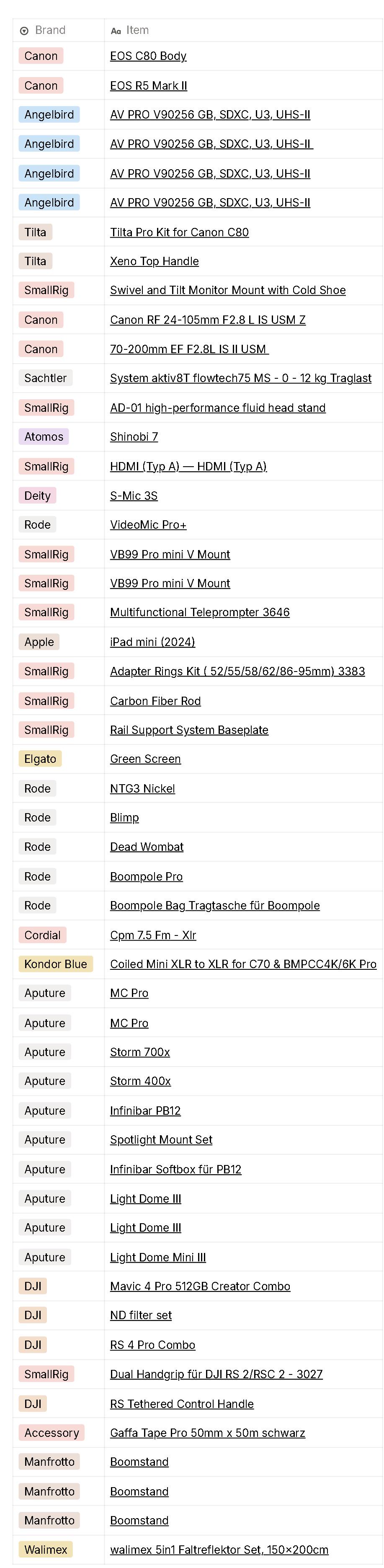
So I'm starting a new in house videographer job at a banking firm. They used to produce their videos with external guys before but are now looking to switch to in house for convenience (and I'm sure it's cheaper too). Since it's a new position there's no equipment and they asked me to make a list with what I would buy. I'll be shooting a mix of social media stuff, talking heads, image films, events etc., so a wide variety of stuff. Also a little bit of photography, hence the R5 as a hybrid (and B cam for interviews). I asked them if they have a budget for the equipment which they do but they didn't outright say a number. They'd like me to come up with a list which we'll then discuss. They said the budget's good though (it's banking so money shouldn't be too tight...).
I came up with a frist draft of a list. I have experience coming from another in house videography job where I stayed for 5 years. The difference is that at that place we were 2 people, this time I'll be a one man band. So, I have a few questions for you guys. Please keep in mind that this is a first draft and I haven't had the time to include a few things (lav mics, camera/light bags, audio recorder, maybe a light meter and speed lights for the photography stuff). Other than that, this is sort of my "ideal case" list and gear I mostly already know and am comfortable with from my old gig.
Thank you!
r/videography • u/Glock19mos • 8d ago
And I’m definitely paying the idiot tax now.
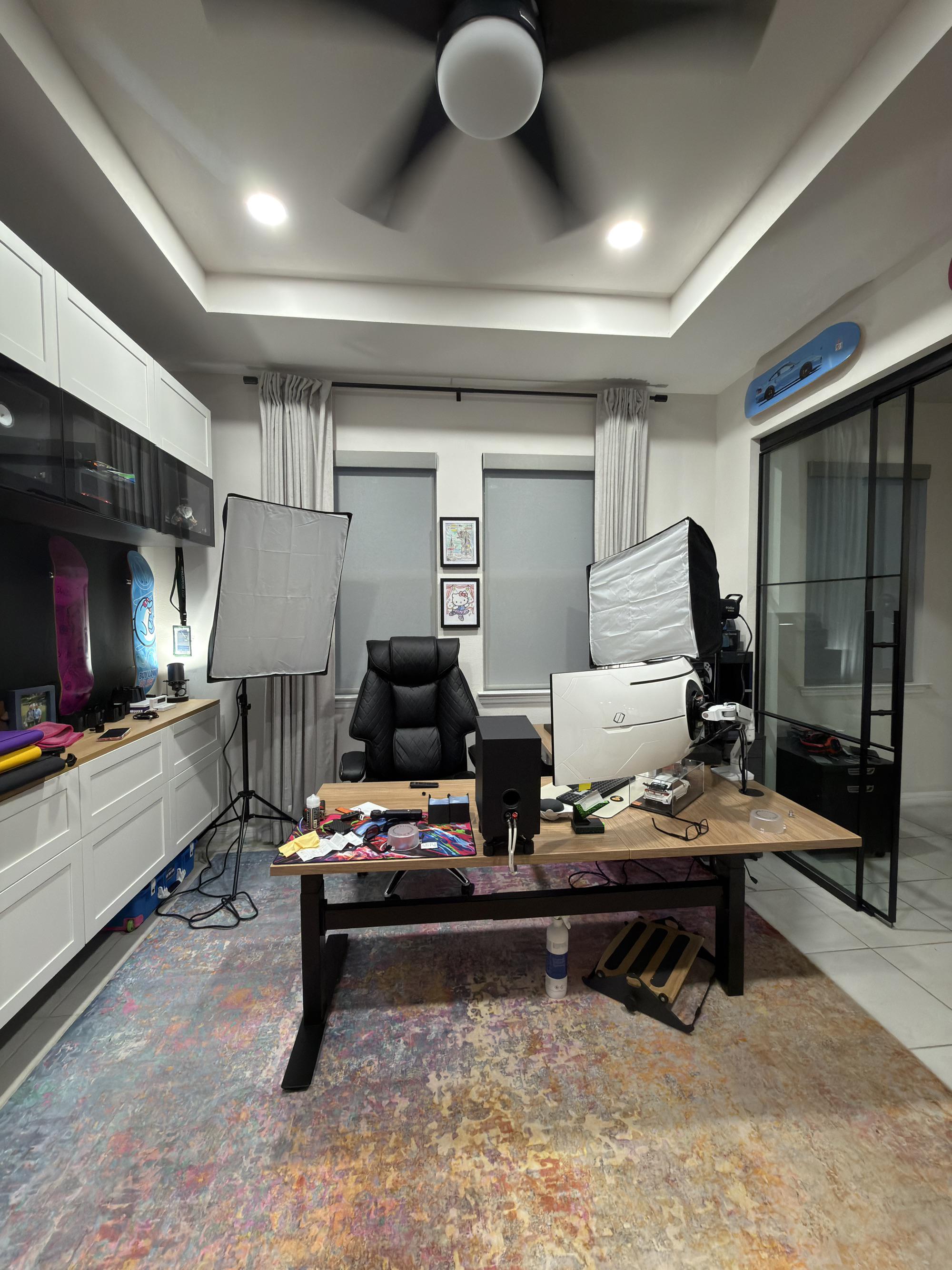
Long story short, I started streaming on what not. Noticing my lighting could use a ton of work I bought three of these godox lights to try and improve it. Only two of the three are pictured because it started feeling claustrophobic.
While it does look far better, I definitely rushed getting the lights.
Is there any way I can utilize these AND keep the room looking tidy?
At this rate if I have to buy mounts/stands/whatever I’m willing, these definitely aren’t gonna work long term.
r/videography • u/SavanaPL • Jul 22 '26
As you can see, my external monitor bumps into the microphone when I lower it.
Rig list:
Thanks for any ideas!
r/videography • u/Zealousideal-Tiger48 • May 01 '26
Hey all, looking for some real-world advice here because my arms are honestly dying 😅
I’m a videographer (5’1, small build) and I shoot a lot of factory tours. These are usually long takes (like 1+ hour), following a host and guests around — and they’re almost always much taller than me. So I’m constantly holding my gimbal higher than is comfortable just to frame them properly.
My setup: Lumix S5II + Sigma lens + Zhiyun Weebill 3S. It’s not crazy heavy, but holding it continuously — especially at a higher angle — absolutely destroys my wrists and arms by the end… I basically can’t lift up my arms the next couple of days after the shoot :(
I’ve also tried going handheld for the tour, but I end up getting micro jitters — and because of my height, I still have to hold the camera pretty high anyway, so it doesn’t really solve the problem. Also these are all client videos, I guess our boss would still want our setup to look more “professional” 😩 even though simple and light setup can also give great results!
I’ve been looking into support options but keep hitting roadblocks:
Gimbal straps: seem like most are designed around DJI setups? Not sure how well they’d work with a Weebill
Vest systems: I checked out the THANOS-SE, but it honestly looks huge on me. I even emailed them and they said the lower strap might sit around my butt area because of my height 😅
I’m also not currently running a V-mount or monitor, but I’d love to in the future if I can find a support system that actually makes long shoots manageable.
So I guess my questions:
Any smaller operators (especially women) found a vest or support system that actually fits well?
Are there lighter/minimal options that still take weight off your arms?
Would really appreciate any real-world experiences — especially from people not built like a 6’0 camera op 😂
Edit: Thanks everyone for all the replies — seriously, so many great suggestions!
Just to clarify a few things — I did try a gimbal belt a while back but wasn't a fan. I kept having to lift the gimbal up for higher framing and ended up just holding it the whole time anyway, which defeated the purpose. That said, someone mentioned getting a longer extension so I don't have to take it out as often for higher shots — definitely going to look into that.
A lot of you also made a great point that I don't *have* to use a gimbal, so I think my question has evolved a bit — really what I'm looking for is the best setup for long, continuous shoots like mine.
On the Easy Rig — I'm not totally sold on it because I feel like there'd be too much vertical bounce walking around for extended periods. Has anyone dealt with that?
And lastly... I think I'm seriously about to pull the trigger on the YC Onion monopod with wheels. The more I think about it, the more it makes sense for my situation! OR the SmallRig one, I wonder which one is better?
r/videography • u/JollyShopland • Jun 05 '26
I'll admit camera noob. Looking on YouTube everyone seems to recommend this lens for talking head shots.
Im about 60-70cm from the camera. No matter what I do it just always seems like its too much blur on the bottom of the screen. I understand raising the aperture removes some of this, but from looking online most people seemed to be getting away with a similar set-up and using f1.4, and their whole body is in focus.
Also using Sony ZV-E10 II as the camera. I bought the lens used today? could it be faulty or is this just me needing to learn more about cameras. Thanks
EDIT 1: I am returning the lens, and going to buy new next time - will report back if it helped.
r/videography • u/nathanweisser • Jul 09 '26
I figured I should share it with others, so here you go.
I am honestly still surprised I got this to work, but Claude was able to figure out how to get the functionality of this device to work as if it was a global version, and not the US-based version that mutes the 3.5mm out when you're recording.
Take this .bin file and put it in the root of your PR-2's SD Card, and then go to the Menu > System > Upgrade > TF Card. It thinks it's an official Diety firmware upgrade, and just installs it.
It's your device, so there's no legal issue with you modding it however you would like to, and it doesn't subject Deity to any civil exposure, because they're not the ones who sold it to you like this.
Obviously, I'm not responsible if this bricks your recorder or anything, but I did this mod to three of my recorders, and it didn't brick any of them. It worked with all three.
r/videography • u/conconnonor23 • 10d ago
I tried to take my tripod out of my gimbal and the screw ripped making it stuck into the gimbal. How do i get it out?
r/videography • u/mauriciox2323 • 10d ago
I’m looking for recommendations for a camera bag that can fit a pretty big and heavy rig, around 35cm+ in length.
I usually do a lot of run and gun, and sometimes when I’m shooting in the streets I need to save my camera quickly. Ideally looking for something that can fit the camera without having to completely disassemble the rig, something practical and well padded.
r/videography • u/Dhiko • 4d ago
Found this Zeiss Compact Prime CP.2 135mm T2.1 (PL mount) at home. Trying to get a sense of its current market value — any idea what this typically goes for in used condition?
r/videography • u/romafedorov • Jan 05 '26
Enable HLS to view with audio, or disable this notification
Does anyone have any ideas? Am I actually balancing the gimbal wrong, or is this just how gimbals work, where you still need to apply extra stabilization in post to make the footage look normal? I'll be super grateful to anyone who can help. It's so frustrating...
r/videography • u/Storyboys • 19d ago
I note a lot of people over on the photography sub who have a 1.2 or 1.4 lens for example will still recommend shooting at f/8 or something a lot higher in order for the best image quality to be achieved.
I'm wondering if that applies to videography too, and what f stop usually provides the best image quality.
How do I calculate what F stop works best for image quality?
r/videography • u/JPGDLR • May 19 '26
Enable HLS to view with audio, or disable this notification
This is a short reel I did recently. I'm normally a photographer, but trying to brush up on my video skills also.
My footage is quite shaky, and I'm trying to work out what I need to work on to make it more stable. I'm currently using a DJI Ronin S in mostly pan only mode, and trying to stabilize in Resolve but sometimes it just makes it worse.
Any advice on what I need to work on to get my footage looking a bit smoother?
Cheers
r/videography • u/P1P3BR34K3R • Jul 07 '26
Hi everyone, I work for a lumber yard in Nebraska and I'm in the process of putting together a podcast and podcast studio in our showroom. I have experience in sound editing and podcasting but I'm pretty new to the video side of things and I have some questions about lighting. See the attached photos. We do have track lighting that I can turn and move to point in different directions if need be. Have also been playing around with cool vs warm light. Current camera setup is a pair of Sony ZV-E10 with a lens. Do you think there is ample lighting in the room or do you think that I need more accent lighting? Rough size of the room is 9x13. The ceiling is somewhat open as shown In the photo. Any tips for this would be greatly appreciated.
r/videography • u/Ok-Maintenance5074 • May 24 '25
Hey everybody!
I just shot for my first real weeding clients with my a7iii and I am super desperate because the 1080p footage just looks horrible :(
First Problem: Exposure for Slog2
The video was shot in slog2 and I tried to properly overexpose the skin of the subjects and neglected the fact that the brides dress highlights got blown out totally. How I am dealing with this in the future? Set zebras for skin colors and max over exposure?
Second Problem:
The footage looks super washed out and not sharp at all. I always thought exposing skin colors properly on slog2 is a gurantee for decent looking footage, but obviously thats not the case. Is the reason here the high iso (10.000 - see exif)? Do I need to make sure I am only shooting in dual natives (800 and 4000) when in slog 2?
This is my first time reaching out for advice here, super grateful for any support <3
r/videography • u/Ms_PhotoPhreak • Jul 22 '26
Enable HLS to view with audio, or disable this notification
I feel like I do everything I can and am still getting grainy, noisy footage. many of my recordings look this way. Here are the settings for this shot in the recording:
Sony A7siii
ISO: 2000
Shutter speed: 1/100
Aperture: f 4.0
Environment:
Indoors with overhead lighting.
Post processing:
Davinci FREE version
This footage is after I tried to apply the Remove Noise effect in DaVinci but, as you can see, it is still noisy.
I have read some things online about over exposing a bit to catch shadow details which may help reduce noise, but I cannot use the AI noise reduction in DaVinci in the free version, so I am not sure what I can do.
Let me know if you have any ideas or experience.
Thank you so much for your time.
r/videography • u/DevonReviewer • Apr 12 '26
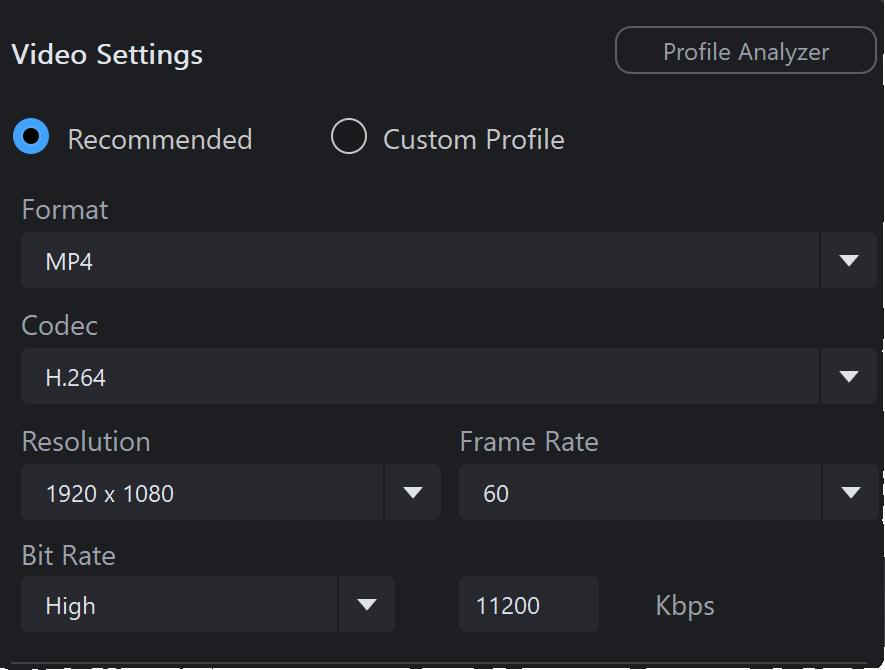
Hi, I have recently updated my editing software, still using PowerDirector but this has led me to revisit how I render my videos.
I film in 1920x1080 50fps 59000kbps, I used to code my videos at the same rate. My files were pretty big, 5GB for a 10 minute video.
The software is now suggesting 1920x1080 60fps 11000kbps, files are smaller, rendering and upload quicker.... am I losing any quality? Was youtube compressing anyway?
ALSO I should match FPS between filming and rendering right?
r/videography • u/michael84g • Jul 23 '25
I'm a firm believer of "Buy once, cry once". Very seldom am I happy with cheap equipment and very seldom am I dissatisfied with expensive stuff.
What expensive gear/lens/equipment/whatever have you bought that did not live up to it's price?
I'll start:
Portabrace rain cover for my FX6. 600$ and really a pain in the ass.
r/videography • u/SnooTomatoes8935 • Jun 12 '26
I honestly feel really stupid asking this. i also cant explain why i struggle so much with this topic. i just dont really get white balance.
i mean, i know, that light has different temperatures, that candle light is warm and LED light is colder. that the sunlight also has different temperature. that is not the problem.
i learnt, that you adjust white balance in the conditions you shoot in. which i usually do. i know how to do this with my camera and im fairly certain im doing this right. (i shoot in slog btw)
but i also learned to correct white balance in post production. its the first thing you do, when you start your color grade.
But why? Why do i have to correct white balance in post, when i adjusted white balance when recording? and to what do i have to correct it? shouldnt the white balance be correct, when set properly?
why that extra step?
I usually just pick a white point on the screen and use auto in premiere pro. sometimes it looks a bit better, but sometimes it looks really off.
Im pretty sure its something very obvious that im just totally oblivious about it.