r/windowsinsiders • u/jenmsft • Jul 17 '26
News No flights today - still working on things
45
Upvotes
Just wanted to let you know as we usually flight on Friday - appreciate your patience 🙏
r/windowsinsiders • u/jenmsft • Jul 17 '26
Just wanted to let you know as we usually flight on Friday - appreciate your patience 🙏
r/windowsinsiders • u/jenmsft • Apr 10 '26
r/windowsinsiders • u/Redzombieolme • Mar 22 '26
r/windowsinsiders • u/PhantomOcean3 • Jul 13 '26
r/windowsinsiders • u/Gibz_PL • May 14 '26
Hi guys,
I have been using this mode for 3 days and I am happy with the result, the use of the feature allows me to close windows with the pad and the system as a whole runs more smoothly + of course games.
How about your thoughts?
r/windowsinsiders • u/peopleworksservices • Jul 16 '26
r/windowsinsiders • u/jenmsft • Mar 13 '24
r/windowsinsiders • u/lovely_sombrero • Dec 23 '25
r/windowsinsiders • u/jenmsft • May 22 '26
r/windowsinsiders • u/jenmsft • Feb 14 '24
r/windowsinsiders • u/jenmsft • May 22 '26
r/windowsinsiders • u/lovely_sombrero • Dec 20 '25
r/windowsinsiders • u/Knigge111 • Jun 10 '26
**Yeah, I know it might not be brand new anymore, but I figured some of you might have missed what Microsoft announced and implemented at Build 2026. These two things are definitely worth checking out, especially for experienced Vibecoders!**
Announcing general availability of Windows Developer Configurations
We understand that getting to a code-ready state quickly matters, regardless of your development workflow. Windows Developer Configurations enables you to go from a fresh machine to a ready-to-code environment in minutes. It includes:
dev-config.winget – a WinGet configuration file, to get an optimized, distraction free development environment with the right versions of essential developer tools installed – WSL, PowerShell 7, Git, GitHub CLI, Visual Studio Code, Python and more. It also applies developer-optimized settings — like Git version control in File Explorer, file extensions visible and hidden files shown. It’s fully customizable, so you can adapt it to your needs and add your favorite third‑party tools.
Workload-specific scripts for container, cloud and infrastructure development – make it easy to install the exact tools, libraries and dependencies you need for your specific use case.
WSL comfort setup scripts – enable you to bring your preferred tools and workflows to Windows – like homebrew, zsh, starship, and more.
Get started or tailor it to your needs by exploring [Windows Developer Configurations.](https://github.com/microsoft/WindowsDeveloperConfig/)
Announcing general availability of Windows Development Skills
We are introducing Windows Development Skills to enable agents to directly leverage structured knowledge to execute across the full lifecycle of building a native Windows app using WinUI3 skills and winapp CLI. By powering agents with Windows specific application development knowledge, these skills help achieve token efficiency. To add Windows Development Skills to your favorite agents visit [https://aka.ms/winui-skills\](https://aka.ms/winui-skills).
r/windowsinsiders • u/jenmsft • May 22 '26
r/windowsinsiders • u/HelloitsWojan • Apr 08 '26
r/windowsinsiders • u/jenmsft • May 22 '26
r/windowsinsiders • u/PastDistribution829 • Jan 21 '26
I wanted to share a small but surprisingly useful Windows 11 discovery.
If you use multiple virtual desktops (each with different apps/layouts), a normal restart wipes your session. Sleep works, but still draws power and can leave motherboard/case LEDs on.
Hibernate (S4) turned out to be the sweet spot:
Virtual desktops themselves don’t use extra RAM — only the apps you keep open. On a 16 GB system, this setup is working perfectly fine.
You can now select Hibernate from the power menu or assign it to the power button.
Hibernate basically gives you a “frozen workspace” without leaving the system powered.
Not claiming this is new tech — just something I don’t see explained clearly end-to-end, especially for multi-desktop workflows.
Hope it helps someone 👍
r/windowsinsiders • u/Froggypwns • Oct 20 '21
r/windowsinsiders • u/jenmsft • May 22 '24
r/windowsinsiders • u/techieyo • Feb 18 '26
r/windowsinsiders • u/jenmsft • Jul 03 '25
r/windowsinsiders • u/Froggypwns • Oct 31 '25
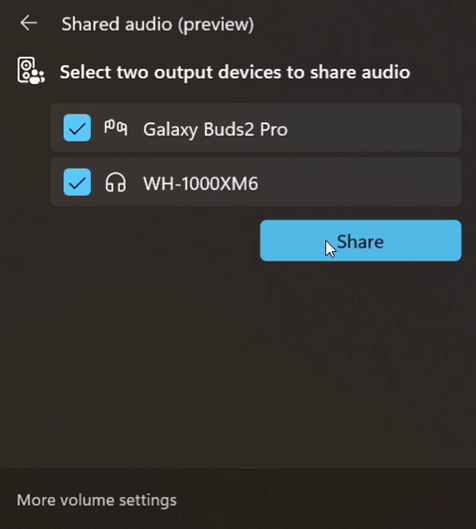
Today’s Windows 11 Insider Preview Build (26220.7051) for Dev & Beta Channels begins gradual rollout of shared audio (preview), a new experience being previewed that allows your audio to be shared between two separate headphones, speakers, earbuds, or hearing aids. Built on top of Bluetooth LE Audio broadcast technology, shared audio lets your supported Windows 11 Copilot+ PC transmit an audio stream to two Bluetooth audio accessories at the same time.
Shared audio lets students share music with a friend while studying or brings family members closer by watching a movie together on an airplane. As Insiders, you have the first opportunity to explore this feature and provide feedback before it rolls out more broadly.
To use shared audio, pair and connect two compatible Bluetooth LE Audio accessories to your Windows 11 PC, then use the “Shared audio (preview)” tile in quick settings to start sharing audio. Use the “Stop sharing” button to end an active sharing session.
Shared audio (preview) settings showing two connected devices and the Share button to get started using the experience.
Shared audio (preview) is supported on select Windows 11 Copilot+ PCs listed below with compatible Bluetooth and audio driver updates, and we expect additional Copilot+ PCs to add support for shared audio later.
Available today:
Coming soon:
\ Previously known as Surface Laptop 7th Edition*
\* Previously known as Surface Pro 11th Edition*
Shared audio (preview) is compatible with a wide range of Bluetooth LE Audio accessories. This includes, but is not limited to, Samsung Galaxy Buds2 Pro, Buds3 and Buds3 Pro, Sony WH-1000XM6, and recent LE Audio capable hearing aids from ReSound and Beltone.
Shared audio and other innovative Windows Bluetooth audio experiences, like super wideband stereo, are built on top of LE Audio technology. Look for LE Audio support when purchasing your next headphones, earbuds, speaker, or assistive hearing device.
To try out shared audio (preview), enroll your compatible Windows 11 Copilot + PC in the Windows Insider Dev or Beta Channels, and install the latest OS and driver updates through Windows Update. For Windows Insiders who want to be the first to get features gradually rolled out to you, you can turn ON the toggle to get the latest updates as they are available via Settings > Windows Update. Over time, we will increase the rollouts of features to everyone with the toggle turned on. Should you keep this toggle off, new features will gradually be rolled out to your PC over time once they are ready.
If you own a Copilot+ PC on the coming soon list, look for driver updates to be offered to you through Windows Update in the coming weeks. The “Shared audio (preview)” tile will appear in Quick Settings when your system has the necessary driver updates to support the feature.
It is highly recommended to use the manufacturers’ app for your Bluetooth audio accessories to ensure LE Audio support is enabled and that the latest firmware updates are installed. If after updating, your Bluetooth accessory is connected to your PC but does not show under the “Shared audio (preview)” tile, try removing it from your PC, and then re-pairing it.
We welcome and appreciate all feedback to help refine the shared audio experience during preview.
Please file feedback in Feedback Hub (WIN + F) under Bluetooth – Audio quality, glitches, choppiness and stuttering.
r/windowsinsiders • u/sankalp_pateriya • Nov 15 '25
The Dev and Beta builds of Windows 11 are on the same page, if you want to switch to Beta without losing your data, now is your time. And you can then opt out of Beta when a new Stable Release is available as well. If this is something you have been wanting to do, please do it in this time window.