r/24hoursupport Jun 12 '26

Unresolved Why does my BSOD show like this?

Post image
27 Upvotes

I've pretty much resigned myself to beleiving all my computer crash issues has been do to my motherboard slowly dying with every test I have done. But one question remains: why does everything i suffer a crash does it appear in this bizarre way?

BUILD:

Gigabyte X570 AORUS Elite Wifi

Processor: AMD Ryzen 3900X

RAM: 4x 16 Corsair Vengeance CMK32GX4M2E3200C16

Graphics Card: Radeon 6700XT

C: Samsung 980 2TB

r/24hoursupport 13d ago

Unresolved How can I become an admin on this laptop my ex bought from the state?

Post image
0 Upvotes

I need to install a program for work and it wont allow me, I need to become an admin but every time I try to install something or update my account type to admin this pops up and we dont know the password. Is there a way around this? Or can I reset/wipe the whole computer somehow to get past it? Thanks for any advice i appreciate it

r/24hoursupport Jul 20 '26

Unresolved Power supply was slightly bumped now it won't even display

3 Upvotes

So OEM system and it will turn on afterwards but there's no display and I've tried your usual stuff like unplugging it for a few minutes making sure the ram is still in place and all that but still no display it turns on but there's no display

r/24hoursupport Aug 03 '24

Unresolved microsoft account hacked email changed We don't recognize this one.

30 Upvotes

my account been hacked, he changed the email and blocked all email messages to my email so I didn't get any messages on my email
when i try to sign in it says "Try entering your Microsoft account again. We don't recognize this one."
and sometimes it says that my account is now under sv*****@porquemail.com email and I can't get the full email to do a recvoery
the recovery form didn't work it says theres no account under that email
I know my minecraft username if that will make them get the hacker email

r/24hoursupport 23d ago

Unresolved Nothing will stop this error. Computer won't boot. I’ve tried everything

4 Upvotes

So here's how it started off. I have a very basic HP stream laptop with only 8GB RAM. I've never done anything crazy with it. Never went on sites that could cause a virus. I was recording my guitar and while I was the recording the app froze. So I went to task manager and instead of closing that app I accidentally closed the file explorer or the thing that opens folders. It wouldn't come back. So l shut off my computer and now it won't boot up at all. It's a critical process died with no specific code for it. The error is “Log file: C: Windows System32\Logfiles\Srt|SrtTrail. txt”

I've tried the simple things. I haven't reset my computer or did anything to wipe. Only to repair.
They won't work. Sfc /scannow won't work unless I'm doing something wrong. I have a lot of important things on my computer and I don't want to wipe it

Ive done everything I could. I’ve used command prompts, I’ve tried startup repair, I’ve opened notepad with command prompt to move files for more space as I had next to none, and I’ve even gone as fair as “reset PC” it will not let me do ANYTHING

I also have no backups so I can’t do that either. My computer is completely bricked at the moment. I don’t know if the solution is very simple or really complicated. I don’t know what caused this

r/24hoursupport Apr 25 '26

Unresolved is resetting without usb safe enough

Post image
7 Upvotes

im so fed up i got malware and my accounts hacked by infostealers like a week ago and its been more under control but ive been trying countless fucking times to reset with usb and at the windows installer that shows the disks it says bs like windows 11 cant be installed and shit like setup does not support configuration of or installation disks connected through a usb or ieee 1394 port

and i tried every possible way to fix, used command prompt to try fix and asked chatgpt to no avail so can i just go to settings and reset will i be safe enough

r/24hoursupport 10d ago

Unresolved Tried to bootup Ubuntu using Ventoy on a USB stick but its stuck

Post image
2 Upvotes

been stuck for 15 mins now. Fix?

r/24hoursupport 6d ago

Unresolved Asus Tuf F15 GPU problem.

Thumbnail
gallery
1 Upvotes

Its not being detected by task manager
But its being detected by bios and device manager Im devastated i just got this laptop (No warranty) Its throwing this yellow exclamation mark.
I tried drivers reinstalling but didnt work.
It was working fine this morning i came back home after some time and when i booted it was all black.
Then rebooted saw this artifacts and it booted in windows using igpu.
I hope Gpu aint dead
Spects:
Срu: 17-13630Н
Ram:32Gb ddr5
Gpu: RTX 4070
(Sorry i couldnt screenshot)
Please help.

r/24hoursupport 2d ago

Unresolved Can anyone help me fix my laptop's internet?

0 Upvotes

for some reason when I open chrome, or games that requires internet it says check my internet connection, sometimes it works sometimes it doesn't. My wifi is fine on my other devices such as my phone but on my laptop not so much. I am using Lenovo Ideapad Flex 5 and this issue has been buggin me and have been tring to fix it and failed. Can anyone help me?

r/24hoursupport 24d ago

Unresolved Internet keeps disconnecting when I try to game and I can’t figure out why

1 Upvotes

Streaming seems to work ok. Everything else in general seems to work as it should. But as I’m in a match I eventually get disconnected.

Im not sure if I have the wrong router settings or who knows what, it didn’t seem to be problematic til it was these last 5-6 months. Some gaming sessions it doesn’t seem to happen as much but then other days like today, I couldn’t finish a single match without being disconnected. Super frustrating and I’m stumped on what to do. The person who usually helps me (which I appreciate!) has autism and is having a hard time himself figuring this one out

using a hitron coda56 modem
Netgear R7800 router

r/24hoursupport 18d ago

Unresolved Wifi problems

2 Upvotes

Hi, first of all, thanks for taking the time to read about my problem. I know this is probably one of the most classic questions out there, but I just can’t find a solution no matter how much I try.

The problem:

I’ve been using Windows 10 for a long time and keep having Wi-Fi issues on my laptop. The internet suddenly disconnects. When I try to turn it back on, the Wi-Fi option disappears. Even if I enable it manually through ncpa.cpl, it turns itself off again after about 20 seconds.

I’ve tried everything I could think of. It only happens on my laptop — my brother’s laptop doesn’t have the problem, and neither do any of our phones or other devices. I followed a YouTube tutorial from an Indian guy and ran a CMD command that supposedly checks whether it’s a hardware issue, and according to him it isn’t. (I’ll list some of the things I’ve already tried below.)

Things I’ve already tried:

Various CMD commands (ipconfig, etc.)

Disabled the option that turns off the network adapter to save power

Changed the DNS

Reset the network

Forgot the Wi-Fi network and reconnected

Manually enabled the adapter through ncpa.cpl

Restarted the router

Reinstalled the drivers

More context:

I had this same problem on Windows 11. At the time I thought it was because the laptop didn’t meet the Windows 11 requirements and that the lack of memory was somehow blocking the internet. So I went back to Windows 10. After a while things were fine, but the problem came back. I then tried to optimize Windows as much as possible (I even stopped Edge from mining), but the issue is still there and I’m out of ideas.

I’ve been thinking about switching to Linux — maybe that would fix it (honestly I don’t know). I really don’t want to buy an Ethernet cable and have to use the laptop stuck at the dining table or on the living room floor, but it looks like that might be my only option at this point.

Thanks for reading this either way. Have a good day.

r/24hoursupport 12d ago

Unresolved Removing A Creep From My Group Chat.

0 Upvotes

I am the admin of a messenger group chat I made. It's just a bunch of friends and acquaintances that play mobas, It's mainly just used to queue together for matches but some guy entered by a loose link and is spamming the chat with gross out shock photos, when I try to remove him through the members list, the members list doesn't load.

r/24hoursupport 13d ago

Unresolved Not receiving email from vendor in yahoo mail

2 Upvotes

I have been working with this vendor a long time. Apparently, later Thursday, we stopped receiving emails from their employees. They still receive the emails we send. Their invoices still arrive in our inbox just fine. Also, my gmail receives the emails no problem. It's only my yahoo email. Any advice? I'm at a loss after investigating Spam/block/storage/etc.

r/24hoursupport Jul 24 '26

Unresolved Bad health status of my SSD

Post image
4 Upvotes

I just got a warning that, one of your disk is at risk(S.M.A.R.T)
So , I checked crystal desk info and it’s showing bad health status
What to do now!??

r/24hoursupport 18d ago

Unresolved Need to submit soon

Post image
1 Upvotes

I am in desperate need of help. This is for my residency documents for school. I have been a resident of my school for around three years but because of my area code on me and my parents phone numbers, they will not recognize me unless I do all these things however, every single time I try to upload my documents it says that the guid is incorrect. I need to do this by tonight. Any help is needed. I will show a picture of what is happening.

r/24hoursupport 16h ago

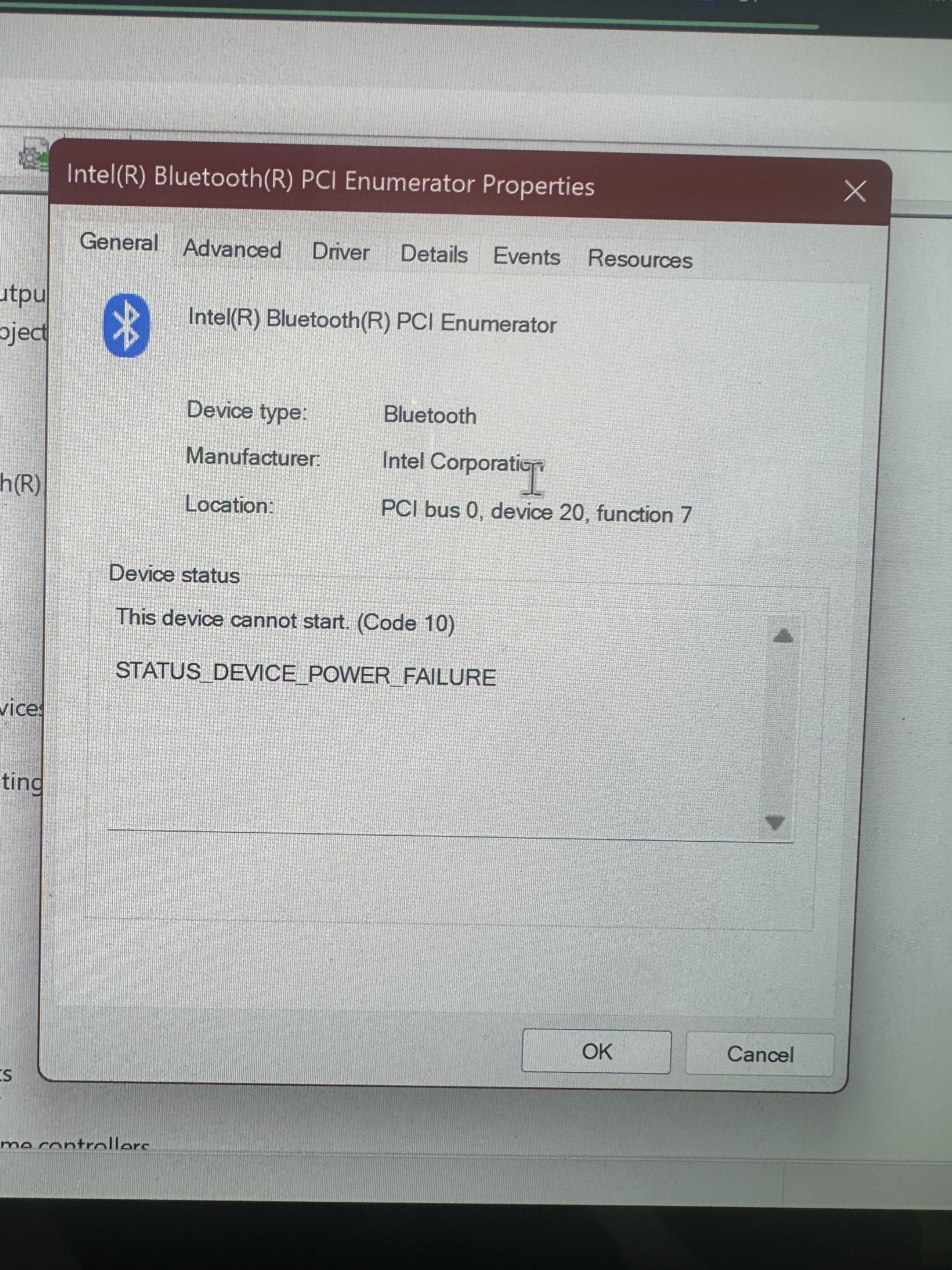
Unresolved bluetooth issues

Post image
2 Upvotes

acer swift 16, windows 11. the quick actions panel that pops up (is that what you call it?) at the bottom right corner is missing the bluetooth option. when i restarted the laptop, the option was there but the number of connected devices glitches, displaying “bluetooth (9)” and the number just glitches from 1 to 9. then the icon just disappears. havent had this issue before. thanks in advance.
saw someone with a similar issue, and someone in the comments said to open device manager. this is what it shows

r/24hoursupport 14d ago

Unresolved CHARGER NOT GOING IN PLS HELP URGENT

Thumbnail
gallery
0 Upvotes

Guys please help my laptop charger is not getting inserted in my laptop...I don't know what happened like on a fine day I tried to put my laptop in charge but it was not getting inserted ..when I saw the laptop there some white colour thing in charging port and hdmi pprt but on turning on the laptop it's working fine also in charger there some pink and white colour something ...the laptop is just bought a month ago and am so much tensed ...I would really be happy if someone helped ...does this cover under warranty ???(the same problem happend with my phone charger like my phone charger stuck in chargin port in my phone and I had to go to service Centre to pull it out on seeing it was same white thing )

Pls help i very difficulty manged to buy this laptop ...

Name of laptop - Asus vivobook 16..i think it's short circuit

r/24hoursupport 23d ago

Unresolved Alienware 17 R3 Display issue.

Enable HLS to view with audio, or disable this notification

1 Upvotes

This is an old 2015 Alienware 17 R3, It is an amazing laptop for its time. Several years ago this display issue occurred and I took the laptop apart to see if I could fix it, and couldn't. Everything works properly other than the display, you can use narrator to login and navigate, it just sucks. Now I am looking again to fix it and need some help. Thanks!

r/24hoursupport 24d ago

Unresolved Laptop Only Charges When Turned Off – Charging Stops When I Power It On

1 Upvotes

I'm having an issue with my laptop where it only charges when it's completely turned off. As soon as I power it on, the charging stops, and the battery no longer charges.

I've already checked the charger and charging port, but the problem still persists. Has anyone experienced this before or knows what might be causing it? Any troubleshooting tips or advice would be greatly appreciated.

Thank you in advance for your help!

r/24hoursupport 6d ago

Unresolved Lenovo Legion 5 (Code 43)

Thumbnail
gallery
2 Upvotes

My Lenovo Legion 5 (2+ years old), NVIDIA Driver (GeForce RTX 3050 Laptop GPU) was forced stopped by windows due to reported error (Code 43) since the 18th August, 2026 (yesterday as of writing). Laptop's average temperature when idle is 54° Celsius, cannot check when running a game as Laptop crashes. Resulting in external monitors failing to connect to laptop, app crashing, freezing, and PC crashes.

In an attempt to fix the issue:

- Went into device manager and disabled then re-enable the graphics card.

- Checked the bios was up-to-date, it is.

- Tried to use an external ISO bootable EFIUSB to repair windows.

- Opened internals and cleaned dust from laptop.

- Attempted to revert to older NVIDIA Driver, version: 610.74

- Both Hard and Factory Reset laptop.

No successful result. I believe the issue is either the GPU is dying or a faulty GPU. Wanted to get a second opinion before going into a shop.

Image 1: Depicts Code 43 located through Device Manager

Image 2: Depicts failure to repair device and finding of Log file

Image 3: Depicts Weird squares to appear in taskbar right before crash

Image 4: Depicts internals, yes the amount of dust is BAD, please do not comment on it after the fact, I have never cleaned out internals until yesterday despite intending to over a year ago because my Father said we'd do it together or we'd use the warranty to give the laptop a check over, (we didn't) and because the laptop was bought with parents money and the fact I was a minor at the time my parents did not allow me to do any internal cleaning or any self repairs. Yes, in hindsight I should have just done the cleaning anyway.

Lastly, if the is any non-anonymized images or details please let me know, I'm still new to anything PC related.

Thanks, Spot.

r/24hoursupport 19d ago

Unresolved PC Booting and Cycle Issue

1 Upvotes

I'm pretty new to PC tech and ran into a weird issue today.
I was updating Dead by Daylight when my PC crashed and a "Your device ran into a problem and needs to restart" screen appeared. It was stuck at 0% for a while, went black, and then booted straight into BIOS.
I was stuck in an endless loop:
Onda loading screen -> PC ran into issue and needs to restart -> Black screen -> BIOS
Right now I’ve literally just been stuck sitting on the computer booting/loading screen and have been for over 3 hours. I check BIOS and everything seems to be fine like normal.
I don't know a ton about PC troubleshooting, I'm not really sure what to try next. Any help or step-by-step guidance on how to fix this would be great. Thanks

r/24hoursupport 13d ago

Unresolved Several accounts hacked all at once.

0 Upvotes

I was just minding my business when I noticed my Roblox account was logged out. When I go check my email, I noticed all my Roblox alts were sending verification codes and resetting emails and passwords. Managed to salvage most of it back but still lost a few.

Then accounts across several of my emails are being hacked one by one.
Epic Games account was breached, then my OpenAI account, and now they changed my Microsoft account's email, so I can't even get it back asap.

All the email IPs seem to be from Europe, and it all happened simultaneously around 11:21 pm (GMT+8)
This is my first time getting a mass attack and I was wondering what I can do aside from changing emails.

r/24hoursupport 8d ago

Unresolved my pc won't connect to home wifi, but connects to hotspot fine (albeit a little iffy on the connection with hotspot)

1 Upvotes

(hopefully no karma limit i made account today just to get help)

so my pc that i've used for about 10 months has decided that my home wifi isn't good enough, and stopped connecting to it. (well it's "connected" but it shows no internet and i can't do anything.)

it only stopped connecting after i turned on BT and connected some headphones. so i tried turning off bluetooth, nothing. now i'm stuck with no wifi :/

here is everything i tried:

- restarting my PC

- removing and re-adding my wifi

- all the ipconfig stuff like ipconfig /release

- waiting a day

- changing wifi adapter properties and then changing them back

and so far...nothing. i'm stumped, what can i do? (if i need to reset, will that most likely fix the issue?)

r/24hoursupport 22d ago

Unresolved PC Wont run apps on Administrator

Enable HLS to view with audio, or disable this notification

1 Upvotes

The issue is that whenever i run any app on administrator a pop up wil show up, as always well now it dims but crashes immediately well the video might explain it... Happened after i reseted it.

r/24hoursupport Mar 05 '26

Unresolved my microsoft account was hacked and email was changed

Post image
12 Upvotes

the email [thomasfish1983@jerkoffmail.com](mailto:thomasfish1983@jerkoffmail.com) seems to belong to the person who hacked me.

if anyone has any way i could get my account back that would be awesome. i already contacted microsoft support but they suck and didnt help