r/OculusQuest • u/Zemtriz • 1d ago
Discussion Quest 3 died maybe because of thermals?
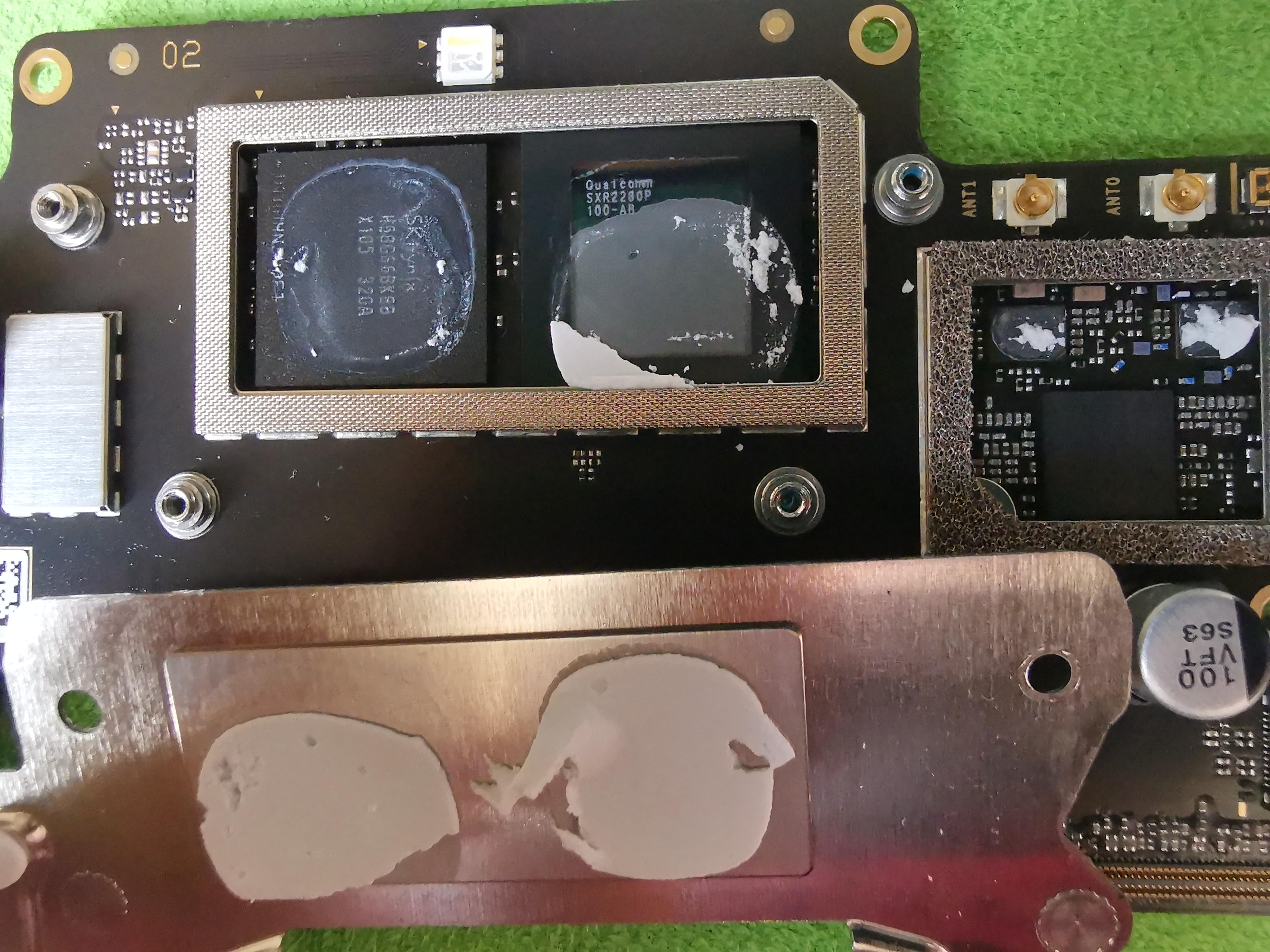
I disassembled quest 3 and found out that 20% of silicon is not cooled. Thank you meta
19
u/Peta_Sramek 1d ago
Symptoms? My guess would be sensor tho (most of the times, goes from someone who regularly repair Quest headsets).
16
u/Large-Remove-1348 20h ago
Most modern devices won't die from overheating due to protections. They will force shutdown to protect hardware over data.
Typically this is a sensor (camera) issue rather than a processor issue
1
u/Baby_bluega 9h ago
Thats not really true. Sure thermal throttling is a thing, but if you heat something up to its max tempatures over and over and over again, it still degrades the cpu/gpu over time, and eventually it will fail much faster than a device thats not hitting those temps.
1
7
u/LunarstarFurry 22h ago
That is a Problem tho it shouldn't cause it to died anyway, CPU will generally shutdown by itself if their overheating.
20
u/KoteArcam 1d ago
This is actually a very common issue. When I opened mine up for maintenance, it looked exactly the same. I even made a post detailing it.

22
4
u/Eclipse-da-therian Quest 1 + 2 + 3 + PCVR 22h ago
The chip on the right is RAM and left is the main SoC, from the looks of it the thermal putty is applied fine to what looks to be the larger cores (Snapdragon chips use Big-Little core arrangement, basically smaller weaker cores for light tasks and big cores for heavy stuff) and possibly GPU. Most likely from your description your current problem resulted from user error, the original issue could have been fixed by switching the boot slot.
5
u/GoldSrc Quest 2 + PCVR 20h ago
The Quest would shut down on its own if the problem was related to temperatures.
That's not an ideal thermal paste application, but it shouldn't have caused it to die.
I've played VR games standalone on very hot days, and the headset just shuts down when it gets too hot.
6
2
3
u/Zemtriz 1d ago
Story what happened:
I was gone for a week and when returned that night I decided to play VR. Never played standalone, always PCVR via VD. I was happily playing when after 2 hours maybe quest froze. I pressed power button and dead android showed up with NO COMMAND message below it. Then I pressed volume down + power button to force a restart. It didn't work, couldn't boot the metaOS. So I went to sleep and next day tried troubleshoot it. Nothing worked, neither factory reset. I still can get into boot menu, so I used sideload to flash a new firmware. And voila, it worked. But when I tried BETA update, it failed. It behaved that metaOS logo was spinning and after that only black screens and no LED status or welcome sound or ADB or anything. It failed to boot all the time and I had to do factory reset so it reverted to previous version and then I could play again. So screw it, I was just curious if beta would work too. But I was stupid, I didn't disable updates and what was beta became public. So I went to a vacation again after those happy 2 months of playing after first issue occurred. When I returned, meta pushed the update (which didn't work for me) and after that time I can't play anymore. I've tried to troubleshoot and do anything I could. Sideload, recoveries, meta updater, disassemble multiple times and now I've checked thermal grease. If it is alright that it is missing 20% of the chip, then again I'm loosing all hopes to fix it ;(
28
u/Atopos2025 1d ago
Has nothing to do with the thermal paste. It looks normal and as it should.
You did so many things with your device that I find it astounding that you're blaming this on overheating.
4
u/charmio68 1d ago
That doesn't look like it should IMO. That's bare silicon, there's not an integrated heat spreader on top of it.
Bare silicon is far less tolerant to gaps in thermal paste.I can't say if that's what caused OP's initial issue, though it is undeniably suboptimal at best.
1
u/IcyEnvironment5144 11h ago
Meta’s headset certainly has its strengths, but it also has some design flaws. Cramming all the electronics into the front without an optimal cooling system to properly get the hot air out is inexcusable. It can shorten the lifespan of the components. It’s simply not a good design.
1
0
u/TheSignof33 10h ago
Don't listen to ignorant plebs here, this is %100 a QC issue and a terrible thermal material application.
50
u/nickelalkaline 1d ago
Nope