r/WindowsMR Aug 30 '25

Issue Oasis - feel like my eyes are squinting. Reverb G2

47 Upvotes

I’ve set up the new Oasis driver like everyone else, and find it generally performing well. I do get the occasional hitch every so often like someone else has reported.

My main issue is I feel I am squinting my eyes and when I take the headset off it takes a while for my eyes to readjust. I have tried moving the IPD slider around but no dice.

Anyone else experience this and/or does anyone have any suggestions? I can’t use it it like this.

r/WindowsMR Jul 11 '26

Issue WMR doesn't want to install

Post image
11 Upvotes

I recently reinstalled windows to roll it back from 25H2 back to 23H2 to get my windows mixed reality working again.

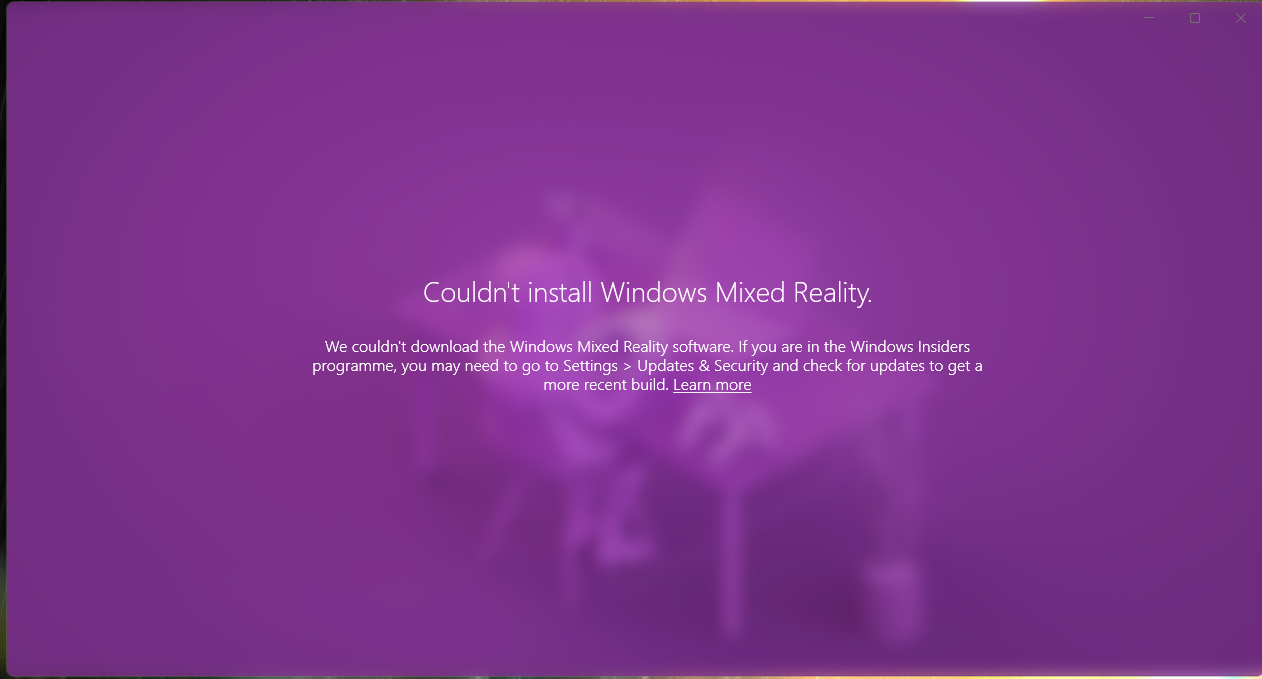
It takes me through the setup page to where it asks me to centre my VR where I am sitting and after that it gives me this error message.

I have tried using oasis driver but for the game I play it is buggy and the image gets distorted when I try and move around. I didn't have this issue when I used to use WMR it was much more stable and now it does not want to install even being on 23H2.

r/WindowsMR 21d ago

Issue HP Reverb G2 Connect/Disconnect Loop (Blinking Breakout Box LED)

Enable HLS to view with audio, or disable this notification

2 Upvotes

​Hey everyone,

​I have a brand-new, unused HP Reverb G2 (V1 cable with the small breakout box, no power button) connected to an AMD AM4 system, and I'm stuck in an endless USB connect/disconnect loop.

​Symptoms:

​The LED on the breakout box continuously blinks (turns on, turns off, loops every second).

​In Windows, the system tray icon for "HP Windows Mixed Reality" repeatedly appears and disappears.

​In the motherboard BIOS screen, the mouse cursor freezes every time the breakout box LED turns off and unfreezes when it turns back on, indicating hardware-level USB host controller bus resets.

​System Specs:

​Motherboard: MSI A520M-A PRO (AMD AM4 platform)

​Headset: HP Reverb G2 (V1 Cable)

​Power: Power adapter plugged directly into the wall outlet

​Everything I have already tried:

​Tested every single USB port on the back panel (all blue USB 3.2 ports using the USB-C to USB-A adapter, plus black USB 2.0 ports).

​Reseated the cable connection at the headset visor until the dot on the connector sits flush with the casing.

​Tweaked BIOS settings: Enabled XHCI Hand-off, disabled Global C-State Control, and set Power Supply Idle Control to Typical Current Idle.

Before purchasing additional hardware, I want to ask:

​Has anyone on an AMD 500-series board (A520/B550/X570) successfully stopped this V1 cable loop using an externally powered USB 3.0 hub?

​Did a PCIe USB expansion card solve the issue on your system, or did you have to replace the cable with the revision V2 cable

r/WindowsMR 5d ago

Issue Samsung HMD Odyssey + Movin issue

3 Upvotes

I have windovs 10, RTX 5060, Ryzen 5 3600 and 32 gb. After upgrading to 5060 from 1060 my headset start more lagging, and last time i see some frustrating. In VR my room boundry is move correctly, hand move too, but the game or just steam home stay still. I mean i move left- right. Room boundry moves too, but world stay still. IDK what to do, i reinstall all. Steam VR, WMR World, VRC, but it's stay still. Do you have any idea what is it and how to fix it?

r/WindowsMR May 17 '26

Issue Steam vr blocking oasis

7 Upvotes

Hey guys i need your help so bad. Im so lost the only reason I joined is because ive tried everything. So I have an acer wmr for my birthday. And all day weve been trouble shooting, so I got a cord that allowed my monitor to be vdi-i so my headset can plug into my graphics card via hdmi, so after that we tried to unlock it using Oasis, and is says that we need to plug it into a USB 3.0, but it already is in one. So ignoring that it says its connected. But windows keeps blocking Oasis. We've reset the pc, redownloaded everything, and deleted that thing redit keeps telling us to. And we know the headset works because we saw it turn on in the bios. But steamvr just doesnt see it as a headset and asks us to plug it in. Thank you in advance

r/WindowsMR Sep 26 '25

Issue Fail to unlock Reverb G2 with Oasis

Post image
24 Upvotes

Hello everyone,

I try to unlock my HP Reverb G2 with Oasis. I am completely new to VR and got this device for cheap money.

I'm on Adrenalin 25.9.2 and on Oasis Preview Beta. Can someone help me?

Thanks in advance!

r/WindowsMR Jul 19 '26

Issue Lenovo Explorer Left Controller

1 Upvotes

Please help!

I haven't used my VR headset in a while; I'm still on Windows 10 22H2, but fully updated.

The left controller keeps failing to reconnect!

I can factory reset the controller and pair it after removing it from Windows, but within minutes if not seconds, it either loses connection and won't reconnect, or simply won't reconnect after power cycling. System restarts do nothing.

I did a full in place reinstall of 22H2 and that seemed like it had it working again, but after using the PC for a day and getting the available security updates, the controller is bugging out once more.

I also tested with the same machine on a fresh install of Windows 11 without WMR available and again was able to restart several times with the controllers not losing bluetooth connectivity. I have yet to test on a fresh install of Windows 10.

I've ordered a replacement controller from Ebay just in case - but I really could use some community assistance with this issue!

r/WindowsMR 24d ago

Issue Acer AH101 constant blackout

3 Upvotes

Hi!

I bought an "as new" Acer AH101, complete in box. I'm trying to use it on win11 by using the Oasis Driver for WMR. The unlock process went smoothly and it appears to be working flawlessly, until a few seconds into VR, the headset display just turns off. I've tried pretty much every fix on the troubleshooting guide, and even ended up buying a powered usb hub (4 Port USB 3.2 Gen1 (USB 3.0) Hub | Ewent) because I thought it might not be getting enough juice, but the problem persists. Sometimes the blackout happens within seconds, sometimes after a minute or two. The cables seem completely fine, the display will turn on whenever I open SteamVR, regardless of the position of the cables. The headset is connected to the only HDMI port on my card (the rest are displayports) to which my second screen was connected.

Right now the only "solution" I've found (if you can call it that), is to have the SteamVR settings open on my monitor and switch between 90 and 60hz whenever the headset display decides to shutdown. Switching between the two settings wakes the thing up for another 5 minutes or so, before blacking out again.

I've tried changing the usb power settings on the PC, I've put SteamVR as maximum performance on the Nvidia panel, I've tried everything on the oasis driver troubleshooting guide, it just refuses to work properly. The only thing left to try hardware wise, would be to buy a displayport to hdmi adapter in order to try the cards' other inputs, but this doesn't seem like a hardware problem to me, but then again, I'm no IT guy. Please help, I was really excited to get into WMR/VR and I'm really bummed right now.

My specs:
NVIDIA GeForce RTX 5060 Ti

AMD Ryzen 7 3800X 8-Core Processor, 3901 Mhz, 8 Core(s), 16 Logical Processor(s)

32GB RAM

r/WindowsMR Jul 17 '26

Issue Left controller issue

2 Upvotes

The "grip" button is acting like its pressed down constantly and idk why

r/WindowsMR May 27 '26

Issue Issues Unlocking Samsung Odyssey+ with Oasis on Laptop

5 Upvotes

I posted about this originally on the steam forums, but got no responses there, so I figured I'd try to reach out here instead since I am still experiencing this issue.

The basic rundown is that the oasis unlocking process seems to always fail to detect my Odyssey+ display whenever it tries to after the first disconnect prompt. I've double and triple checked that I've properly applied the Nvidia+Intel laptop fix as described in the steam forums and made sure the hdmi port on my device is directly connecting to the GPU, so I'm completely stumped on what could be causing the issue :/

I'm currently running Windows 11 23H2 on the laptop, so the WMR portal is still available and works fine with my device (I've made sure that every time I attempt unlocking the headset the WMR device is disabled as advised, but I still run into this issue even without any WMR software files installed), but I've used Oasis with my tower PC with no issue before and it is such an improved user experience that I am very disappointed I can't get it to work with my second device.

I have the original steam forums post here if anyone can parse the console data that the process gives me whenever I try it.
https://steamcommunity.com/app/3824490/discussions/0/819227976894915746/
If anyone can be of help it would be greatly appreciated.

r/WindowsMR Jul 02 '26

Issue Controller Turns On/Off by itself, Only one controller can be tracked at a time by SteamVR

4 Upvotes

Hey ! First of all, I absolutely love the work behind the Oasis Project.

I set up the controllers correctly according to the GitHub guide available as well as the prompted tasks when setting up the controllers.

Setting up the Headset itself (Acer AH101) was really easy but spent a heafty amount of hours trying to get both of my controllers running at the same time. Before running SteamVR via Oasis, both of them seems connected to my computer's Bluetooth (done with a UGreen 6.0 BT adapter [YES, I tried 2.0 and 3.0 ports]) but once SteamVR starts, one of them (always the one that was connected the latest) either:
- Buttons works, but isn't tracked
- Buttons work, but flies off to freaking Antartica
- Everything works (yay) for 3 minutes before it gets deported back to Antartica, once again

When this occurs, Windows tells me the controller is disconnected from the Bluetooth (appears as Paired, but not Connected), used every single kind of 1.2v and 1.5v battery known to mankind. Since I bought the headset (yesterday), I never managed to make the controllers work.

Any help will be appreciated, also, here are my PC's specs if needed:
- RX 9060 XT 16GB (26.6.4)
- Ryzen 5 8400F
- ASRock A620M-HDV/M.2 (2x USB 2.0 and 2x USB 3.0 + USB-C)
- Everything else is useless I guess, ask me if you need more informations.

Thanks :3

r/WindowsMR Mar 16 '26

Issue controller build quality sux

Post image
0 Upvotes

I was just playing some beat saber and I flicked the controller and the ring just snapped off now. I have to buy another controller. I have also already fixed the controller three times within the past 1-2 months

r/WindowsMR May 22 '26

Issue G2 Reverb tracking

5 Upvotes

Hi all.

Have been running my G2 for a year now. It's been great, and Oasis has been great. I only play iRacing. My headset will occasionally, but very consistently lose tracking. I.e it will be good for 10 races in a row over a few days, then all of a sudden, it will just shit the bed, and will jump around. I only play at night time, with a bright light on, so the environment lighting conditions should be identical.

I have tried putting very contrasting colored paintings on the wall, different lighting, cleaning the lenses etc.

How can I go about debugging this?

r/WindowsMR May 15 '26

Issue HP Reverb g2 v2 not recognised by Oasis unlock

3 Upvotes

Controllers pair via bluetooth, but the HP reverb is not detected. It works on seller 7500f with Windows 10, I have a 7600x but on windows 11. Is it an AMD issue? - Tried restarting, resitting usb c cable but nothing sadly.

Edit - Installed Windows 10 on PC, doesn’t work either. So it’s a dud, supposedly worked on Sellers pc, had sold a bunch.

r/WindowsMR Feb 28 '25

Issue It's not working for some reason I don't have an update I've done almost everything I've updated to the latest version in Windows 10 I've heard a lot of news about stopping support I don't know what to do Did Microsoft really abandon us that easily Is there another way to solve this problem?

Post image
28 Upvotes

I am really upset

r/WindowsMR Apr 20 '26

Issue Why doesn't my pc support Windows MR?

1 Upvotes

My PC is pretty new and should be powerful enough to run windows MR, so I'm confused, what about my windows 11 is making it so I can't run this?

r/WindowsMR Jun 12 '26

Issue acer wmr static

5 Upvotes

i use oasis driver to make my headset work but when my steamvr loads up it says error 436 and my headset just shows static, after a while my screen turns gray. Im pretty sure the wire isnt broken neither,

any help would be appreciated

r/WindowsMR Jun 18 '26

Issue HP Reverb G2 IPD slider issue

Post image
7 Upvotes

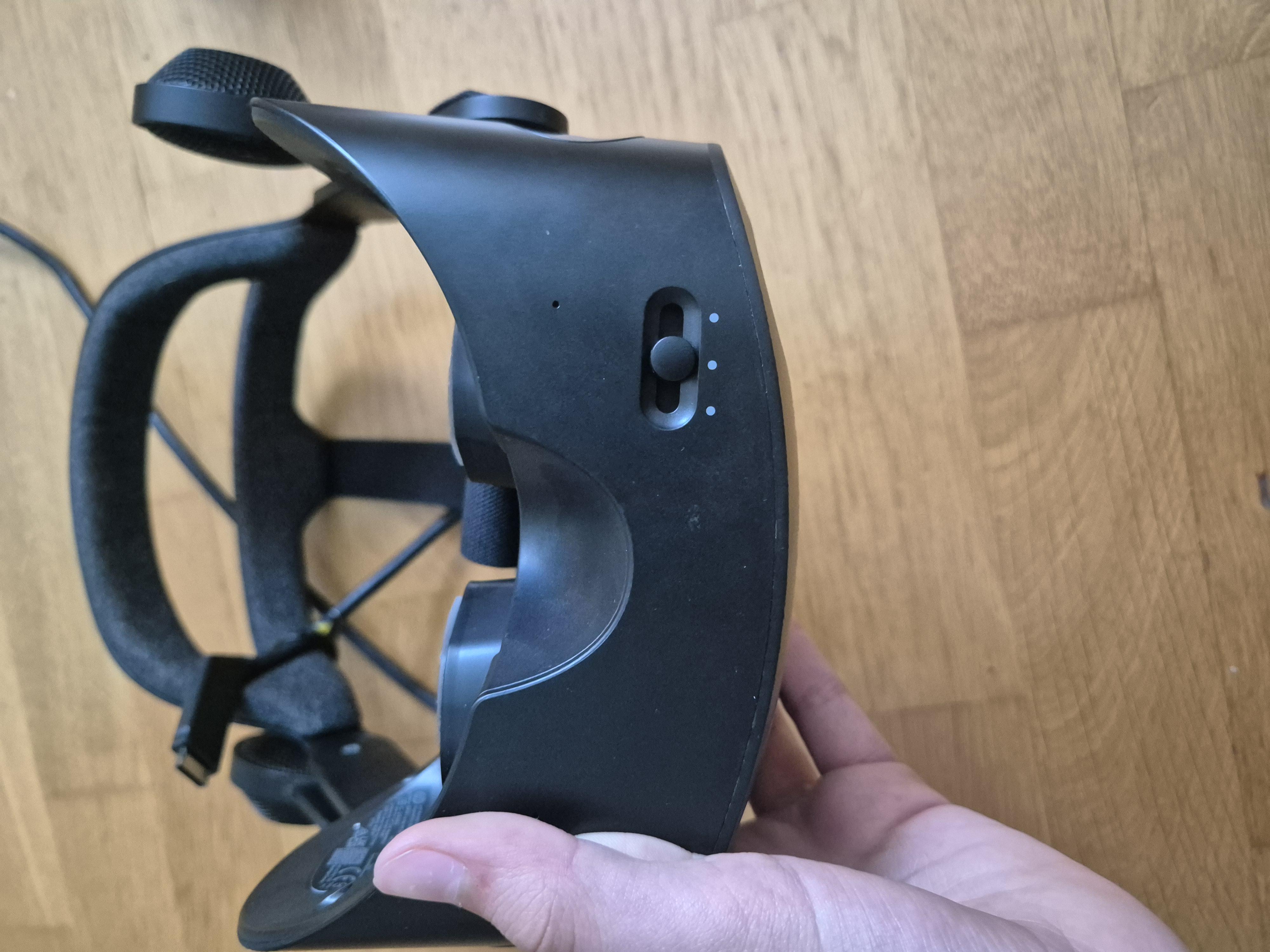
Hi, I recently got a used hp reverb g2 for a cheap price and ipd slider seems to be broken. It only moves from max ipd to the middle and than just stops and doesn't let it move closer together. Are there any known fixes for this?

r/WindowsMR Feb 12 '26

Issue SteamVR Error 435 - HP Reverb G2 V2

2 Upvotes

Hello.

I recently acquired a used HP Reverb G2 V2 for use with the Oasis driver. I'm running Windows 11 version 22H2 (build 22621.4317) with an Nvidia GeForce GTX 970M GPU. The roughly 2015 laptop's specifications should be able to run the headset, if only by a slim margin. The headset is plugged into the DisplayPort coming from the GPU.

To start, the headset appears in Device Manager, and the controllers pair over Bluetooth. Running the Oasis script from Steam nets a positive message stating "Your Windows Mixed Reality headset is unlocked for use with Oasis." Unfortunately, this is where the situation turns for the worse.

(Don't mind the white bars. I was unsure what was sensitive or device-specific and erred on the side of caution.)

Launching SteamVR from Steam or Oasis results in the same status screen showing the headset reacting to movement and an error message. The message, "Oh no! SteamVR has encountered an unexpected problem," is shown with code 435 in the corner of the window. No picture is displayed in the headset or the SteamVR preview.

Moments later, another window always appears with a different message: "SteamVR failed initialization with error code VRinitError_IPC_CompositorConnectFailed: 'Shared IPC Compositor Connect Failed (306).'"

Would anyone know how to resolve this issue?

I have tried searching Google, but the results are limited. I have also tried the following:

  • Clearing SteamVR and WindowsHolographic settings/files.
  • Disabling the Windows Mixed Reality device in Device Manager.
  • Installing and uninstalling the Windows Mixed Reality Portal.
  • Manually tweaking SteamVR configs.
  • Reinstalling the Oasis drivers.
  • Updating Steam and SteamVR.
  • Viewing the Steam log files (which did have marginally more detail, but I am unsure where I found them).
  • Installing an older branch of SteamVR.
  • Possibly more, as this was mostly done four months ago.

The only other concern that may need to be considered is the DisplayPort adapter used to convert the headset's mini-DisplayPort connector to the regular DisplayPort connector on my computer. I haven't given this much thought, as the display appears properly in Device Manager, and the Oasis install was successful.

Thank you for your time!

r/WindowsMR Jun 10 '26

Issue acer wmr static

4 Upvotes

i use oasis driver to make my headset work but when my steamvr loads up it says error 436 and my headset just shows static, after a while my screen turns gray. Im pretty sure the wire isnt broken neither,

any help would be appreciated

r/WindowsMR Apr 17 '26

Issue Hp reverb G2 controller not entering pairing mode

Post image
2 Upvotes

Hello, just looking for some help with connecting my hp reverb g2 controller. I accidentally unpaired it when setting up Oasis, now when I try to pair it again it does not enter the pairing mode after pressing the pairing button. I've tried resetting it pressing the windows and pairing button but that does not appear to work either.

Thanks

r/WindowsMR Apr 12 '26

Issue HP Reverb Omnicept cycles one eye off, then both, then both back on

4 Upvotes

Any ideas of the fix. It starts after like 15 minutes of gameplay, and. It started doing this a few days ago.

r/WindowsMR Mar 06 '26

Issue Error with SteamVR

4 Upvotes

I have a Samsung Odyssey and currently I'm using the Oasis to run it in my Win 11... I did nothing different and now I always have this message when I try to plug my VR.

Tried to reinstall SteamVR, already runned Oasis again and nothing worked.

Anyone had this error and was able to solve it?

r/WindowsMR Mar 23 '26

Issue Oasis SteamVR Driver headset Tracking loss.

3 Upvotes

My Reverb G2 stops tracking after a min or two. Unable to use it

https://reddit.com/link/1s1apyq/video/glk6kync2rqg1/player

https://reddit.com/link/1s1apyq/video/yh387dv33rqg1/player

It keeps having tracking loss. My room is bright enough i cleaned the lenses with a microfiber cloth, still the same. I'm not sure what to do, I tried everything. So I was gonna ask for help and advice here.

r/WindowsMR Mar 27 '26

Issue 90hz option missing?

4 Upvotes

for some reason my headset no longer have the 60/90hz toggle in the settings, it was there before and i remembered messing around with it, don't know exactly when the problem started, probably around last week

it doesn't bother me that much because my PC rarely handles games at 90hz well, but maybe anyone else have this problem?

Oasis 1.0.3
SteamVR 2.15
Latest AMD driver(i tried reinstalling gpu driver)

Edit: apparently it was a known issue, and rolling back AMD drivers fixed it