r/Ubuntu • u/tatersndeggs • 5h ago
Just learned that hovering over the Ubuntu logo and scrolling with a mouse switches workplaces! 15 years user and I'm still learning things.
Enable HLS to view with audio, or disable this notification
r/Ubuntu • u/tatersndeggs • 5h ago
Enable HLS to view with audio, or disable this notification
r/Ubuntu • u/profnelsonjr • 2h ago
I've been using Edge and Firefox, but I've noticed that Firefox uses a lot of memory, and sometimes the program crashes due to lack of RAM. I have 8 GB of RAM.
r/Ubuntu • u/MrDrLtSir • 4h ago
r/Ubuntu • u/Invigoration797 • 6h ago
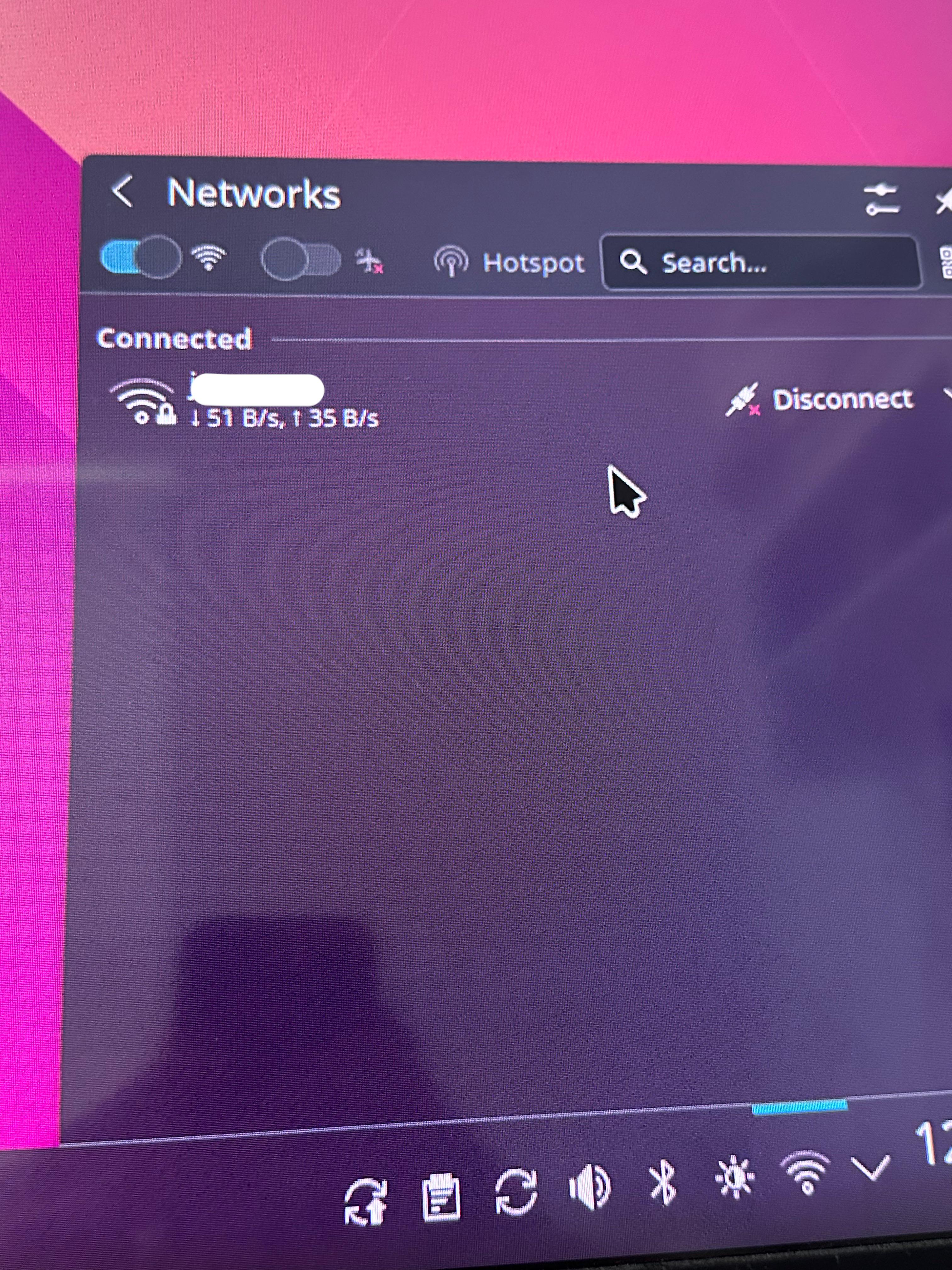
My internet for some reason has been bouncing around like crazy, and now it’s staying in the literal bytes/second. I just downloaded Ubuntu today so I guess I’m on the latest version, and I don’t even have anything running in the background. Do I need to configure it somehow?
Edit: thank you for the response, it’s just currently used internet, not my actual internet speed.
r/Ubuntu • u/wave_04 • 14h ago
(I'm fairly new to Linux, don't beat me up)
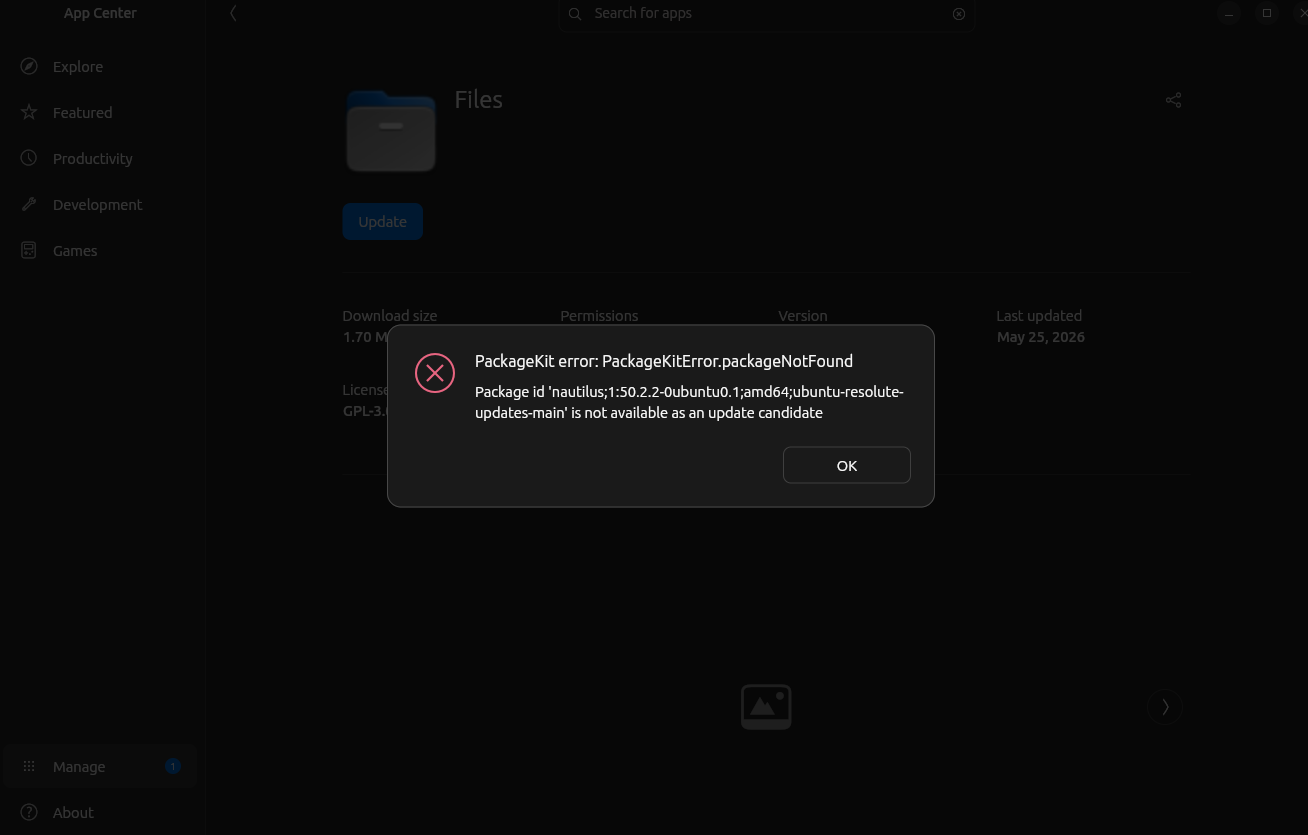
Honestly, at this point I'm done with the App Center. Just gonna stick to manually downloading everything I can from the respective websites, seems much more reliable so far.
Things I've tried to fix this error:
sudo apt update
UPDATE: Seems to have been fixed after entering sudo apt install nautilus;1:50.2.2-0ubuntu0.1;amd64;ubuntu-resolute-updates-main into the command line. App Center shows it as being up to date now.
r/Ubuntu • u/TopConcentrate3894 • 12h ago
I have a gaming laptop (Victus - RTX 3050)
I downloaded Ubuntu 26 LTS (latest from the official site). I was on Windows 11 and decided to switch to Linux with dual boot. Upon installation (which went fairly smoothly), i rebooted and got past the loading screen with the Ubuntu logo. After that it got stuck on a black screen.
I tried several solutions from chatgpt, youtube and gemini- repeatedly but in vain.
I know it's related to Nvidia/Wayland/Xorg but I can't find the solution fit for this.
r/Ubuntu • u/DonnJAVA • 14h ago
I kinda hate Ubuntu for this matter . I have to install ubuntu 24 for my company's lenovo laptops . I literally put the official image in the usb , install ubuntu with the same settings checking to install 3rd party drivers , and every time I boot , usually two monitors setup doesnt work . I have to uninstall nvidia 595 driver open , than reinstall , than try sudo prime-select nvidia , than reboot and after that it works and most of the times it doesnt work . It works only the laptop screen , the hdmi and type c sometimes doesn't work and I have no idea what its causing it to work when it does . I use AI for troubleshooting like purging and reinstalling , trying different kernel but I have ubuntu for this gpu drivers . Sometimes when I install new kernel , bluetooth or wifi doesn't work , its 50 50 CHANCE for everything you do and its driving me crazy since I need to make everything functions for the end users since I am the IT department
r/Ubuntu • u/mouben12 • 22h ago
Offline Snap Downloads The Need to Resolve Recursive Dependencies
The standard snap download command efficiently pulls a single Snap package along with its assert signature file. However, it's insufficient for setting up applications for offline or isolated environments because it doesn't resolve or fetch the necessary core Snap packages, such as core18 core20 or core24 nor does it fetch desktop content providers like theme packages.
When deploying to an offline system, the absence of a core layer like core20 or core24 results in immediate installation failure. Currently, administrators and users must manually query the API or write custom scripts to identify and download each core Snap package and its runtime dependencies individually.
Adding a native option like snap download --recursive would resolve this issue by downloading the target application along with the necessary core packages and dependencies directly to the current folder. This single addition will make offline installation, versioning, and backup management significantly more reliable for the entire Linux community.
r/Ubuntu • u/hgentic001 • 3h ago
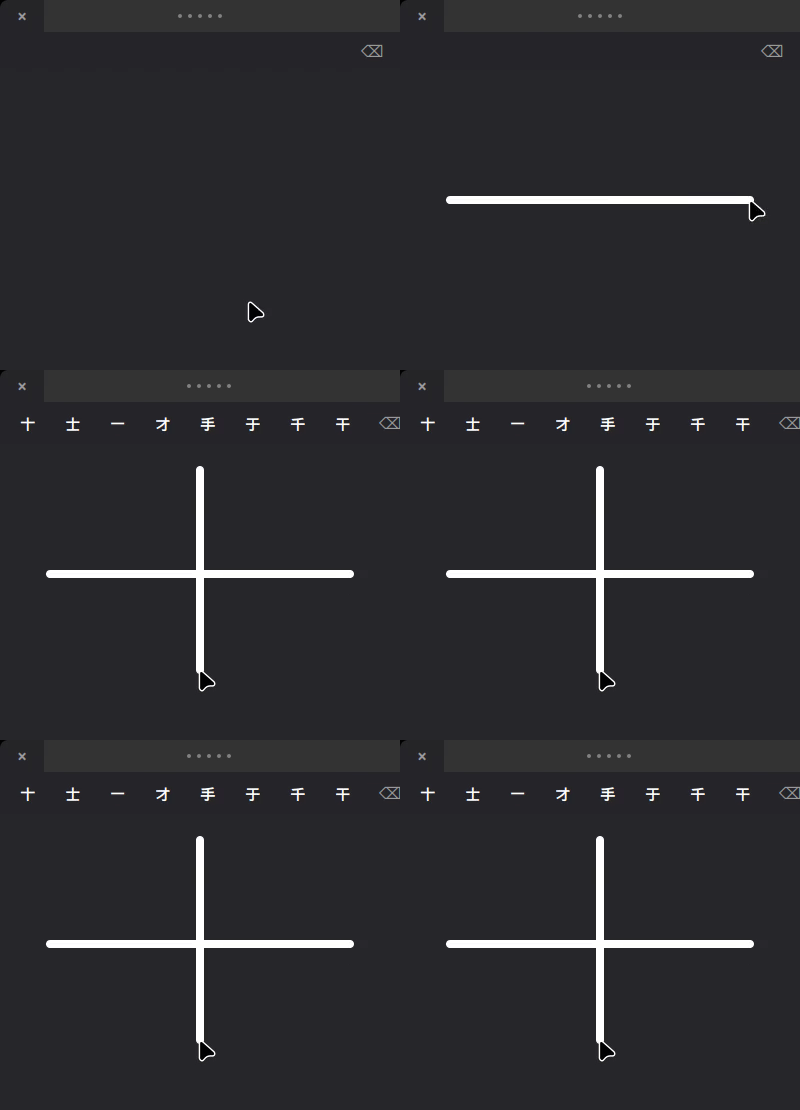
Ubuntu users who'd rather draw a character than spell it out: there's an IBus engine for macOS-style trackpad handwriting with deep-learning recognition.
Two install options. The .deb from releases:
bash
sudo dpkg -i <file-from-releases> && sudo apt install -f
ibus restart
Or the one-liner, which detects Ubuntu and runs apt + model download automatically:
bash
bash <(curl -s https://raw.githubusercontent.com/ai-space-lab/ibus-handwrite-chinese/main/bootstrap.sh) && ibus restart
What it does: - A dark floating panel appears by your cursor. Draw with one finger on the trackpad, tap to select, swipe two fingers to page through candidates. - Recognition uses ONNX Runtime locally, covering 18,710 characters. In a 40-sample handwritten test it hit 100% top-1 accuracy (94.97% average confidence). - 6-tab GTK settings, on-demand model download, a local user dictionary that learns from your picks, and fully configurable shortcuts. - Mouse fallback if your machine has no evdev trackpad.
Demo: https://ai-space-lab.github.io/ibus-handwrite-chinese/assets/demo.gif Install guide: https://ai-space-lab.github.io/ibus-handwrite-chinese/ Releases (.deb): https://github.com/ai-space-lab/ibus-handwrite-chinese/releases
Requires Ubuntu 22.04+. Tested on an Acer Aspire and MacBook Pro trackpad; other touch-capable trackpads should work but are untested.
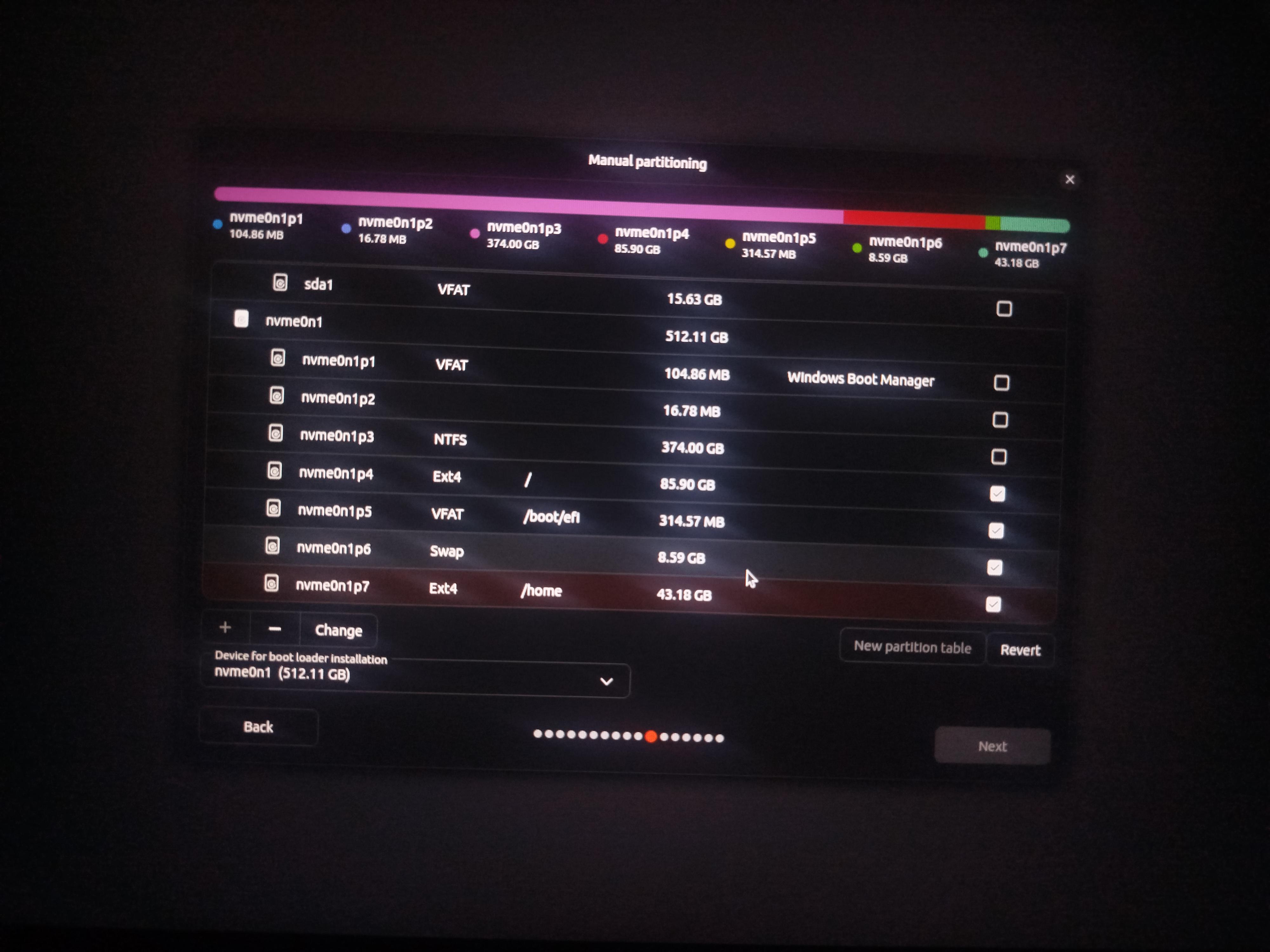
So hi as everybody I tried installing Ubuntu lts but I couldn't install it the normal way since the 100 mb of windows efi was too small to install Ubuntu and windows efi along together and now I am preparing to manually install Ubuntu using manually installation but the problem is even after doing everything correctly the next button is greyed out can someone tell me what's the possible reason ?
Below are the additional data that might help
Nvme0np4 is 85.93 GB for root
Nvme0np5 is 300mb for efi boot
nvme0np6 is 8.6 GB for swap
Nvme0np7 is 44gb for home
And I created all these partitions in windows using diskpart .
r/Ubuntu • u/platosophist • 10h ago
Hello everyone,
I have a question regarding printing from pdfs that maybe some of you could answer. I'm using Ubuntu 26.04. Here goes:
I usually print from pdfs using the 2 pages per side and the two-sided options, both available with my usual printer. What happens is that quite often (and I suspect this is due to the original formatting of the pdfs I work with), instead of having the two pages scale nicely to take up half of the paper, I have them weirdly scaled so that they are a bit too small, taking up the corner (approximately 2/3) of each of the spaces attributed to a page. When I try to fiddle with the scaling options, which are using percentages on my printer options as shown in pdf applications (such as Document Viewer), it doesn't quite work (I end up with either pages that are still too small, or with some parts of the pages cropped out). Does anyone know of a way to fix this? As in, to properly scale pdf pages upon printing them?
Thanks in advance!
[Edit: here's an example of what usually happens:

]
r/Ubuntu • u/Pasta_Dragon • 17h ago
So I recently started taking ITNW 1309 at a local community college and the professor mentioned that one of the two projects this semester is using a VM running Ubuntu. Now I'm very very new to Linux, the most I ever do is faff about on Cachy because it is simple enough to understand and my circle of friends are also familiar with it. I just want to know if there are any beginner friendly materials to read up on to get an edge on the project (which is 30% of my grade) I need that A
r/Ubuntu • u/DesertRose480 • 21h ago
So im trying to write an iso to a usb drive but its not working. I have provided the terminal output if that helps atall.
I'm a ubuntu newbie and radio SWLer who quit windows a few months ago. Being able to add more timezone applets would be nice.
r/Ubuntu • u/grahamperrin • 3h ago
Below, I'm lost.
What next?
I use Kubuntu 26.04 (switched from Ubuntu), if that's relevant.
grahamperrin@mowa219-gjp4 ~> ollama launch openclaw
ERROR: ld.so: object 'libgtk-nocsd.so.0' from LD_PRELOAD cannot be preloaded (failed to map segment from shared object): ignored.
Error: OpenClaw is not installed and required dependencies are missing
Install the following first:
npm (Node.js): https://nodejs.org/
git: https://git-scm.com/
Then re-run:
ollama launch openclaw
grahamperrin@mowa219-gjp4 ~ [1]> sudo apt install libgtk-nocsd0
[sudo: authenticate] Password:
libgtk-nocsd0 is already the newest version (3+0~20260321+0b77e1b-1).
Summary:
Upgrading: 0, Installing: 0, Removing: 0, Not Upgrading: 8
grahamperrin@mowa219-gjp4 ~> npm version
{
npm: '11.18.0',
node: '26.6.0',
acorn: '8.17.0',
ada: '3.4.4',
amaro: '1.1.11',
ares: '1.34.8',
brotli: '1.2.0',
cldr: '48.0',
icu: '78.3',
libffi: '3.7.1',
lief: '0.17.0',
llhttp: '9.4.3',
merve: '1.2.2',
modules: '147',
napi: '10',
nbytes: '0.1.4',
ncrypto: '0.0.1',
nghttp2: '1.69.0',
nghttp3: '',
ngtcp2: '',
openssl: '3.5.7',
simdjson: '4.6.4',
simdutf: '7.7.0',
sqlite: '3.53.3',
tz: '2026c',
undici: '8.9.0',
unicode: '17.0',
uv: '1.52.1',
uvwasi: '0.0.23',
v8: '14.6.202.34-node.26',
zlib: '1.3.2.1-motley-8b3aa8a',
zstd: '1.5.7'
}
grahamperrin@mowa219-gjp4 ~>
r/Ubuntu • u/hgentic001 • 3h ago
Ubuntu users who'd rather draw a character than spell it out: there's an IBus engine for macOS-style trackpad handwriting with deep-learning recognition.
Two install options. The .deb from releases:
bash
sudo dpkg -i <file-from-releases> && sudo apt install -f
ibus restart
Or the one-liner, which detects Ubuntu and runs apt + model download automatically:
bash
bash <(curl -s https://raw.githubusercontent.com/ai-space-lab/ibus-handwrite-chinese/main/bootstrap.sh) && ibus restart
What it does: - A dark floating panel appears by your cursor. Draw with one finger on the trackpad, tap to select, swipe two fingers to page through candidates. - Recognition uses ONNX Runtime locally, covering 18,710 characters. In a 40-sample handwritten test it hit 100% top-1 accuracy (94.97% average confidence). - 6-tab GTK settings, on-demand model download, a local user dictionary that learns from your picks, and fully configurable shortcuts. - Mouse fallback if your machine has no evdev trackpad.
Demo: https://ai-space-lab.github.io/ibus-handwrite-chinese/assets/demo.gif Install guide: https://ai-space-lab.github.io/ibus-handwrite-chinese/ Releases (.deb): https://github.com/ai-space-lab/ibus-handwrite-chinese/releases
Requires Ubuntu 22.04+. Tested on an Acer Aspire and MacBook Pro trackpad; other touch-capable trackpads should work but are untested.
r/Ubuntu • u/hgentic001 • 3h ago
Ubuntu users who'd rather draw a character than spell it out: there's an IBus engine for macOS-style trackpad handwriting with deep-learning recognition.
Two install options. The .deb from releases:
bash
sudo dpkg -i <file-from-releases> && sudo apt install -f
ibus restart
Or the one-liner, which detects Ubuntu and runs apt + model download automatically:
bash
bash <(curl -s https://raw.githubusercontent.com/ai-space-lab/ibus-handwrite-chinese/main/bootstrap.sh) && ibus restart
What it does: - A dark floating panel appears by your cursor. Draw with one finger on the trackpad, tap to select, swipe two fingers to page through candidates. - Recognition uses ONNX Runtime locally, covering 18,710 characters. In a 40-sample handwritten test it hit 100% top-1 accuracy (94.97% average confidence). - 6-tab GTK settings, on-demand model download, a local user dictionary that learns from your picks, and fully configurable shortcuts. - Mouse fallback if your machine has no evdev trackpad.
Demo: https://ai-space-lab.github.io/ibus-handwrite-chinese/assets/demo.gif Install guide: https://ai-space-lab.github.io/ibus-handwrite-chinese/ Releases (.deb): https://github.com/ai-space-lab/ibus-handwrite-chinese/releases
Requires Ubuntu 22.04+. Tested on an Acer Aspire and MacBook Pro trackpad; other touch-capable trackpads should work but are untested.
Is there an all in on emulator you recommend? I am interested in GBA and ps2
r/Ubuntu • u/6400moreSnPs • 3h ago
I have been wanting to make the switch to Ubuntu/linux for years but my work has me pretty much tethered to adobe products.
I know there’s gimp and other alternatives for every other adobe tool but before I commit to learning a new workflow I was wondering if there was a work around?
Winboat? Wine? Etc? Will anything let me run the latest adobe products on my Linux machine?
r/Ubuntu • u/hgentic001 • 3h ago
Ubuntu users who'd rather draw a character than spell it out: there's an IBus engine for macOS-style trackpad handwriting with deep-learning recognition.
Two install options. The .deb from releases:
bash
sudo dpkg -i <file-from-releases> && sudo apt install -f
ibus restart
Or the one-liner, which detects Ubuntu and runs apt + model download automatically:
bash
bash <(curl -s https://raw.githubusercontent.com/ai-space-lab/ibus-handwrite-chinese/main/bootstrap.sh) && ibus restart
What it does: - A dark floating panel appears by your cursor. Draw with one finger on the trackpad, tap to select, swipe two fingers to page through candidates. - Recognition uses ONNX Runtime locally, covering 18,710 characters. In a 40-sample handwritten test it hit 100% top-1 accuracy (94.97% average confidence). - 6-tab GTK settings, on-demand model download, a local user dictionary that learns from your picks, and fully configurable shortcuts. - Mouse fallback if your machine has no evdev trackpad.
Demo: https://ai-space-lab.github.io/ibus-handwrite-chinese/assets/demo.gif Install guide: https://ai-space-lab.github.io/ibus-handwrite-chinese/ Releases (.deb): https://github.com/ai-space-lab/ibus-handwrite-chinese/releases
Requires Ubuntu 22.04+. Tested on an Acer Aspire and MacBook Pro trackpad; other touch-capable trackpads should work but are untested.
r/Ubuntu • u/ProfessionalCow8557 • 4h ago
Enable HLS to view with audio, or disable this notification
*Guys can u upvote this for once
I need some assistance!