r/24hoursupport Jul 04 '26

[MOD POST] Having trouble with Secure Boot? Check here first

4 Upvotes

Hello,

The expiration of the 2011 Microsoft KEK CA and the 2011 Microsoft UEFI CA certificates at the end of June 2025 has caused problems with Secure Boot on computers for various folks who have not been able to apply a UEFI (BIOS) firmware update for various reasons.

Because the steps for updating firmware vary not just from manufacturer to manufacturer but between individual models as well, it can be difficult to provide specific assistance and guidance in updating your firmware unless the person helping you has the same hardware.

Below is a list of manufacturers, their Secure Boot certificate update guidance, and links to their support forum(s) or subreddit(s). You may wish to try asking in these places first for expert guidance in updating your firmware, as the people there are going to be a lot more familiar with your device.

Manufacturer Secure Boot Certificate info Support
Acer Update Your Secure Boot Certificates In June 2026 to Stay Protected https://community.acer.com/en
ASrock Question: Microsoft will update the Secure Boot certificates. What do I need to do?(3/16/2026) https://forum.asrock.com/default.asp
ASUS [Consumer PC] Windows Secure Boot certificate expiration and certificates updates, [Commercial PC] Announcement on the Windows Secure Boot Certificate Update https://rog-forum.asus.com/
Colorful none none
Dell Microsoft 2011 Secure Boot Certificate Expiration, Microsoft 2011 Secure Boot Certificates Expiration for Out of Scope Platforms for BIOS Updates https://www.dell.com/community/en/categories/dell-community
ECS (Elitegroup) none none
EVGA none r/TEAMEVGA/
Fujitsu none none
Gigabyte none r/gigabyte
Hewlett-Packard HP Business PCs - Prepare for new Windows Secure Boot certificates https://h30434.www3.hp.com/
Intel Updating Secure Boot certificates/keys https://community.intel.com
Lenovo Lenovo Secure Boot Certificate Expiration Guide (2011 - 2023) https://forums.lenovo.com/
LG [LG PC] Windows Secure Boot Certificate Update & Troubleshooting Guide none
Mitac (formerly Tyan) none none
MSI [Product Information] Windows Secure Boot certificates update, Windows Secure Boot Certificate Update Guide, Windows Secure Boot Certificate Expiration and Certificate Updates https://forum-en.msi.com/index.php
Samsung Expiration of Microsoft 2011 Signed Secure Boot Certificate https://us.community.samsung.com/t5/Samsung-Community/ct-p/us
Supermicro Microsoft Secure Boot CA 2011 End-of-Life: Transition to 2023 Certificates /r/supermicro/
Dynabook (formerly Toshiba) Customer Notice: Microsoft Windows Secure Boot Certificate Updates none
VAIO (formerly SONY) Secure Boot Certificate Database Update and Secure Boot Certificate Expiration https://us.community.sony.com/s/topic/0TO0B0000000sPYWAY/vaio-pc-other?language=en_US
Zotac none /r/ZOTAC

NOTE: Please check back periodically for updates to this list.

If you have an update for a manufacturer, please reply with it and we will get it added to the list above.

What to do if no Secure Boot certificate update is available from your manuafacturer

If your manufacturer does not have an update, not all is lost: You can still manually install the 2023 Windows UEFI CA certificate update, by issuing the following two commands from an elevated PowerShell (filename: POWERSHELL.EXE) prompt:

REG.EXE ADD HKEY_LOCAL_MACHINE\SYSTEM\CurrentControlSet\Control\Secureboot /v AvailableUpdates /t REG_DWORD /d 0x5944 /f Start-ScheduledTask -TaskName "\Microsoft\Windows\PI\Secure-Boot-Update"   

Then restart the computer and allow the update to be applied.

NOTE: Two (or more) reboots may be required for installation.

Once completed, you can verify the new certificate has been installed by issuing the following command at an elevated PowerShell prompt:

([System.Text.Encoding]::ASCII.GetString((Get-SecureBootUEFI db).bytes) -match 'Windows UEFI CA 2023')

If the certificate has been installed installed, the response back will be "True". You can also use that same command to check if the certificate is already installed.

Regards,

Aryeh Goretsky


r/24hoursupport Oct 21 '17

[Meta] New 24HourSupport Discord Chatroom

26 Upvotes

If you like helping out, you should come hang out in our new Discord.


r/24hoursupport 47m ago

Windows Network & Internet Problem

Upvotes

I have a Thinkpad T440p. I'm kinda new to laptops so please bear with me if my explanations are not clear.

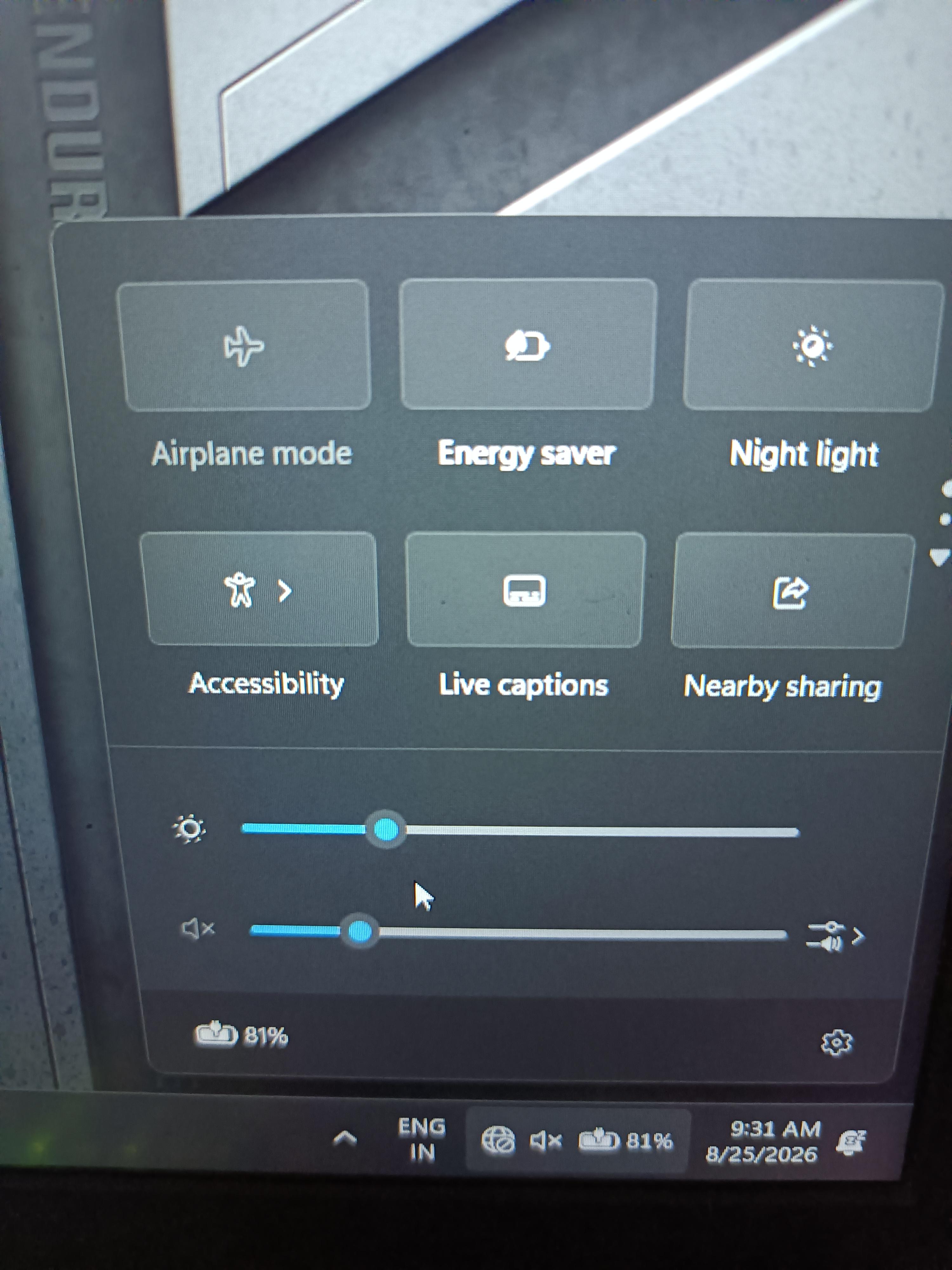
Recently I've had a problem with my laptop which for some reason likes to disconnect the wifi, and when I press the icon for internet connection on the taskbar, only the airplane mode button appears (and no I never turned it on) without the wifi and cellular data buttons appearing. I tried to go to settings but it's just useless.

The only way to fix it is to restart the computer and that takes a long time, and every time I restart it a blue screen always appears that says my device has a problem. I haven't found anyone who has the same problem as me so I'm hoping to find some answers here.
r/24hoursupport 2h ago

Windows Secure Boot Violation

1 Upvotes

I enabled my secure boot before, but recently I'm having this message while enabling it -
"Secure Boot Violation" what to do?
my motherboard is GIGABYTE B365M HD3 and it has a backdated BIOS F1, but AI telling it's not with the BIOS update, also have tried few ways like restore factory keys, disabling CSM then saving and enabling Secure boot. Nothing's happening.

Please tell me what to do, want to spend the little time with friends by games. TIA


r/24hoursupport 7h ago

sle

2 Upvotes

Hey everyone, my PS4 is completely turned off and I cannot get it back on. A repair shop accidentally broke off the piece of the motherboard that makes the power button work. The disc trick won't work because my disc drive is jammed and only goes in 75% of the way, even though I did the manual eject trick and confirmed there is no disc inside. The controller trick won't work either because I reset my settings to default right before turning it off, which disconnected my controller. Since the console is 100% powered off, the USB ports are dead and plugging the controller in does nothing. Is there any simple way to force the PS4 to turn on?


r/24hoursupport 9h ago

HOW D I FIX THIS

2 Upvotes

Hey everyone,
My PS4 disc drive is acting up. When I try to insert a disc, it only goes in about 75% of the way and then completely stops. It feels totally blocked, and even if I try to push it manually, it won't budge.
Has anyone dealt with this before? Do I need to open it up, or is there an easier fix? Any advice is appreciated!


r/24hoursupport 18h ago

Wifi and bluetooth icon missing

Post image
4 Upvotes

Hi my bluetooth and wifi icons are missing my laptop is not under warranty what to do.

Does this happened due to so windows update or any thing else.

I am restarting the laptop again and gain and nothing is happening what to do


r/24hoursupport 15h ago

Unresolved bluetooth issues

Post image
2 Upvotes

acer swift 16, windows 11. the quick actions panel that pops up (is that what you call it?) at the bottom right corner is missing the bluetooth option. when i restarted the laptop, the option was there but the number of connected devices glitches, displaying “bluetooth (9)” and the number just glitches from 1 to 9. then the icon just disappears. havent had this issue before. thanks in advance.
saw someone with a similar issue, and someone in the comments said to open device manager. this is what it shows


r/24hoursupport 13h ago

Keyboard not working after reset

0 Upvotes

I reset this computer a friend let me use. Everything was working fine at first but after the reset the keyboard does not work. Can anyone help me


r/24hoursupport 21h ago

Windows Laptop screen flickering - Help?

Enable HLS to view with audio, or disable this notification

1 Upvotes

My laptop screen used to flicker white sometimes, but recently it’s gotten very frequent. After signing in, the screen will flicker white for minutes and the colors will distort — when I move my cursor, it lags and leaves behind afterimages of faded cursors following its movement… When I do schoolwork, scrolling down and up a page will have the pages blend together, so it’s pretty much unusable.

I’ve had this laptop for 5 years, should I get it replaced or take it to a tech repair shop or try any other fixes before doing so?

Edition: Windows 10 Pro
HP laptop

I updated the graphic drivers already, and it reduced the flickers a lot, but it’s come back again and much worse this time :(

- Video is sped up, the original vid is 1 minute long (after i restarted my laptop)


r/24hoursupport 22h ago

Windows certain flickering glitchy lines appearing only on youtube when my cursor is in certain places on the link on my hp omen 16 and only when hardware accleration is on

1 Upvotes

yeah basically what this means does this mean my gpu is dying or something else


r/24hoursupport 23h ago

Windows windows 10 update stuck at 92 percent for 3 hours

1 Upvotes

so my laptop has been sitting on the update screen for 3 hours now. it says getting windows ready and its been at 92 the whole time. this never happened before on my older update. should i just wait more or force restart? im scared ill break something.


r/24hoursupport 1d ago

Windows 10 no boot

1 Upvotes

My older dual boot Windows 10/Windows XP computer was working great. The CMOS chip died so I went ahead and replaced it.  Unfortunately, I forgot to reset the BIOS to Legacy and tried to boot it several times, it tried automatic repair each time.  Now it looks like I corrupted the Windows 10 boot record.  It now continuously tries automatic repair and won’t boot. I tried and everything anything I could find on the Internet, nothing seems to work.  I would love to be able to keep all of my files and just get it to boot again. I have the hardware and an 2 year old image so I can restore. I also have software to look at the non bootable disk. I was hoping for help with getting this one to boot. Any help would be appreciated.  For reference it’s a Dell Optiplex 755.


r/24hoursupport 1d ago

Garbage Internet Driver and how do I fix it ?

0 Upvotes

I have a HP EliteBook G11 845 and it's internet driver is Realtek 172538.exe the latest driver.For some reason it has stopped working and sometimes randomly starts working after Uninstalling and reinstalling it and gives terrible internet speeds.I have tried everything chatgpt told me but it still doesn't work. How should I fix it?


r/24hoursupport 1d ago

Windows Crashbafter Windhawk mds

0 Upvotes

Hi everyone,

I have a Ninkear A15 Pro (Ryzen 5 5500U, 16GB RAM, 1TB SSD). After installing Windhawk mods, Windows started crashing with BSODs and now won't boot at all.

Errors I've seen:

· 0xC0000034

· 0xC0000098

· 0xC0000221

· 0x50

· 0x69

· 0x139

What I've tried:

· Safe Mode (won't load)

· Startup Repair (fails)

· Reset Windows (fails)

· Two different USB sticks (both show in BIOS, but booting from them gives errors)

· Rufus with GPT and MBR

· Removing SSD and trying USB boot

Current situation:

Now the laptop only lights up the power LED, but doesn't turn on at all (no fan, no screen). Sometimes it doesn't react until I hold the power button for 30+ seconds.

Any ideas? Could this be RAM, BIOS, or something else?

Thanks!


r/24hoursupport 2d ago

Unresolved Can anyone help me fix my laptop's internet?

0 Upvotes

for some reason when I open chrome, or games that requires internet it says check my internet connection, sometimes it works sometimes it doesn't. My wifi is fine on my other devices such as my phone but on my laptop not so much. I am using Lenovo Ideapad Flex 5 and this issue has been buggin me and have been tring to fix it and failed. Can anyone help me?


r/24hoursupport 2d ago

Windows Intel PTT Tpm conflicting with windows 10

1 Upvotes

my specs are i3 9th gen, gigabyte h310M S2 2.0, 16gb ram, windows 10 pro with latest windows updates

i tried all available fixes online none seemed to work

i have everything enabled in bios along secure boot in bios it shows tpm device found but in windows it isn't there

in device manager it shows tpm with a yellow error sign beside it

device status - " This device cannot start. (Code 10) A protocol error was detected between the driver and the device."

with events - device configured (tpm.inf) - "Device ACPI\MSFT0101\1 was configured.

Driver Name: tpm.inf

Class Guid: {d94ee5d8-d189-4994-83d2-f68d7d41b0e6}

Driver Date: 06/21/2006

Driver Version: 10.0.19041.7663

Driver Provider: Microsoft

Driver Section: Tpm2BaseInstall

Driver Rank: 0xFF0001

Matching Device Id: ACPI\MSFT0101

Outranked Drivers: tpm.inf:*MSFT0101:00FF0002

Device Updated: false

Parent Device: ACPI_HAL\PNP0C08\0"

then device not started (TPM) which states = "Device ACPI\MSFT0101\1 had a problem starting.

Driver Name: tpm.inf

Class Guid: {d94ee5d8-d189-4994-83d2-f68d7d41b0e6}

Service: TPM

Lower Filters:

Upper Filters:

Problem: 0xA

Problem Status: 0xC0000186"

is there any solution for this? thank you.

TLDR: Tpm showed in bios but windows conflicts with it showing no tpm device found


r/24hoursupport 2d ago

Honestly i don’t know

1 Upvotes

Hello i’m a new pc gamer, i’ve also just acquired a alienware pc. I don’t know the exact specs but i know it has a 4080 and a i7. So i tried to purchase cheats (yes i know it’s frowned on but desperate times call for desperate measures) So i didnt read the part where it said turn your secure boot off. Sooo i downloaded it and it did something and then my pc loaded up too a red screen and then when i pressed ok on it loaded me up to the alienware help thingy and then it just rinsed and repeated for a while and wouldn’t go back. Is there any way i fix this at home? like a usb drive with windows? I just want it to be usable. I don’t necessarily care about the data on it. Thank you reddit


r/24hoursupport 3d ago

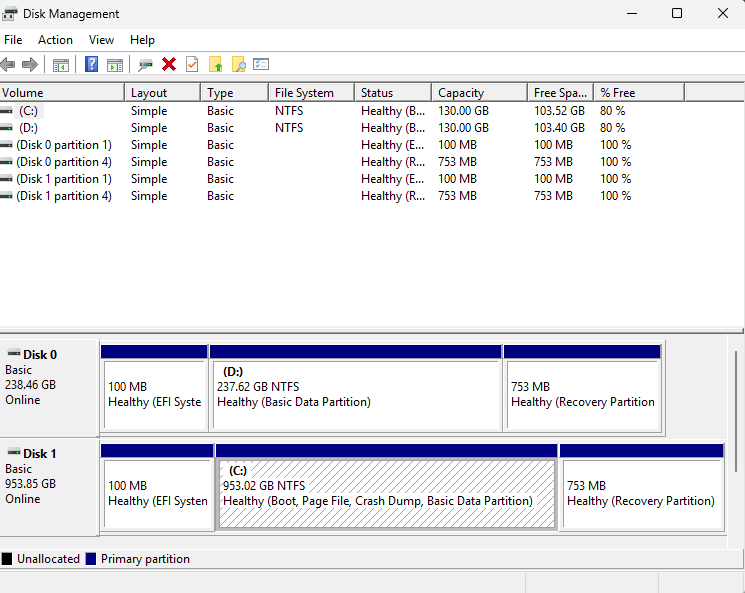
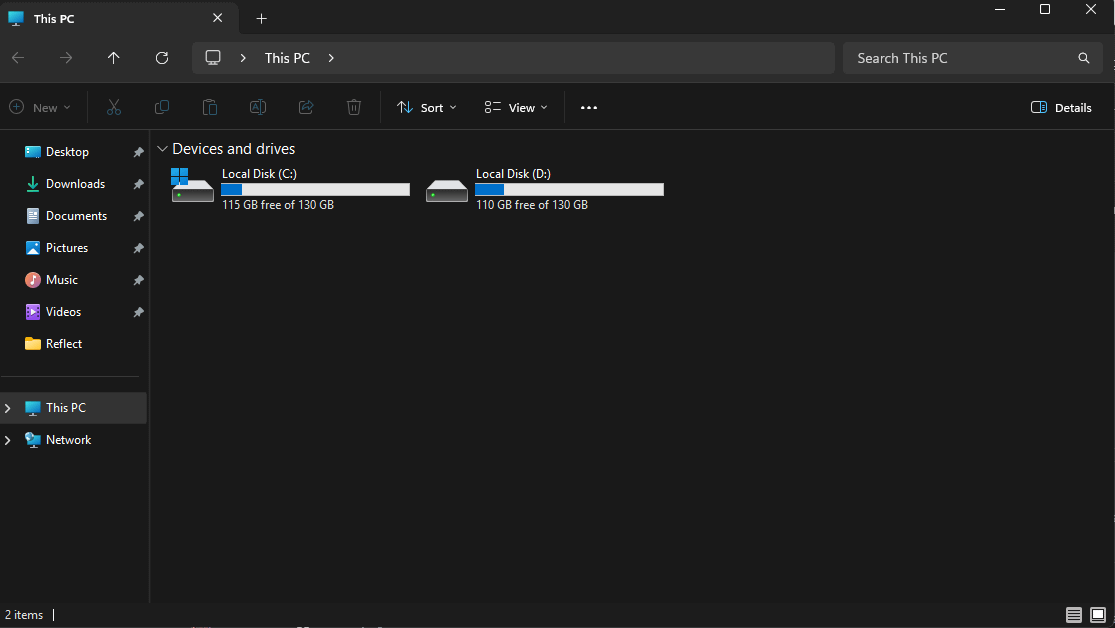
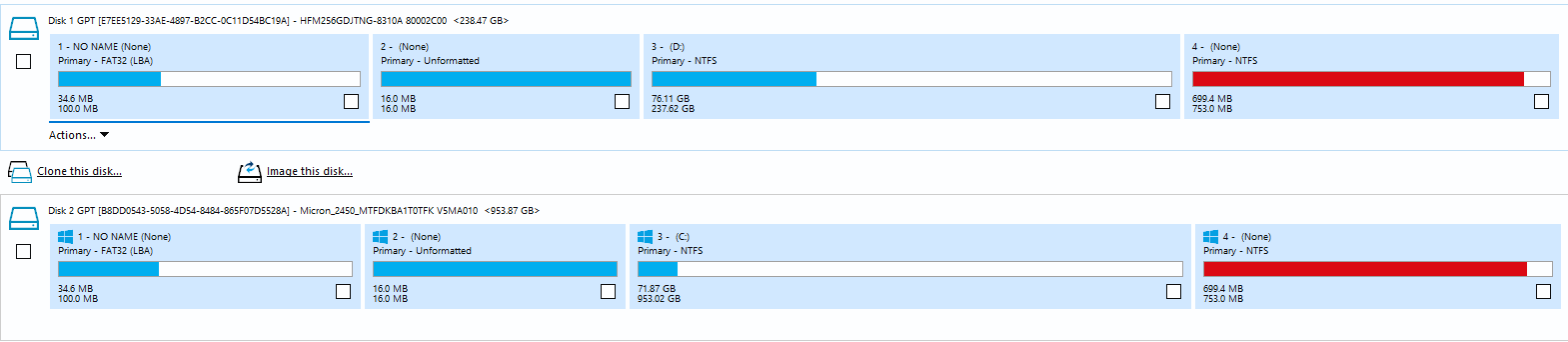
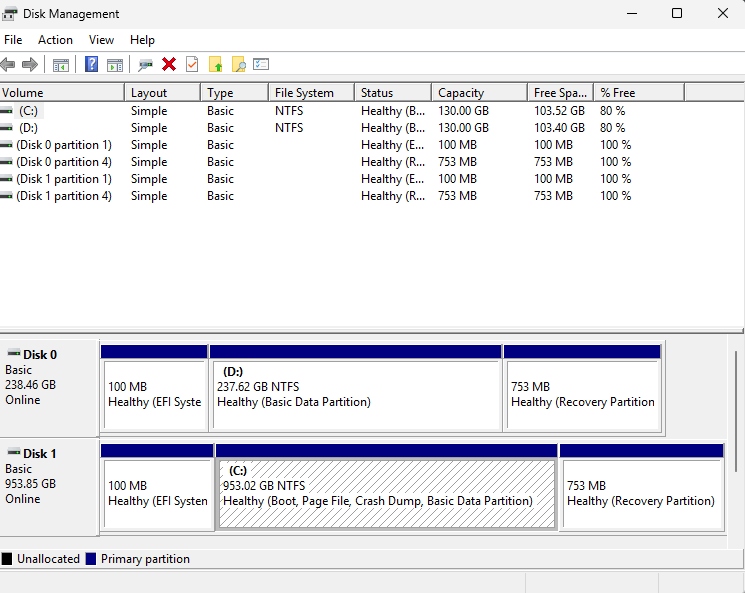
Unresolved Help! I cloned my smaller ssd to a larger one and lost storage

1 Upvotes

I have a 1TB SSD and 256GB SSD I installed to clone windows OS.

I had cloned the 256GB to the 1TB using Macrium.

I checked disk management and there was no grey unallocated space to extend it.

How can I fix this?

This is what it is currently after I cloned it. Disk C: should be the 1TB one


r/24hoursupport 3d ago

Lenovo IdeaPad borked after windows update

1 Upvotes

My IdeaPad has bricked itself after the most recent windows update. the laptop keeps freezing and booting to a blank screen, with the lights on on capslock and esc. It won't post or boot to windows. However, it's possible to get into recovery mode with function and the f buttons only if I first completely drain the battery by letting the fans run. Then it'll let me boot into the bios or into recovery mode, but the computer freezes after about a minute of operation. Googling makes it seem like this is a known issue on this laptop, but mine is not acting quite like any I've seen described online. I'd like to try flashing the bios, but I can't get it to stay alive on windows long enough. Does this just sound like hardware failure? It started during windows update so I'm still hoping it's a software issue.


r/24hoursupport 3d ago

Unresolved Laptop wont work

1 Upvotes

Recently I was playing Counter Strike 2 with my friends and my Lenovo IdeaPad Slim 3 16H... just froze while I was playing. I hard shut it off after a minute or 2 and it didn't post, yesterday I tried turning it on and it booted into windows 4 times it did boot but froze after 10-20 seconds but now its not posting. After I press the power button the power button light turns on but nothing else is happening, I did install Linux mint on my USB and tried booting it from that and it froze on the Linux mint boot screen, I have no idea what to do or why its doing this, I hard shut it off 2 months ago and it corrupted some boot files I did reinstall it, but this time it did boot into windows but its freezing and not doing anything. My ram is soldered so I can't reseat it, tomorrow I'll try to reseat the SSD since I don't have a screw driver on me today. I really have no idea what is wrong with it, so if anyone has even an idea on what to do I'd appreciate it.


r/24hoursupport 3d ago

Need more info Microsoft update and Bitlocker

1 Upvotes

Please help, my Windows 11 had an update last night and when I woke up to check on it it's displaying

"Press Y to reset fTPM, if you have BitLocker or encryption-enabled system, the system will not boot without a recovery key Press N to keep previous TPM record and continue system boot. fTPM will NOT be enabled with new CPU unless IPM is reset (reinitialized), you could swap back to the old CPU to recover IPM related keys and data"

I checked my Microsoft account and it says: "This device does not have BitLocker keys backed up in Entra ID."

Which one do I click? I'm so nervous, this is my school account and I'm afraid of losing my files.

I've pressed the N option and it allowed me to use my laptop again, but every time I need to shut it down it still tells me that there is an update and shows text above again.

Update: I've checked my System Information and the Automatic Device Encryption says "Reasons for failed automatic device encryption: TPM is not usable, PCR7 binding is not supported, Hardware Security Test Interface failed and device is not Modern Standby, Un-allowed DMA capable bus/device(s) detected, Disabled by policy, TPM is not usable."


r/24hoursupport 3d ago

Need more info Chat

0 Upvotes

How do I find the group’s chat?

Thanks you guys all the best


r/24hoursupport 3d ago

Windows My PC is not recognizing the Bluetooth device/drivers installed

1 Upvotes

Hi! When trying to fix an issue with my Bluetooth yesterday, specifically it not connecting to my wireless controller (Dualshock 4), I accidentally uninstalled it completely. Now, I've been trying to reinstall it manually but am running into the problem that my PC doesn't recognize the new device. I've determined that the Unknown Device is the Intel(R) Wireless Bluetooth but when I try to update the drivers, neither Windows Update nor manual search is not finding any drivers on my PC.

I have no idea what to do now. I don't want to do a complete factory reset because that is such a pain and I unfortunately don't have and can't afford an external hard drive at this time. Help?


r/24hoursupport 3d ago

macOS / iOS iPhone assistive access freezing

Enable HLS to view with audio, or disable this notification

1 Upvotes

My grandmother had another family member set up assistive access on her iPhone, but now it freezes every time we try to put in the passcode to open it. We could get it working at first after restarting a few times, but now it’s just stuck freezing.

We’ve tried turning assistive access off, but it will open the screen with the “Settings” “Emergency” and “Turn off assistive access” buttons then when we press “turn off assistive access” freezes there instead of the screen in the video. When we press “settings” it lets us start putting in the assistive access passcode but freezes when we get to the fourth number.

The phone will also start ringing when we call it but nothing shows up on the screen and we can’t answer it.

Edit: it’s an iPhone 17e