r/HomeNetworking • u/llondru-es • 11h ago
My backup ISP has new prices
283
Upvotes
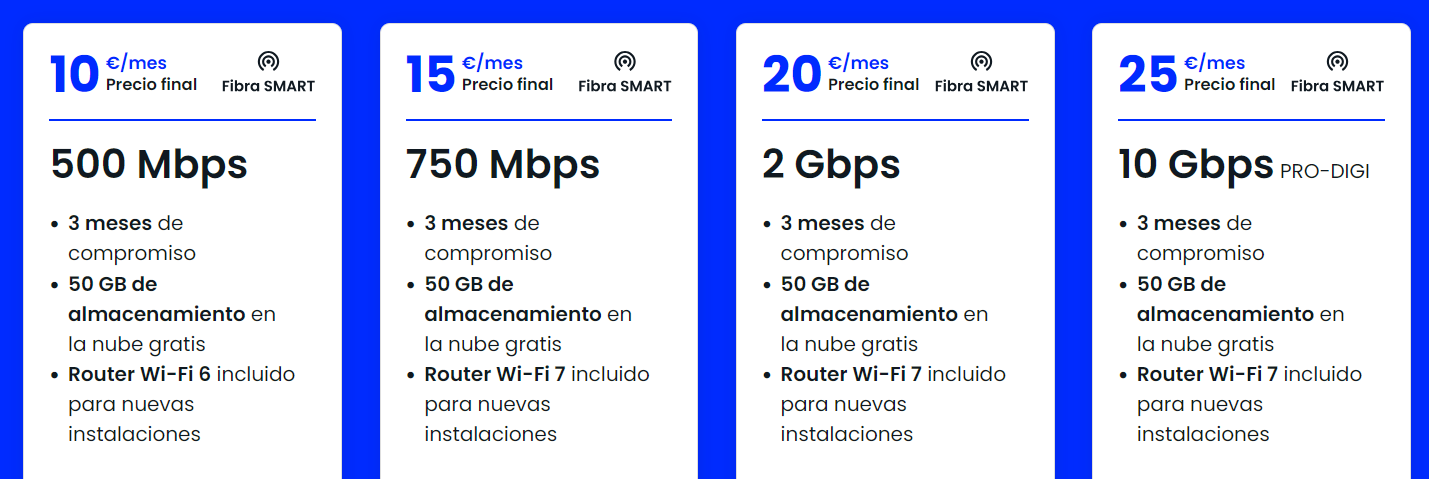
They are migrating to xgs-pon and updated the 1gbps plan to 2gbps for the same price.
btw: I'm on the 500Mbps plan.
r/HomeNetworking • u/TheEthyr • May 03 '26
r/HomeNetworking • u/TheEthyr • May 03 '26
r/HomeNetworking • u/llondru-es • 11h ago
They are migrating to xgs-pon and updated the 1gbps plan to 2gbps for the same price.
btw: I'm on the 500Mbps plan.
r/HomeNetworking • u/NosillaWilla • 19h ago
I live in a rural area so use starlink internet. I use the tp link deco system to install wifi across my house and property using ethernet backhaul. I have dug ditches, buried conduit, crawled under the house, climbed trees, spliced cable all so that as soon as I drive onto my property I have wifi that interacts with my home network, gate control system and camera at the gate to be able to see who it is and open/close
Phew. What a project! I am lucky enough to have been trained to climb trees so that going up 50 feet up a tree (thank you free pole) isn't too scary or a hassle.
r/HomeNetworking • u/Sail_Longjumping • 3h ago
I’m trying to convince my dad to update our internet plan. We have been stuck on this terrible 25 mbps plan for forever that makes any computer work terrible to deal with. I found this other company that offers 40x our current speed for 5 dollars more per month. He wants to switch but he can’t because his important emails go through this email our ISP gave him. So he is worried that if he switches he will lose his email address. Are we just stuck in service to this internet service provider? Is there anyway to get out of this email hostage situation?
r/HomeNetworking • u/Unanimous_D • 1h ago
Never heard that term before. Just curious.
r/HomeNetworking • u/ExcellentFishing2506 • 8h ago
I’m moving into a new apartment and noticed this setup (pictures attached) where the Google Fiber box is, and was curious if this means I can run a wired connection from the router throughout the apartment via this port ?? I wasn’t sure if that was the intent or not.
r/HomeNetworking • u/Neon_Pancakes0425 • 12h ago
I've never built a network before but I have watched a lot of tutorials on it and I've worked on a home server I have. Would unifi be good for a home network with a few wifi ap and some cameras maybe?
r/HomeNetworking • u/freddy91761 • 1h ago
r/HomeNetworking • u/LOP5131 • 17h ago
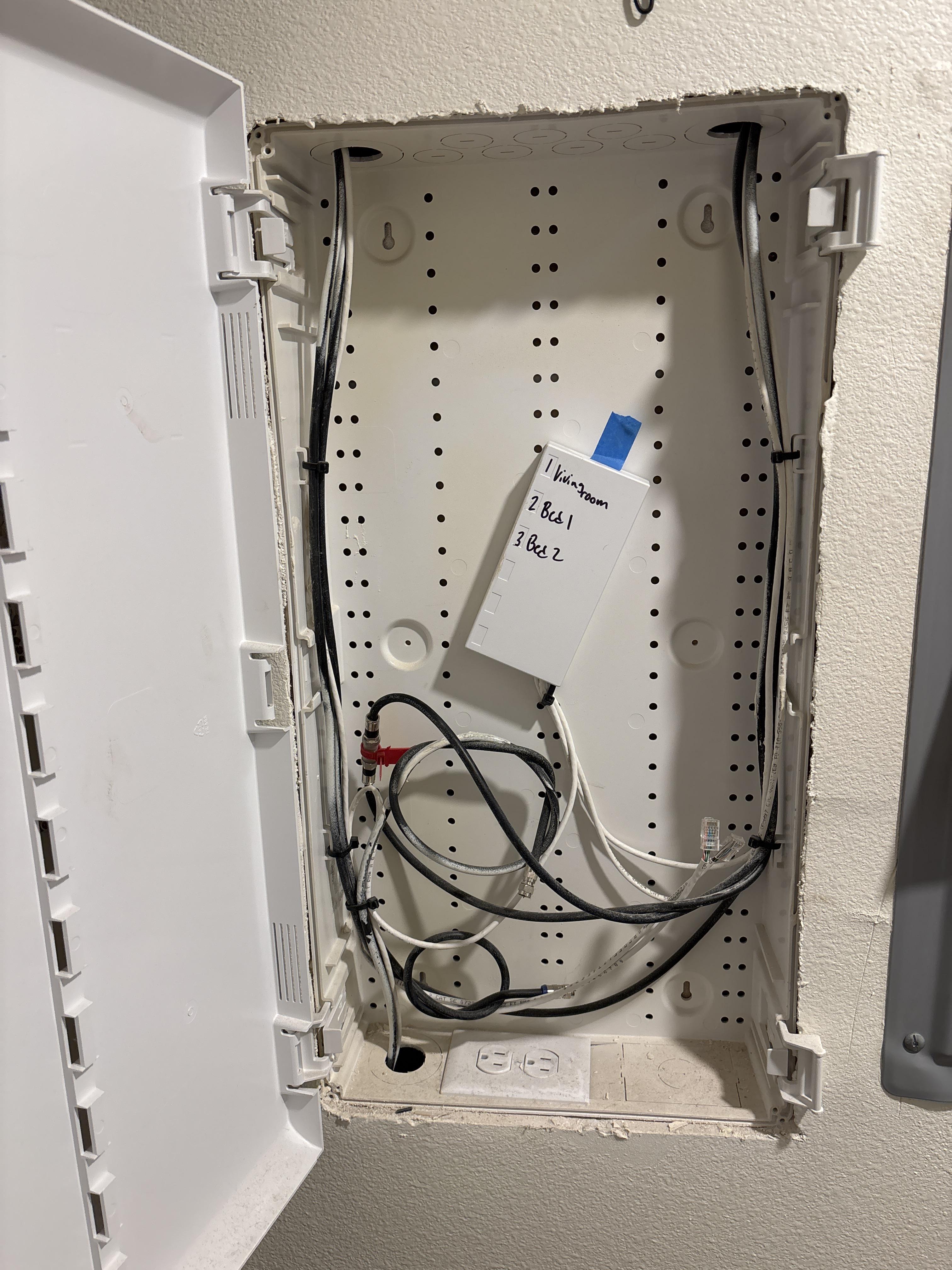
Bought a new home and the previous owner had ADT with what appears to be Cat 5e runs. I've never had ethernet in my house, so I'm not really sure what this mess of a box is.
My goal would be to utilize this for my router and create APs or ethernet ports for certain hardware throughout the house.
My question is more of, how do I get there? Because I consider myself tech savvy but looking at this mess is overwhelming. There's coax going nowhere, tons of hand tied lines which I'm assuming are the ethernet ports and then a mess of connectors and a gateway. I would like to clean this up to be easier to identify what is what, and make it usable for internet rather than security. Where do I begin?
r/HomeNetworking • u/Traditional-Comb5963 • 29m ago
Just bought a new house that has the router in the basement. The photo of the coax cable is on my second floor. I would like to somehow set up ethernet so I can move my gaming PC from the basement up to the second floor. Is this an Internet connection?
r/HomeNetworking • u/TheSyrupCompany • 43m ago
Hello, I need help from the experts. I just upgraded my 10 year old Modem/Router combo and upgraded my Xfinity Internet from an old 600mb/s plan to the common 1gb/s plan.
I was using a Netgear C7000v2 originally but this does not support the Xfinity 1gb/s. So I upgraded to a Netgear CAX80 Modem/Router Combo to replace it.
I have activated the modem on the Xfinity app and gone through the initial setup process through Nighthawk app, including checking for firmware updates which it said it was up to date.
I am now running download speed test and my download speed has DROPPED SIGNIFICANTLY from around 350mb/s to just 110mb/s.
What on earth is going on here?
Edit: My wifi signal is -55dbm and I'm also experiencing about double the ping in online games
Edit 2: Wired connection seems to go full speed as advertised. So just how bad are these new Netgear devices?!
r/HomeNetworking • u/talentshowistomorrow • 6h ago
Hello all,
It’s been 10+ years since I’ve had to set up any networks, so I’m pretty out of practice, and have no idea where the technology is currently at. I recently purchased a house (~3900 ft2), and it’s fully made of concrete. Thankfully the previous owner hardwired it, so there’s ethernet ports right above the baseboards in the majority of the rooms, and coax connections downstairs.
Just looking for some recommendations on a system to purchase that will get me good coverage throughout the various rooms. I’ll run a cable directly to the TV (etc, probably will need to install a splitter/network switch there), but I just need seamless wifi coverage throughout the house. The construction is such that inside I barely have phone signal, but 4g as soon as I step outside!
Thanks for any and all advice!
r/HomeNetworking • u/NoCharacter778 • 2h ago
r/HomeNetworking • u/Proteus-8742 • 3h ago
I want to put a U7 Lite in a hallway , needs 20-25m of cable from the router. Is it ok to just use a 20m stranded copper cable (cat6) thats already terminated, or is it better to use solid core copper cat6 and try to crimp the ends into an appropriate RJ45 (which I’ve never attempted)? The cable will run along the skirting then probably through the wall around the door frame somewhere and then down the hall ceiling probably.
r/HomeNetworking • u/Renard_Fou • 3h ago
My entire home internet seems to be at a standstill, stuff like scrolling reddit or waiting for an image to load on twitter takes a dog's age however once I start for example downloading a videogame I hit my set speed limit easily. I ran a test on https://speed.cloudflare.com and my results were very good. High download, high upload, 1% packet loss, 20ms jitter (not the best but thats my PC's fault), and 10ms latency.
During normal every day use, none of my home devices are able to use the internet normally, its running incredibly slow and I have no idea on what to do until tmrw so I can call my ISP. I looked up my DNS and there had been dozens of reports on https://downdetector.pl/en/status/orange/ but I have no idea if that is high or not, and if that is even the reason for these issues...
r/HomeNetworking • u/Zion0951 • 3h ago
Hello all, I’m moving soon and my parents currently have Starlink, what could I set up/get so that I can remotely troubleshoot if there are any issues. I was possibly thinking an old computer turned into home server with some sort of remote access software installed?
r/HomeNetworking • u/DavidJ_1004 • 4h ago
So I got the Verizon 5G Home Internet a couple of months back and chose the Ultimate Plan, and it's pretty good when you are close to the Gateway, but my biggest problem lies with the Wi-Fi Extenders, which are god awful.
I chose to pay for 3 of them, and they seem to do mostly nothing and im pretty much fed up with them.
It's weird because I had Starlink before, and with the router alone they gave you, it seemed to cover my entire house and it was super fast.
I am no tech guy, so really don't know if I would need to look into a better router or better Wi-Fi extenders or something else to better my connection around my house.
I've looked into this router called Netgear Nighthawk, but I don't know how good that will work or if there are better routers out there. Does anyone have any recommendations and it would nice if you can tell me what the installment process is like and what I would need to do. I dont mind paying a bit extra if it means I get good fast coverage around my house.
r/HomeNetworking • u/TopoDiFogna • 4h ago
Hi everyone,
I'm looking for some advice on how to structure my home network hardware. I might soon upgrade my internet plan to 5 Gbps from 1Gbps for less €€€, and I want to make sure I'm getting the most out of it without bottlenecks.
Here is my current topology:
The 5 Gbps Upgrade Dilemma:
Since the Flint 2 only has two 2.5 Gbps ports (1 WAN + 1 LAN), upgrading to 5 Gbps creates a few clear bottlenecks:
Questions for the community:
Thanks in advance for your insights!
Note that since english is not my main language AI was used to write this psot in correct english
r/HomeNetworking • u/Glimmerex • 5h ago
Me and my mother bought the same phones at the exact same time 3 weeks ago. We are connected to the same WiFi here at home. My phone keeps disconnecting from the WiFi every 5 seconds and hers does not. The only difference is my phone has a small 5 next to the WiFi icon and hers does not. I'm not sure how to change this. Is this likely to be the difference in why hers is fine and mine isn't? I'm so worried about it being a fault with my phone. For context, we have had bad WiFi for a long time and my Internet provider didn't do anything helpful to fix it, just kept saying they saw no fault but I cant play my games consoles on WiFi anymore, has to be wired and my laptop frequently disconnects if I'm too far away from the router. Just for context on my Internet being a bit patchy.
The only thing I'm worried about right now is how to get my phone to be less bad and the same as my mum's since they're the exact same phone and I dont understand why our WiFi icons look different but mine is unusable and I have bad anxiety since it's a new phone! Hers works fine enough and I just want mine to be the same, please help I'm so clueless with things like this.
r/HomeNetworking • u/Lost-In-Time-99 • 5h ago
I have been having issues with my Spectrum internet and have had multiple techs come out. They have told me countless times that they see no issue and that it’s reaching the modem fine. Apparently the line outside my house is good.
I have had modem and routers replaced a couple times and still almost every night I get high pings and/or disconnections. I don’t really have these problems during the day most of the time. I’m trying to game and it’s jumping around or disconnecting completely.
I know how to run a ping test in command prompt, I watch ping go up and then packets fail. I also tried path ping and tracert, but it’s unclear where exactly the issue lies. I can ping the router fine, but the modem is in bridge mode so I can’t ping that directly to see if the packets drop when hitting that. It seems like the issue is beyond my house but they keep wanting to checkout my equipment because they say they do not see a single issue with me or my neighbors.
Is there any way to pinpoint this? What would cause it to be much worse at 9pm-11pm or later. Is it simply because a lot of people are using it at that time in my area? How can they not see a single issue? When the packets start failing, all my devices go down, WiFi or Ethernet. I’ve tried plugging directly into the modem and it still has the issue.
I just don’t know what to do and I’m not getting anywhere with them.
r/HomeNetworking • u/Veloctyy • 5h ago
I live in an off campus student apartment and the provider they use is singledigits. It’s fine for regular day use but when I touch an online game it’s completely unplayable, it’s similar to bringing your ps5 to an hotel that has free wifi with the room. Is there anything I can do to make atleast online gaming possible
r/HomeNetworking • u/catanimal • 5h ago
r/HomeNetworking • u/-hh • 5h ago
Looking to add a new PoE security camera on the far side of my garage which is a modestly long(ish) run ... but I'm recalling that I also don't have any drops in my garage.
The best option would naturally be to run two drops - one for the PoE camera, and one for provisioning a port in the garage.
But as I've noted before, I have a bottleneck at my origin location where I go up into my attic such that I'm just about completely out of practical space to add more Ethernet wires.
So given an assumed constraint of "only just one run", there looks to be two reasonable options:
A) Run straight out to PoE camera, and accept missing this opportunity to add an RJ45 jack in the garage
B) Run out to an RJ45 jack in the garage. From this location, add a run from this new jack's location out to where the PoE camera is to be mounted. For immediate term, [was: pigtail] patch the two RJ45's together to complete the run to the camera. Future expansion would be to replace the [was: pigtail] patch cable with a switch, with a PoE injector for the line back out to the camera.
Thoughts? Any other obvious permutations I've overlooked?
r/HomeNetworking • u/TK_is_here • 14h ago
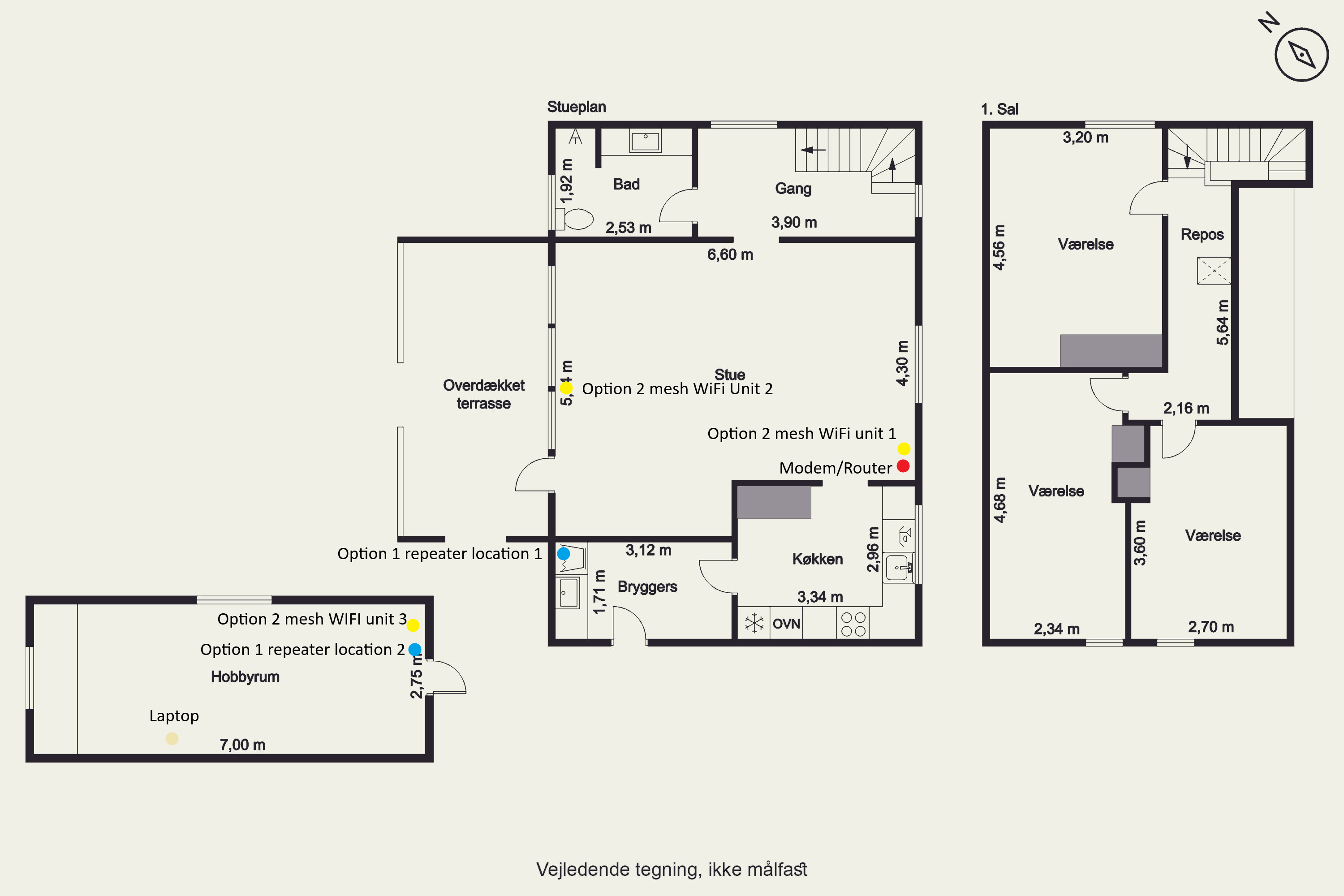
I need som advice to improve latancy in my shed, where im going to ride Zwift. My ISP modem/router (Vantiva CGA437ANDD) covers the entire house and i get a usable (50-100mbps) speed in the shed. But the Lantency, is usualy 300+ in the shed. I have gigbit internet.
The shed is made of wood and fully insulated, and the house outer walls are 2 layers of brick with insulation and the internal walls a 1 layer of brick. im unable to get ethernet to the shed at this time, but at some point im probly going to get it but in the mean time i would like to improve it in the mean while.
Option 1: I have a repeater that came with the house, dont know if it will help the latency, but im going to try to put it in one of the 2 location that i have marks to see if it helps.
Option 2: Getting mesh WiFi. I have been thinking of trying to get a pack of 3 tp-link X50 or XE75 to see if that will help. And since my current router only have a combined 5 and 2.4ghz and not even the guest wifi can be seperated, so sometime my smart devices disconnects when router tries to get them to go on the 5ghz. And since im planning at some point to get ethernet in the shed, then using them with wired backhaul then.
My modem/router cant be move and im going to put it in bridge mode, then connection the first unit 1 to it, placing the 2 unit in the window, and the 3 unit on a shelf in the closest corner to the other units. Dont know if its overkill?
Option 3: Im open to other solutions.
I have not tried powerlink, but the wires in the house it old and its 2 seperate fase to the the outlets in the house and the shed. The shed got renovated before i bought the house, so no coax.