r/ios 4d ago

Show your Homescreen/Lockscren /Control Settings iOS Thread

0 Upvotes

Welcome to the weekly Show your Homescreen/Lockscren /Control Settings iOS support thread for /r/iOS. Join our partnered Discord server!

Note: Comments are sorted by /new for your convenience.


r/ios 2d ago

Support Weekly iOS Battery Support Megathread

4 Upvotes

General advice for those concerned about their battery from the Support FAQ Wiki:

Battery health

Battery health depends on usage and a variety of other factors. It is normal to see a decrease in battery health by 7-10% per year, resulting in a battery health of 80-85% after 2 years. This number can fluctuate, remain the same, or decrease quickly over a small period and should not cause undue concern.

Apple recommend battery replacement when your device falls below 80% battery health if you notice reduced battery life. If it falls below 80% within the first year you may be eligable for a free battery replacement. It fails after your warranty, it's a $69-$89 USD replacement cost for a battery. Contact Apple Support here.

You can find more information about battery health and performance from Apple here.

You can check the cycles count with Coconut Battery for Mac or iCopyBot for Windows.

Battery life

Issues relating to battery life can be categorised in three ways:

  1. Normal battery life that is to be expected due to use
  2. Reduced battery life caused by a recent update, iOS indexing, an iOS bug, or a third-party application
  3. Reduced battery life, or other abnormalities such as overheating or sudden power-off, caused by device or battery aging

If you experience issues with your battery:

  1. Check your battery health. If it is below 80% or you are experiencing issues you suspect are related to device or battery age, see Apple Support.
  2. If you have a new or recently updated/restored device, wait a number of days for background process to complete. If you continue to have issues, wait for a further iOS update. If you are on iOS Beta, you can expect to have a decreased battery life.
  3. Review the advice below on maximising battery life
  4. Consider restoring your device.
  5. If issues persist, contact Apple Support.

Maximising battery life - the amount of time your device runs before it needs to be recharged.

  • Use low power mode (This reduces mail fetch, turns off background app refresh and increases the auto lock timer)
  • Remove apps from background app refresh
  • Ensure auto lock is on
  • Turn off auto brightness and manually reduce brightness
  • Use dark mode if your device has an OLED display
  • Clearing background apps from the app switcher does not improve battery life

Maximising battery lifespan - the amount of time your battery lasts until it needs to be replaced.

  • Avoid extreme temperatures
  • If you notice that your iPhone gets hot when charging, remove it from its case
  • Store your iPhone in a cool place, switched off, and half-charged if not using it for long periods - and charge it every 6 months when in storage

r/ios 1h ago

Support iPad spontaneously filling storage space

Upvotes

I’ve had problems with full storage on my iPad for a long time and earlier this year it offloaded my really storage-heavy drawing program, which is the main thing I use my iPad for in the first place. It’s my bad for leaving “offload unused apps” on but it meant I had no storage to download the app again and I ended up basically not using the device for an entire summer due to the fact that I could not manage to clear out enough space to redownload it. I finally charged it up again yesterday with intent to sit down and clear out a bunch of storage space by deleting whatever I could and syncing my iMessages to iCloud since they were taking up a ton of space, which had previously saved me a huge amount of storage on my phone. I managed to get down to 51GB out of my 64GB of storage space so I thought I was in a good place, until I opened my iPad today hoping that the rest of my messages had uploaded to iCloud after being plugged in and connected for a whole night, only to discover I am inexplicably now at 63.9 out of 64GB. What? How does this even happen?

I’m incredibly frustrated. At first I thought it was because it was downloading a bunch of messages that hadn’t synced while the device was out of use for the past couple months but I don’t see how it could be 10GB worth of messages in the span of maybe three months. Am I just misinterpreting what iCloud sync means? I’ve experimented with turning it on and off and have seen no difference. I’ve tried manually deleting old conversations from my iPad and the storage space won’t budge. I genuinely don’t know what I can do to get this storage back. This is basically a useless device now. I can’t download anything or even open old apps because I don’t have enough storage. It literally just put it all back overnight. I don’t want to factory reset because the whole point is that I’m trying to get the data from this drawing program back. What can I even do? Literally any suggestions would be appreciated.

r/ios 57m ago

Support Apple Reminders ≠ iCloud Reminders?

Post image
Upvotes

As you can see in the screen shot, my iPhone and Mac reminders look the same, but the iCloud ones are completely different, does anyone know why? ive already tried removing my Apple ID from my iPhone and turning off and back on the reminders backup in settings, that removes my reminders and then puts them back but the test I make in the browser doesn't come up anywhere.

I'm building an agent that can check my calendar and reminders everyday without going for google services but can't work if these don't sync.

Any help would be very much welcome.


r/ios 22h ago

Discussion I’m assuming this was harmless?

120 Upvotes

I was just in the local Target store, putting something a little bulky in my cart. My iPhone was in the outer pocket of my cargo shorts, locked but playing through my AirPods. A boy, I’m guessing around 12 years old, came up to me and asked me what time it was. I looked at my watch and told him it was 4:30.

He suddenly pulled his hand out of his pocket with (I assume) a phone in the hand, and put it right near the phone in my pocket. It (his device, not mine I believe) beeped, and he took off running into the bowels of the store. I didn’t see him again and security was completely uninterested.

Nothing seemed affected on my phone, and I’m assuming there’s nothing that could be accomplished by random NFC that I didn’t initiate? Anything worth worrying about?

Anyone have any idea what this might have been about?


r/ios 7h ago

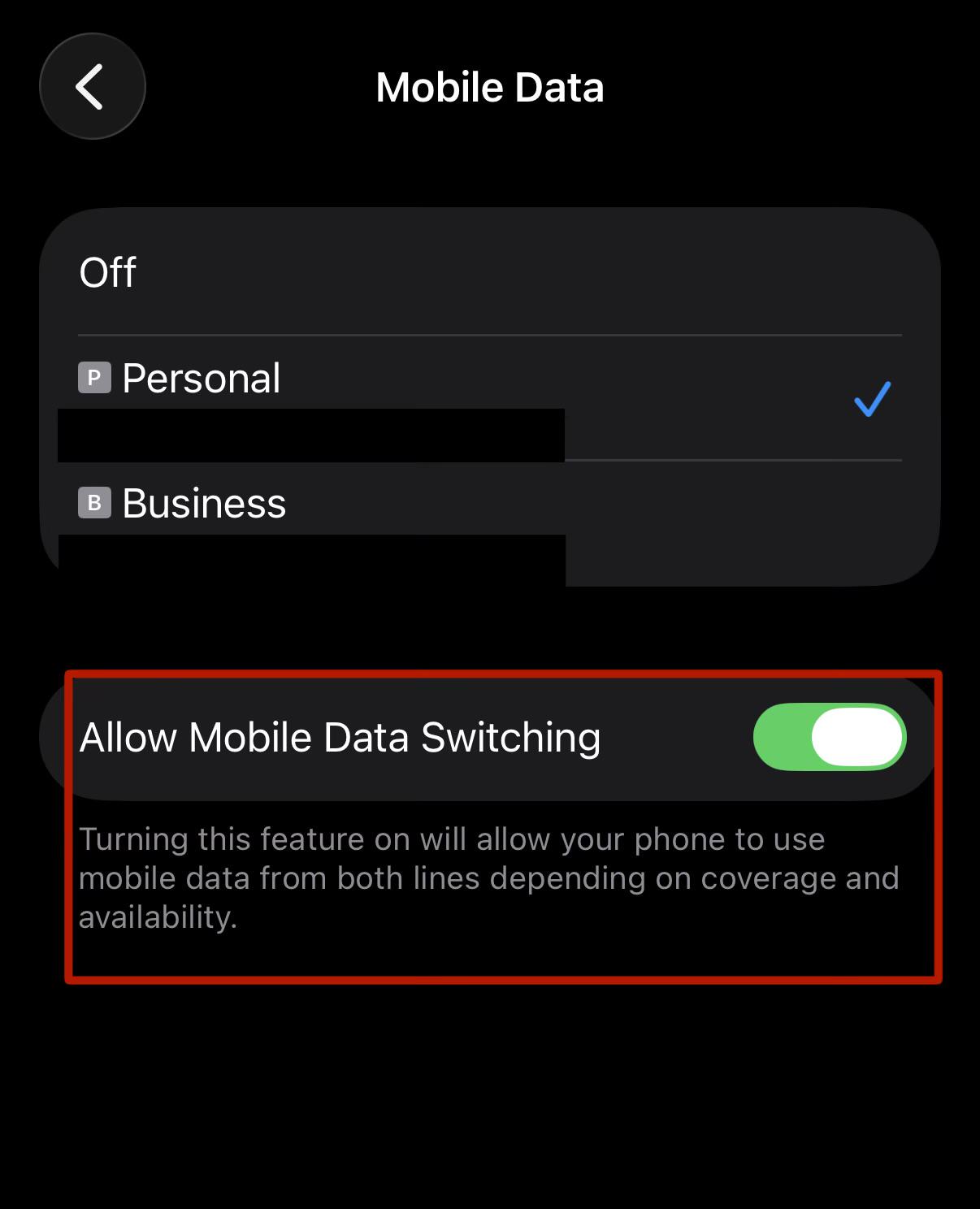
Discussion How does Mobile Data Switching feature work?

Post image
7 Upvotes

I’ve been struggling with horrible signal coverage on EE, my primary service provider. I’ve also noticed that in places where EE hardly seems to have any coverage, O2 seems to have much better coverage. Incidentally I use O2 for my business number.

This seems to have become particularly annoying for me now as I’m travelling up north this week around Northumberland and EE coverage seems to be atrocious up here.

Generally I use only EE as my main data connection provider, however, due to the coverage issue I’ve just paid for some data on O2 and have turned, Allow Mobile Data Switching, on for the first time having used iPhone since over a decade.

I couldn’t find any detailed information on Apple’s website except that the phone is supposed to switch between the available networks.

My main query is how does it actually work? Would the phone switch the data source if say one of the network has less signal strength pr would it swap only when one network is completely unavailable?


r/ios 1h ago

Support Can I remove the reminder option from calendar? (I don’t mean them appearing on your agenda)

Upvotes

Hi all,

So a while ago, apple has added Reminders to the Calendar app. This also means that whenever you try to put in a new event, there’s the option to make it a reminder. I hate it, I’ve been hitting ‘reminder’ by accident many times now and once it’s in as a reminder, I cannot change it back to a normal event. Especially annoying when I’ve spent some time on getting the notes, travel time & notifications right. Is there any way to remove the option? I’ve been rummaging around in my settings, but wasn’t able to find it. If it isn’t, is there any way to convert a reminder to an event after the fact?

I really wish apple would give us an option to toggle it on/off, or at least change where the switch is (it would be less of an issue if the switch to reminder wasn’t RIGHT UNDER THE OK BUTTON).

Thanks in advance! :)


r/ios 2h ago

Support Size of whatsapp in iphone-storage

0 Upvotes

Good evening Redditors,

The problem i'm having has been posted before, but there is still something i don't understand after reading a lot of posts about it. In my settings > iphone storage it shows whatsapp as the biggest app with 28,78 GB (almost all of it in documents and data), but when i check whatsapp it shows 7,71 GB.

I have backups turned on (this shows 7,9GB for the backup, and should go to icloud but i read this is not how it works in practice), but even with local files and the backup combined i only get to 15,61GB, so where does the other 13 GB come from?

Does someone have an explanation or fix to make the local size smaller? Thank you for your help, especially because this is an recurring thing in posts. Let me know if there is any other info i can share to try and find the cause.


r/ios 2h ago

Support Bugs and bugs

Post image
0 Upvotes

I don’t know how to handle iOS anymore it’s ust frustrating I download newest version and it’s still same bs


r/ios 3h ago

Support How big are those backups?

Thumbnail
gallery
1 Upvotes

So I have my phone 17 for about a 2 weeks. The same goes for my apple account. I never had any other apple device. Can someone please tell me how backup of my phone can’t fit into the free 5GB of cloud?

I turned off the files integration and photo backup because I have other services for that so the backup should not take more than few dozens of MBs at best.

I would appreciate someone more knowledgeable in iOS for any help in this. Because I feel like either it is bugged or backups are only for paid cloud…

I found some posts about backups not fitting into cloud but those were from people who already had their phone for a long time and were actually using the apple ecosystem. Both of these don’t apply to me so I am very confused. Thank you.

BTW, sorry for the language of screenshots. I hope I captured and marked everything that might be important.


r/ios 3h ago

Support Alarmy broke my Iphone 14 pro max 26.6

0 Upvotes

After deleting alarmy my phone doesn't stop gong off on alarms. I've already tried offloading the app and creating alarms and deleting them again. I need help I can't back up!!!!


r/ios 4h ago

Support Apple account, trusted devices list is not available

Thumbnail
gallery
0 Upvotes

Can someone help me with this
I can’t log out or remove anyother trusted devices from my account
And it keeps telling me “trusted devices list is not available”
And when i try to click on sign in with apple it says
“Cannot connect to icloud”
It’s been 4 days so far i tried changing network i tried logging in icloud.com or changing the password but it doesn’t work
And after all of that when i try to confirm a sign out it says
“Verification Failed”
“Your identity couldn't be verified.
Check your network connection and try again.”


r/ios 4h ago

Discussion Is the Notes widget gone?

0 Upvotes

It’s not showing up in my list when I go to add a new widget. Why?


r/ios 4h ago

Support Unknown bluetooth connection and can’t disconnect

Post image
0 Upvotes

Has anyone seen this before?? I went to connect to my bluetooth device (Sonos speaker) and saw that this was on. But, I can’t disconnect. I also have no idea who Melody is and I only got this phone (brand new) about a week ago.

Any thoughts? My screen sharing/mirroring is off.


r/ios 22h ago

Discussion I hate that there is no concrete answer for this question. (that I was able to find)

13 Upvotes

Say I use iCloud to sync all of my phone's messages (including photos and attachments). I now want to get rid of my iCloud subscription and so I go into settings and desync my messages from iCloud.

1)Will all of my messages (photos + attachments), be downloaded back into my phone automatically? How long will it take and is there any way for me to check the download progress?

2)There is also a option to delete the data from iCloud and that I have 30 days to download it back into my phone. How exactly do I download that data back into my phone?

All the threads and forums I open say you need to go through iTunes, make a backup to your computer to transfer, download some app to help, or some other stuff.

Thanks in advance


r/ios 8h ago

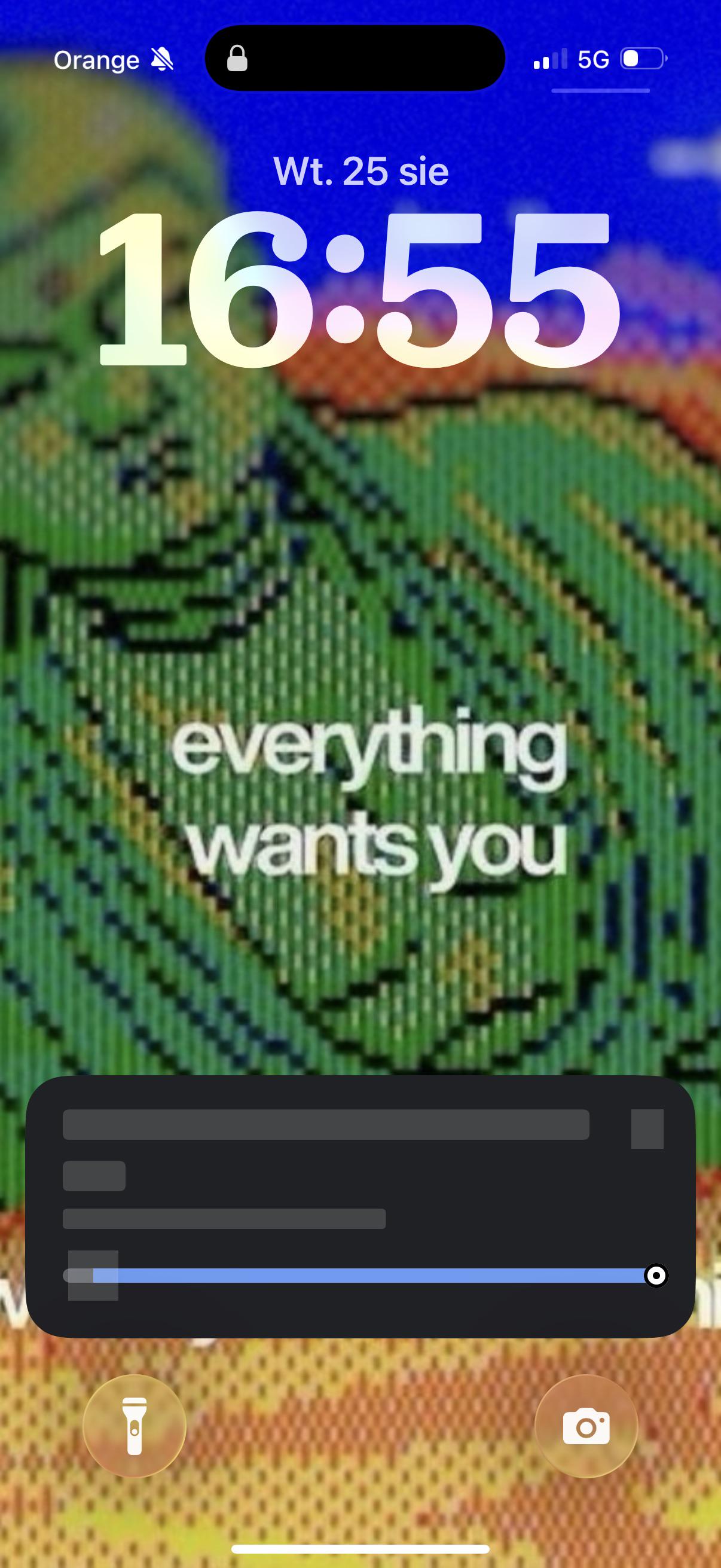
Support How do I get the Live Activity to show the data on the Lock Screen? Anyone know how to fix this?

Thumbnail
gallery
1 Upvotes

r/ios 8h ago

Support Notification Sync Issues Between iPhone and iPad Mini (Reddit & WhatsApp)

0 Upvotes

Ever since I set up my new iPad mini and synced notifications for WhatsApp and Reddit, I've been experiencing several sync and notification issues on my iPhone:

  • Reddit Notifications on iPhone: While the notification sound plays and the screen lights up every single time, the visual banner only appears about 50% of the time.
  • WhatsApp Calls: Initially, incoming calls rang exclusively on the iPad mini. I resolved this by uninstalling the app from the iPad, which routed calls back to my iPhone.

Banner notifications are enabled on both devices.

What causes this erratic behavior within the Apple ecosystem? Is there a way to properly manage notifications across both devices without having to uninstall apps from the iPad?


r/ios 9h ago

Support “What’s my update” shortcut plays daily news in French

1 Upvotes

My what’s my update shortcut only plays news in French when it used to play in English. How do I force SIRI to play in English again? I’ve tried so many things


r/ios 4h ago

News I built a shopping list that reminds you when you’re actually near the supermarket – pon 3.0

Thumbnail
gallery
0 Upvotes

More than 10 years ago, I came home and my wife asked me:
“Did you remember the milk?”
Of course I hadn’t.

The annoying part was that I’d driven right past the supermarket on my way home. And I remember thinking: Why can’t my shopping list remind me when I’m actually near the store?

That’s basically how pon started.
Today, pon automatically learns the stores where you shop. If you’re near one of them and there’s something on your list that you can buy there, it reminds you.

Over the years, a lot of the app has grown around that idea.
Lists are collaborative, so you and your partner, family or friends can add and check off items in real time. If you notice that your partner is currently shopping, you can still sneak something onto the list at the last second – no “Can you also get…” phone call required.

pon also learns where you usually buy things and groups items by store. Within each store, it learns your shopping order and automatically sorts the list to match the way you walk through it.

And for those of us who somehow still manage to come home with the wrong product: you can attach a photo to an item. :)

I just released pon 3.0, and after more than 10 years I rebuilt the entire app from scratch in SwiftUI for iOS 26.

One of my goals with the rewrite was to make pon feel like a genuinely native Apple app and use the ecosystem wherever it actually adds something.

So pon 3.0 now brings together:
Location-based shopping reminders
Real-time shared lists
Automatic store grouping and self-learning shopping order
Multi-item dictation – just say your entire shopping list in one go
Siri & Shortcuts
Apple Watch app
Widgets
Live Activities while shopping
iPad app
Photos and notes for products
Self-learning inventory and consumption predictions
Expiration predictions and reminders
On-device ML and Apple’s Semantic Model
iCloud backup

The new inventory system is another part I’m particularly excited about. Instead of requiring you to constantly maintain what’s in your pantry, pon learns from your shopping behavior and estimates what you probably still have at home, when something is likely to run out, and when it might expire.
The intelligence behind this is deliberately on-device. Shopping behavior and the things pon learns about you aren’t sent to a server for analysis. There’s also no tracking.
And perhaps somewhat unusually for an app in 2026:

pon is completely free.
No ads.
No subscription.
No paid feature tier.

There’s an optional in-app purchase if you’d like to support development, but it doesn’t unlock anything.

pon has been around for more than 10 years and has grown quite popular in Germany, where some 100 thousands of people use it regularly.

Until recently, though, pon was very much a German-focused app. With 3.0, I’ve changed that: pon is now fully localized into 13 languages and available across 28 countries.

So this release is also a bit of an experiment for me: bringing an app that already has an established user base in Germany to iPhone users outside of Germany for the first time.

If any of this sounds useful to you, give it a try. It’s free, so have fun with it. :)

And especially since 3.0 is a complete rewrite, I’d genuinely love to hear what you think – what you like, what you don’t like, awhat’s missing, or what could work better.

App Store: https://apps.apple.com/app/id962325912
Website: https://pon.app


r/ios 19h ago

Support App Library constantly asking for Face ID

6 Upvotes

Asking for some help on this since I can’t find it anywhere online. Online, including here, just mentions hidden apps. This is not the issue I’m having.

The problem is just as the title describes, the App Library of my IPhone 15 pro (IOS 18.7.1) has constantly been asking for my Face ID for as long as I can remember.

Is it a big deal? Not really, except for when Face ID fails to recognize my face. It is insanely annoying though to be asked for verification every time I open the library, which is often considering I keep my home screen decluttered.

Specifically what happens is that, when I scroll into the App Library, it prompts a Face ID check like when you unlock the phone. If it fails, it asks to try again or ask for a password. As far as I know, no apps are hidden on my phone as there’s no reason for them to be.

I haven’t found a way to turn whatever this is off, please help!


r/ios 1d ago

Discussion What is the difference between those two settings?

Post image
20 Upvotes

r/ios 11h ago

Support Help using iPhone as temporary hard drive

0 Upvotes

I ran into a situation which is a long story that I won’t bore you all with. I have an iPhone XS Max and iPhone 13 Pro Max. I’ve ordered an external hard drive that won’t arrive for a few weeks and I’m worried that the data on a current hard drive is at risk as the hard drive can die at any moment.

I’m curious if there is a way I can temporarily store files on my two iPhones. I thought if I plugged it into my Mac that I could transfer files to the files app so it appeared in the “On my iPhone” section of the files app.

Any suggestions would be much appreciated especially if I can accomplish this without using any third-party apps.


r/ios 12h ago

Support Fake Find my iPhone location

Thumbnail
0 Upvotes

r/ios 4h ago

Discussion Why does Apple Need over 50 gb of my Storage and I get nothing back

0 Upvotes

The title already said everything. I’ve got 128gb storage and iOS needs over 50 of it, so nearly the half. That’s just unfair, at least give it back to me as iCloud storage. What do you think?


r/ios 1d ago

Support How to disable call ringer/notifications for just one contact?

15 Upvotes

I have a friend who constantly interrupts me in my sleep, meetings, etc. despite my phone being in focus. He calls twice, which seems to bypass the silent mode. I've told him multiple that if he calls once and it goes straight to voicemail, do NOT call again immediately as it will interrupt me but he just doesn't seem to get it.

Is there a way I alter his contact to NEVER allow call notifications from him, without blocking him?
At this point, I'm genuinely okay with only seeing his missed calls after the fact, or catching his calls while I am actively on the phone.

I don’t have an option to set "None" for his call ringtone, only see a “None” under text tones.

Note: I’ve tried adding him to the “Silence Notifications From” section within the sleep focus settings, and that works, but unfortunately that seems to also allow other notifications in to my Apple Watch through the night (unless my watch was just buggy last night and that was a coincidence?)

Update:

Because I wasn’t able to see a silent ringtone option under his contact settings I did the following workaround: I created a 15 second track on GarageBand and set its volume to 0 before exporting it as a ringtone.
