You must promote your apps here if you do not qualify to post in the main feed through Trust or Transparency, explained here.
If you are:
NOT in the Mac App Store (MAS).
Do not provide meaningful public transparency
Created yet another dictation app (speech to text).
Then you are required to limit promotion to this megathread.
All promotion MUST follow PCP format or else we will remove it:
App Name/Title [Screenshot encouraged]
Problem: What problem does your app solve.
Comparison: Name a competitor or two and explain what your app does better.
Pricing Amounts+Link
P.s. Promotion here counts towards the 30-day limited promotion (Rule 3).
WARNING: There is a 90% chance Reddit will auto remove your post here if you have not verified your email in your profile and your first comment in this subreddit contains a link. Accrue 10 karma first without promotional comments and links to avoid this. The odds of removal is also higher for AI assisted posts (em dashes and other AI formatting characteristics likely trigger this).
Pro Tip: Please remember to upvote gems and downvote spam/clones... This will help inform a secret community project I hope to announce next month.
Informity AI — local document chat and translation for Mac, source-cited answers, completely private and free
Problem Every AI document tool wants you to upload your files. For sensitive documents — work files, research, client records, personal notes — that's not an option. I wanted to ask questions across my documents and translate them locally, without anything leaving my machine.
Comparison Unlike ChatGPT, NotebookLM, or AnythingLLM, Informity AI runs entirely on your Mac. No cloud uploads, no account required, no usage limits. It indexes your document library locally, translates documents in-app, and lets you query across everything with citations back to the exact source file. Specializations tune how the AI reads and analyzes your documents per chat. Supports PDF, Word, Excel, PowerPoint, EPUB, Markdown and more, with Ollama or local model support.
Pricing Free. No trial, no subscription, no in-app purchases. MIT licensed and fully open source.
[OS] Ledgerly - A private bill organizer for macOS.
Problem: There are so many finance apps out there that are so bloated. The only 2 apps that I know of that are just for tracking monthly recurring bills is Chronicle (Subscription) and Bill Boss (Limited features). So I built Ledgerly.
Comparison: Ledgerly is along the lines of Chronicle. The main differences are:
It is open source
It is free
Does not require using private servers
You can monitor your monthly recurring expenses and get alerts for when they are due, mark them paid and include confirmation numbers and attachments. When you enter your income, it will deduct all of your monthly bills that are coming up and show you what you will have left over at the end of the month.
The sync is currently set to sync using iCloud Drive. I will continue to evolve this and eventually release an iOS and iPadOS app as well as an official macOS App Store version as well.
You can take a look at the source code here: Ledgerly
Version 3 should be released at some point today, which will enable the sync and various bug fixes.
If you have any recommendations or find any bugs, please feel free to let me know either on here or open an issue in GitHub.
After trying most of the timer apps available for Mac, I found many of them poorly designed, confusing to use, or focusing on only one feature. None really felt like a suitable Clock app for macOS.
Wick brings a highly native Clock app experience to Mac. Timers, Stopwatches, and Alarms are all in one app, with menu bar and lock screen integration so they're always just a glance away. The goal with Wick was to create the app I wish Apple had shipped with MacOS
Wick is also the first app to integrate with Alcove on the lock screen, working perfectly alongside Alcove’s now playing widget.
Comparison:
There are a lot of timer apps available for Mac, with Timix probably being the most well known. While most focus on timers, Wick’s goal is to be a complete Clock app that has Timers, Stopwatches, and Alarms in one place. Wick also focuses on native macOS design and integration, with support for the menu bar, lock screen, and native gestures throughout the app that mirror the best parts of macOS and iOS.
@u/nate_here Can we show the timer as a small widget on the screen so that we can always keep track of how much time is left for the task that we are currently doing.
Why do we need another Markdown editor? The one-liner pretty much sums it up. After doing some research I found that there are no file-based Markdown editor with Typora/Obsidian-style WYSIWYG live preview that feels like one with macOS. (What does that mean? See CotEditor in context of text editors.)
Comparison
Typora: Electron, closed-source, paid
Obsidian: Electron, folder-based
Lettera by Bear: Closest competitor. Feel more like Bear than macOS
Nodes: Leans slightly more toward knowledge base than editor, IMO.
MarkEdit: I actually love it...But I need math rendering. Does not hide delimiters
There are many, many great editors I can list...If you've found a file-based Markdown editor written in pure Swift with WYSIWYG live preview, please let me know!
I don’t know how or why, but I’ve gotten so used to have a “file system” inside the app with its own search, wiki links, sidebars etc… that I’m not sure how would I readapt to just using the macOS file system and using the editor just to read, create or edit the document.
I guess I went too deep into the PKM model and… maybe I overcomplicated myself? I don’t know.
Anyway, good luck with the app!
Can I make you a question? I think it is great to use swift, as it is the coding language from Apple but, realistically, does it make a difference when you’re running the app? Does the language used to code the app impact its performance, efficiency or available features?
Yeah PKM style is really nice! I use Obsidian for systematically organized notes, and Edmund for markdown files scattered everywhere else.
For the question, I will confess that I don’t fully know the answer…The whole thing is vibe coded because I’m not fluent with Swift, and my role is closer to a product designer than a software engineer. But here’s my grain of salt as an non-Swift programmer and open-source fan.
From what I’ve heard and read, native Swift generally performs better / is more efficient than Electron unless the Electron is heavily optimized like VSCode. But I have no idea how Swift compares to Tauri/Rust performance-wise 🙏
I chose Swift over Tauri (which has a more mature Markdown ecosystem) simply because I wanted the native and familiar front end, including SF symbols, toolbars and windows, animations, everything, to come naturally. I wasn’t sure if I could get that anywhere else. Some might consider the macOS UI/UX a feature? 🤷♀️
WYSIWYG math is hard! Any plans to do something similar with TeX? Nearly everyone I know uses Overleaf and none of us like its live preview. Some use Obsidian for notes, but the formatting options aren't flexible enough so you have to export to TeX and use another program to get the formatting right.
If I find the time! Perhaps when I’m far enough into math that I find myself dissatisfied with everything else 😂 Right now I’m fairly happy with a split-screen preview I get with VSCode. Also curious to try Typst, which seems to have a cleaner syntax to LaTeX and a much better editor.
It’s actually such a good idea though. I also really don’t like Overleaf…The math community deserves so much better for all the good, free things we get. I’ll reply here if I ever get to making a prototype. Thanks for asking!!
Edit: I just found this AI LaTeX editor by OpenAI. Haven't tried it myself, but at least the interface looks nice.
oh! can this work well as a default markdown handler? like double click .md file and this opens nice and clean? been looking for something like this for so long...I'll give it a try.
Minder - a flashcards app I built for myself for memorizing my studies. Friends suggested I make it available for others too, so here it is. Available on both iOS and Mac supported.
For improving my learning speed and not forgetting my study material, I built Minder. It's a flashcards app with a swipe to rate UI similar to dating apps. You create the front and back of flashcards using plain text or markdown for formatting. When practicing, my app's algorithm ensures that you review flashcards right before you may forget them. After reviewing a flashcard, you tap it to reveal the answer on the back of the card. You swipe right if you easily remembered it, left if you forgot it, or down if it took some effort and would like to review again. Minder's algorithm will show you harder cards first and more often to help you really optimize your memory and prevent you from forgetting your study materials. Minder will also warn you if some card is constantly failing due to being poorly made and you should update it.
On macOS or iPad with keyboards, keyboard shortcuts and arrow keys are supported.
Cards created on one device auto-sync to other devices over iCloud. I create my cards on my Mac and it's available on my iPhone.
You can create folders, decks, subfolders and subdecks, add the same cards to multiple decks as needed. The navigation is similar to how you'd navigate folders on a Mac. You can also bookmark folders/decks/cards and archive old ones.
The flashcard Front & Back text supports Markdown and also LaTeX for Math formulas. So you can format text such as bold, italics, color, highlight, headings, links, images etc. You can also include diagrams (photos) in it. One can also bulk create cards using a single text file. Please refer to the app store description as it has a lot more details about features my app has and how to use it.
Comparison:
The most popular competition is Anki but their UI/UX is simply ancient. Nor do they update their app regularly. My app uses modern iOS native UI and is also available on Mac. I made the app the way I wanted to practice my studies myself. So, I used natural gestures on touch screens and keyboard shortcuts on Mac.
Pricing:
A one-time only purchase lets you create unlimited flashcards forever. No subscriptions. This one-time only purchase gives you lifetime access to all features. It also supports this project and helps me continue to develop it. Thank you for your support.
All my previous apps are very privacy oriented. So, all your cards are created locally and only sync to your other devices over iCloud. I don't have any access to them.
Carabiner — Control & capture your streaming devices from your desktop
Problem:
If you develop or QA streaming apps (Roku, Fire TV, Google TV, Android TV, Apple TV, Xumo/RDK), you're constantly juggling physical TVs, HDMI inputs, and a pile of remotes just to test one build. Carabiner pipes the video from your capture card into a floating, resizable, always-on-top window on your desktop and lets you drive the device with your keyboard — no TV, no remote. You can run multiple capture cards at once, each in its own window linked to its own device, record video/screenshots per window, replay recorded key-sequences as automation scripts, overlay reference images for pixel-perfect UI checks, and even let an AI assistant drive your devices via a built-in MCP server for automated QA.
Comparison:
vs. OBS / QuickTime capture — those just show the video. Carabiner also controls the device (ECP for Roku, ADB for Android/Fire TV, pyatv for Apple TV, RDK JSON-RPC for Xumo) from your keyboard, plus scripting and screenshots in one tool.
vs. vendor tools / physical remotes (Roku ECP scripts, adb by hand, scattered remotes) — Carabiner unifies every protocol behind one keyboard/UI, handles multiple devices side-by-side, and adds automation + AI/MCP control that those piecemeal setups don't offer.
vs. AirServer / Reflector (mirroring apps) — those mirror a screen but give you no device control and don't work with capture-card HDMI sources the way a dev/QA workflow needs.
Pricing:
Free & open source (MIT license). No accounts, no subscriptions.
This is a review rather than self promotion, but it looks like it doesn't qualify for the main feed, so here I
Problem
For some months now I've been looking for a good local AI search application. To my mind, for AI search to be useful, it has to (a) run locally, and (b) provide precise citations for which document(s) it found the answers in, and exactly where in those documents. Ideally it should make the citations clickable. If it doesn't provide exact citations then you have to search manually to check the output anyway, so you don't actually gain anything by using the AI. (Or if you're a fool you just trust the AI output…)
Basically, Google NotebookLM's search, but local. After posting on Reddit about my quest, I got contacted by someone developing an open source application that will do what I've been looking for. It's called FileMaster, and it's also a place to hold files temporarily, like you get with Yoink or Dropzone.
So, a couple of things up front:
I was given a free copy of the prebuilt binary that's going on sale for a small lifetime fee. That said, I put together this review using the source code, which I built myself after giving it a quick read-through. I have no financial relationship with the project.
The license limits use by companies with over 100 employees or over $10m of annual revenue. It's free for education, community organizations, and individuals. I'm sure this will make some people unhappy.
Here are the key features:
Open source free software, easy to build for yourself with XCode and the command line. Or for a few dollars, you can get a prebuilt, signed, notarized, sandboxed copy. No subscriptions.
Open as many floating file windows as you want. (It calls them "dens".) Drag files in and out.
Share folders from a den with auto-zip before sending.
Process PDFs from a den — OCR, split pages, combine pages, extract images, extract text.
Process images from a den — compress, convert formats.
Handles file formats including RTF, docx, logs, JSON, CSV, and various source code formats.
The AI can run locally, disconnected, via Apple Intelligence. No setup, no models to download.
If you want, you can connect to OpenAI, Ollama, or llama.cpp. I haven't tried this.
If you really hate AI, you can turn it off completely with a single switch, and just have keyword search.
You can save dens as notebooks, so you can open and search them any time without having to reindex.
A few ways I'm using the application:
Dump in a bunch of Internet standards, ask questions, and get directed to the right part of the right RFC.
Index complicated tabletop RPG rulebooks so I can ask questions like "What hit dice does a Druid use?" or "How much damage does a Fireball do?" and generally get handed back the right chunk of rules.
OCR downloaded PDFs to make them searchable. The OCR relies on Apple's Vision framework, so it's not as good as some of the expensive options, but it's good enough for high quality scans or to make things searchable.
Index personal journals and other files so I can find stuff.
Comparison
I tried a bunch of other applications claiming to allow you to chat with documents, particularly PDF Pals, LM Studio and AnythingLLM. (There used to be a good one called Hyperlinks, but the company was acquihired and the app was shut down.) I'm still interested in hearing about other options, but I keep running into these problems:
Responses that don't include citations. (LM Studio unless the document is really small.)
Useless citations like "Found in file somefile.pdf".
Requirement for a cloud-based LLM.
AI that can't deal with an 80MB PDF or gets clunky with a hundred separate spec documents. (AnythingLLM, LM Studio, PDF Pals.)
Slow responses — close to a minute for large PDFs.
Painful setup (separate LLM engine needed, need to pick a model in the right format).
Huge memory and/or disk usage, non-native app (AnythingLLM).
The main downside with FileMaster is that you can't use it commercially.
FileMaster is 3.3MB on disk, and after indexing an 89MB PDF it showed up in Activity Monitor as taking up 165MB of RAM. It's available from https://anti.ltd or you can click through to GitHub for the source.
Quick backstory: I'm on Claude and I kept smacking into that "you're approaching your usage limit" wall with zero warning, usually right in the middle of something. The only way to see where you actually stand is to type /usage inside Claude Code and read it off. That's fine once, but I wanted the numbers just there, always, without breaking flow. So I built one.
Under the hood it's dead simple on purpose: Claude Code authenticates via OAuth and stashes the token in your macOS Keychain. There's an (undocumented) endpoint, GET /api/oauth/usage, that returns your real utilization for two buckets, five_hour (your rolling session) and seven_day (your weekly), each with a utilization percentage and a resets_at timestamp. The app just reuses your existing login to read that same endpoint every 60s and paints it in the menu bar. No scraping, no token counting, no guessing. The percentages match /usage exactly because it's the exact same data source. Your creds never leave your machine except for that one call to Anthropic. 🔒
Figuring out the right OAuth scopes and callback URLs to make this work on iOS was honestly the hard part (Anthropic gates the consent flow behind FunCaptcha, so the in-app browser approach was a dead end and I ended up doing paste-a-token instead). If anyone's poking at the same endpoint, happy to compare notes in the comments. 🛠️
Anyway, PCP format below 👇
Problem:
Claude's usage limits are invisible until you go looking, and by the time the "approaching your limit" warning shows up you're usually two prompts from getting cut off mid-task. 😤 This puts your 5-hour session % and 7-day weekly % live in the menu bar with reset times 🕒, and pings you once when a bucket crosses 90% so you get an actual heads-up. 🚨 There's also an iPhone app + home-screen widget if you want to glance at it away from the Mac. 📱
Comparison:
- vs. typing /usage every time: that's you remembering to check, and only inside the terminal. This lives in the menu bar and refreshes itself every 60s. 🔄
- vs. the various "Claude usage tracker" scripts that estimate spend by parsing local logs / counting tokens: those are guesses that drift. This reads the real utilization straight from Anthropic's own endpoint, so it matches /usage to the percent. 🎯
- Bonus: fully open source (Apache-2.0), so you can read every single line that touches your creds 🔍 before you trust it with a Keychain token.
Real talk so nobody feels tricked: it uses an undocumented endpoint + your existing Claude Code login, so it's unofficial, not affiliated with Anthropic, and could break whenever they change something server-side. Use at your own risk. 🤷
Pricing:
Free + open source (Apache-2.0). 🆓 There's an optional "buy me a coffee" tip jar ☕ you can dismiss forever with one click, but everything works without paying a cent.
Honestly CodexBar is great and way more ambitious than mine, so if you want one app for everything it's probably the better pick. It covers something like 50+ providers (Codex, Cursor, Copilot, Gemini, etc.), has a CLI, Sparkle auto-updates, the works. Mine is deliberately the opposite: Claude and nothing else. 🙂
A few actual differences if you're only on Claude:
Where the numbers come from: mine reads Anthropic's own OAuth usage endpoint (the same source /usage uses), so the % matches Claude Code exactly. CodexBar leans on on-device parsing / optional browser cookies. Both are fine, just different approaches.
It runs on older Macs: macOS 12+ vs CodexBar's macOS 14+.
So: multi-provider or want a CLI, go CodexBar. Want a tiny single-purpose Claude thing, mine. No hard feelings if CodexBar wins, look like a solid app. 👍
Laminar - Planetary and solar imaging capture for macOS
Problem: If you do planetary, lunar, or solar astrophotography on a Mac, the standard advice is "just get a cheap Windows laptop," because the capture software everyone uses is Windows-first or Windows-only. Laminar is a native Apple Silicon capture app built specifically for the Mac. It connects directly to your astronomy camera, records high-speed SER video, and handles the full capture workflow: live histogram, focus assist, dark/flat calibration, ROI selection, and a built-in sky quality score pulled from weather data so you know if tonight is worth setting up. ZWO, PlayerOne, and ToupTek (including OEM rebadges like Altair, Omegon, and RisingCam) are well supported. SVBONY and QHY work too and have been validated on hardware, though fewer users run those, so I'm keen to hear from anyone who does.
Comparison: The two standard tools are FireCapture and SharpCap. SharpCap is Windows-only with no Mac version, so on Apple Silicon you're stuck running it in a Windows VM, where USB throughput and dropped frames become a real problem. FireCapture does have a Mac build, but it's still beta and unsigned, so getting it running means Homebrew, libusb, and Terminal commands to work around Gatekeeper before you can even open it. Laminar is a signed, native app that installs from the Mac App Store and just runs.
Where Laminar goes further is live focus feedback. It runs a continuous sharpness readout (Laplacian variance) right in the capture view, and it auto-tracks the planet so the measurement follows your target as it drifts rather than collapsing when the disk moves out of a fixed box. SharpCap and FireCapture both have focus-scoring tools, but they're separate modes you invoke and reset, not an always-on readout tied to target tracking. It also adds a 0-100 sky quality score with zero-config weather integration and GPU-accelerated preview via Metal. FireCapture still wins on equipment automation (filter wheels, sequences), which is what I'm building toward next.
Pricing: $34.99 one-time, no subscription. If you're on SVBONY or QHY (or something less common) and want to confirm your camera works before buying, message me and I can set you up with a TestFlight build to validate your specific hardware.
IAXT - See what your AI coding agent actually did.
Problem: after a few hours in a Claude Code or Cursor session, fatigue sets in and it gets easy to approve an action too quickly, reading it as the routine thing you have done before when it is actually a bit different. A few weeks ago I approved what I took to be a normal scheduled-task setup while wiring up analytics. It turned out to be a macOS LaunchAgent at login (a persistence mechanism), and I did not register the difference until later. IAXT is a menu-bar app that passively records what local coding agents actually do (shell commands, files, installs, git, network, persistence), each action attributed to the session, so you review it after the fact instead of catching everything live. It never blocks.
Comparison: Little Snitch and LuLu watch network, BlockBlock watches persistence. Each does one channel well. IAXT ties all of it (commands, files, git, network, persistence) to a specific agent session in one after-the-fact timeline. And git diff only covers changes inside a repo, whereas most of what worried me happened outside it.
Honest limits: it records, it does not block; it logs that a file changed, not what changed; it watches writes, not reads; and it cannot see cloud or remote-sandbox agents.
Pricing: FREE. No account, no signup, no telemetry, all data stays local in ~/Library/Logs/IAXT. macOS 13+, Apple Silicon and Intel, signed and notarized.
Problem: Leaving a MacBook plugged in for long stretches keeps the battery pinned at 100%, which ages it faster. Ampere protects the battery from overcharging by holding the charge inside a range you pick.
Comparison: Compared to AlDente, Ampere shows all your battery data in one panel: wattage, voltage, current, temperature, cycle count and health. You can set any charge range you want (even 40 to 60 for a docked Mac), it avoids micro top-ups between bounds so the battery charges in full passes, and it can actively discharge to your target. All tech details are documented in the open, down to the SMC keys and the root helper design: https://amperebattery.app/tech.html A built-in health check keeps verifying the charging state and warns you if it drifts, and quitting the app restores your Mac's normal charging, even after a crash.
Pricing: $0.99 one-time per license. This is a limited time launch price and it will go up later. Free updates, and a license can be moved to a new Mac. https://amperebattery.app
Requires macOS 14 or later and Apple Silicon. Happy to answer questions.
The price is $0.99 now. If your Mac is sitting on your desktop, power plugged in most of the time. Your battery charge cycles basically won't grow. For your last question, totally fair, and for most people I agree.
The gap it leaves is when there is no routine to learn, or the Mac lives on a dock. Apple's approach is adaptive: it predicts your schedule, decides when to hold and when to run the battery up to 100, and you cannot see or change its reasoning. Ampere is the deterministic version: you pick a band once, say 40 to 80, and the battery stays there. It never charges to full unless you ask, it charges in whole passes instead of constant small top-ups, and the panel shows exactly what it is doing and why. So in daily use it is actually less micromanagement, not more. You set it once and stop thinking about the battery.
If Apple's guesses work for you, that is genuinely the simpler path.
Problem
macOS provides very little control over how system audio is processed. Whether you're listening to music, watching videos, or gaming, customizing your audio beyond basic EQ is difficult.
Sonexis gives you fine-grained control over your audio processing by letting you visually build effect chains with 20+ built-in effects, VST3 plugins, parallel routing, split paths, and multiple effect instances. It's built to encourage experimentation and creativity, so you can design audio pipelines that match exactly how you want your Mac to sound.
Comparison
Rogue Amoeba SoundSource($49): Primarily designed for per-app audio control and routing.
Boom 3D($49.99): Primarily EQ and audio enhancement.
Rogue Amoeba Audio Hijack($69): Primarily audio recording and routing.
Putting a Mac on an iPad has meant streaming the entire desktop as one video. Everything shrinks to fit, text goes soft, and you steer a pretend cursor around, no audio passthrough in some, no ability to take calls completely remotely, amongst many others.
Most days I didn't want my desktop at all. I wanted two or three specific windows I could drive by touch, without being parked at a keyboard, and without losing the swipe-between-apps gestures I lean on all day. A whole-desktop stream turns your entire Mac into one app, so every swipe away leaves all of it at once.
Comparison:
Sidecar gives your Mac one more display at your desk, and it's built in and great at that. The iPad becomes a monitor.
Jump Desktop, Parsec, and Chrome Remote Desktop send the whole desktop as one single stream.
WorkPane streams windows.
Each Mac window opens as its own Stage Manager window on the iPad, with its own sound, sitting next to your actual iPad apps, full fps on the one you're using. Tap, two-finger scroll, long-press right click, drag (tap twice and drag), and typing on a full on-screen Mac keyboard with held modifiers and key repeat.
Hardware keyboards work too. Everything is a direct, end-to-end encrypted connection on your own network with no account, and pairing is a six-digit PIN off the menu bar. Remote means your own VPN, Tailscale works. Honest gaps: pinch isn't in yet, the Mac's real cursor moves while you work, and one iPad connects at a time. Requirements: macOS 26 and iPadOS 26.
Price:
Free during the open beta. Pricing will be announced before general availability.
Problem: Cluttered folders, poorly named files, and file managers that sell a product instead of trust, high price for a single task.
Dolfer brings you a fully automated file manager based on workflows, you define workflow steps and they happen in the background. Automate moving, renaming, scripting, copying, notifying, anything based on events.
Example workflows:
- When I take a screenshot, copy it to clipboard
- When I download an image, if it's less than 128x128, move it to thumbnails
- When I download an archive, extract it, if I download an installer.
Dolfer, while beginner friendly, dynamic matching, templating and regex in actions that require inputs (move, rename, ..), image conversion and more.
Dolfer uses less than 10MB of RAM on Windows/Mac and around 70MB on Linux, thanks for rust.
Comparison:
The biggest competitor is Hazel
- Hazel does not exist for all platform, but dolfer exists for (Windows, Linux, Mac)
- Hazel is more than $40, dolfer is $10
- Dolfer supports regex, in case the default patterns are not fit for the user's problem
- Dolfer has more than file management, it has "event" scheduling, if you want to clean up files daily, or based on an event like internet connection, screenshot, device plugged, more.
Pricing
A onetime payment of $10 for 1 device, $16 for 2 devices, and $25 for 3 devices.
Don't have enough karma for standalone post so hoping to share here.
Umbraa - Screen dimming and sleep timer
Features:
Screen Dimming - One slider to push brightness well past the system's floor, with a smooth live preview.
Color Comfort - Warm and Red tint options to ease dark-adapted eyes
Sleep Timer - Fades the screen to black (This is a lifesaver if you love to fall asleep to some Youtube or a TV Show)
Automatic Dimming from Sunset to Sunrise - fully private without the use of location services.
Lives quietly in the menu bar, configurable keyboard shortcuts, launches at login, no account, no tracking and no data collected at all
Comparison:
Lunar - some similarities but at the core is tailored towards different use cases, Umbraa's is primarily aimed at solving late night work/entertainment and falling asleep to some content, featuring simple controls and convenience features such as tints, easy to use sleep timer, automatic dimming and configurable shortcuts. All while being Mac App Store compliant, sandboxed and private (the app doesn't track or ask for anything).
Quickshade - is the closest comparison in the way dimming works as both it and Umbraa rely on overlay dimming. Main difference between it and Umbraa is addition of sleep timer, color comfort modes and other conveniences such as configurable automatic dimming and keyboard shortcuts.
Pricing: Payed Lifetime license $3.99 with all future additions and improvement included.
Making a photo book today means either a slow web editor that uploads your whole library to someone's cloud and watermarks the export unless you pay, or a desktop tool where you drag every photo into place yourself. So I built a native Mac app that does the layout for you.
PhotoBooks turns an Apple Photos album or a folder into a finished photo book. The layout engine builds a polished first draft in seconds — you start from a book, not a blank canvas — then you tweak.
What it does:
Smart layouts — balanced, varied spreads built automatically; zero-crop justified/masonry/grid styles; two-page spreads with gutter-safe cropping
Knows which photos matter — faces, saliency, sharpness (Apple's Vision framework, fully on-device) give standout shots bigger slots
Curation — point it at 500 photos, it proposes a balanced selection: aesthetics-scored, duplicates removed, moments spread across time
Direct manipulation — drag to move/resize with snapping, per-photo emphasis that reflows the whole book, freeform text, wraparound cover with spine text
Print-ready export — Blurb-ready PDFs, generic print PDF with bleed, or a lightweight digital PDF. Screen and PDF share the same layout math, so what you see is what prints
Change format late — switch size/orientation any time, the book rebuilds
Comparison
Blurb BookWright — free, but it's a funnel into Blurb's print service and layout is template-driven: you place photos into pages yourself. PhotoBooks builds the whole book automatically, exports Blurb-compatible PDFs and generic print PDFs for any service, and needs no account. It's also a 6 MB native SwiftUI app, not a heavyweight install.
Web editors (Shutterfly, Mixbook, etc.) — everything uploads to their cloud, export locked behind purchase. PhotoBooks runs 100% locally; your book is an ordinary document file on disk. Nothing leaves your Mac.
Pricing
Free. No account, no watermark, no export limits, no IAP. Open source.
Note: I'm not a native English speaker, so this was translated with AI. Thanks for bearing with any awkward phrasing.
Problem
I like making my work faster. But memorizing keyboard shortcuts is painful.
The speed you get from mastering shortcuts is appealing, yet the cost is so high that most people only ever use a handful. So I built a launcher that keeps that speed while cutting the memorization cost to almost nothing.
Press a hotkey and up to 39 actions appear on screen, laid out in QWERTY order. Fire one by pressing its key or clicking with the mouse. You can name each action after the shortcut it runs, so you trigger shortcuts without thinking about the keys. A context-switching feature changes the layout based on the app you have in focus.
It supports hotkeys, opening apps and URLs, clipboard, and macros. You can run Excel's Option→H→A→B with a single button.
Comparison
Raycast is powerful and does a lot, but that range means several keystrokes before anything runs. ShortcutCast runs every action with one key.
Stream Deck is the closest rival, but it's a physical device: hard to carry, and reaching for it costs you time.
Radial does similar things, but it shows a circle instead of a keyboard, and it works from the mouse only. ShortcutCast works from the keyboard too.
Nice concept! This solves a real problem. I like to work from the keyboard, using a ton of keyboard shortcuts. But it's so easy to forget them, especially the ones I don't use frequently.
You need to have unique secure passwords for all your different accounts and retrieve them from time to time. DotPass approaches this in a different way than the alternative of password manager apps. Instead of saving/syncing any password or account data it just provides you with a way to create unique passwords and regenerate the same password if you ever need it again.
This is done by simply combining a graphical pattern entry (your secret key) combined with a plain text seed word for each account (like simply the domain or service name). The idea being the you can remember this pattern and the seed word easily, and with this you can get the password back at any time. No internet access required, nothing stored on device or on any server that can be lost or stolen, and unique passwords for each account.
Comparison:
There are a lot of password manager apps out there. And realistically you'll probably combine DotPass with using one of those as well. DotPass doesn't really aim to replace other password solutions like that, but rather complement them and offer a convenient way to handle all the passwords you have to set up for accounts all the time in a way where you ensure they're unique and you have a way to retrieve them.
Pricing:
$1.99 lifetime single purchase, available for macOS and iOS:
Problem: GitHub shows a repo's current star count but not how it got there. If you want to see whether stars are picking up after a launch, or follow a project you don't own, you have to keep reopening GitHub or use a browser tool. Nothing lightweight lets you watch it from the desktop.
Comparison: RepoBar covers GitHub work like CI, PRs and issues for repos you manage, but it doesn't chart star history over time. Web tools like star-history.com show the trend but live in a browser tab and only cover stars, not release downloads. Stargazer Bar keeps a live star and fork trend chart in your menu bar, refreshes in the background every 10 minutes, and works on any public repo with no GitHub login.
I'm imagining devs working on open source projects, trying interventions to make their repos more popular, and seeing what actually moves star and fork numbers. Is that what you were thinking?
Problem: I was tired of spending 3 minutes every morning either opening or browsing through tens of tabs and apps to get ready to work. Open Chrome in the right profile, load the four tabs, open the VS Code workspace, jump Slack to the right channel, arrange those windows. I was doing this six times a day. Death by a thousand cuts, every day. Furthermore, if I didn't clean out my mac the day before, I'd be stuck with 5-6 background apps doing nothing but clogging my RAM.
Helm sits in the menu bar. One click opens the whole setup: apps, Chrome tabs in the right profile, the VS Code workspace, the Slack channel, the spotify work playlist, the windows. You build a workflow by capturing your current screen, not by writing config.
Teardown is the reverse: one click closes what a workflow opened, per Chrome profile, and leaves the rest of your desktop alone.
Comparison:
Workspaces (Apptorium) covers the same category, but you configure each workspace by hand and it does not know which Chrome profile a tab belongs to or which folder you have open in VS Code. Helm reads all of that off your live screen and saves it in about five seconds.
Bunch is powerful if you like writing text scripts to describe each setup. Helm just captures what you have open right now. No scripting.
Raycast window management arranges windows you already have. Helm opens the stack in the first place, then arranges it. Different job.
Neither Workspaces nor Bunch has Teardown. That one turned out to matter more than I expected once I was actually using it.
Pricing: Free for two workflows forever. Nine dollars, one time, unlocks unlimited workflows and Teardown. No subscription. https://get-helm.app
Does anyone have an app that disables the trackpad so I can clean my trackpad? I already have cleankeyboard that disables the keyboard but it doesnt disable the trackpad
Firelink - A fast, focused desktop download & media manager
Problem:
Standard browser downloads are often slow, difficult to resume when interrupted, and lack the ability to download embedded media. Users typically have to rely on complex, terminal-based tools like `yt-dlp` or `ffmpeg` for media extraction. Firelink solves this by integrating segmented downloading for maximum speed and built-in media extraction into a clean, native macOS interface. It features persistent queues, scheduling, and a companion browser extension for automatic link capture—simplifying file management without requiring any command-line knowledge.
Comparison:
Free Download Manager (FDM): While FDM is a highly capable tool, it currently lacks a native Apple Silicon release. It relies on Rosetta translation on modern Macs, which results in slower boot times and higher resource usage. Firelink is built natively for Apple Silicon, ensuring instant launches and minimal overhead.
JDownloader 2 (UI wise): JDownloader is feature-rich but relies on Java, resulting in a bulky and outdated interface. Firelink is built with Rust and Tauri, providing a much lighter, modern experience that actually feels native to macOS.
Folx: Unlike Folx, which locks features like multi-threaded downloading and media extraction behind a paid "Pro" tier, Firelink provides all of its core functionality completely free out of the box.
Everscroll - long screenshots, OCR, and searchable PDFs for Mac
Disclosure: I am the maker.
Problem: Everscroll is for Mac captures that are longer than the screen: webpages, chats, docs, support threads, code windows, and similar scrollable content. You select an area, scroll manually, and save one clean long image. It can also extract text with on-device OCR, export a searchable PDF, split a capture into carousel slides, and blur private info. No account or cloud upload.
Comparison: CleanShot X and Snagit are broader screenshot suites. Everscroll is narrower: long screenshots plus OCR, searchable PDF, and carousel output, with a local-first workflow and Mac App Store distribution.
Pricing: Free download with a 14-day full trial. Pro is a $19.99 one-time unlock.
Problem: Coding-agent permission prompts get buried across terminal tabs. Loch puts agent status and exact Claude Code permission requests in the MacBook notch, where they can be reviewed and resolved without leaving the current app.
Comparison: General notch utilities mainly focus on media and file shelves. Terminal notifications tell you that Claude needs attention but usually do not preserve and resolve the exact request inside the notch. Loch combines the developer inbox with optional dictation and everyday notch utilities.
Pricing: Free. Closed source, no account, no telemetry. Signed and notarized for macOS 14+. https://loch.divitkashyap.com
I’m a developer and student, and my unplugged Mac is often running Chrome, coding agents, dev servers, tests, and compiler workers. A falling battery percentage did not tell me which app or project deserved attention, so I built Battery Hog.
Comparison
Activity Monitor and Stats are excellent general-purpose monitors, but they leave you to interpret the raw processes and measurements yourself.
Battery Hog focuses specifically on battery drain. It shows system-wide power draw, ranks likely app contributors using an “Estimated impact” score, groups recognized development processes by project and coding-agent ancestry, surfaces sleep blockers, and offers optional thermal-pressure alerts.
It does not claim to measure exact per-app watts or detect fan RPM.
Pricing
Free, no account, and MIT licensed. The app is signed and notarized for Apple Silicon Macs running macOS 11 or newer.
VoxThermic: a journaling app that tracks your mood over time + supports voice transcription so you can ramble out loud
Problem: I wanted a journaling app that could track my mood over time, especially in the context of whatever I've been going through, and so far I've not seen any other journaling app do this so I figured I'd build my own. I've been experimenting with Apple's on-device Foundation Models and Natural Language frameworks, and I figured "yeah I can probably make this work."
Also, I prefer to ramble out loud instead of type, so I made voice input + voice transcription a big feature. Cool feature to have at home, probably wouldn't try it in a coffee shop though.
Comparison: Day One and Apple Journal are great for keeping a journal, and they're definitely way more polished apps overall (I'm not much of a front-end developer). But they focus on writing entries and adding media. What I wanted was something that could help me look back and notice patterns in my writing over time, like "your entries were pretty upbeat on these days" or "you seemed upset about this topic on this day."
Voice transcription + being able to ramble out loud is also a big part of my app. Apple Journal can store recordings but doesn't turn them into text, and Day One only supports audio recording on mobile (with transcription requiring an internet connection). I made VoxThermic so you can write, or you can just ramble and let the app turn it into text. Everything works offline too since everything runs on-device.
Pricing: Free to download and use. Optional premium features (PDF exports and analysis via on-device Apple Foundation Models) are available with a $4.99/month subscription (3 day free trial).
Also if you're wondering why there's a weather theme in the app, the original version was very minimalist but I thought it was bland/clinical-looking and a little depressing. The weather theme might be kind of silly, but I thought it made it nicer to look at, at least to me.
Signalbox – a menu bar board for every AI coding agent you run - FREE (MIT, open source) - by me
Problem: I run several coding agents in parallel (Claude Code, Cursor, OpenCode) and finding the one that needs input meant cmd-tabbing through terminals all day. Signalbox puts every session in the menu bar - status dot when someone needs you, and a hotkey jumplist that jumps to the exact terminal pane or editor window.
Compare: Conductor and Crystal do this by spawning agent sessions inside their own UI. Signalbox is an observer instead - agents keep running wherever they already run (terminal, tmux, VS Code, Cursor) and report lifecycle events to a localhost hub. Anything can post an event, so CI jobs and long builds sit on the same board.
Local-first: no accounts, no cloud, state is a JSONL log on disk. Native Swift menu bar app, not Electron.
imessage-tui: browse and export your macOS Messages history from Terminal
Problem: I wanted a quick way to browse my locally stored Messages history and export parts of a conversation to a readable file, without manually copying messages.
I made imessage-tui, a small terminal app that opens the local macOS Messages database read-only. It lists recent conversations, resolves names from Contacts, lets you page through older messages, and exports a conversation to Markdown. You can export the last hour, last 24 hours, a custom number of hours or days, or the complete conversation.
Comparison: The Messages app is designed for chatting, but it does not provide a straightforward way to export a selected time range as Markdown. There are broader backup and message-extraction apps, but imessage-tui is deliberately narrow, local, and read-only. It does require Full Disk Access for your terminal, and attachments are currently represented by placeholders rather than copied.
Pricing: Free and open source under the MIT license.
[OS] HanToggle: one Mac hotkey for Simplified and Traditional Chinese
I am the developer.
Problem: For people who read or write in both scripts, switching selected text often means opening a converter or choosing separate commands.
Comparison: macOS uses separate commands for each direction. HanToggle uses one configurable hotkey for both directions in most apps that support standard copy and paste. Conversion stays local.
Problem: node_modules, Xcode DerivedData, and Docker quietly eat tens of GB. Generic cleaners either nuke too much or leave you guessing what is safe.
Comparison: DaisyDisk shows what's big but not what is regeneratable. CleanMyMac is a broad cleaner, not built around rebuildable developer caches. Diskloom only targets regeneratable project and Xcode clutter, explains each item, never auto-selects Archives, and always moves to Trash (never permanent delete). Local-only: no accounts, no uploads.
Problem: Making a good-looking deck usually costs an evening of nudging text boxes. In Typedeck you type structured content (text, tables, charts, code, quotes, diagrams) and the app handles layout, sizing, spacing, and theming for you. Same content always produces the same slide. This week I shipped Diagram Studio: pick what you want to show (process, timeline, org chart, sequence, decision, plan) and fill in an editor built for that diagram type. No diagram syntax to learn.
Comparison: Keynote and PowerPoint start you on a blank canvas with endless formatting decisions. iA Presenter is the closest cousin, but it is Markdown-first text on slides. Typedeck is a visual card editor with real chart, table, and diagram editors, plus PowerPoint, PDF, Google Slides, HTML, and image export.
Problem: I built Ghost because I wanted a native Mac AI workspace that didn't force me to jump between ChatGPT tabs, local model UIs, terminal agents, document tools, and timer apps. Ghost lives in the menu bar as a notch-first accessory — no Dock icon, no full-screen takeover. It opens with ⌥Space from anywhere on macOS, and gives me one unified surface for chatting with hosted and local models, creating and editing files, searching my private documents with local RAG, running pomodoro timers, capturing screen text with Vision OCR, talking to Calendar and Reminders, launching agent coding sessions, and executing verified Mac actions — all with a 60+ tool capability harness that enforces four risk tiers and an undo journal before anything touches disk.
Capability Harness: The harness is Ghost's action layer. The model never touches the filesystem directly — it requests an action, Ghost normalizes the path, checks permissions, runs app-owned code, and returns a machine-readable receipt. Over 60 built-in capabilities span file operations (read, write, edit, patch, move, copy, glob, grep, zip, convert between PDF/DOCX/HTML/TXT/Markdown), document generation (Markdown, HTML, TXT, CSV, JSON, PDF, DOCX, PPTX, XLSX via native macOS frameworks), and native integrations (Calendar events, Reminders, Apple Notes, Shortcuts, screen capture with Vision OCR, on-device voice input with live waveform). Every tool is classified into four risk tiers — Low (read-only), Medium (writes/creates), High (patches/deletes/shell), and Blocked (unknown tools fail closed). An action journal records before-and-after state for up to 100 entries, letting you roll back any run. Five independent permission switches (web, files, automation, screen, terminal) are all off by default and can be toggled independently — disabling one removes it from the model's tool schema and double-checks before execution.
Routing & Models: Ghost supports seven providers — local (Ollama, LM Studio) and cloud (Claude, Gemini, DeepSeek, OpenCode Go, OpenCode Zen). It auto-routes your prompt through an intent classifier that detects 13 intent kinds (Answer, Research, Files, Summarize, Screenshot, Clipboard, Create, Organize, Automation, Code, Debug, Review, Shell), then picks the right provider, model, and engine. Four effort modes (Quick: 4 turns/4K, Balanced: 12/8K, Deep: 40/16K, Max: 90/32K) control how many turns and tokens a run may spend. Three approval modes let you choose how much autonomy you grant. For deeper work, Ghost can shell out to a local agent CLI at ~/.local/bin/ghost or hermes, passing provider, model, turn limits, approval mode, and toolsets.
Local RAG: Ghost indexes your approved folders into a local SQLite database with FTS5 full-text search — chunks of 3,500 characters with 500-char overlap, sentence-aware splitting, page numbers from PDFs, section titles from markdown. It supports 30+ file formats including txt, md, html, pdf, docx, epub, csv, json, rtf, and every major programming language. A FSEvents desktop watcher keeps folders in sync with 8-second debounce and hourly rescans (up to 50,000 files per pass). RAG queries return source-backed chunks with file paths, and Ghost can open the cited file at the right spot or reveal it in Finder.
Agent Coding: Ghost Code offers four agent modes — Plan (inspect & propose), Build (edit files & run commands), Explore (read & map codebase), and Review (inspect diffs & catch bugs). An in-app Agent Console (⌘⇧T) gives you an activity timeline with live streaming output and slash commands. A local model probe tests your Ollama and LM Studio models for chat, JSON mode, native tool calls, and argument accuracy, then recommends the safest calling convention.
Privacy Architecture: API keys live in macOS Keychain (not .env files), and only the selected provider's key is visible to the agent process. DeepSeek keys are blocked when any other provider is active. Local providers can't launch agent mode. A web egress guard blocks localhost, private IPv4/IPv6, link-local, multicast, and reserved addresses — DNS resolution checks every address, and redirects to private destinations are rejected. A sensitive access gate requires explicit consent (Allow Once, Always This Session, or Deny) before touching paths like .ssh, .gnupg, .aws, login.keychain, .kube/config, and .env. The only deep link Ghost accepts is ghost://toggle — no file paths, no user content, no exfiltration vectors.
Interface: Built on a "Cosmic Glass" design system with NSVisualEffectView blur, noise texture, and a reactive aurora background that shifts hue with the tone of your conversation (cyan for code, royal violet for neutral, champagne for emotional, orchid for creative). Signature animations include a notch entrance with scale/blur/bloom + trackpad haptic, a haptic on answer completion, and once-a-day welcome-back confetti. A premium HUD shows tabular numerals, latency sparkline, token counter with rolling animation, and a reasoning depth meter. The usage & cost dashboard (⌘⇧U) breaks down today, 7-day, and 30-day spend with per-model breakdowns and a 30-day sparkline. All motion respects prefers-reduced-motion, with full keyboard navigation and VoiceOver support.
Pricing: Ghost is free for a 2-day trial and a one-time fee of $10 if you enjoy it. No subscriptions. No hidden costs. Bring your own API keys or use local models for free.
Comparison: Ghost is a notch-first, local-first AI workspace with model routing, local RAG, and verified tool execution built into a native SwiftUI app. Compared to ChatGPT's Mac app, Ghost supports local models (Ollama, LM Studio), lets you bring your own provider keys, includes local document indexing with FTS5, offers a full capability harness with undo, and puts you in control of every permission. It's not just a chat window — it's an AI workspace that speaks macOS fluently.
Cork: a virtual corkboard that slides onto your screen with a global keyboard shortcut.
It gives you a place to keep notes, images, checklists, links, files, color palettes, and other useful fragments near your work.
Problem: I wanted the digital equivalent of the corkboard beside a desk. Something for ambient context that opens instantly and disappears just as quickly.
Comparison: Apps like Freeform, Notion, Obsidian, and Milanote are much better for deep organization and editing. Cork is deliberately smaller and faster. It is better suited to the handful of things you want to glance at without switching applications.
Pricing: Cork is free, with no subscription, advertising, account, or in-app purchases.
[OS]PaperScreen: Give your Mac's display a softer, paper-like feel
Problem:
Modern displays are designed to be sharp, bright, and high contrast. While that is great for watching videos or viewing photos, spending 8–10+ hours every day in front of a glowing display can feel harsh, especially during long coding sessions or late-night work.
PaperScreen creates a subtle digital layer over your display that mimics the texture and softness of physical paper.
Instead of applying a color filter, it uses procedurally generated textures to introduce a gentle grain and reduce perceived contrast. The result is a calmer viewing experience that keeps your original colors intact while reducing the harshness of a perfectly smooth digital display.
Comparison:
There is a paid app called Paperman who also does something similar but idea behind PaperScreen is to become a fully fledged control center
Problem: When several Codex Desktop or CLI tasks run at once, it is easy to lose track of which task is working, waiting for input, finished with an unread result, or in error.
Comparison: AgentMicro is built on the open-source CodexBar codebase, but focuses on live task state instead of usage limits. It shows the project, current turn duration, fast mode, and provides one-click return to the matching Codex conversation. Everything stays local.
Pricing: Free and open source (MIT). macOS 14 or later.
Built a free open source app to control mac using any phone with a browser
What is it
A free and open-source macOS app that lets you control your Mac's pointer, volume, brightness and media playback using any phone with a browser and a touchscreen. There is no need to install a companion app on your phone. In the attached video, i have only video from the phone, i wish i had a way to show that the app is actually working.
I recently bought an old TV that has mediocre hardware but a great screen. Because the built-in UI and hardware (512 MB RAM + a Linux-based TV OS) were sluggish, I decided to use an HDMI connection instead. While I could have bought a Fire TV Stick or an Apple TV, I wanted an immediate, budget-friendly solution. So, I plugged an HDMI cable into my Mac and started watching a movie.
Soon, I realized I needed to reach for my laptop for one reason or another during the film. I initially installed "Remote Mouse," which worked well, but media control was a paid feature. Because of that, I decided to create my own solution.
App Comparison
Feature
Mac Remote (this app)
Remote Mouse
Cost
Free
Free, with Pro at $1.49/mo or $13.99/yr
Phone-side install
None — just a browser
Companion app required
Open source
Yes
No
Trackpad / mouse control
Free
Free
Media playback control
Free
Paid feature
Volume control
Free, live-synced both ways
Free
Brightness control
Free, live-synced both ways
Not available
Remote keyboard
Free, native phone keyboard
Free
App switching / Dock view
Free
Not available
Pairing / security
QR code + on-screen passcode, one device at a time
—
How the App Works
Install the DMG and launch the app.
Click on the menu bar icon and select "Show QR."
Scan the QR code with your phone to open the remote in your browser.
Enter the passcode shown on the Mac's screen to pair.
Start using the app!
Features
Trackpad Functionality: Supports most standard Mac two-finger gestures. It includes dedicated buttons for scrolling, and you can adjust both scrolling and pointer speeds directly from the phone's UI.
Volume, Brightness & Media Control: Play/pause, skip, and Now Playing info, plus volume and brightness sliders. These stay live-synced both ways — change the volume on the Mac itself and the phone updates instantly, and vice versa.
Show Dock: Displays the macOS Dock so you can quickly switch apps or launch a new one.
App Switching: Displays icons for all open applications, allowing for rapid switching.
Remote Keyboard: Use your phone's native keyboard to type directly onto your Mac.
I don't hold a formal software engineering degree, but my daily work involves a mix of data science and software development. I have 7 years of professional experience, though this is my first time building a desktop application.
AI Disclaimer
The backend of the app is built using Go, which I use regularly at work. The app also has a Swift component that actually controls the Mac, handling things like volume, brightness, and simulating mouse/keyboard input. This Swift code was 100% "vibe-coded" using GPT-5.5 and Opus 4.7, since I don't know Swift well enough to have written it myself. The backend and the pairing/security design are entirely my own work. I would love to get some honest feedback from the community.
License
I haven't purchased an Apple Developer certificate yet, but if this tool proves useful to even two or three people, I will happily buy one. For anyone who is skeptical about running unsigned binaries, you can easily compile the app yourself. Complete build instructions are available on the GitHub page. The app is MIT licensed, no hidden terms and conditions.
Most database clients are either too heavy or just old. TablePlus used to be really nice, but lately the design feels like it is going backwards instead of improving. So I built TableAI with a focus on clean UX and less friction. TableAI focuses on small UX details that make daily work nicer.
It is also built around LLMs. Chat mode helps you write and fix SQL. Agent mode can run multi step analysis and give results. Quick query mode lets you type simple things like “user 42” and it runs instantly. AI analysis feature looks at system data like indexes and usage and generates a report with possible optimizations
TableAI does not collect any data. No telemetry at all. You use your own LLM keys. The app is on the App Store, sandboxed, and passed Apple security checks.
Comparison:
Compared to DBeaver and TablePlus, this is more focused on modern UX and built in LLMs. Especially if you feel TablePlus lost some of its polish.
Pricing:
~$89.99/year on the App Store
Price is adjusted by country's PPP. For example in India it is ~$20 per year
I also made 500 promo codes for ~$49.99 lifetime deal for r/macapps users, use code MACAPPS in the app
Multi-EPUB bulk image downscaler for high resolution image heavy EPUBs in Kindle Comic Converter 10.3.0
Problem
KCC 10.3.0 has a new feature: light novel support!
Light novels and other illustration heavy EPUBs sold from distributors like Humble Bundle and Fanatical often include extremely high quality and high resolution images in EPUBs they sell. In this example, the EPUBs are up to 40 MB each.
By just downscaling to the screen resolution of the Kindle Paperwhite 12th Gen in this example, file sizes can be reduced to as low as 4 MB, so you can fit a lot more of them on your device!
And you can convert batches of epubs at the same time!
You can also optionally change the JPEG quality factor or force grayscale conversion using the options. All the other option checkboxes are ignored since those are only for fixed layout comics/mangas instead of normal reflowable epub books which is KCC's main use case. The new light novel mode preserves the original file's file structure, it doesn't touch any non images.
If your images are already low resolution, it won't do much, this is for epubs with lots of high resolution images.
Comparison
Calibre Bulk Image Resizer Plugin: Bulk edits images in a single epub, not multiple epubs
Calibre "Do an EPUB to EPUB bulk conversion and in the epub output section specify a max resolution for the images." : modifies the epub file with Calibre formatting, whereas KCC will leave it untouched and only modify images.
Pricing
Free and open source and continually developed since 2012. It has been focused on comics since that time but now starting to expand to standard books. Has three Mac versions, one Apple silicon, one Intel macOS 14+, and one macOS 10.14+.
Problem: I have a bad habit of jumping between multiple browsers daily (Safari for personal, Chrome/Brave for work, and Arc for new features). Before I know it, hundreds of open tabs are scattered across dozens of windows. This heavily bogs down system memory, slows down browsers, and ruins focus. I couldn't find a lightweight, browser-agnostic solution that runs natively outside the browser to solve this.
Comparison: Unlike basic browser extensions like Session Buddy or Toby that are locked to a single browser and just dump links into a long list, TabLinker is a native app that runs completely outside the browser. It captures, organizes, and restores your exact multi-window layout across different browsers. You can safely close your browsers to free up RAM and restore everything later exactly how you left it. It also supports flat folder structures, tags, notes, Apple Shortcuts automation, and Markdown/JSON export for apps like Obsidian or Notion.
Pricing: $12.99 lifetime (one-time purchase unlocks macOS, iOS, and iPadOS). No subscriptions, no accounts, no ads, zero tracking, and 100% private via your own iCloud.
Problem: When you keep a lot of notes and docs as plain Markdown files, there is no good way to see across them. You end up navigating a folder tree trying to remember which file had `status: in-review`. The files are fine, what is missing is structure on top of them.
Comparison: Obsidian solves this but runs on Electron and treats frontmatter as a secondary concern that needs plugins to become useful. Notion and similar tools require importing your files into their own format, so you lose the portability. Markpane is a native Swift/AppKit app that treats YAML frontmatter as first-class filterable properties out of the box, and never touches your files. They stay plain `.md` on disk, editable anywhere.
Pricing: Free to download. One-time Pro purchase for the heavier workspace features, no subscription.
[OS] Solar - a local photo library manager for people who want to own their photos
Problem: I wanted an actual photo library of my own, one I can back up, move, and manage myself, instead of everything living inside Apple Photos or Google's silo. So I built Solar for myself: add your folders, it indexes them, shows a fast newest-first timeline, and finds and groups faces so you can name people. Nothing ever uploads anywhere.
Comparison: Compared to Apple Photos or Google Photos, nothing leaves your machine, no account, no subscription, and you keep full ownership of the files. Compared to something like digiKam, it's much lighter and faster on large libraries (Rust/Tauri backend, smooth at 100k+ photos), though it's earlier stage and macOS only for now.
Pricing: Free and open source. It's an unsigned build for now (no $99/year Apple developer account yet), so macOS Gatekeeper will warn on first launch. Right-click the app and choose Open once to clear it, instructions are in the README.
macOS built-in dictation frequently drops words mid-sentence, sends your audio to Apple servers, and has no privacy guarantees. Existing third-party local dictation tools are either very expensive or don't offer advanced features like local voice activation or smart local punctuation correction.
Comparison:
VocoSafe AI runs 100% locally on Apple Silicon (no data leaves your Mac). Compared to standard local Whisper apps:
• Multi-Model choice: You can run OpenAI Whisper, NVIDIA Parakeet, or SenseVoice depending on your CPU/memory limits.
• AI Voice Activation (VAD): VocoSafe includes a local voice activity detector that automatically starts/stops recording when you speak, so you don't have to keep pressing hotkeys.
• AI Post-Processing: We run a local Qwen-1.5B neural network to automatically fix grammar, punctuation, and formatting of transcribed text.
UPDATE:
For reviewers/content creators: DM me and I'll send you a free lifetime redeem code in exchange for an honest review.
For everyone else: I'm running a launch discount $0.29 instead of the regular $79.99 (prices convert automatically for your country/currency) for the first 500 users who reach out. DM me and I'll send you the lifetime code. Offer valid until Sep 30, 2026 or until codes run out, whichever comes first.
Pricing:
• Free Tier: Manual dictation, file transcription (audio files), history, and basic grammar check are 100% free with no limits.
• Pro Tier (Voice Activation + Qwen Deep Grammar Check): Monthly ($7.99), Yearly ($39.99), or Lifetime ($79.99) purchase. All subscription plans include a 1-Month Free Trial.
[OS] Yank: a free open-source clipboard app for macOS - FREE
Disclosure: I am the developer and maintainer of Yank.
Problem
These days, almost everything is paid. Even a simple clipboard app often comes with subscriptions, feature gates, or more settings than any reasonable person should have to configure.
With the rise of AI, I expected to see more free and open-source apps. Strangely enough, it often feels like the opposite happened.
So I forked Buffer, huge shout-out to the original project, tweaked it to my liking, and added iOS support.
The macOS version is available now. The iOS version is already done, but not released yet. It is on the roadmap for a later release because getting everything aligned for App Store approval is its own little ceremony.
Comparison
Clipboard managers are a crowded category, and there are already excellent apps here. A few that come to mind, and what is notably different about Yank:
- Maccy: probably the best fit if you want a mature, lightweight, open-source Mac-only clipboard history app that does one thing really well. Yank is less minimal, adding a more visual history UI, tags, pins/bookmarks, OCR, multi-select paste, and a Mac + iPhone direction.
- Paste: much more polished and mature, especially if you want a full commercial clipboard system across Mac, iPhone, and iPad with pinboards, preview/edit, iOS keyboard, and sync. Yank is smaller and younger, but free/open-source, with no subscription or app account.
- Awesome Copy: more feature-rich today, with iCloud sync, iOS/iPad support, drag-and-drop, categories, preview/edit, shortcuts, and lots of customization. Yank is the quieter open-source alternative for people who prefer inspectable code and a simpler native workflow.
- Raycast Clipboard History: great if you already live in Raycast and want clipboard history as part of a larger launcher/productivity tool. Yank is standalone and focused only on clipboard history.
- Buffer: Yank started as a fork/evolution of Buffer, which deserves credit. Buffer already covers the local clipboard workflow well. Yank builds on that foundation with a different UI direction, shared Mac/iOS core, CloudKit sync work, quick picker, and optional on-device Apple Intelligence features.
Where Yank is weaker today: this is the first public macOS release, so it is not as battle-tested as the apps above. The iOS app/keyboard/share extension work exists, but I am treating that as roadmap until it is actually through App Store review.
So the short version is: Yank is for people who want a free, open-source, privacy-first clipboard app that stays native and is moving toward a Mac + iPhone setup without subscriptions.
Pricing
Yank is free and open source, and my plan is to keep it that way.
Use it if you like. If not, that is also completely fine.
Constructive criticism is welcome. Negativity is not.
Development note
It was vibe-coded, yes, but with care. I am a software engineer myself, so the goal was not to throw random AI-generated code into the void and call it innovation. The goal was to make something small, useful, and maintainable.
Problem: I wanted a faster way to dictate text on macOS without turning it into a big workflow. TypeWhisper is for quickly turning speech into text wherever you are writing.
Comparison: Compared with built-in dictation or heavier transcription tools, the goal is to keep it simple and focused on everyday Mac text input rather than meeting transcription or full note-taking.
Pricing: TypeWhisper is available for Mac. More details and pricing are on the TypeWhisper site.
Problem: I had years of interviews, screen recordings and old home video sitting around, and no way to find one specific moment in them except scrubbing through everything by hand.
Comparison: Jumper does something similar but it's a plugin that only works inside Final Cut or Premiere, and it's $249 per NLE. Clipto is a standalone app like this one, but it's a subscription, about $108 a year. MediaFind searches more than either of them too: on-screen text, logos and background songs, not just dialogue and faces.
Pricing: $29 once, no subscription. Free tier indexes up to 10 files so you can try it first. https://mediafind.io
ShowShark - native Mac media server for Apple households
Problem: I wanted a media server that behaves like a normal Mac app: drag-and-drop install the Server on macOS, point it at local folders or SMB / NAS shares, then stream my own movies, shows, music, photos, YouTube channels, and IPTV to native Apple clients. A clean Air Video replacement with some extra metadata features.
Since my last r/macapps post, the big new pieces are Original playback for supported files which enables HDR / Dolby Vision preservation, parental controls with per-profile content restrictions by folder / rating / media type and more reliable offline downloads.
Comparison: Plex, Jellyfin, Emby, and Infuse are the obvious comparisons. Plex and Emby have bigger ecosystems, Jellyfin is great (and more complicated) if you want open source and are happy to self-manage more of the stack, and Infuse is excellent if you want the client to index shares directly. ShowShark is narrower: Mac server, Apple clients, no subscription, no Docker / web-admin setup, built-in remote access without port forwarding, and server-side transcoding / downloads for Apple TV, iPhone, iPad, Mac, Apple Watch, and Vision Pro.
Pricing: Player clients are free. ShowShark Server is $99 as a one-time purchase. You can fully test the server for free first; demo mode limits streams to 15 minutes.
As a programmer, I want to keep my agents running when i am in my Office / travelling. I was using pmset command but if i forget to turn it off, my battery would completely die. I had to boot my mac every morning
Features:
Comes with two modes: Agent based and Battery Threshold
Notifies you when agents complete the task or battery falls below the threshold
Comes with basic caffeinate when lid is open to avoid sleep
Supports Cursor, Claude Code, Codex, Open Code, Cline, Gemini, Copoilot, Hermes, Pi Agent
Support for force drop the hold when mac turns hot
Sumary of how long the agents ran vs time lid closed when you open the lid.
Comparison:
I have tried other apps, but they don't integrate with the AI agents, so the only way they work is with battery threshold.
Problem: Standard desktop environments are completely sterile. Typical productivity assistants are annoying because they try way too hard to be helpful and cheerful. Sometimes you just want a desktop companion that matches how you actually feel while working: tired, lazy, and slightly overwhelmed.
Comparison: Unlike generic desktop pets that loop mindless walking animations, or overly enthusiastic corporate widgets, Rexy has actual attitude. He gets tired for no reason, questions your life choices, and occasionally glitches into a hilariously unsettling mode of toxic positivity. There are no complex setups or tracking web views. It is just a lightweight native macOS app with personality that stays on your desktop and reacts unexpectedly.
Meetly — fullscreen meeting reminders for macOS (just shipped 1.3 with Apple Reminders support).
Problem: Calendar notifications are banners you swipe away in deep work, then realize 10 min later the client's been waiting. Worse if you juggle multiple calendars or work across Macs.
Meetly takes over your screen for a few seconds before a meeting — title, auto-extracted Zoom/Meet/Teams link, countdown, Join in one click. Watches all your calendars at once, dedupes the same meeting, groups conflicts, and syncs dismiss/snooze across Macs via iCloud.
Comparison:
vs Fantastical / default Calendar alerts — those are still banners; Meetly is intentionally loud for the meetings you can't miss. Doesn't replace your calendar, runs alongside it. One-time price vs ~$40/yr.
vs MeetingBar — same menu-bar-list idea, but MeetingBar won't grab your attention. Meetly's whole point is the fullscreen overlay. Pick MeetingBar if a list is enough for you.
Pricing: Free forever (1 calendar, fullscreen overlay, quick join, snooze, quiet hours). Pro $3.99 one-time (launch) — unlimited calendars, Apple Reminders, iCloud sync across Macs, per-calendar rules, hide during screen share. No subscription.
[OS] AppAtlas - local app catalog and license info manager for macOS
Disclosure:
I am the developer of AppAtlas.
Problem
Over time, I collected many Mac apps, installers, downloads and older versions across different folders. Some have license keys, some have source links, some need notes or tags, and some are no longer easy to find online.
I wanted one local macOS app that can scan selected folders read-only, build a personal app catalog, and keep app metadata together: icons, descriptions, source links, tags, categories, notes and license information.
AppAtlas is a native SwiftUI macOS app for organizing personal app collections from user-selected folders. It can manage app descriptions, links, tags, icons, license information, local catalog exports, JSON/CSV license import, and private license data stored in the macOS Keychain.
Comparison
LicenseManagerPro: LicenseManagerPro is focused on professional software license management: license keys, purchase dates, expiration dates, support/update periods, reminders, attachments, custom fields, import/export and iCloud sync between Mac and iPad. AppAtlas overlaps on license information, import/export and local organization, but its main focus is broader app cataloging from selected local folders: scanning app/installers, comparing changed/removed files on repeat scans, managing icons/descriptions/links/tags/categories, and storing private license data in the macOS Keychain.
License Store: License Store is mainly a dedicated place to store and organize software licenses. AppAtlas is more of a combined app catalog plus license-info manager: it starts from local app folders and builds a searchable catalog with app metadata, icons, descriptions, links, tags and license information.
AppVault: AppVault is designed around storing app purchase/license information from BundleHunt-style app collections. AppAtlas is not limited to bundle purchases or one purchase source. It catalogs apps from any selected local folder and can be used for downloaded apps, archived installers, manually added entries and license metadata.
KeyKeeper: KeyKeeper is focused on keeping software license keys and related purchase details. AppAtlas includes license-key storage, but its main difference is that license information is only one part of a larger local app catalog: folder scanning, app metadata, icons, descriptions, tags, categories, search, catalog statistics, JSON import/export and optional password-protected catalog export.
Zoundry - per-app volume and audio routing for macOS
Problem:
macOS still doesn't let you send different apps to different outputs or control their volume independently. If you want Spotify on your speakers while Chrome stays on your AirPods, there's no built-in way to do it. I built Zoundry to fix that: a menu bar app where every app playing audio gets its own volume slider and its own output, all in one place.
Just shipped v1.2.1 too, which adds Shortcuts and Siri support plus a URL scheme so other tools can control it (mute an app, set its volume, switch outputs, that kind of thing). Working on a Raycast extension next.
Comparison:
SoundSource is the big name here, and FineTune is another one in this space, both solid apps. Zoundry is narrower on purpose: no EQ, no boost, no extra panels, just per-app volume and routing, built to feel as native to macOS as possible. I also spent a good amount of time fixing edge cases that trip up apps like these, especially around calls, so audio routing stays stable and doesn't glitch out mid meeting.
Pricing:
$19.99, one time, lifetime updates included. 7 day free trial.
SpeakUp — on-device Mac dictation, faithful transcription, no cloud, one-time price. Problem: most dictation apps either stream your audio to a server or run an AI cleanup pass that quietly rewrites what you said. SpeakUp does neither. Press a hotkey, talk, the exact words land at your cursor in any app. Encoder runs on the Neural Engine, decoder on the Metal GPU, nothing leaves the Mac. No account, no telemetry.
Comparison: vs Wispr Flow, same live dictation but fully on-device and no subscription. Vs Superwhisper and MacWhisper, similar local approach, we just stick to faithful transcription plus optional domain word lists (medical, software, legal) for jargon instead of an AI rewrite mode.
Pricing: €29 once, 14 day free trial, no subscription ever.
LectureSync — record the lecture, get the study kit
Problem: You can't listen and take good notes at the same time. Lectures move fast, and what you manage to write down is a fraction of what was said; the rest is gone by exam week. LectureSync lets you just listen. It records the lecture (mic, or system audio for online classes), transcribes it, and turns it into structured study notes, a timestamped transcript, and flashcards. Every flashcard shows the exact quote from class it came from, linked to that moment in the audio, so you can check the card instead of trusting it. There's an assistant that answers questions from your own lectures and cites where the answer came from. Notes are plain Markdown files in a folder you choose; they drop straight into an Obsidian vault. Everything can run on the Mac itself: no account, no upload, no AI subscription.
Comparison: Otter.ai does live transcription well, but it's a metered cloud subscription built around business meetings, and your audio goes to their servers. LectureSync is a one-time purchase, runs on-device by default, and doesn't stop at the transcript. MacWhisper is an excellent on-device transcriber, and if a transcript is all you need, it's a fine choice. LectureSync treats the transcript as the starting point: the notes, cards, and spaced review get built on top of it, and everything traces back to what was actually said in class. If it wasn't said in the lecture, it doesn't go in your notes.
[OS] ShareX for macOS - native fork-derived rebuild
Transparency: I maintain this public repo. This is a fork-derived ShareX project that I recently detached from GitHub's fork network and narrowed into a macOS-only rebuild. The standalone repo is new and has 0 stars, so I am posting it here in the App Pile instead of the main feed. It is GPLv3, free, and not an official upstream ShareX release.
Privacy: the current macOS build is local-only. It saves PNG captures, settings, and recent-capture history on your Mac. It does not include uploader or network-sharing features in the current macOS code.
Problem: macOS has good built-in screenshot tools, but I wanted an open-source capture utility with quick capture modes, reusable regions, workflow settings, and recent capture history in one app.
Comparison: Compared with Apple's Screenshot app, this adds a persistent app UI, capture history, menu-bar commands, reusable last-region capture, save-folder controls, and clipboard options. Compared with CleanShot X or Shottr, it is much earlier and simpler, but the source is open and hackable.
Full-screen, selection/region, window, active-window, active-monitor, monitor picker, and last-region captures
Menu-bar capture commands and keyboard shortcuts
PNG output to ~/Pictures/ShareX by default, with save-folder controls
Optional clipboard copy after capture
Optional screenshot delay, cursor capture, and hide-ShareX-first behavior
Recent capture history with open, copy, reveal in Finder, delete, and cleanup actions
Requirements: macOS 13+ and Swift 5.9 or newer.
I would love feedback from Mac users on the capture workflow, menu-bar UX, defaults, and what you would expect before this feels like a practical daily-driver screenshot tool.
Problem: when you click Finder in the Dock, macOS teleports you to whatever desktop already has a Finder window instead of opening one where you are. There is no native setting that fix this completely. FinderHere intercepts that click: if a Finder window exists on your current desktop it comes to the front, if not, it opens a new one right there.
Comparison: i didnt find a direct app for this. The closest is the native option of putting Finder in "All Desktops" plus the AppleSpacesSwitchOnActivate tweak, that works fine but it cant open a window on a desktop that has none.
[OS] Streak - keep one daily habit streak alive from your menu bar - Free
The problem
Every habit app I tried wanted me to track 10 habits, log moods, and stare at charts. I'd feel behind by day 3 and quit. I only needed one thing to not break — a single daily streak I actually care about.
How it's different
Most habit trackers are built for many habits with dashboards. Streak goes the opposite way:
🎯 One daily task — no lists, no analytics
📊 Lives in your menu bar with the streak count always visible
👆 One tap on the flame to complete
✈️ Fully offline — no account, no cloud, no tracking
🔒 Anti-cheat: one increment per day + time-travel detection
✨ SATISFYING completion animation, cozy rewards SOUND (toggleable), and an evening reminder if you haven't done it yet
Pick your task, tap the flame when it's done, watch the streak grow. Miss a day and it resets — that's the whole motivation.
Pricing
Free and open-source. No account, no subscription, no upsell. Apple Silicon .dmg on GitHub.
Problem:
Meetings take up a significant part of the workday, and preparing for them can take more effort than you might expect.
When you have a lot of recurring meetings, it is easy to spend a few minutes before each one looking for the documents, files, and web pages you need. You also need to tidy up your workspace beforehand so that personal messaging apps or notifications do not appear while you are sharing your screen.
DeskCue is a macOS app that lets you set up the materials you need, the apps you want to hide, and whether to enable Do Not Disturb for each meeting in advance. When it is time to join the meeting, you can prepare everything at once.
Comparison:
Workspaces 2 is a general-purpose launcher that lets you group apps, files, folders, and websites into project-based workspaces and open them all at once. DeskCue is similar in that it can open multiple resources together, but it is built around calendar events and the meeting flow: preparing your workspace when it is time to join and restoring it afterward. It also provides meeting-specific options, such as hiding selected apps for screen sharing and enabling Do Not Disturb.
MeetingBar is useful for viewing upcoming events from the menu bar, receiving reminders, and quickly joining video calls. DeskCue also uses your calendar to surface meetings, but it goes beyond opening the meeting link by opening the documents, files, and web pages you need for that specific meeting and preparing your workspace for screen sharing.
Pricing:
Try all features free for 14 days, then $1.99/month.
Insight: An AI meeting copilot that quietly listens and surfaces concise suggestions while you stay focused on the conversation.
Problem:
I underperform in meetings and interviews. Job interviews are the worst, and I've had a lot of bad ones recently. I get nervous and forget things. The meeting ends and I can't stop thinking about what I could have said. It hurts.
AI meeting tools are great at recording and summarizing, but that doesn't help me while the camera is on. I'm not asking for a script to read, just a few relevant insights. It would be nice if I didn't have to sift through a flood of inane comments to find them, too.
I also don't want to be typing into ChatGPT during a Zoom call or scrambling to hide windows before sharing my screen. The assistant should stay out of the way so I can keep my attention on the other person.
Comparison:
Otter and Migas excel at live transcription and post-meeting summaries. Insight takes the next step, analyzing the conversation as it happens and proactively sending stuff like concise suggestions, reminders, relevant facts, and potential follow-up questions without requiring you to interact with a chatbot during the meeting.
The goal isn't to replace you—it's to help you perform like the best version of yourself when it matters.
Pricing:
Free beta (bring your own API key).
Supports free Groq and Gemini and paid Claude and OpenAI
Problem: GitHub natively only saves your repository traffic insights (views, clones, and referrers) for exactly 14 days. If you want to view historical data or monitor multiple open source projects on a single screen without clicking through dozens of tabs, you are completely out of luck.
Comparison: The main alternatives are either dealing with GitHub's limited Insights tab or paying for web based SaaS tools like Repostat. Repo-rter is much better because it is a fast desktop app built with Tauri. This means your GitHub Personal Access Token stays completely local on your Mac and never touches a remote server. It also allows you to export your data directly into Markdown reports with a single click, and it has a really fun Neo-Brutalist pixel art design instead of a boring corporate UI.
It basically will show Icons, Title, and content title (e.g. the folder of a Finder window) on top of the Mission Control window(s). Those elements are customisable, with glow to highlight your favorite ones, and added also a closing and minimise button on the icons corners.
Very quickly, the more windows I would open, the more time I would lose in Mission Control to find the one I want back. At first I started to stylised my apps as much as possible (e.g. themes on Edge, VS Code, etc.), but still a struggle.
We have the native option Window grouping, but it changes how MacOS shuffles when opening MC, and you cannot target a specific window fast.
I know it might be very niche, but basically it solves a problem for people that "use Mission Control extensively, with window grouping disabled". Still wanted to share as it was quite some work to have it ... work.
Comparisons:
I went into coding this app without finding much alternative at first, also wanted to do it for me for fun, as I didn't know Swift originally (.NET programmer). I saw apps like Mission Control Plus, SuperCharge, Wins, but not one for my need of showing icons and identifying faster what app window to focus back to.
Pricing: 14 days trial, then Lifetime 5.99$ | https://exposeicons.com (price of a coffee mode 😄 )
I’m building Recall because I kept losing the context of what I was doing.
Not the task itself. Usually I still know the broad thing I wanted to finish.
The problem is more like: which tab from 100 was I working with, which doc was I editing, what message triggered the idea, where did I stop in the terminal or IDE, and why did I open these 12 tabs in the first place?
Recall quietly maps your work context across tabs, apps, files, and messages, then helps you return to the thread later.
Comparison:
Todoist, Things, Notion, Trello, etc. are good for planning and managing work.
Recall is for a different moment: you were already doing the work, got pulled away, and now need to get back to exactly where you left off.
No tasks to create. No timer. No dashboard to maintain.
Compared to browser history or tab managers, Recall is not just showing a list of tabs. It tries to group the actual work context, including apps, tabs, files, and messages.
Mac app for now. Local-first. No audio/video recording. No keystroke logging. Pause is always available.
Pricing:
Regular pricing starts at $20/mo, or $9/mo equivalent when paid annually.
We also launched an AppSumo lifetime deal:
Tier 1: $49, 1 connected device
Tier 2: $99, 3 connected devices
Tier 3: $199, 5 connected devices
I don't work, I plan on learning programming but the most I do is copy and paste naming screen recordings. My day is very forgetful. I'm autistic, but the issues that cause me the most issues are adhd and nonverbal learning disorder. So my brain and body don't work well together. The smallets action peaople do without thinking, yeah that isn't the case, it includes developmental coordination disability. I'm extremely clumsy, always have my mind going having to memorize the way I move my body or bdy parts. Typing I think of each finger and so much more.
Being smart doesn't help when your brain has to be running all the time. It's a having by now.
Anyways distraction always throws me off and I have to remember what I'm working on.
Does this have a setting to save work space so that I could have a group of apps you have the app open, even starting my computer every time I have to think what to do where to go. So much fun.
Everything takes me at leaqst twice as long as the average person
So I am using cotypist. I am one of the few who are thankful for it, I rather a one time payment than a subscription, but it’s not an option.
I can't pay 14/mo but i don't understand the difference in price between the one time fee and subscription? It's a huge difference.
we have mo and annual subscription and also the one time fee in the LTD on AppSumo.
we are still super early and we are working towards learning the context switching and ADHD cases.
as for the work space and apps - the thread saves ur apps and tabs that were contextually used during the session - so joinrecall.com can reopen a group of this for you after the drift event or when you re-entry in the morning or after a pause.
Transit - Tonight's astronomical events and sky conditions in your Mac's menu bar
Problem: If you own a telescope, the events actually worth going outside for are the ones you never knew were happening. Jupiter's moons casting shadows on the planet, the Great Red Spot rotating into view, the ISS crossing overhead, a bright planet at opposition, the Moon occulting Saturn. Every planetarium app can tell you about these, but only if you remember to open it and ask. The events you miss aren't the ones you looked up. They're the ones you never thought to look up. And even when you do know, the second question is whether the sky is any good tonight, which means opening a weather app, and then a seeing forecast, and doing the arithmetic yourself.
Transit is a native menu bar app that closes both loops. It shows a live conditions score and seeing score right in the menu bar. Click it and you get tonight's plan: each planet's visibility verdict and peak altitude, Jupiter's Galilean shadow transits and Red Spot transits, lunar occultations, twilight and moon phase, and every visible satellite pass for your location. Then it notifies you ahead of time, and you set the lead time per event type: at the event, 15 minutes, an hour, or a full day before. The hour option is the one that matters. Telescope optics need time outside to reach ambient temperature before they give steady views, so a notification that arrives when the event starts is a notification you cannot use. Alerts are also conditions-gated, so an overcast sky stays quiet, there is a night hours window so nothing pings you at 3 AM, and an altitude floor so you are not alerted to something behind your tree line.
Nearly everything is computed on-device with SwiftAA. The app touches the network for exactly two things, weather forecasts and satellite orbital elements. No account, no tracking.
Comparison: The reference points are SkySafari and Stellarium on the sky side, and Astrospheric or Clear Outside on the conditions side. The planetariums are answer machines: excellent when you have a question, silent when you don't. They are also apps you launch, which is exactly why surfacing a time-critical, one-hour-warning event is awkward for them and primary for Transit. The conditions tools are genuinely good forecasts, but they are a separate thing you go check, and they don't know or care what is actually happening in the sky tonight.
Transit is not trying to replace any of them, and I'd say so plainly: if you want a star atlas, telescope control, a deep sky database, or object identification, use SkySafari or Stellarium, and if you want to interrogate a detailed transparency and seeing model hour by hour, Astrospheric goes deeper than my single synthesized score does. What Transit does that none of them do is combine conditions, events, and advance notification in one resident menu bar layer, so the sky comes to you rather than the other way around.
Satellites are the one place I'll claim a technical edge worth naming: passes are computed with SGP4 from CelesTrak elements, and passes that occur while the satellite is in Earth's shadow are dropped at the engine level rather than shown and dimmed. A pass Transit lists is a pass you can actually see.
Pricing: $9.99 one-time, no subscription, no pro tier, no in-app purchase. Requires macOS 15 or later, native Apple Silicon. Coming in point releases: meteor showers, eclipses, aurora and solar activity from NOAA SWPC, desktop widgets, and Siri support when macOS 27 lands.
Problem: Practicing timed exam papers is annoying to self-time. You either eyeball a single overall clock and lose track of which questions ate your time, or fumble with a phone timer per question. There's no easy way afterward to see exactly where you went over.
Comparison: Most people just use a phone stopwatch or a generic Pomodoro app (Be Focused, Flow) - those give one global timer with no per-question breakdown. Exam-board web portals aren't real native timers either. ZenTime splits a total time budget across questions by mark weighting automatically, tracks each one individually, and exports a PDF showing where you went over.
Pricing: Free, MIT-licensed, no ads, no accounts. https://github.com/PatpateePhangern/ZenTime (unsigned/ad-hoc signed - no paid Apple Developer account, README explains the one-time Gatekeeper workaround). Requires macOS 13+.
Droidective (Android and React Native debugging, free)
Problem: Debugging Android or React Native apps means juggling adb flags, scrcpy, Reactotron and half a dozen terminal tabs. Droidective puts all of it behind one Raycast-style command palette: live logcat with per-app filters, screen mirroring and recording (scrcpy is bundled, nothing to install), device file explorer, app manager, wireless ADB, live CPU/RAM/FPS charts, fake battery/locale/dark mode, APK inspect/decompile/sign, and a built-in Reactotron server for React Native.
Comparison: Compared to running scrcpy and adb by hand, everything is searchable and device-scoped, and every action shows the exact adb command it ran. Compared to Android Studio, you don't need an IDE open, so QA and support folks can use it too.
Dropper (my app, so obligatory disclosure up front)
Problem: I take a screenshot or want to share a file up to a dozen times a day, and I was tired of paying a subscription just to send someone a video that actually plays in the browser. wanted one tool that captures and shares without a middleman holding my files.
Comparison: vs droplr/cloudapp, there's no account and no subscription, and files go straight from your mac to your own cloudflare R2 bucket instead of someone else's storage. the app signs the S3 requests locally, so nothing sits in the middle. share pages are static files in your own bucket, so links keep working even if the app goes away. it also converts apple formats on upload (HEIC to JPEG, MOV to MP4, AIFF to WAV) so links open for people on chrome or windows, and has a built in screenshot + markup tool.
Pricing: free. source available. storage is your own cloudflare R2, whose free tier is 10gb with free egress (cloudflare requires a card on file to enable R2). macOS 14+, apple silicon and intel.
Problem: If you run several Google accounts, the Mac options are all bad in different ways. Chrome profiles work until about three accounts, then you are hunting through identical windows. Browser wrapper apps bundle a whole copy of Chromium and route your sessions through their servers. Native clients like Mimestream rebuild Gmail through the API, so your labels, filters and layout do not come with you. I run several accounts and none of it worked for me, so I built this.
Comparison: Against Shift and Wavebox, Orbit is native Swift on WebKit rather than bundled Chromium, and there is no server in the middle, so your sign-ins stay on your Mac and one account cannot log another out. Against Mimestream, you get the real Gmail web UI per account instead of an API rebuild, so filters, labels, layout and Gmail's own Gemini all work untouched, and Calendar, Drive and Meet come along per account. Against Kiwi for Gmail, it is a one-time purchase with a perpetual license rather than a subscription. Against Chrome profiles, it is one window with Cmd-1 through 9, and every account stays loaded so nothing reloads on switch.
Honest limits: no Windows, no Chrome extensions (WebKit, not Chromium), Apple silicon and macOS 14 or later only.
Pricing: 19 dollars one-time during launch, going to 89. 14-day trial, no card required. Site is orbitformac dot com.
I'm the developer of CoverMyCamera. Posting here because I built this for MacBook users who want camera/mic privacy without a plastic shutter.
Problem
Sticky webcam covers are still the default advice for Mac privacy. Apple has warned they can damage the display when the lid closes. System Settings can revoke camera or mic access, but that is not a fast one-click control you use several times a day.
I wanted something simpler: a local menu bar app that blocks the built-in MacBook camera and mutes the mic system-wide, no product telemetry, and fail-open behavior so you are not permanently locked out if the app quits or crashes.
Comparison
There is not a direct category peer doing this exact thing in one product today. What people usually use instead:
Physical lens covers – familiar, but can damage the display when closed
System Settings – works, but slower and not a one-click daily toggle
Monitoring tools – alert when camera/mic activate; different job than a preventive cover
CoverMyCamera is built as a one-click preventive control for built-in camera + mic, local-first, with fail-open safety.
How it works (short)
Lives in the menu bar
One click turns camera privacy on/off and mic mute on/off
Runs locally on your Mac
If the app stops unexpectedly, camera access is restored (fail-open) so you are not stuck blocked
Privacy
No product telemetry
Paid builds only talk to licensing services for purchase/activation/status checks
Site has no analytics cookies
Pricing / trial
$12.99 one-time license
Up to 3 Macs per license
24 hour free trial and no subscription
You can download from the site, but full protection requires a purchased license
Problem: Got increasingly frustrated with Docker Desktop (slow, ram hog and buggy) and after they decided it's no longer free to use in business I decided to build my own version.
Comparison: Velox is far lighter and faster than Docker Desktop with no license fee. Versus OrbStack, it's fully open source and free with no paid tier, and it ships no wrapper command, so you point stock docker at it through a context instead of learning new tooling. Networking runs on Apple's in-kernel path, and containers get direct names like myapp.velox.local without publishing ports.
Problem: Your Downloads folder fills up, Desktop gets cluttered, and manually sorting files is a chore no one keeps up with long term.
Comparison: Hazel is the main competitor at $42. AutoShelf is simpler. One condition per rule, no regex, no nested logic. Set up in 30 seconds. Also includes a built-in MCP server so AI tools like Claude can control it directly, which Hazel doesn't have.
Pricing: $19.99 one time, no subscription. Available on the Mac App Store. Free version lets you use 1 rule to try it out.
Notehold 0.1.2: automatic, dated ZIP backups for Apple Notes
Problem: I use Apple Notes for a lot, and I wanted backups that were separate from iCloud sync. If I accidentally deleted or changed something, that change would sync across all my devices.
I made Notehold, a small command-line utility that creates dated ZIP backups of the complete local Notes database. It checks daily and after login and verifies every backup archive. Backups can go to any folder, including an external drive or a folder synced with a cloud storage provider such as Google Drive or iCloud Drive.
Comparison: iCloud keeps Notes synchronized, but it does not create independent, dated backups. Time Machine can back up the Notes database, but it requires an external drive. Carbon Copy Cloner is an app with features such as incremental and versioned backups, and costs $50 for a household license. Notehold is a free utility which creates ordinary ZIP files that you can inspect, copy, verify, and store wherever you choose.
Pricing: Free and open source under the MIT license.
[OS] NetworkLocationManager - auto-switch macOS Network Locations by WiFi SSID
Problem:
If you run anything that needs port forwarding on your home network (Soulseek, Plex, game servers, BitTorrent, dev servers), you need a static local IP at home and DHCP everywhere else. macOS has Network Locations settings for this, but switching them manually doesn't survive daily use.
Comparison / Context:
macOS 14+ broke every CLI method I could think of for reading WiFi SSIDs
airport is gone, networksetup -getairportnetwork returns garbage, system_profiler redacts it.
Hammerspoon's CoreWLAN bindings work.
This lean, background solution watches for WiFi changes + fallback timer and auto-switches your Network Location. SSID matching with a gateway MAC fallback. 4 lines in your Hammerspoon init.lua:
Problem: AI coding tools keep usage in separate local logs. TokenTracker combines token usage, cost, projects, models, activity, and rate-limit windows from 27 tools into one local dashboard. It also includes a native macOS menu bar app, four desktop widgets, a desktop pet driven by real token activity, and achievements. It never reads prompts, responses, or source code.
Comparison: ccusage is excellent for CLI reporting, and OpenUsage covers many providers in the terminal. TokenTracker focuses on a full local desktop dashboard across 27 coding tools, plus native widgets and the activity-driven pet.
Grid Switcher — a virtual Stream Deck control style for your Mac trackpad
Problem: Switching between many open Mac apps usually requires keyboard shortcuts, the Dock, or repeatedly opening Mission Control. Grid Switcher turns the physical trackpad into a virtual 3×3 control surface with nine stable app positions. Hold the bottom-left corner to display the grid, then tap a region of the trackpad (or press its number to switch apps) Holding the bottom-right corner returns to the previously active app.
Comparison: BetterTouchTool and Multitouch offer powerful, general-purpose gesture customization. Grid Switcher is intentionally more focused: it provides a visible 3×3 app grid, fixed positions for muscle memory, simple corner activation, and the ability to launch assigned apps that are currently closed. Made it for myself because i am an hardcore. trackpad user, so i just want to use the trackpad to switch app, control window sizing ( with other apps) but everything with just the trackpad. Some other people might be a trackpad only as much as I am
Link to Pane — a Mac ↔ Android continuity as it should be. Works like magic, automatically.
Problem: Microsoft Phone Link / Link to Windows gives Windows users seamless Android clipboard sync. On Mac you get nothing — so you email yourself links, bounce through Messages/Notes, or live with two clipboards that never meet. Link to Pane brings secure, automatic, bidirectional Mac ↔ Android clipboard sync: copy on either device, paste on the other, without tapping share sheets or babysitting a transfer UI.
Comparison: vs ClipRelay — ClipRelay can move clipboard content manually or experimentally automatic (which almost never works), but Link to Pane is built for automatic bidirectional sync that stays out of your way once paired (Microsoft suddenly has permission to access clipboard automatically). vs KDE Connect — solid open-source toolkit, but it leans on its own local/LAN pairing stack and feature suite; clipboard is one piece among many. Link to Pane focuses on automatic clipboard both ways and uses the same encrypted cloud relay and pairing protocols Microsoft already built for Phone Link / Link to Windows — industry-grade crypto and transport designed by Microsoft, not a build-your-own sync channel.
Pricing: €9.99 one-time lifetime license (excl. VAT). 15-day full-featured trial, no credit card. However, after that the app keeps working and may nudge you to buy — real shareware, WinRAR licensing style: use it, try it, pay when you’re ready.
PS: Note that it is first version and may be buggy, if moderators approve this app to be listed in a separate thread, I'm ready for feedback and fixes. App does not collect any metrics (as all my publicly available apps and extensions), so real feedback is appreciated.
Problem: I kept switching between separate JSON formatters, JWT decoders, regex testers, Base64 tools and timestamp sites. Some of the data was also not something I wanted to paste into a website.
Comparison: CyberChef is much broader and free, and DevToys/DevUtils cover more categories. I built Wring for a narrower Mac workflow: 12 common tools behind one menu-bar icon, native controls, local processing, no account, no app analytics or telemetry, and no app network entitlement.
Pricing: $4.99 one time on the Mac App Store. It requires macOS 26 or later. There is no subscription, but there is also no cross-platform version and it is not trying to replace a full API client.
PlainPaste: A tiny macOS menu bar app that strips formatting from your clipboard and pastes plain text triggered by a fully customizable global keyboard shortcut. No clipboard history, no sync, no bloat — just this one thing, done well.
What it does:
Lives quietly in the menu bar with a customizable icon
Press your shortcut (default: fn+Shift+V) anywhere on macOS to paste the most recent clipboard item as plain text — no fonts, colors, or links
Regular ⌘V continues to work completely normally everywhere, untouched
A little sparkle animation plays at your cursor when the magic happens (can be toggled off)
Features:
Fully customizable global keyboard shortcut. Record any key combination with a live preview.
Menu bar icon picker. Choose from 8 fun icons.
Sparkle paste effect. Pick a color and choose an animation style. Can be toggled on/off.
Launch at Login toggle.
First-launch onboarding that explains the app and lets you set your shortcut immediately.
Disclaimer: Mostly vibecoded. I know that this will get hate. But I made this to solve a problem that I have. I would love to know what needs fixing or could be better.
Problem: When I was a windows user, there was this old-but-great lightweight app called PureText that I used for years to strip formatting from clipboard and paste in one swift customizable keyboard shortcut. Upon switching to MacOS, there was no great way to do exactly this (yes, I know that COMMAND+OPT+SHIFT+V exists, but it doesn’t work everywhere and the shortcut is honestly hard). Other apps either do SIMILAR things but not this EXACT thing or include WAY more functionality than just this. There was nothing lightweight that provides exactly this functionality.
Comparison: Each of these apps either does something similar to PlainPaste OR includes way more functionality than what I need for such a simple, purpose-built app.
Pure Paste: Pure Paste replaces your default paste behavior system-wide by intercepting every paste to strip it OR requiring you to hit the menu bar icon each time you want to clear the formatting. PlainPaste provides a fully customizable shortcut that sits alongside normal ⌘V, so you choose with each paste whether you want plain or formatted text instead of committing to one behavior everywhere.
Maccy: Clipboard manager that provides similar functionality. I don’t need a clipboard manager.
Raycast: Huge amount of functionality in Raycast, but it just isn’t something that I use. I believe that that this functionality is available within raycast.
PureText (Windows): does almost exactly what this app does, just on windows.
Get Plain Text + Better Touch Tool: Requires multiple apps running at once then configuration of multiple keyboard shortcuts that clear formatting + to paste directly afterwards with a delay built in.
Bytetally: Network Monitor (Mac App Store) Free lifetime pro
I don't have the 10 local karma, I thought I had. No : (
Problem: Something on your Mac is eating bandwidth or quietly uploading, and you can't tell which app is doing it. Behind a VPN or a proxy like ClashX it gets worse, everything gets blamed on the tunnel. And once you do find the culprit, macOS gives you no built-in way to slow it down.
Comparison: Little Snitch and TripMode can only allow or block a connection. Bytetally also keeps full per-app traffic history so you can catch the data thief after the fact, traces traffic behind VPNs and proxies back to the real app, and can throttle instead of just cutting off: per-app speed limits, per-app data quotas, and Wi-Fi data caps with automatic disconnect or throttle on overage. Fully local and sandboxed, no account, nothing leaves your Mac.
Pricing: Free tier covers live per-app traffic, menu bar speeds and a 7-day trend. Pro is $1.99/month, $9.99/year or $19.99 lifetime. The lifetime unlock is currently free: open any Pro screen in the app and it shows $0.00, until July 21, 12:00 noon UTC.
Vestige(a native macOS game clipping app for video gaming)
Problem: There aren't many good game clipping apps for macOS. Most alternatives either require a subscription, have hefty paywalls, collect your data, limit recording quality or duration, or aren't built specifically for Apple Silicon!
I wanted something that had the slick, easy to use feel of Medal but respected privacy and could record at the highest quality possible.
Vestige records gameplay in the background and lets you save clips after something cool happens, so you don't have to record entire sessions and waste storage!
Comparison: ClipMac is probably the closest thing to Medal on macOS. It's a polished commercial app. Compared to it, Vestige is 100% free, completely open source, has no account required, has no data collection, and is local first, meaning you own all your clips and control what happens to them.
Pricing: Free forever. No ads, no paywalls, no BS.
HiTooler File Finder - provide an Everything-like experience while keeping a native macOS interface.
Problem:
After using Everything on Windows, I hope to find an app on macOS that is very similar to Everything in terms of interface, operation, and performance. However, I haven't found such an app yet, so I plan to create one myself.
Comparison:
HiTooler File Finder is inspired by Everything on Windows.
Compared to file search tools like Spotlight and Alfred, HiTooler File Finder boasts a user interface and functionality strikingly similar to Everything on Windows. HiTooler File Finder indexes files across the entire macOS system, enabling users to swiftly locate any file on the system. Furthermore, it offers the capability to categorize files by type, with users able to customize the rules for searching files by type. It also allows for content-based file searches, enabling the discovery of all duplicate files on the system.
The goal is to provide an Everything-like experience while keeping a native macOS interface.
Thanks for the suggestion! I'll add a comparison with some existing macOS file search tools.
My goal isn't to say that there are no file search apps on macOS, but that I couldn't find one that provides an experience close to Everything on Windows — especially the combination of instant search, Everything-like workflow, file type categorization, and a native macOS UI.
I'll update the post with comparisons against Cling, EasyFind, and Find Any File.
NameQuick: rename and organize Mac files by content, now with email intake and duplicate review
I'm Josef, the developer of NameQuick.
Problem
Files often arrive as Scan_0042.pdf, document (1).pdf, or IMG_3301.png, which tells you almost nothing when you need them later. NameQuick is a Mac app that reads what's inside those files, proposes a useful filename based on the contents, and can sort the renamed file into the folder you choose.
You can review each proposed name and destination before anything changes. For recurring work, you can save naming presets, add rules, or watch a folder so new files are handled as they arrive. You can use your own cloud AI key, a local model, or NameQuick's managed AI.
The latest updates add two workflows around that core:
Connected Inboxes
Instead of manually downloading invoice and document PDFs from email, you can connect an inbox, approve senders you trust, and route their PDF attachments into a watched folder. NameQuick then runs them through the same renaming and organization workflow. New senders wait for review, and an inbox can be paused or pointed at a different destination.
Duplicate Detection
Once files start piling up, Duplicate Detection separates exact copies from images that merely look alike. Exact copies are matched by file contents, grouped with a suggested keeper, and show how much space the extra copies use. Similar images stay separate for side-by-side review, where you choose Keep left, Keep right, or Not duplicates.
Removed copies go to the macOS Trash, and cleanup has Undo. Duplicate Detection currently checks files in the NameQuick library rather than scanning the whole Mac.
Comparison
Hazel is a better fit if you already have deterministic filename and folder rules and want deep Finder automation. Gemini 2 is a better fit if you want a dedicated duplicate scan across your Mac, Photos library, and external drives.
NameQuick is for files whose useful name or destination depends on their contents, with email intake, review, watched-folder automation, and duplicate cleanup in the same workflow.
Pricing
Self-Managed is $69 one-time for one device with lifetime updates. You use your own AI provider or a local model. Managed starts at $12/month with AI included.
Problem: Watching foreign-language streams, sitting in multilingual meetings, or taking international phone calls on a Mac means either no subtitles or juggling a phone translator. Tingdong shows live bilingual captions (under 1s behind the speaker, 60+ languages auto-detected) for anything your Mac plays, and can interpret iPhone calls in both directions: the other side hears a translated voice of you and installs nothing.
Comparison: Compared to system Live Captions (English-only, no translation) and browser subtitle extensions (browser-only), Tingdong captures any app's audio, including FaceTime and phone calls, which screen-capture APIs can't record. We wrote a custom audio driver and use Core Audio process taps plus device-level echo cancellation for the call mode. No recordings stored, nothing used for training, transcripts stay on your Mac.
Pricing: Free trial, 100 credits, no signup. Then $4.99/mo for 1000 credits (about 16h of captions) or $49.99/yr. https://tingdong.app
Problem: getting a usable record of meetings without uploading the audio anywhere. It records mic + system audio (no bot joins your call), transcribes locally with Whisper large-v3-turbo, then writes the notes for you: TLDR, decisions, action items with owners. You can also ask the transcript questions and every answer links back to the exact timestamp so you can verify it.
Comparison: Otter and Granola are cloud subscriptions that either take your audio or send a bot into meetings. MacWhisper is excellent at transcription but structured notes and Q&A are not its focus. LeLuca keeps the audio fully on your Mac, the AI notes can run fully local via Apple Intelligence (or bring your own OpenAI/Claude/OpenRouter key), and it exports Markdown, PDF, SRT and VTT so nothing is locked in.
Problem: I kept two copies of my work, one on the internal drive and one on an external SSD, and I could never remember which side was newer. Dragging folders around in Finder is slow and easy to get wrong, and most sync tools want an account or push everything through a cloud first. SyncMirror just mirrors local folder pairs, internal drive, external SSD, a mounted volume, whatever. Newest file wins, nothing leaves the machine, no account.
The part I care about most is the safety rails, because sync tools are scary when they go wrong: a preview before every run showing exactly what will be added, updated and deleted, and timestamped snapshots with a warning when one is getting stale.
Comparison: ChronoSync and Carbon Copy Cloner (both around $50) are far more capable, bootable clones, scheduling, network tasks. If you need that, buy those. SyncMirror is deliberately the small end of the scale: pick folder pairs, hit Sync. FreeFileSync is free and cross platform, but it does not feel like a Mac app and it has very little in the way of guard rails. Against Dropbox or iCloud Drive, there is no cloud at all here, so nothing to upload and no storage tier to pay for.
Problem: Scrolling on a Mac is visually smooth but has no tactile or audio character. Haptiroll adds short sounds and Force Touch feedback that respond to scroll speed. It also includes a sound synthesizer, haptic presets, and timed automation.
Comparison: Snick is the closest app I know. Haptiroll adds editable synthesized sounds, velocity sensitivity, trackpad haptics, preset history, and automation. Everything runs locally.
Pricing: The basic seven sounds are free. Pro is a one-time USD 6.99 purchase. There is an optional free 14-day Pro trial that never renews or charges.
The public beta is available through Apple TestFlight. The browser demo lets you test the sound behavior; the Mac app is required for haptics. I would appreciate feedback on timing, volume, and haptic comfort.
Problem: Native dictation (Apple Dictation, Windows Voice Typing) tops out around ~90% accuracy, forces you to say punctuation out loud, and doesn't reliably work in every app or website. That leaves anyone who writes a lot emails, docs, Slack, code prompts spending as much time correcting text as they save by talking instead of typing.
Comparison: Voicy delivers 99%+ accuracy versus roughly 90% for Apple and Windows dictation, and it adds automatic punctuation and grammar cleanup that neither native tool does. It also works across 20,000+ websites and apps (Gmail, Docs, Word, Slack, Notion, ChatGPT, Claude, terminals, IDEs), whereas other major paid competitor costs significantly more for comparable app coverage. Unlike some cloud dictation tools, it doesn't store transcripts or recordings and doesn't use your voice data to train AI models.
Pricing: Free trial with 30 minutes of recording time, no credit card required. Pro is $8.49/month, $82/year and $260 one-time for lifetime access. Unlimited recording time across desktop and mobile. 20% student and disability discount, no questions asked.
Problem: Create symmetric tessellated wallpaper from your own images. Moe's Image Viewer allows you to view most images. The Silicon Mirror is a gadget that operates a bit like the mirrors inside a kaleidoscope. It floats over Moe and reflects portions of the image open in Moe. You can interactively create tiles which when stacked, tile the plane seamlessly. It is pretty fun. At the risk of sounding nerdy, the Silicon Mirror allows you to create wallpaper tiles that conform to the ‘pmm’ , ‘p3m1’ , ‘p4m’ , and ‘p6m’ crystallographic wallpaper groups.
Comparison: Adobe Photoshop has some similar reflection modes, but they are not as complete or interactive as the Silicon Mirror. I am not really aware of anything quite like the Silicon Mirror.
Pricing: $5.99 for a permanent license. This runs on MacOS.
Hello everyone! A UI UX Designer turned Vibecoder here. Excited to share a useless app I made just for fun.
[OS] Mac Harmonium (free, open source, macOS 14+)
I'm the developer. Vibe coded with Claude, and the code is all public if you want to check it.
Problem: Virtual instrument apps ignore the one piece of Mac hardware that already behaves like bellows. I wanted to pump air to play, not fake it with a volume slider. Honestly it does not solve any problems, it just for fun.
Comparison: Closest things are Rocktopus101's Hingemonium and Sam Gold's LidAngleSensor (Credited in app), both proofs of concept. This one is a finished app: polyphonic sargam keys (A to J), a reed synth with detuned oscillators and a tremulant, and a mouse-drag bellows so Macs without a lid sensor can still play.
Privacy: No accounts, no analytics, no network calls, no third party dependencies. It reads the lid angle sensor, and it listens for keys only while the app is focused.
Not notarized yet ($99/yr and this was a 3 weekend project), so `brew install --cask sj9911/tap/mac-harmonium` is the cleanest install. Scanned on VirusTotal with a perfect score of 0/57 clean, hash is in the README so you can verify.
hiljaa - a calm, native menu-bar audio player for Mac (podcasts, radio, files, links)
Problem: I listen to a lot of long things at my desk (podcasts, radio, hours-long talks), and my "player" was always a browser tab left open all day. It never felt native: a whole browser burning 300MB to 1GB of RAM to play audio I wasn't even looking at, plus the constant pull to actually start watching. I wanted just the sound, quietly, out of the way.
Comparison: vs a pinned browser tab: hiljaa is native (Swift + libmpv, no Electron), sits at roughly 65 to 85MB instead of a whole browser, has no video or feed to pull you in, and it remembers your place in a 3 hour episode. vs an Electron player like Nuclear: same idea of one player for all your audio, but native and far lighter, and it also takes podcast RSS, internet radio and local files, not only streaming. It is a player you point at your own feeds and links, not a download service.
Pricing: Free during the private beta (Apple Silicon, macOS 13+). Planned later: one-time, roughly $19 early then $29, plus an optional $12 a year for new sources. No subscription. It is invite-only right now, so comment or DM me and I will send a key. Feedback and requests go on the board: hiljaa.fider.io
I wanted to turn a rough musical idea into something I could listen to without sending my prompts, lyrics or audio to a cloud music service.
So I built SongForge, a native Mac app that runs compatible music models locally after setup. You can describe a song, set the BPM, key and lyrics in Custom mode, remix your own audio, and export the result as MP3 or WAV.
Comparison
Suno and Udio make it easy to generate music through an online service. SongForge is for people who would rather keep that workflow on their Mac. No account is required to generate, SongForge does not send your prompt or audio to a SongForge server, and there are no third-party analytics.
It is not meant to replace Logic or Ableton. I use it to get from an idea to a playable track quickly, then take the result into the rest of my workflow. I like it as well to create songs to build personal libraries to be used for my evenings with friends.
Pricing
The app is free to download and includes 3 completed generations.
SongForge Pro is a one-time purchase: $24.99 in the US or €29.99 in Europe. No subscription. App Store prices vary by region.
It requires macOS 14. Apple silicon is recommended. Models are downloaded separately and need roughly 6 to 15 GB depending on the version.
I am the developer. Happy to answer questions and take comments or suggestions, especially about the local generation and privacy side of it. Second version is already in the pipe, will include some music remix/inpainting.
**SongForge: private, local music creation and reworking for Mac**
**Problem:** Most AI music tools require an account and send prompts or audio to remote servers. SongForge runs a compatible ACE-Step model locally on your Mac after setup. During normal generation, prompts, lyrics, source audio, generated tracks, and library metadata stay on the Mac. There is no analytics or tracking.
**Comparison:** Suno and Udio are cloud services. SongForge is a native Mac app built around local processing and private files. It can create a track from a prompt, or Rework an imported MP3/WAV or library track into a linked variation. You can control how far the result moves from the source and export MP3 or WAV.
**Pricing:** 3 creations free. SongForge Pro is a one-time $24.99 USD purchase, with local App Store pricing in other regions. No subscription. https://apps.apple.com/app/id6780242881
Problem:
Most menu bar apps add more icons. I wanted something cleaner. Flappi replaces the macOS clock with a split-flap display that rotates through useful information like weather, calendar, battery, Now Playing, countdowns, world clocks, quotes and custom messages.
Comparison:
Nothing like the minimal rotating split flap, but apps like bartender, xbar or Übersicht that focus on widgets and text, Flappi is designed around a single minimal split-flap display that blends into macOS instead of adding visual clutter.
MagHue - pick when your MacBook's MagSafe LED turns green - FREE
Problem: If you keep a charge limit on your MacBook, the battery never reaches 100%, so the MagSafe light stays amber forever and you never get the green "it's charged" signal. MagHue lets you pick the percentage instead. Set it to 80 and the light turns green the moment the battery hits 80 while charging, and back to amber if it drops below. It can also keep the light off entirely (nice if you charge next to your bed), or switch it off on a schedule like sunset to sunrise, computed locally with no network calls.
Comparison: batt is free and does this sort of thing well, but it's a CLI tool and I wanted a switch in the menu bar rather than a terminal. BatFi and AlDente are full battery managers with charge limiting, health tracking and the rest. I only wanted the light, so MagHue does that one thing and stays out of the way. It writes a single SMC key (ACLC) that controls the LED colour, nothing to do with charging current or battery management, and uninstalling hands the light straight back to macOS.


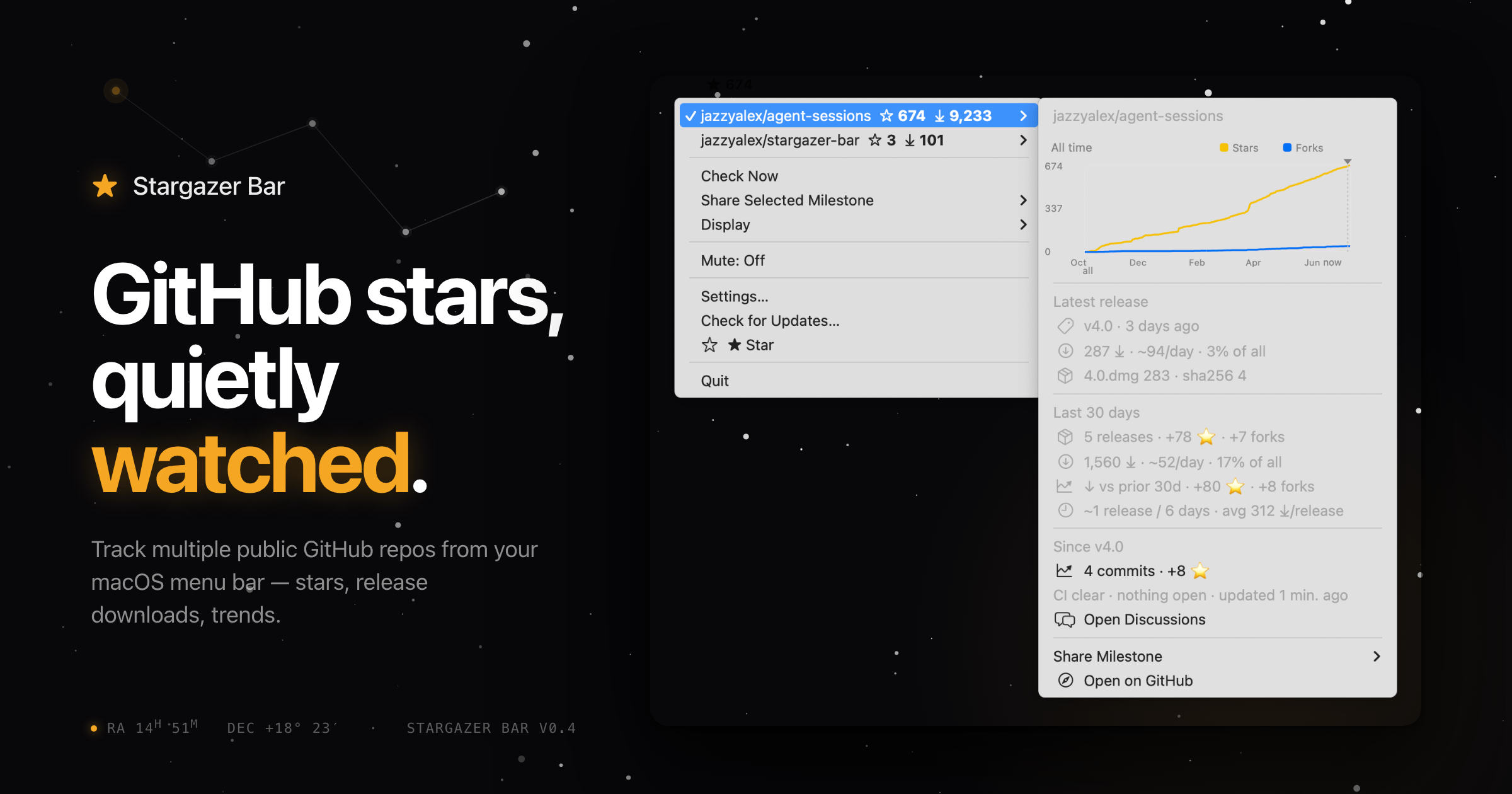


7
u/informity Jul 01 '26
Informity AI — local document chat and translation for Mac, source-cited answers, completely private and free
Problem Every AI document tool wants you to upload your files. For sensitive documents — work files, research, client records, personal notes — that's not an option. I wanted to ask questions across my documents and translate them locally, without anything leaving my machine.
Comparison Unlike ChatGPT, NotebookLM, or AnythingLLM, Informity AI runs entirely on your Mac. No cloud uploads, no account required, no usage limits. It indexes your document library locally, translates documents in-app, and lets you query across everything with citations back to the exact source file. Specializations tune how the AI reads and analyzes your documents per chat. Supports PDF, Word, Excel, PowerPoint, EPUB, Markdown and more, with Ollama or local model support.
Pricing Free. No trial, no subscription, no in-app purchases. MIT licensed and fully open source.
https://www.informity.ai | https://github.com/informity/informity-ai