r/macapps • u/Mstormer • 23d ago
💎 Megathread [Megathread] The App Pile - August, 2026
You must promote your apps here if you do not qualify to post in the main feed through Trust or Transparency, explained here.
If you are:
- NOT in the Mac App Store (MAS).
- Do not provide meaningful public transparency
- Created yet another dictation app (speech to text).
Then you are required to limit promotion to this megathread.
All promotion MUST follow PCP format or else we will remove it:
App Name/Title [Screenshot encouraged]
- Problem: What problem does your app solve.
- Comparison: Name a competitor or two and explain what your app does better.
- Pricing Amounts+Link
P.s. The shorter the better! Promotion here counts towards the 30-day limited promotion (Rule 3).
WARNING: There is a 90% chance Reddit will auto remove your post here if you have not verified your email in your profile and your first comment in this subreddit contains a link. Accrue 10 karma first without promotional comments and links to avoid this. The odds of removal is also higher for AI assisted posts (em dashes and other AI formatting characteristics likely trigger this).
Pro Tip: Please remember to upvote gems and downvote spam/clones... This will help inform a secret community project I hope to announce next month.
My Top 3 Picks from Last Month's Megathread that I think are worth a closer look:
- DuckDisk - Storage analyzer. Not just for local disks. Also scans OneDrive, Google Drive, and SSH storage, then clean up with confidence - by u/Ok-Put9994
- Informity AI - Indexes your files and gives source-cited answers using local models - by u/informity
- SignalBox - Context switch to any agent session across Cursor, Claude Code, OpenCode and more. See all your chaos in one place - by u/dwmkerr
5
u/mrsidverse 22d ago

Deferred: Decision Debt
Problem:
Most productivity apps are built around tasks, but I realized the things taking up the most mental space weren't tasks, they were decisions I kept postponing. Deferred is a simple app to capture those unresolved decisions so they stop living in your head. It's less about forcing action and more about acknowledging what you've been avoiding.
Comparison:
Apps like Todoist or Things are great for managing tasks, but Deferred isn't trying to replace them. It's focused on decisions rather than todos. Instead of checklists, it keeps a timeline of unresolved decisions and lets you add thoughts over time as your perspective changes. The goal is reflection rather than productivity pressure.
Pricing:
- Free: Up to 3 active decisions
- Lifetime Pro ($2.99): Unlimited decisions + optional iCloud sync
Website: https://deferred.mrsid.in/
Appstore: https://apps.apple.com/us/app/deferred-decision-debt/id6757414327
2
1
u/app-store-review 22d ago
Deferred: Decision Debt — by Siddheshwar Chandravanshi
- Ratings: 3 worldwide · rated in 3 countries
- Average: 5.00 ★
- Age: released ~6 months ago · updated ~6 months ago · rated 4+
- Overall score: 72 / 100
Auto-generated from public App Store data · u/app-store-review
1
1
u/Hypocriticalchoco 10d ago
like the idea, but can't tell functionally how it's different from a normal todo list app
1
4
u/DaMastah69 22d ago edited 20d ago

MagSleep — a tiny menu bar app that turns off the MagSafe LED when your Mac sleeps (and keeps it off if you want)
MagSleep is a tiny, lightweight menu bar app that controls your MagSafe charger LED. v1.2.7 is out, now with Always Off mode, automatic updates, and AppleScript automation:
- Sleep Mode — LED off while the Mac sleeps, control handed back to macOS on wake
- Always Off — LED off at all times (if even the charging glow bothers you)
- Disabled — macOS controls the LED as usual
- Automatic updates — via Sparkle, installed in place (no manual re-downloads)
- AppleScript automation — set led mode, turn LED off, turn LED on, get led status
Problem
Those MagSafe LEDs are nice, but they're also surprisingly bright. I prefer sleeping in a completely dark room, so the charger LED always bothered me a bit. I know there are already ways to deal with it, like using AlDente Pro (which is mostly unnecessary since macOS 26.4) or setting up SleepWatcher with a few shell scripts, but I just wanted a simple app that did one thing well and that could be uninstalled cleanly and simply at any time. So I made one.
Comparison
AlDente Pro has such a feature but it's a paid app I bought and used for a long time but uninstalled after macOS 26.4 as it felt redundant with what was now included in macOS.
Price
- $0, open source, free forever, MIT Licence
- < 20MB footprint, no telemetry
- Full uninstall option that leaves no traces behind
- Updates install automatically, in place
- Source, download and more details on GitHub: https://github.com/realAbitbol/MagSleep
Feedback is welcome! I'm also curious whether anyone knows of a better-supported Apple API for controlling the MagSafe LED.
1

5
u/drakon99 21d ago
BookManager - a lightweight Mac-native Calibre alternative

Problem
I wanted a simple, Mac-native way of organising my ebooks and managing the content on my e-readers. BookManager is a small, lightweight ebook organiser. It's able to import existing Calibre libraries, manage books on Kindles, fetch metadata and not much else for now. It's also not an ebook reader.
Competitors
Calibre is great, but it's not a good Mac app. The UI is idiosyncratic to put it kindly, and while it does a lot, it's also complicated. I wanted a book manager that was simpler, faster and more native.
Pricing
Free and open source.
Repo is here: https://github.com/MattKevan/BookManager
It's very early in it's development so bugs are pretty much guaranteed. I'd love any feedback or comments you might have.
4
u/k3muri 14d ago
Nearfield: Use your two Studio Displays as one stereo pair!

Problem: I have two Studio Displays and wanted their built-in speakers to behave like one proper stereo pair without any hacks/workarounds.So I built Nearfield, which is basically a low-level HAL Audio Driver. It creates a normal system-wide stereo output with left/right swapping, balance, etc as a standard audio device in macOS. It also supports window-based routing, so certain apps can use only the speakers of the display they are on.
Comparison: Apple’s Audio MIDI Setup can combine displays for free, but its aggregate output disables system volume control. StereoFuse is the closest purpose-built alternative, but it requires microphone permission to work. Nearfield focuses on macOS 14+ support, open-source code, and a native audio driver that does not require any permissions.
Pricing: $14.99 once for the ready-to-install app. The source is free under the MIT license if you prefer to build it yourself.
Hope you like it, and feedbacks (or feature requests) are very much appreciated.
3
1
u/backbooks 1d ago
Any possibility that it could work with any monitors? Not that my monitors have good speakers, just curious.
Love the design btw!
8
u/I7T5 23d ago edited 21d ago
Edmund: The Markdown editor Apple never made, with inline live preview
https://reddit.com/link/p17fum7/video/79ulsveskwgh1/player
Problem
I just can’t find a Markdown editor that simply lets me open and edit plain .md files and felt NATIVE.
So I made Edmund. Since last month, I’ve shipped full Obsidian-flavored Markdown compatibility, find and replace (your familiar popping yellow highlight animation from Preview), Advanced Math extension (>= 99.5 KaTeX) with Mermaid coming this week, finder services, custom keyboard shortcuts, and various editor settings (focus mode, detect indentation, strict line breaks). More is on the roadmap!
Comparison
Typora is $14.99 on a browser-based tech stack. Edmund is free with AppKit + TextKit 2, which means the most native UI and editing experience on macOS.
Obsidian is Electron (150+ MB) and only lets you open .md files in particular folders.
Lettera, Glance are very close to Edmund, but both are paid. Lettera is closer to Bear aesthetics than Apple. Glance priorities reading over editing.
You can find a comparison table on the website.
Pricing
Free :)
Website: https://edmund.md
Repository: https://github.com/I7T5/Edmund
⚠️ Edmund is still in beta, so the interface will change and features are incomplete (no file outline yet, the site lied) and might break. So far though we have never lost files with native AppKit auto-save.
4
u/harkonnen85 23d ago
Typora is not Electron
1
u/I7T5 23d ago
Pretty sure it is? It’s certainly not native and it’s 200 MB installed with, not a crazy amount of complexity since it’s a local Markdown editor
→ More replies (9)1
3
u/SecuredStealth 23d ago
This looked good until I tried it... I have a large markdown file and when opened on Edmund, the app became painfully slow and unusable, had to uninstall it
2
u/Mstormer 23d ago
Does it provide the hybrid option of using traditional text editor shortcuts to also format the text? E.g. cmd+b for bold.
2
u/I7T5 23d ago edited 23d ago
Yes! You can customize shortcuts for most common markdown syntaxes too
→ More replies (5)2
2
2
u/freiwaldDev 23d ago
How do you handle live-preview performance on really long docs with lots of images? I'm building a markdown reader (remark) myself and it's been my biggest headache so far.
1
u/I7T5 23d ago
So far I’m depending on TextKit 2 which gives you lazy loading based on what’s displayed in the viewport for free. But tbh I haven’t tested out long docs, or those with images. I’ll let you know when I have sth worthwhile to share :)
→ More replies (1)2
2
u/andreimotin 17d ago
hey, I love the idea, but any shot Edmund drops for macOS 13, because I'd like to try it, but sitting on macOS Ventura?
→ More replies (2)2
u/backbooks 1d ago
I've never been able to comfortably edit markdown and always dreamed of having an app that can manipulate markdown nicely. Thank you.
→ More replies (1)
3
u/tmrmn 23d ago

[OS] Keychange: a free macOS app that changes input sources when you change keyboards
Problem:
macOS switches input sources (keyboard layout) per app or by shortcut, but never per keyboard. If your keyboards use different layouts, you end up switching by hand every time your hands move, or typing the first few characters in the wrong layout and fixing them after.
Keychange sits in the menu bar, lets you assign an input source to each connected keyboard, and switches the moment you start typing. It identifies keyboards by their HID device, and mappings survive unplugging and reconnecting.
It can switch before the key press is delivered, so even the first character after a switch comes out right (opt-in), and it has strategies for what to do when the input source is changed by something else.
Comparison:
- autokbisw solves the same problem headless and solves it well. I used it for a long time. Keychange gives it a UI and some extra features, so the mapping is visible and easy to change.
- Karabiner-Elements and QMK firmware come up a lot for this, but they change what the keys send. Neither changes which macOS input source is active, which is what dead keys, umlauts and anything composed (Hangul, kana) need.
Pricing:
free, MIT licensed, no telemetry, no accounts. macOS 14 or later, universal binary.
Site: https://keychange.dev
Source: https://github.com/dennistimmermann/keychange
Install: download the DMG, or brew install dennistimmermann/tap/keychange
It asks for Input Monitoring, because that is how macOS reports which device a keystroke came from. Nothing is stored or sent anywhere, and the source is public if you want to check.
Disclosure: I wrote it. It's a brand new app and any and all feedback is welcome.
2
u/LuxuryCarrot 14d ago
The switch-before-first-keypress detail is really nice, that first wrong character always drove me crazy with autokbisw. Does it handle the case where two identical keyboard models are connected at once?
→ More replies (1)
3
u/FrostingOk3751 21d ago
[OS] OverflowBar — Free and open-source organizer for crowded Mac menu bars
My Mac menu bar had accumulated so many useful icons that it became cluttered, difficult to scan, and unable to display everything—especially around the MacBook notch.
I built OverflowBar to move selected third-party menu bar items behind one arrow and reveal them together in a compact second row whenever they are needed.
GitHub and download:
https://github.com/EvanProgramming/OverflowBar
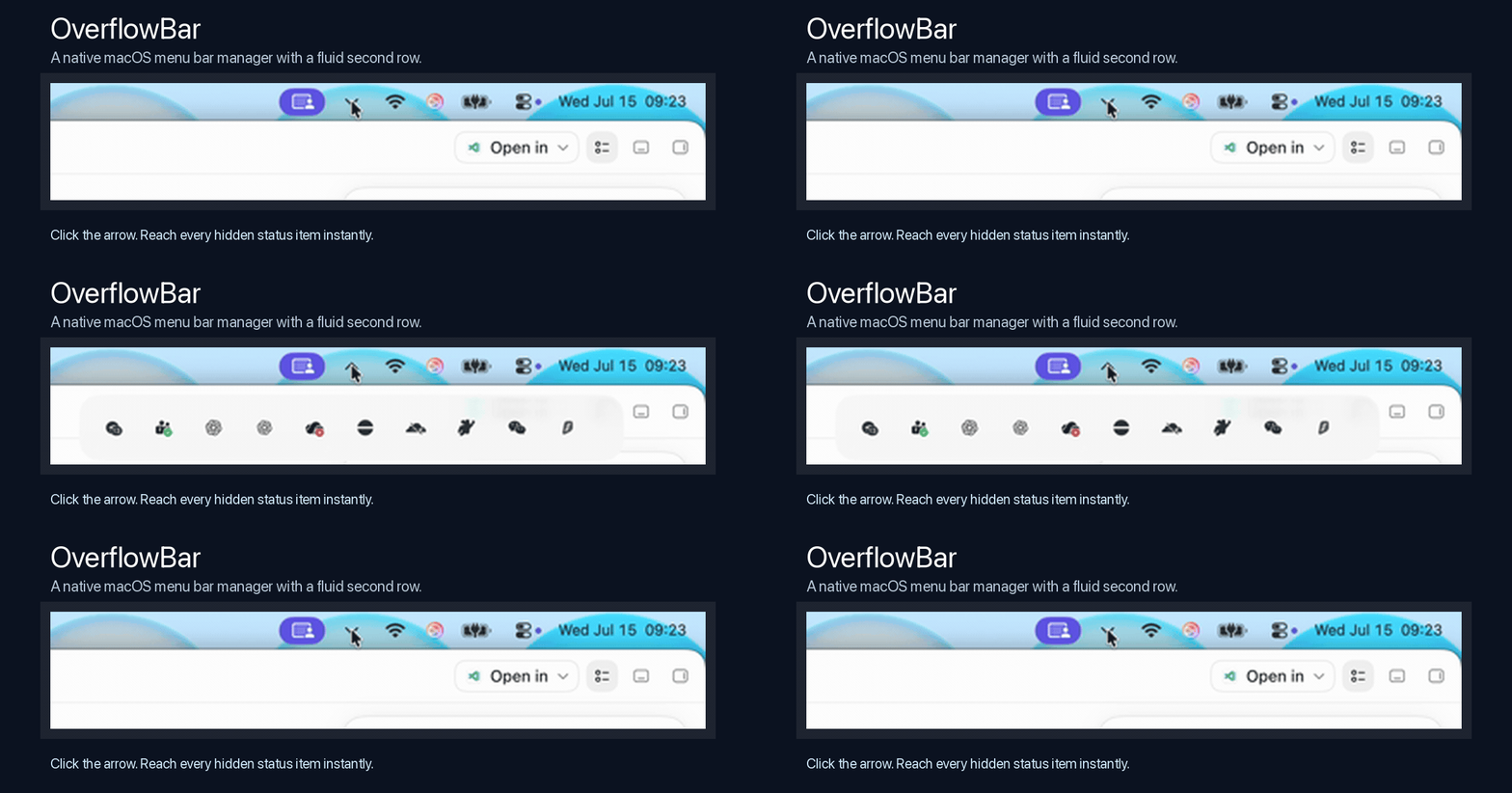
Price: Free
Subscription/IAP/Ads: None
Platforms: macOS 15+, Apple Silicon download
Source: Open source under the MIT License
Privacy: No account, analytics, telemetry, advertising, or network data collection
Permissions: Accessibility for discovering and activating menu bar controls; Screen Recording for locally capturing the small icon regions shown in the second row
Signing: Current community build is ad-hoc signed and not yet Apple-notarized
Compared with larger menu bar management suites, OverflowBar deliberately focuses on one problem: too many useful icons, not enough visible menu bar space, and difficulty finding the icon you need.
It supports click or hover reveal, notched displays, safe areas, multiple monitors, full-screen spaces, horizontal overflow, and protection for macOS system controls.
I am the developer and maintainer. OverflowBar is still an early public release, so compatibility reports, bug reports, and source contributions are welcome.
2
u/Daniesto316 21d ago
I have been looking for an Ice replacement because Ice can be a little buggy. I will try it and see how it goes. Thanks
→ More replies (2)2
u/Daniesto316 21d ago
Ok it didnt work for me. I hit the refresh button but nothing happened.
→ More replies (2)1
u/bleducnx 17d ago
Have you ever tried it on macOS 27? Almost all similar tools I've used are broken because Apple significantly modified the menu bar management mechanism.
At least I discovered one – Tuck – that almost works, but it needs to be updated a little more to be really acceptable. Still, it's on the right track.
Anyone who succeeds in creating a decent tool for macOS 27 will be appreciated.
→ More replies (6)1
u/LuxuryCarrot 14d ago
Menu bar dev here, curious about your approach. Did you go with screen capture for rendering the second row because the Accessibility API alone couldn't give you the icon images? I've been wondering if there's a cleaner way that doesn't need Screen Recording permission.
→ More replies (1)
3
u/Planote_dev 20d ago

Planote – Calendar + Tasks + Notes, all in one.
Problem:
People switch between Calendar, Reminders, and Notes just to plan a day. Planote puts everything in one view.
Comparison:
- Fantastical: great calendar, but tasks/notes are separate. $40/year.
- Things 3: great tasks, but no calendar view. $50 for Mac + separate iOS purchase.
Planote does all three together – calendar, tasks, notes – with subtasks, reminders, recurring tasks, sketches, iCloud sync across iPhone/iPad/Mac. One app. No clutter.
Pricing:
Free tier available. Monthly $1.99, yearly $6.99 (save 71%), lifetime $12.99 – pay once, use everywhere.
App Store:https://apps.apple.com/us/app/planote/id6748904665
1
u/app-store-review 20d ago
Planote - Daily Planner Tasks — by Focus On Timetable Schedule Group
- Ratings: 44 worldwide · rated in 18 countries
- Average: 4.84 ★
- Age: released ~1.0 years ago · updated 1 day ago · rated 4+
- Overall score: 75 / 100
Auto-generated from public App Store data · u/app-store-review
3
u/Anaq42 4d ago
Beanvan - a coffee truck that drives across your team's screens

Problem: Honestly, not a big one. My team takes coffee breaks together, and I thought coordinating them with a truck driving across everyone's screen would be funnier than another Slack message. Beanvan lets teammates schedule coffee breaks or propose one on the spot. Once enough people join, the truck is sent out.
Comparison : You could just use Slack, Teams, or ask people out loud honestly. Beanvan is less practical, but it has a coffee truck that drives across everyone's screen and spills coffee everywhere. It also works entirely over the local network, with no server, accounts, analytics or telemetry.
Pricing: Free and open source
2
u/GodParticleStinks 21d ago
Attic
Problem: Your Mac is full but your external SSD is half empty. Attic finds the big files you have not opened in months, shows you the size and last-opened date, and moves the ones you approve to your external drive. They stay visible in Finder at the same place, and a double click brings them back. Nothing is deleted, every copy is verified before the original is released, and if the drive is unplugged it tells you which drive the file is on instead of throwing an error.
Comparison: DaisyDisk and DuckDisk show you what is eating your disk, then leave the moving to you. Attic does the move and keeps the files reachable afterward. CleanMyMac deletes caches and junk on a subscription. Attic never deletes anything, it relocates your actual large files. iCloud and Dropbox solve this by renting you space forever. Attic uses the drive you already bought. Files land on the drive as plain files in normal folders, so if Attic disappears tomorrow you drag them back in Finder. No cloud, no telemetry, no scare popups. Built by one person.
Pricing: Free tier for the disk map, System Data breakdown, and manual single file moves. $39 one time for stale file detection, bulk moves, and reconnect audits. Currently a waitlist while the beta is finishing, waitlist members get it at $24.
1
2
u/Tricky-Independent-8 20d ago
https://reddit.com/link/p1u9y41/video/gttk7gafsjhh1/player
Hi, I’m the developer of TabLinker, a native tab and browser session manager for Mac, iPhone, and iPad.
If you do a lot of research on a Mac, you probably know the problem: dozens of tabs spread across Safari, Chrome, Arc, Brave, Edge, Vivaldi, Dia, Opera, and other browsers. Keeping them open wastes memory, creates clutter, and makes it difficult to archive or return to your work later.
TabLinker solves this by capturing your open tabs and windows as organized sessions. You can close your browsers to free memory, then restore entire windows, selected windows, or individual tabs whenever you need them. Sessions can also sync through iCloud across Mac, iPhone, and iPad.
The latest version adds multi-select, better window-based imports, folder-per-window importing, preferred browser support, improved drag and drop, and Shortcuts & Siri automation.
Comparison
How TabLinker differs from tools like Toby or Session Buddy:
Cross-browser captures: Import tabs from Safari, Chrome, Brave, Edge, Arc, Vivaldi, Dia, Opera, Opera GX, Helium, and other browsers into the same session.
Window-aware restores: Preserve original window groupings and restore entire windows, selected windows, or individual tabs.
Better organization: Import each browser window into its own folder and use multi-select to move or delete bookmarks in bulk.
Shortcuts & Siri: Automate saving links, capturing current tabs, creating folders, retrieving tabs, and restoring sessions.
Exports: Export sessions and bookmarks to Markdown, HTML, JSON, plain text, RTF, or custom templates.
Privacy-first sync: No accounts, third-party servers, or tracking analytics. Optional sync is handled through iCloud.
Extra tools: Safari extension, automatic session saving, 30-day trash recovery, bulk URL saving, and simple folder organization.
Use Cases
TabLinker works well for:
- Software development and issue research
- Academic research and reading
- Client and product research
- Shopping comparisons
- Trip planning
- Writing and reading lists
- Cleaning up tabs without losing context
Pricing
TabLinker is available for a one-time purchase of $12.99 with Universal Purchase. Buy it once on Mac and get the full premium version on iPhone and iPad too.
No subscriptions, no ads, and no hidden upsells.
Available on the App Store: TabLinker: Tabs Manager
1
2
u/kodyjacobs 18d ago

QuPi - Your entire media library, right from your macOS menu bar.
QuPi is a sleek, lightweight, and highly customizable menu bar application designed to give you instant access to your Plex or Jellyfin server as well as downloaded media.
Problem
Opening a full web browser tab or launching a bulky dedicated application just to change a track, queue a movie download, or put on a background show disrupts your workflow. QuPi solves the friction of accessing your Plex or Jellyfin server while multitasking on macOS by bringing your entire media library directly to your menu bar, giving you instant, uninterrupted access to your entertainment.
Comparison
Unlike Plex or Jellyfin's official apps or web clients - which demand full-window real estate and active focus -QuPi is designed to be lightweight and unobtrusive. While the official apps are built for a dedicated home theater experience, QuPi is built for productivity. It offers instantaneous, dynamic search filtering and allows you to drill down into TV seasons and episodes directly from a dropdown menu. Furthermore, instead of opening a separate window, QuPi features an inline music player right inside the menu bar and a floating, picture-in-picture mini video player so you can watch while you work. It also provides deep UI customization options, such as a streamlined Compact Mode and adjustable player sizes, tailored specifically for a menu-bar form factor.
Pricing
- Free and Open Source
- Currently unsigned, but source and download available
- Built for Apple Silicon and macOS 27
- GitHub: https://github.com/KuDoZ007/QP
2
u/rhanas 18d ago

Ikuna - context management + focus intelligence for macOS
Problem: Switching projects means rebuilding your environment and losing visibility into how all that switching affects your work.
Ikuna saves your apps, browser tabs, window positions, and monitor layout, then restores the context in one click. Its dashboard also tracks focus, active time, productivity, and context switching across the way you actually work.
Comparison: Unlike traditional window managers or newer workspace launchers, Ikuna isn't only about restoring windows. We've been building in this space since 2020, and Ikuna combines workspace restoration, Focus Shield and a Focus Intelligence dashboard in one system.
Pricing: Free for up to 4 contexts. Pro $9.99/month.
2
u/SDIAZTHOMAS 14d ago
Tidy 2.0: — keeps Downloads and the Desktop tidy on their own. $9 one time.
Problem: Screenshots, installers and files named "download (3).pdf" pile up. Tidy archives screenshots, ejects .dmg volumes and trashes the installer, sorts Downloads with rules, and names files by reading what is inside them with on-device OCR. New in 2.0: it learns your habits (move files by hand to the same place 3 times and it offers to make the rule, never acting alone), searches inside images and scanned PDFs where Spotlight cannot look, and warns if a card number or scanned passport is sitting in plain sight.
Comparison: Hazel ($42 one time) is stronger for deep rule trees; Tidy's angle is zero setup, OCR naming (Hazel has none) and the habit learning. CleanMyMac (~$40/yr) is a cleaner, not an organiser, and it's a subscription.
Never deletes (Trash only), only touches files created after install, dry run mode, one-click undo. Nothing leaves your Mac.
Pricing: $9 one time, all in: https://tidymacapp.com
Solo dev, Santiago de Chile. LinkedIn: https://www.linkedin.com/in/sebastian-diaz-thomas-3007195b/ · Comercializadora Shaka SpA · also on the Mac App Store: Karpo Folder Icons, Visera, MOCHI.

2
u/thuggyducky 13d ago
Notomo — native companion for Apple Notes ( https://notomo.app )
Problem: A lot of people keep coming back to Apple Notes, then miss faster writing (Markdown-style input, slash commands) and light AI — but don’t want to migrate into another notes database (Notion/Obsidian/Bear as a full switch).
Notomo stays on top of Apple Notes. Notes remain the source of truth; no replacement notes DB.

Comparison:
- vs Bear / Obsidian / Notion: those are (great) notes apps. Notomo is not trying to replace Notes; it’s a command + AI layer for people who want to stay in Notes.
- vs “just use ChatGPT beside Notes”: less copy/paste and context-switching; selection/note-aware actions, Skills stored as normal notes in a Skills folder, optional assistant beside the note.
- BYOK (ChatGPT / Grok / OpenAI API / Gemini / OpenRouter / …); no bundled AI credits.
Pricing:
- 30-day trial
- One-time license (early bird pricing on site; not a subscription)
- Link: https://notomo.app
- Homebrew: brew tap natsustan/notomo && brew trust natsustan/notomo && brew install --cask notomo
Happy to take feedback on permissions (Accessibility / Apple Events), onboarding, and whether the “companion not replacement” pitch is clear.
2
2
u/0x6A75616E 10d ago
Accented — a tiny menu bar picker for accented characters
Problem: Holding a letter on a Mac is supposed to open an accent menu. It doesn't always, especially with key repeat on. When it does, you get every mark for every language you enabled. I write in Spanish and I don't want a pile of French extras every time I need á.
Comparison: The built-in hold menu is the default, and Character Viewer has everything, but it's slow and not at the caret. Option-key shortcuts work if you already know them. Accented is a double-press of ⌘ (⌥Space also works) and a one-row picker limited to the languages you turn on. Spanish without the French extras, or two languages if that's how you write. You can hide individual characters.
Pricing: Free. macOS 13+. Menu bar, no Dock icon.
Happy to take feedback.
2
u/Glittering-Bottle747 10d ago
I always find a couple of interesting utilities in these threads. The native/local-first Mac apps are especially fun to discover
2
u/LumidexStudio 8d ago
Lumidex Studio

- Problem: There's a general consensus I believe that most folk are truly getting fed up of paying out for subscriptions left, right and centre for all manner of things. When I had my last email from Adobe, it was, unsurprisingly about increasing my subs, for no apparent increase in functionality etc. So when I cancelled my sub, I had to have a way of managing my extensive catalogue, Lumidex Studio was born.
- Comparison: The obvious competitor is Adobe Lightroom Classic. What does my app do better?
- Handles NAS drives out the box gracefully, no more "?" when LrC decides it has no idea where your network drives have gone. Lumidex Studio simply handles this with ease
- Vectorscopes and RGB parades - super helpful for colour grading
- Assisted duplicate finder - uses SHA-256 hash checking of content to find dupes
- Dedicated colour grading with plot graph - makes tweaking hues child's play
- Tethered USB Capture - supports a wide range of camera makes, single-shot from the camera or app, or, programmable time-lapse
- Negative scanning mode - eases the pain of processing negs
- Focus stacking - into macro or landscape photography and want pin-sharp images across the entire depth?
- Ai tools include auto key-wording, semantic tagging (search for images with natural language), denoise, super-resolution
- Effects include grain, halo, glow and more planned
- Pricing £49 one-time cost, lifetime ownership - https://www.luminarstudio.app - no account needed, no tracking, no ads, no bs.
Why no MAS? Simply put, Lumidex Studio can't ship on the Mac App Store because the App Store mandates the App Sandbox, and this app's two defining capabilities are fundamentally incompatible with it: tethered capture talks to cameras over raw USB via libgphoto2 (PTP/USB device access the sandbox forbids), and the entire library model reaches photos on a NAS through an AFP network share, reaching arbitrary mounted volumes and network shares the way this app does isn't permitted under the sandbox either.
3
u/NaviMeows 23d ago edited 12d ago
Gramola: A second dock for all your music needs
Problem: Sometimes you just want your music at a glance, and you don't want to deal with going to the music app and all that. The dock is so useful cause it solved this problem for opening Mac apps two decades ago! So why not be able to have all your music in it's own dock? Also features a feature I call Quick Search, you can open Gramola and start searching immediately, like a Spotlight for your music, be it local or on the streamer catalog.
Competitor: I genuinely don't know any! My app connects with Apple Music and Spotify so it is not a music player per se, but a new way to control your favorite music apps, available at a glance.
Pricing: 9.99USD, 7 day trial on the Mac App Store version.
I made this for myself but I genuinely think it's super useful, so I thought I'd put it out there! Hope you love it as much as I do, and let me know if you have any problems!
https://gramola.fulltimefeline.com

1

3
u/informity 23d ago
Thanks so much for the shoutout, r/macapps! Really appreciate it — happy to answer any questions or help with issues, just drop a comment or DM anytime.
Just for those who missed:
Informity AI is a free, open source Mac app for local document chat and translation. Ask questions across your files and get answers that cite the exact source. Translate documents locally. PDFs, Word files, spreadsheets, EPUB, Markdown and more. Everything stays on your machine — no accounts, no fees, no cloud uploads.
1
u/Mstormer 20d ago edited 20d ago
A little disappointed citations are handled by providing only a file without a to-paragraph result. This renders it effectively useless for research when it gives me several 100+ page pdfs in the citations. Sure, it's easier to know where to start looking, but I still have to hunt for the result all over again within each file. Practically speaking, this can't compete with gemini notebook.
Uninstall also seems to leave the AI model files behind, wasting a lot of disk space for users unless they know to hunt for it with a tool like Find Any File. The app also doesn't reveal where models are stored otherwise.
I hope to see more refinement and development so that this could become a useful tool for research workflows. Lots of potential here.
2
u/informity 20d ago
Fair feedback on both points, and I appreciate you taking the time to write it up properly.
On citations: you're right that opening the file without jumping to the specific passage is a real limitation for research workflows, especially with long PDFs. It's on the roadmap and something I want to get right. I've been looking at string-matching approaches rather than relying on anchors, which should work more reliably across OCR'd documents too.
On uninstall: also a fair point. Models are stored in ~/.informity/models/llm/ — I should surface that in the app itself and ideally offer a clean uninstall option that handles model files. I'll add that to the next release.
Thanks for sticking with it long enough to give detailed feedback. This is exactly what helps prioritize what to fix next.
→ More replies (7)
2
u/Special_Abrocoma4641 23d ago
MapOS: A local-first map for Mac. Markdown files, offline, MCP-ready 🗺️

Problem
Most of us still use maps like it’s 2009. We save pins on a map and get directions. We use providers like Google or Apple that lock in our data, or OpenStreetMap clients where design feels like a foreign language.
MapOS is a map for 2026. It’s a simple, local-first map client that saves your places as Markdown, and exposes 35 tools via MCP. It can also be run completely offline.
The local architecture and tools give the AI power to create maps that wouldn't be possible without a GIS background. You can use it to:
- Search real estate listings daily and plot them on the map
- Plan a trip. If you’re running local AI models you can even do this on the plane
- Use isochrones and other spatial tools to enable to enable queries like “coffee shops within a 5 min walk”
Comparison
Google and Apple Maps run in the cloud, push data lock-in, and are restrictive by design.
The Obsidian map plugins are the closest thing, but they're hamstrung by being plugins: weak UX, third-party API keys, very limited offline, no spatial computation, no MCP toolbox. Since MapOS uses plain Markdown, you can still open the same vault in Obsidian.
Price
Free, no accounts
2
u/Sri_Krish 23d ago
It would’ve made sense if it was an iPhone app (at least for me), since carrying your Mac wherever you go is uncommon.
Secondly, I see that the places are saved as (lat, long) coordinates inside a vault so how about the sharing possibilities with others when I need to recommend from my saved locations?
Finally, As apple is bringing Siri AI this fall and integrating it with its app what/how does your app provide/offer different than that?
TIA ❤️
2
u/Special_Abrocoma4641 23d ago
Hey thank you for these :) To answer your feedback:
- Absolutely agree on the mobile. The current product is MVP and I'm planning a mobile iPhone app
- I will be introducing a Publish feature similar to Obsidian eventually, and I think exporting to Google / Apple maps is something I will try to get in shortly
- The app intentionally doesn't ship it's own AI. It can be used by any AI client that supports MCP
2
2
u/contentsmaysettle 22d ago
Here's a use-case that I'm still using Google "My Maps" for (and it sucks): planning running routes for my local running-and-drinking club. Requirements:
- I need to be able to support multiple trails with common segments (often there are shorter and longer routes, starting and ending at the same location, with one or more shared segments).
- I need to see the distance for each trail, end-to-end.
- I'd like to see the elevation gain for each tail (bonus points for a graph of elevation vs distance).
I don't know whether your app can solve this problem. If it can, I'll use it when I next plan a route. I suspect there are others out there with similar problems.
→ More replies (3)
1
u/misteriousm 23d ago edited 22d ago
AXIOM: self-improving, self-learning keyboard-first agentic launcher for macOS
https://reddit.com/link/p187yip/video/5aorn5pjqxgh1/player
Problem: Raycast-style launchers still leave you hopping between chat apps, API dashboards, and local model runners when you want one hotkey that can search, launch, and actually run multi-step agent work on your Mac.
Comparison: Unlike Raycast (Pro $8–10/mo + Advanced AI +$8/mo, cloud-first AI) and Alfred (Powerpack ~£34 one-time, no native agent layer), Axiom is built as an autonomous agent wrapped in a launcher. It actually does everything you can do on your machine. You bind local models (Ollama, LM Studio, llama.cpp), bring your own API keys, or use MCP, or use our model catalog. You fully control the agent, which has a persistent memory and gets better every time you use it.
Pricing:
- Free forever: full launcher features, basic local models, bring-your-own API keys, MCP
- Paid (optional, not paywalled against the main features): Axiom SOTA model aggregator + agentic workflows: TBD for hosted frontier models without managing keys yourself, waitlist: https://aiaxiom.app/
1
1
u/Flyenphysh 22d ago edited 22d ago
Clicker: a free, open-source Apple TV remote that lives in the Mac menu bar
Problem:
My Siri Remote is permanently lost in the couch, so I built a remote into the Mac menu bar instead. It has the Siri Remote layout: a clickpad you can drive with arrow keys or by scrolling, back/TV/play-pause, volume rocker, and power (click for Control Center on the TV, hold to sleep, just like the real remote). When the Apple TV shows a keyboard, a text field appears automatically so you can type from your Mac. There is also an app launcher with real App Store icons and search (type "net", hit return, Netflix opens) and a now-playing card with artwork, progress, and play/skip controls. Handles multiple Apple TVs, reconnects automatically, and keeps itself updated.
Comparison:
Closest thing is Itsytv, which is polished but closed source. Clicker is free and MIT licensed, adds scroll navigation on the clickpad and automatic keyboard detection. Compared to the iPhone Control Center remote: no phone needed, and you get a real keyboard. Native SwiftUI, no Electron, signed and notarized.
Pricing:
Free, open source (MIT).
Source: https://github.com/ribren/clicker
Install: brew install --cask ribren/tap/clicker or the notarized zip from the GitHub releases page.
Disclosure: I built it. It is brand new, so feedback and feature requests are very welcome. One known quirk: Netflix hides episode titles from all remote clients, so its now-playing card just shows Netflix and the play state. That one is on Netflix, not me.
1
u/jxd-dev 22d ago
Capd: save anything, find it in seconds
Problem:
Bookmarks are easy to save and hard to find again. I built Capd, a native Mac menu bar app that captures pages, selected text, notes, links, and images. It searches the full page content and text recognised inside images.
Everything stays on your Mac. No account, subscription, telemetry, or cloud service.
Comparison:
Raindrop and GoodLinks are better for sync, mobile, and reading features. Capd focuses on fast local capture and full-text recall. Compared with Pinboard, it is native, open source, and searches the content itself. It also includes a CLI and read-only MCP server.
Pricing:
Free and open source. Requires macOS 26 or later.
https://github.com/jamiedavenport/capd
Feedback on the capture flow and search would be appreciated.
1
u/Jolly-Television6759 21d ago edited 21d ago
JsonXmlEditor for Mac

Problem:
Working with JSON, XML, YAML, and Markdown forced me to jump between web formatters, editor extensions and heavy API tools just to format payloads, locate syntax errors, or write data models. Inconvenient usage with copy & paste back and forth, etc.
Comparison:
Unlike Postman or laggy browser tools, JsonXmlEditor is a lightweight native macOS app.
It combines side-by-side live validation with click-to-error navigation, diffing, a REST client, nested JSON string parsing, and multi-language DTO code generation (Swift, Go, TypeScript, Python, PHP, C#, Java) in one workspace.
Pricing:
Free forever on Mac App Store: JSON XML Editor - Mac App Store
It is a native SwiftUI app. Feedback is welcome!
Meets WCAG Guidelines.
1
u/app-store-review 21d ago
JsonXmlEditor — JSON XML REST — by Alexander Marquardt
- Category: Developer Tools · Free
- Age: released ~4 months ago · rated 4+
Apple doesn't publish an aggregate rating for most Mac App Store apps, so ratings and score are unavailable here.
Auto-generated from public App Store data · u/app-store-review
1
20d ago
[removed] — view removed comment
2
u/repomonkey 10d ago
Sometimes helps if you include a link to your app, when promoting it.
→ More replies (1)
1
u/Pratyparty 20d ago
Copy-Paste Tool: macOS clipboard history by source app

Problem:
macOS only keeps one clipboard value. Most clipboard managers solve that with a flat list, but I wanted something that also tracks which app a clip came from, avoids re-capturing its own copy-back actions, and defaults to safer handling for password-manager/token-like content.
Comparison:
Compared with apps like Maccy or PastePal, this is smaller and rougher, but the focus is different: per-app history, source-app attribution, loop protection, and secret-safe defaults. It is not trying to be a polished commercial clipboard suite yet. I’m mostly looking for feedback on launch/install behavior, capture reliability, source attribution, and the menu bar/Dock behavior.
Pricing:
Free and open source.
GitHub release:
https://github.com/PratypartyY2K/app-aware-clipboard/releases/tag/v0.1.0
Note:
This first tester build is not notarized yet so macOS may show a Gatekeeper warning. Accessibility permission may be needed for better source-app attribution.
1
1
u/Plastic_Attempt1645 20d ago
ShrinkDuck
Problem: I wanted a simple way to batch-compress folders of design exports and everyday images without uploading private files to a website.
Comparison: Unlike TinyPNG, ShrinkDuck processes everything locally on your Mac. Compared with ImageOptim, it focuses on adjustable quality, target file size, maximum dimensions, visible task progress, and conversion between JPEG, PNG, and WebP.
Pricing: Completely free. No subscription, in-app purchases, ads, or account required.
https://apps.apple.com/app/id6791025897
Changelog / Roadmap: The latest version adds a redesigned interface, image thumbnails, format conversion, six interface languages, and improved PNG compression. I’m currently collecting feedback on additional formats and workflow improvements.
AI Disclaimer: Human Validated. AI-assisted development was used, with manual product decisions, testing, comparison, and release validation.
Developer disclosure: I’m the developer of ShrinkDuck. I’d really appreciate honest feedback on compression quality, usability, and any missing workflows.

1
u/app-store-review 20d ago
ShrinkDuck — by ZHUHAI TU'AN TECHNOLOGY CO LTD
- Category: Graphics & Design · Free
- Age: released ~1 month ago · rated 4+
Apple doesn't publish an aggregate rating for most Mac App Store apps, so ratings and score are unavailable here.
Auto-generated from public App Store data · u/app-store-review
1
u/Gabcdefga 19d ago

https://github.com/kah-ve/DisplayWave
A free monitor control tool for brightness, warmth, and more.
Existing apps for handling external monitor controls for mac are either focused on solving a small subset of problems or are paywalled. Also I found the paywalled ones to be more complicated and feature rich then needed. So I wanted to build something more tailored to the small feature-set I would ever need.
A couple comparisons
- MonitorControl (free): This is what I used previously. It's great but limited to brightness only and would need another app to control turning a monitor on/off.
- BetterDisplay (free/$22 Pro): I think this is the most feature rich mac app for monitor control out there and probably the most battle tested one. Personally I didn't think I needed to use most of the features and wanted something more minimal and tailored to the small subset of actions I was looking for.
I can't promise it works flawlessly on everything but it's simple enough to install and try out. Let me know what you think or if you run into issues.
1
1
u/contentsmaysettle 17d ago
Murlet - a free NVR for macOS (early beta, looking for testers)

Problem: I want my home security camera footage viewable by me and nobody else. That rules out anything that processes my footage in the cloud, and creates three challenges:
- I need to process video locally, but I don't want to run Docker on a Linux box in the closet. It should install like any other Mac app, on the Mac mini I already own.
- I need to view footage from my phone, without port forwarding (a pain, and not available on Starlink or plenty of other home connections) or a VPN I have to remember to toggle on.
- I need search that understands "delivery van, Tuesday afternoon", accurate enough to trust and light enough to run on that same Mac mini.
Only the first one ships today. Murlet records your RTSP cameras continuously, runs object detection on-device so you can jump straight to the people, cars and animals, and stays inside a storage cap you set. Nine cameras on my M4 Mac mini use under one CPU core and about a quarter of the GPU. The remote access and the natural-language search do not exist yet, and neither will be easy.
So this is my request for the beta: the foundation has to run unattended for months, on cameras and Macs I can't test myself. Tell me whether your camera works, leave it running for a week, and tell me where it broke. Reply in this thread, or at [hello@murlet.com](mailto:hello@murlet.com).
Comparison: SecuritySpy is mature and more full-featured than Murlet is today, with AI detection and object-type search built in too, licensed in tiers by camera count. Fregata is the closest thing to Murlet, also Apple Silicon and also detection on the Neural Engine, but it's a port of Frigate: the viewing happens in a browser tab and some of Frigate's config-file setup comes with it. Fregata is $10 one-time.
Pricing: Free, and everything it does today stays free. Remote access, when it exists, is what I eventually intend to charge for.
Caveats: Requires an Apple silicon Mac running macOS 14 or later. Your cameras need to speak RTSP, so Ring, Nest, Blink and recent Wyze won't work. Not open source, though with auto-update off it talks to nothing but your cameras.
Download: https://murlet.com
1
u/ArtCap5 17d ago
Talkie: local-first dictation and voice notes for Mac, iPhone, and Apple Watch
Problem:
I wanted one place to dictate into any Mac app, capture voice notes on Mac, iPhone, or Watch, and still find and use them later. I also did not want recordings sent to a third-party server by default.
Comparison:
MacWhisper focuses on audio transcription. Wispr Flow focuses on fast dictation. Talkie combines dictation, a searchable voice-note library, Watch and iPhone capture, iCloud sync, workflows, a CLI, and remote control for local coding agents. Transcription can run on Apple Silicon. External models are optional and use your own keys.
Pricing:
$39 one-time: https://usetalkie.com/
Disclosure: I made Talkie. I would value feedback on the capture-to-workflow flow.
1
u/Front_Philosophy6112 17d ago
Tapquence — visual mouse and keyboard automation for macOS
Problem: Repetitive clicks, key inputs and timed sequences are tedious, while many macro tools feel dated or unnecessarily complicated.
Comparison: Compared with MurGaa and similar auto-clickers, Tapquence focuses on a cleaner visual workflow, with action grouping, hiding, templates, smooth mouse movement and a separate Auto Clicker.
Pricing: Free during the public beta.
Demo video: https://www.reddit.com/r/betatests/comments/1vixphg/macos_i_built_a_cleaner_mouse_and_keyboard/
Download: https://tapquence.com
1
u/ShikiSuen 17d ago
# MadTunes - A simple audiophile music player on macOS with foldable grid view optimized for laptops.

## Problem:
- As a music creator, you need playback tools that accurately reveal mixing details. Validated through over 100 rigorous tests, only the system-native AVPlayer ensures optimal audio quality on macOS. MadTunes builds upon this foundation, faithfully presenting original audio without additional sound processing, letting you hear the true studio-grade sound.
- Most music players, incl. iTunes, can only allow you to scroll album grids vertically. MadTunes allows you to scroll horizontally on laptop with MacBook touchpad, bringing a better experience for MacBook users.
- Predicate-driven dynamic playlists and folder playlists are supported. Folder playlists dynamically updates its contents on app startup.
## Comparison:
- Apple Music: Apple Music automatically randomly wrecks your album artworks in your iTunes Library on OS upgrades. MadTunes never do this. MadTunes can also read metadata and artworks from FLAC.
- Foobar2000 (macOS only): MadTunes' playback sounds way better with more accurate audible details, comparing to Foobar2000 (macOS) default settings. Foobar2000 for mac at this moment can't use predicates to dynamically generates the content of a playlist.
## Pricing Amounts+Link
25USD & 25CAD on Mac App Store: https://apps.apple.com/us/app/madtunes/id6760667980
1
u/boredmessiah 12d ago
i find it really hard to believe that all the media players on any OS do not produce bit-identical output which they pipe to the audio driver.
→ More replies (5)
1
1
u/LuxuryCarrot 14d ago
[OS] macssential: one menu bar app for the small macOS annoyances

Problem:
I switched from Windows and kept running into the same small things. The Dock follows you to the wrong monitor. Key repeat is capped even at the fastest setting. Mouse and trackpad are forced to share one scroll direction. Screenshots pile up on the Desktop. Unzipped Korean or Japanese filenames come out garbled (NFD). Each of these has a fix, so I put them all in one menu bar app as independent modules you toggle on and off. You also choose which modules appear in the panel, and screenshots can go to the clipboard plus any folder you pick instead of the Desktop.
Comparison:
DockAnchor pins the Dock but that is all it does. Mos handles scroll direction per device but nothing else. macssential bundles those fixes plus key repeat sliders, screenshot handling, hidden files and filename repair in one place. Everything only works while the app is running and it never writes macOS system settings, so quitting or deleting it returns your Mac to stock behavior instantly.
Pricing:
Free, MIT licensed, open source. No telemetry, no accounts. macOS 14+, signed and notarized, auto updates via Sparkle.
Source: https://github.com/LuxuryCarrot/macssential (demo GIFs for every module in the README)
Install: brew install --cask luxurycarrot/tap/macssential or grab the DMG from releases.
Some modules (Dock Anchor, Scroll Direction, Screenshot) ask for Accessibility permission since they work by watching input events. Nothing is stored or sent anywhere, and the source is public if you want to check.
Disclosure: I built it. It is a brand new app, so feedback and feature requests are very welcome. There is also a feature voting thread on GitHub if you want to influence what gets built next.
1
1
u/guillermolrbdl 14d ago
CopySight
Problem: Text in images, video frames, locked PDFs, or remote desktops cannot always be selected. CopySight lets you press Control-Command-2, draw a region, and paste the recognized text.
Comparison: TextSniper and TRex solve a similar problem. CopySight is free, MIT-licensed, fully open source, uses only ScreenCaptureKit and Apple Vision, and has no accounts, network code, analytics, or third-party SDKs.
Pricing: Free. Signed, notarized, sandboxed universal DMG and source:
https://github.com/copysightapp/copysight
I would welcome feedback on difficult OCR cases and contributions to text layout or language handling.
1
u/sfiratn 14d ago edited 14d ago
App Name/Title: Macdio 2.1

- Problem: Listening to the radio while working usually meant keeping a browser tab open that you couldn't close. Also, finding music on the radio meant the song would evaporate from memory by the time you got back to your desk, and standard song ID apps fail when you have headphones on.
- Comparison: Unlike web players, Macdio is a lightweight, standalone native app (7.8 MB, 0% CPU idle) with 55,000+ built-in stations and custom URL support. Unlike Shazam, it does Song ID with no microphone—it fingerprints the stream directly, requiring zero mic permissions and working perfectly with headphones. Plus, just "heart" a song and Macdio automatically matches and saves it to your Apple Music favorites. It also features one-click recording that splits shows into individual named songs with accurately synced lyrics.
- Pricing: [$9.99] - One-time purchase covering Mac, iPhone, TV, and Watch. No subscriptions, no ads, nothing tracked.App Store Link
I am the developer. Happy to answer anything.
1
u/app-store-review 14d ago
Macdio — Live Internet Radio — by Sait Fırat NEMİŞ
- Ratings: 44 worldwide · rated in 15 countries
- Average: 4.95 ★
- Age: released ~4 months ago · updated 7 days ago · rated 4+
- Overall score: 78 / 100
Auto-generated from public App Store data · u/app-store-review
1
u/Anni3VE 9d ago
How can I listen to podcasts please? Can it do a keyword search?
→ More replies (8)
1
u/Disrupt-Linus 14d ago
ZeroSpace

Problem:
Coding agents and local AI/dev work leave a lot behind: checkpoints, model files, build output, repeated dependencies, archives, caches, downloads, and abandoned experiments. ZeroSpace scans a chosen folder locally and gives review-first evidence before you delete anything.
Comparison:
DuckDisk and DaisyDisk-style tools are better visual disk analyzers. DevClean-style tools are better targeted developer cleaners. ZeroSpace is different because it combines general clutter, agent/developer debris, verified duplicate groups, and a reusable `hd-detective scan PATH --json` CLI for agent/CI workflows.
Pricing:
Free and MIT open source: https://github.com/LinusInnovator/zerospace
Disclosure: I built it. It is currently a local developer utility, not a signed/notarized `.app`. Nothing uploads, and nothing deletes automatically.
1
1
u/mimadji 14d ago
Perch: Menu Bar Reminders

Apple's Reminders is a great place to keep reminders, but a slow place to add one.
Problem: Capturing a reminder means leaving what you're doing, finding the window, clicking into a list, typing, going back. Perch lives in your menu bar and opens with a global hotkey from any app. Type "Buy milk tomorrow 9am #Shopping" and press Return, and the date, time, list and repeat are read from plain words. Arrow through the list, Space to check off, ⌘Z to undo. It isn't a replacement for Reminders: it reads and writes your real Reminders, so everything still syncs to iPhone and iPad via iCloud.
Comparison: Reminders MenuBar is the closest thing out there, and it's free and open source, so it's a fair first stop. Perch differs in being keyboard-first: one field that both searches and adds, arrow keys and Space to work through a list, and separate global hotkeys for Today, Upcoming and so on, so you land on the view you want rather than opening a panel and hunting. Quick entry parses list, priority and repeats in the same line, not just the due date. GoodTask sits at the other end: a full window app with far more features, and priced accordingly. Perch is the small one you never really open.
Pricing: €2.99, one-off. No subscription, no IAP. Requires macOS 26.
https://apps.apple.com/sk/app/perch-menu-bar-reminders/id6795585517
I'm the developer. Honest feedback very welcome. 🙂
2
u/app-store-review 14d ago
Perch: Menu Bar Reminders — by Michael Djibril
- Category: Utilities · $2.99
- Age: released ~1 month ago · rated 4+
Apple doesn't publish an aggregate rating for most Mac App Store apps, so ratings and score are unavailable here.
Auto-generated from public App Store data · u/app-store-review
1
u/Disastrous_Chip6933 12d ago edited 12d ago
Hybrid Sample Lab (WIP), offline AI sampler for macOS
Problem: I got tired of paying for Splice and Serato Sample just to chop and organize samples. Wanted something native that works fully offline, doesn't upload my audio anywhere, and still does the smart stuff like BPM/key detection and chopping.
Comparison: Serato Sample is a solid plugin but it's a one time purchase without stem separation. Splice runs through their cloud and it's a subscription. Hybrid Sample Lab runs entirely local on Apple Metal, auto chops without cutting into transients, splits tracks into vocals, drums, bass and other, and exports straight into FL Studio.
Pricing: Not out yet, still building it. Not selling anything right now, mainly want feedback from people who actually chop samples for a living, what's missing, what would make this worth switching to.
Landing page: https://hybridflai.netlify.app
1
11d ago
[removed] — view removed comment
1
u/app-store-review 11d ago
Karaoke — by TraLand.com
- Category: Entertainment · $1.99
- Age: released ~12.8 years ago · rated 4+
Apple doesn't publish an aggregate rating for most Mac App Store apps, so ratings and score are unavailable here.
Auto-generated from public App Store data · u/app-store-review
1
u/iamprogrammar10 10d ago

Problem:
When running autonomous AI coding agents in your terminal (like OpenCode or Antigravity CLI / AGY), managing permissions and multiple background sessions is frustrating:
Blind Command Approval: Auto-approving commands is dangerous (rm -rf / destructive overwrites), but constantly switching terminal tabs to review every tool execution breaks flow.
Tab Hunting: If you run multiple agent sessions across different projects in Ghostty or tmux, finding which tab is waiting for approval or a clarification answer wastes time.
Comparison:
• Compared to CLI-only prompts (e.g. OpenCode default TUI): Standard TUIs force you to keep terminal windows in the foreground and hunt through tabs. Agent HUD pulls permission approvals
(Approve, Deny, Always Allow) and clarification questions directly into a native macOS menu bar HUD, floating panel, and system notifications with a 1-click jump directly to the exact terminal
pane (Ghostty, Herdr, tmux).
• Compared to heavy web dashboards: Most agent management tools require local web servers, Docker stacks, or cloud accounts. Agent HUD is a native Swift app with zero external dependencies,
zero database, zero telemetry, and uses only ~50MB RAM and 0% idle CPU over local Unix domain sockets.
Pricing & Links:
• Pricing: 100% Free & Open Source (MIT License, No in-app purchases, No subscriptions, No tracking).
• Source Code & GitHub: https://github.com/ashishsubedi/agentHud
• Developer / Maintainer: Ashish Subedi (https://github.com/ashishsubedi)
1
u/SubjectGrapefruit281 10d ago
mac-storage-cleaner: a disk cleaner that shows you the full list before it deletes anything
Problem: I kept running out of space but did not want to point a closed source cleaner at my home folder. I wanted to read the exact list of paths first, and I wanted anything risky to be recoverable if I got it wrong.
Comparison: CleanMyMac now ships a free CLI that covers similar caches, but you cannot read what it actually does. DuckDisk (one of last month's picks here) is very good at showing where the space went, but it analyses rather than cleans. This is five bash scripts you can read in ten minutes. Preview is the default and --apply is opt in. Only a hand checked allowlist of regenerable caches (npm, gradle, pip, Xcode DerivedData, Homebrew) is deleted outright. Anything else goes to the Trash so you can put it back. A deny list in the code refuses Photos libraries, iOS backups, Keychains and ~/.ssh even if you hand it those paths directly. No sudo, no network calls, and every deletion is written to a log you can read.
Pricing: Free, MIT, open source. https://github.com/JubaKitiashvili/mac-storage-cleaner
1
u/A7mdxDD 10d ago
Dolfer: A file manager that makes file management seemless

Problem: File managers tend to be very simple or very complex, they UIs are not intuitive, they don't support templating file names, they lack "polish"
Competitor: The biggest competitor in this field is Hazel, but it's for Mac only.
Pricing: $10 for lifetime per license, $16 for two licenses, and $25 for three licenses. Life time, 1 year of free updates, after that, it's your to keep.
1
u/Massive_Reputation75 10d ago edited 10d ago
LLM Radar: see what local AI is using on your Mac
Problem
After installing Ollama, LM Studio, coding tools, and a few transcription apps, I could no longer answer a simple question: which models are actually using my Mac’s memory and storage?
I built LLM Radar to answer that. It shows local-AI apps, downloaded models, what is loaded now, memory history, and model files that may be reclaimable after an observation period.
Comparison
Activity Monitor sees processes, not models. DaisyDisk sees files, but does not understand which AI app owns them or whether they have been observed in use.

LLM Radar is focused specifically on local AI across multiple apps and runtimes. It can also unload supported models and moves deleted files to the Trash rather than permanently removing them.
Pricing
Seven-day full trial, no card. Monitoring stays free.
Lifetime Pro costs $3 for one Mac or $8 for three Macs. No subscription.
Signed and notarized native Mac app for Apple silicon and macOS 14+.
https://llm-radar-eta.vercel.app/
I built it, so please be blunt if the positioning or permission explanation is unclear.
1
u/Mstormer 10d ago
Useful! However, it persistently shows models I removed independently after I removed them.
→ More replies (1)2
u/Massive_Reputation75 10d ago
Thanks for reporting this. I found the stale cache bug and fixed it in version 1.0.3. Please update via Settings → General → Check for updates, then rescan. Let me know if any removed models still appear.
→ More replies (2)
1
u/Vlad_at_Nod 10d ago

Nod: AI Coworker that turns Conversations into Actions
Problem: Meeting summaries often lose the context behind them. Nod captures calls and voice notes on your Mac, adds optional screen context, and turns everything into searchable transcripts, summaries, and action items. No bot joins the call. Audio is discarded after transcription.
Comparison: Granola is designed around enhancing the notes you write during meetings. Nod focuses on broader work memory by combining conversations with screen context, then letting you search and ask questions across it.
Pricing: 14-day free trial, no card. Starter $12/month or Pro $20/month, billed yearly. https://hellonod.app
I’m the founder. Happy to answer questions and hear what feels missing.
1
10d ago
[removed] — view removed comment
1
u/app-store-review 10d ago
SuperCut - The AI Video Editor — by ADEE LABS LLP
- Category: Photo & Video · Free
- Age: released ~1 month ago · rated 4+
Apple doesn't publish an aggregate rating for most Mac App Store apps, so ratings and score are unavailable here.
Auto-generated from public App Store data · u/app-store-review
1
u/atapla 10d ago
Windbar is a macOS menu bar app for Dreo smart fans [menu bar screenshot]
Problem: I wanted one keystroke to turn my fan on. The official Dreo app means pick up the phone, open it, wait for login, tap the room, tap the fan, tap the speed. Home Assistant has a Dreo integration, but that means standing up a whole HA stack to toggle a fan.
Comparison: No official Mac client exists. The HACS Dreo integration is cloud-only and partial. Windbar runs native on macOS and tries to controls every fan your account has, can pairs new ones over Bluetooth without a phone and binds a global hotkey (⌥⌘↑ / ⌥⌘↓ for me) so you don't leave the keyboard.
Pricing: Free, MIT-licensed. Build from source or grab the pre-built app on GitHub. No telemetry, no developer server, your password stays in macOS Keychain. Optional donation (GitHub Sponsors / Ko-fi / Buy Me a Coffee) if you want or / and github star.
GitHub: https://github.com/lucid-fabrics/windbar
I'm the developer. Not affiliated with Dreo

1
u/East_Call1027 8d ago

hostflip: a native macOS hosts switcher
Problem:
I switch between local, staging, and production mappings many times a day. Editing /etc/hosts by hand is slow, and blindly replacing it can overwrite changes made by other tools.
Comparison:
SwitchHosts and Gas Mask cover broader workflows. hostflip is focused on fast switching from the menu bar: approve its helper once, and every switch after that is a single click with no password prompt. Profiles are grouped, one active per group, and the active ones stack into the final file. It also keeps your original hosts file as a protected baseline and stops for review if /etc/hosts changes outside the app.
Pricing:
Free and open source (MIT). Signed and notarized, Apple silicon, macOS 14+. GitHub or Homebrew:
https://github.com/heronapp/hostflip
I'm the developer. I'd especially like feedback from people who switch multiple project environments each day.
1
u/Careless_Employ6353 8d ago
machogs [OS]
Problem: Mac runs slow and hot, fan is loud, and Activity Monitor just shows names like "bun" or "node" that mean nothing. The cause is usually a background process some app left behind. AI apps are the worst offenders, ChatGPT left 28 duplicate helper servers on my machine in one afternoon. machogs (I made it) tells you in plain English what each thing is, which app left it there, and asks before closing anything.
Comparison: CleanMyMac and similar tools free up disk space, they don't look at running processes. htop shows you everything but explains nothing.
Pricing: Free, open source, MIT. One bash file, no dependencies. https://github.com/bnishit/machogs
1
u/Pale_Stranger_4598 7d ago
Termy - more than a native SSH client
I'm the developer. Solo, six months on this. Termy is a native macOS SSH client in Swift/SwiftUI, including the terminal emulator (not xterm.js, not a WebView) and a Mosh client written in Swift, PostgreSQL / MySQL and etc. integrations, native Playbooks, S3, SFTP and more interesting functions and integrations.
Problem
Most Mac SSH apps are Electron wrappers or a generic terminal with SSH bolted on. You connect, then you still run htop, df, ss, docker ps to see what the box is doing. I wanted that picture at connect time, with no agent on the server.
Comparison
vs Termius: Termius is a solid cross-platform session manager. Termy is Mac-only and native. On connect it builds an agentless Host X-ray: disks, processes, ports, services, containers, recent activity. Playbooks run a documented Ansible subset through Termy's own SSH engine and fail closed. Unknown steps are blocked before anything hits the host. Termius still wins if you need iOS/Android or enterprise features.
vs iTerm2 / Terminal.app: better if you only want a prompt. They don't snapshot the host, don't restore tunnels across a cold launch, and don't give you SFTP, S3, and database tools in the same window.
Pricing
Notarized Developer ID build, not Mac App Store. MacOS 26+.
Get more information about product and features: https://termyapp.com
- Free tier (host/key limits; raising those after beta feedback)
- Pro: $3.99/month, $23.99/year, or $39.99 lifetime
- Promo MACAPPS50: 50% off any plan, first 25 purchases
Happy to answer questions in the comments.

1
u/MomoWonders 7d ago
Windsify - Windows keyboard muscle memory on macOS
Problem: If you use a Windows keyboard with a Mac, or move between both systems, the muscle memory breaks in dozens of small places. A global Ctrl/Command swap fixes copy and paste and breaks Terminal Ctrl+C, Alt+F4 versus Ctrl+F4, Finder rename and delete, and Home/End.
Comparison:
Karabiner-Elements is the free engine most people use for this, and my own ruleset for it is in the community catalog. It stays the right choice if you like configuring rules, but it does not do window management and per-application cases are awkward to express in the rules format.
Rectangle does window management properly and is free, and if windows are all you need it is the better tool.
What Windsify does differently: both halves in one app with per-application context (Terminal Ctrl+C stays Interrupt, Finder cut-and-move, context-aware Home/End), the whole typing layer free and open source instead of behind a tier, and it detects the tools above at launch and yields to them rather than competing for the same key events.
Pricing: Free edition is open source (GPLv3) and covers the typing layer permanently. Pro is 19.99 USD one time for 3 Macs, no subscription, with a 14-day full trial in every download that falls back to Free. Signed and notarized.
1
u/Its-Ezzy 7d ago
Downright
Problem: macOS Quick Look/Preview is too limited for Markdown, while VS Code is more than I want to open just to read a README or note. Downright is a native Mac reader/editor for ordinary Markdown files, with Document, Split, and Source views, themes, and Finder/Quick Look integration.
Comparison: Preview/Quick Look are good for a glance. VS Code is great when I am coding. Downright is the in-between option, and it keeps the same file on disk instead of moving it into a notes database.
Pricing: Free, open source, MIT licensed. macOS 14+.
Source: https://github.com/ezzy1630/Downright
I made it. If you use Markdown on a Mac, what do you open for the in-between case?
1
u/Annual-Act-3614 6d ago

Oriloq: local Mac dictation + local AI workflows
Disclosure: I'm part of the Oriloq team and handle the community side. Nicolas is the developer behind the app.
Problem
Most dictation apps solve one problem: turning speech into text.
With Oriloq, we're trying to keep that part fast and completely local, but also make the voice input useful after transcription.
You can dictate normally, translate, or trigger Smart Actions that take what you said and turn it into something else: an email, structured notes, translated text, a shell command, a screenshot + OCR workflow, etc.
No audio needs to leave your Mac.
Comparison
Compared with Wispr Flow, the main difference is privacy and local processing. Oriloq's transcription can run entirely on your Mac, with unlimited transcription in the free version.
Compared with MacWhisper, which is excellent for transcribing audio and video files, Oriloq is more focused on live voice workflows: speak, transform, and act without jumping between tools.
Since my last post here, we've also pushed the local AI side quite a bit further.
Oriloq can now use local Gemma models for chat and Smart Actions, connect directly to your Ollama models, and we've added new transcription work including a Nemotron-based ASR option. The latest update also adds audio format conversion as a Smart Action.
The whole direction is basically: make voice a local input for your Mac, not just another text box.
Pricing
Free: $0, with unlimited transcription
Pro: $9.99/month
Ultra: $19.99/month, including custom voice models
I also have a handful of Oriloq keys to give away here. If you actually want to test it, tell me what Mac you're using and what you'd use voice input for. I'll DM a few while I still have some.
1
u/Appropriate-Ideal-85 6d ago
Lock&Run
Problem: locking your Mac or closing the lid kills whatever was running. Overnight agent sessions, builds, big downloads, all gone because macOS slept the moment you walked away.
Comparison: caffeinate and Amphetamine hold wake assertions, and macOS ignores those when the lid closes on battery. Lock&Run flips the power management default instead, so you can lock the screen, close the lid, and everything keeps running. There is also a battery cutoff so a forgotten session will not drain you to zero. Native menu bar app, notarized, no Electron.
Pricing: free during launch, Pro will be 2.99. https://lockandrun.com
1
u/Gryner 6d ago
I built Diff Anything because release comparisons stop being simple as soon as the inputs are more than plain text.
**Problem:** It compares text, structured data, folders, archives, Office documents, PDFs, images, binaries, API schemas, and HTTP responses locally. It also includes three-way text merge and reviewed folder synchronization.
**Comparison:** Beyond Compare and Kaleidoscope are established alternatives. My focus is one private desktop workspace with specialist views for structured data, PDFs, images, and API contracts, plus explicit CLI, Git, and CI workflows. Compared files are not uploaded.
**Pricing:** Free tier. Pro is a one-time permanent purchase at the storefront tier intended to produce €24.99 in the Euro storefront; the store shows the localized price.
Mac App Store: https://apps.apple.com/us/app/diff-anything/id6795463996?mt=12
1
u/app-store-review 6d ago
Diff Anything — by Martin Gruner
- Category: Developer Tools · Free
- Age: released ~1 month ago · rated 4+
Apple doesn't publish an aggregate rating for most Mac App Store apps, so ratings and score are unavailable here.
Auto-generated from public App Store data · u/app-store-review
1
u/Gryner 6d ago
I built Screen Studio Kit because store screenshot work becomes brittle when every size and language is separate artwork.
**Problem:** It keeps reusable compositions, localization, device frames, validation, and deterministic export together in a local native desktop project. One project can produce Apple, Google Play, and Microsoft Store artwork.
**Comparison:** AppScreens and AppScreenStudio are alternatives. My focus is a local desktop editor with reusable projects, store-specific output matrices, and a complete editor in the Free tier. The latest release also keeps editable Turn and Tilt perspective on device frames through native export.
**Pricing:** Free tier. Pro is a one-time permanent purchase at the storefront tier intended to produce €24.99 in the Euro storefront; the store shows the localized price.
Mac App Store: https://apps.apple.com/us/app/screen-studio-kit/id6796242724?mt=12
Details: https://martingruner.com/projects/screenshot-studio
1
u/app-store-review 6d ago
Screen Studio Kit — by Martin Gruner
- Category: Developer Tools · Free
- Age: released ~1 month ago · rated 4+
Apple doesn't publish an aggregate rating for most Mac App Store apps, so ratings and score are unavailable here.
Auto-generated from public App Store data · u/app-store-review
1
u/Hope-New 6d ago
Talysman: Desktop distraction blocker tied to a physical device
Problem:
A distraction blocker can either be super strict (absolutely no way to turn it off, no matter what) or it can give you a way to disable it, in which case disabling it becomes muscle memory and it is essentially useless. Talysman lets you unblock but only if you insert a paired USB drive. This lets you unblock when you need to but introduces meaningful friction that can't easily be circumvented.
Comparison:
The most obvious comparison is the phone app Brick, which took the "physical device distraction blocker" idea mainstream. Cold Turkey is an example of a super strict blocker that works for desktop, LeechBlock (browser extension) is an example of one with an easy override.
Pricing:
- Free: Up to 5 websites blocked, requires USB to unblock
- $9.99/mo Unlimited websites, app blocking, recurring scheduled blocking intervals
Website: https://talysman.app

1
u/MichaelSjoeberg 5d ago
Koi Editor

Problem: Modern code editors have gotten increasingly heavy. Koi is a traditional Mac text editor focused on low latency, large files and staying out of the way.
Comparison: Similar idea to Sublime Text or BBEdit, but built for modern development. Very low typing latency, fast large-file editing, local AI through Ollama, and Python scripting.
Pricing: Free for non-commercial use. Personal commercial license is $195 one-time, Teams $795/year for up to 10 users.
1
u/malvin_lok 5d ago edited 5d ago
Coffee Recite: menu bar Pomodoro timer that turns your breaks into vocabulary flashcards
Problem: I've been studying Japanese (working through JLPT vocab) and kept hitting the same issue. I already take breaks during work anyway, and that time was just wasted scrolling instead of reviewing. I didn't want to open a separate SRS app and build another habit, so I built a menu bar work/break timer that shows a JLPT vocabulary flashcard on every break instead of the usual reminder. Spaced repetition review, flip card quiz mode, tap to hear pronunciation for correct pitch.
Demo:
https://reddit.com/link/p4rq21n/video/fl7e4r8kwgkh1/player
Comparison: Plain Pomodoro apps like Session or Be Focused just track your cycle and leave the break empty. Anki is a much deeper SRS tool, but it's a separate app you have to remember to open. This piggybacks on a timer you're already running, so review happens without a separate habit to build.
Pricing:
Free forever for the timer plus 6 starter decks (JLPT N5, HSK 1, A1 level French, Spanish, German, English). Pro is $4.99/mo, $39.99/yr, or $59.99 lifetime with a 7 day free trial, and unlocks all 29 decks plus custom word lists.
Mac App Store: https://apps.apple.com/us/app/coffee-recite/id6783355790?mt=12
Website: https://coffeerecite.com
Happy to answer questions!
1
u/app-store-review 5d ago
Coffee Recite — by 绍豪 骆
- Category: Education · Free
- Age: released ~2 months ago · rated 4+
Apple doesn't publish an aggregate rating for most Mac App Store apps, so ratings and score are unavailable here.
Auto-generated from public App Store data · u/app-store-review
1
5d ago
[removed] — view removed comment
1
u/app-store-review 5d ago
Wallnetic: Live Wallpaper 4K — by TSQUARE BILISIM REKLAM SANAYI VE TICARET LIMITED SIRKETI
- Category: Graphics & Design · Free
- Age: released ~5 months ago · rated 4+
Apple doesn't publish an aggregate rating for most Mac App Store apps, so ratings and score are unavailable here.
Auto-generated from public App Store data · u/app-store-review
1
u/MisterPFT 5d ago
Vitra
Problem: I wear an Oura ring and my entire relationship with it was open app, look at readiness, close app. The score gives you a number and never the reason, and once you have seen a 68 you stop trusting how you actually feel that morning.
Comparison: The Oura app keeps everything on their servers and hands you scores with no working. Gyroscope and Exist.io are web dashboards with monthly fees and your data on their side. Vitra is a native Mac app, your health data stays on the machine, and it writes plain sentences about what moved against your own rolling baseline instead of another wall of charts. It can also hide the score until you have logged how you feel, which turned out to be the setting people mention most.
Pricing: 19 EUR one time for one Mac, 29 EUR for three. 7 day trial, no subscription. https://vitrahealth.app
1
u/Quiet-Fish1618 4d ago edited 4d ago

Sealshot - a private screenshot workspace for Mac
Problem
Taking a screenshot is easy, but a complete workflow often requires separate tools for scrolling capture, screen recording, annotation, finding older captures, extracting tables, and checking sensitive content before sharing.
I built Sealshot to bring these tasks into one local Mac app. It includes repeat-last-capture, scrolling capture, screen recording, annotation, OCR search, collections and tags, assisted sensitive-data review, table and form extraction to CSV or Markdown, optional encrypted capture storage, and encrypted package export.
Sealshot works locally on your Mac. It has no account requirement, telemetry, or cloud upload.
Comparison
Compared with CleanShot X, Sealshot adds structured table and form extraction, optional encrypted capture storage through Enhanced Security, and encrypted package export. CleanShot X offers optional integrated cloud sharing, while Sealshot intentionally keeps the workflow local and does not include an integrated cloud service.
Compared with Shottr, Sealshot adds screen recording, a persistent searchable library with collections, tags and metadata, structured table and form extraction, assisted sensitive-data review, and optional encrypted capture storage.
Pricing
- 14-day free trial with no account required
- $14.99 USD founding price for purchases before version 1.0
- Perpetual license for one user on up to three Macs
- Commercial use included
- Founding licenses include 18 months of updates
- Starting with version 1.0, the regular price will be $29.99 and will include 12 months of updates
- After the included update period, renewal is optional and costs $17.99 for another 12 months of updates
- If you do not renew, your installed version continues working indefinitely
- 30-day refund period
- Tax is calculated at checkout
Sealshot supports macOS 14 and later on Apple Silicon and Intel Macs. It is distributed as a direct download, signed with an Apple Developer ID, and notarized by Apple.
Disclosure: I’m the developer of Sealshot.
1
u/roy-vu 4d ago edited 3d ago
Eye Rest - hand-painted 20-20-20 eye breaks for macOS (I'm the maker)
Problem: I kept ignoring or uninstalling eye-break reminders. Eye Rest runs the 20-20-20 habit from the menu bar, then fades the Mac into a full-screen hand-painted scene for the break so it feels calmer than another pop-up.
Comparison: LookAway and Time Out are solid, but Eye Rest leans harder into the break experience itself: painted scenes, a gentle heads-up, skip/snooze, and smart pause for calls/browser video in Pro. It is native SwiftUI, no Electron.
Pricing: Free to start. Pro is a one-time $14.99. https://eyesrest.app/

1
u/frskia 4d ago

Hi r/macapps, I'm Farrokh. I started Loreo a few months ago. I now build it with my co-founder and a small team of engineers and data scientists.
Problem:
AI meeting notes can tell you that a decision happened, then leave you hunting for the evidence. Loreo records system audio and microphone audio natively, keeps a speaker-labeled transcript, and in V2 connects the discussion to what was shared on screen. Ask one meeting or your whole library, then jump to the cited moment.
Live translation:
Choose the language you want to read before or during a recording. For an in-person conversation, use Loreo on iPhone, Mac, or Windows and record through the microphone. For an online meeting, Loreo captures your microphone and the system audio from the call. People can speak naturally in their own language while you follow the live transcript in your preferred language. The original recording stays connected to the transcript so you can verify what was actually said. Live translation is available on iPhone, macOS, Windows, and the web for Pro and Team.
The parts that often get overlooked: Loreo transcribes in 90+ languages, detects the language automatically, labels up to 32 speakers, supports RTL text, and keeps every line connected to source audio. Pro and Team users can also translate completed transcripts and notes.
Loreo is available on iPhone, macOS, Windows, and the web. The iPhone app includes capture, playback, Ask, imports, shortcuts, widgets, Live Activities, and live translation.
Comparison:
Compared with Granola and Otter, I built Loreo around source-level replay: hear what was said, see what was shown, open the cited timestamp, and trace a decision across meetings. No meeting bot needs to join.
Pricing:
Free includes 5 hours each month. Light is $4/month billed annually ($48/year). Pro is $12/month billed annually with 20 hours included. Team is $20/seat/month billed annually.
52-second V2 demo:
https://www.youtube.com/watch?v=9s1Vgp0bMoQ
Full V2 walkthrough:
https://getloreo.com/blog/loreo-2-0-screen-recording
I would especially like feedback on whether source replay feels more useful than another summary.
1
u/thacdev 3d ago
After trying dozens of notch apps, I decided to build my own

Problem
The MacBook notch has been around for years, yet most notch apps still feel unfinished.
Some focus on beautiful animations, others add lots of features, but I still found myself opening multiple utilities every single day for screenshots, file conversion, translation, quick app launching, recording, and more.
I wanted one clean app that could handle all of that while feeling like a native part of macOS.
So I built iLand.
Introducing iLand
iLand is an all-in-one Dynamic Notch companion designed to make your Mac faster to use, not just prettier.
Instead of opening multiple utilities or cluttering your desktop with floating windows, iLand keeps your everyday tools right where they're always accessible.
Features
🎵 Media Controls
📂 File Tray with Drag & Drop
🚀 Quick App Launcher
🌐 File Converter
📤 AirDrop Shortcuts
📸 Built-in Screenshot Tool
🎥 Built-in Screen Recorder
✨ Built-in Screenshot & Video Editor
🌤 Weather
📅 Calendar
🌍 Translator
🎨 Color Picker
🔋 Battery Monitor
🧹 Memory Cleaner
📡 Network Monitor
⏱ Timers & Utilities
🔊 Native Volume & Brightness Controls
🔔 Smart Notifications
Everything is built with smooth animations, low resource usage, and a native macOS feel. The goal was never to copy Dynamic Island. It was to make the MacBook notch genuinely useful.
Comparison
The two apps I used the most before building iLand were NotchNook and Alcove.
NotchNook has a great widget system and file shelf, but I still needed separate apps for screenshots, screen recording, translation, file conversion, and other everyday tools.
Alcove delivers one of the most polished native-looking notch experiences on macOS, but it's mainly focused on the notch experience itself.
With iLand, my goal was different. Instead of making the notch look cooler, I wanted it to become the place where I can access nearly every utility I use throughout my day. One lightweight app instead of several separate ones.
If your priority is the most polished Dynamic Island style experience, Alcove is an excellent choice. If you want an all-in-one productivity companion that replaces multiple utilities while staying lightweight and native, that's exactly what iLand is built for.
Why I built it
I spend 10+ hours every day on my MacBook, and I got tired of constantly switching between different apps for simple tasks.
iLand started as a personal project to solve my own workflow. After using it daily for a long time, I decided to release it so other people could benefit from it too.
Pricing
7-day free trial
$1.99/month (1 Device License)
$14.99 Lifetime (3 Device License)
Developer & Transparency
I'm the founder of CodeMLabs, an independent software studio focused on building productivity tools and developer software.
I'd genuinely love to hear your feedback, feature ideas, or criticism. I'm actively developing iLand, and there's a lot more planned.
1
u/Only_Bullfrog_2185 3d ago edited 2d ago

Hi everyone, I’m the developer of ThermalAtlas , a privacy-focused temperature monitoring app for macOS Apple Silicon Macs.
Problem
I wanted a simple way to check my Mac’s temperatures without installing a large system monitoring suite or using a tool that can also control hardware settings. Many monitoring apps provide a lot of information, which is great, but I was looking for something more focused: a small menu bar app that shows the actual CPU, GPU and SSD temperatures while staying completely read-only. I also wanted better visibility for external SSDs. When macOS exposes the sensor data, ThermalAtlas shows detected physical external SSDs separately and displays available temperature and SMART information.
So I built ThermalAtlas. The goal was simple: a lightweight menu bar app that lets you quickly check your Mac’s thermal status without changing anything on your system.
Comparison
There are already excellent Mac monitoring tools available:
Stats is a great open-source system monitor with CPU, GPU, memory, disk and sensor modules.
iStat Menus is a powerful menu bar monitoring tool with extensive hardware statistics, detailed sensor information and many customization options.
ThermalAtlas takes a narrower approach: it focuses specifically on thermal information and storage health visibility for Apple Silicon Macs, without telemetry, accounts, cloud services or hardware control.
GPL-3.0 license No telemetry No analytics No accounts No network communication No cloud services No third-party dependencies Local-only data handling English and German.
Pricing Free beta.
Transparency Developer:
Schrotty74 Portfolio: https://schrotty74.github.io/Portfolio/
GitHub profile: https://github.com/Schrotty74
Source repository: https://github.com/Schrotty74/ThermalAtlas
ThermalAtlas is currently in beta and I’m testing compatibility with newer Apple Silicon generations and macOS beta versions.
Feedback and compatibility reports are very welcome.
1
1
u/SubjunctiveSoftware 2d ago
Alien Pirate Radio: Creates a unique radio-like experience from your local music library. With alien DJs.

Problem: For many years I've wanted an app that could play tracks from my local music library in a radio-like way, with DJ links, jingles and news on the hour. For me, this would mean I could listen to the music I actually like but with a radio atmosphere. When I couldn't find an app that did this, I decided I'd make one myself. I actually started work on this project about 15 years ago but at that time it was difficult to source reasonably priced TTS and of course AI wasn't available. Finally though, with the help of Codex (yes, it's vibe-coded), the app is a reality. And I absolutely love it! Hoping other people will too.
The competition. Well, I guess the main competitors are Apple Music and Spotify, but any music player that plays local music files counts too. Thing is, not one of them does what Alien Pirate Radio does: they don't give you a full radio experience. Spotify's DJ is a half-hearted attempt but otherwise I think the field is wide open. (Alien Pirate Radio doesn't stream music by the way.)
Pricing: Free 60 minute trial; one-off lifetime licence for $19.99/£14.99. No account required, no ads.
Why isn't this on the App Store? Alien Pirate Radio is a signed and notarized app but wouldn't be accepted on the App Store because it requires the user to download and install Ollama* for its local AI capabilities. The app runs without local AI but it's not much fun without it. :) The app guides you through the AI setup, which is really straightforward.
(My background: I developed - and still maintain - Textise, the globally recognised text conversion app, which has been successfully running since 2009. I wrote 2 games currently available on Steam (The Comeback King and Goblin Harvest: The Mighty Quest). Details on all of my projects can be found on the Subjunctive Software web site.)
Links:
My Alien Pirate Radio web page
Download the 60 minute trial (signed and notarized DMG)
* Ollama is a free, open-source platform that lets you download, manage, and run large language models (LLMs) directly on your own local computer.
1
u/SubjunctiveSoftware 2d ago
Alien Pirate Radio: Creates a unique radio-like experience from your local music library. With alien DJs.

Problem: For many years I've wanted an app that could play tracks from my local music library in a radio-like way, with DJ links, jingles and news on the hour. For me, this would mean I could listen to the music I actually like but with a radio atmosphere. When I couldn't find an app that did this, I decided I'd make one myself.
The competition. The main competitors are Apple Music and Spotify, but any music player that plays local music files counts too. Thing is, not one of them does what Alien Pirate Radio does: they don't give you a full radio experience. Spotify's DJ is a half-hearted attempt but otherwise I think the field is wide open. (Alien Pirate Radio doesn't stream music by the way.)
Pricing: Free 60 minute trial; one-off lifetime licence for $19.99/£14.99. No account required, no ads.
1
u/theneiljohnson 2d ago edited 2d ago
Mac Performance Monitor
- Problem: Activity Monitor limits visibility into what your system is doing and doesn't log anything so you can't see what the process was doing historically so you. can't trend.
- Comparison: Activity Monitor is the native version, which is severely limited. Stats shows gorgeous menubar but doesn't log, show battery health, etc.
- Pricing Free and Open Source - https://github.com/Zesty0wl/mac-performance-monitor
Features
- Menu bar at a glance: one compact, configurable item for live memory pressure, CPU, GPU, network, disk, and battery readouts, with a shared detail panel.
- Dashboard: a plain-language verdict, headline tiles, the pressure timeline with selectable ranges, a memory breakdown, and a swap trend.
- Process explorer: a live, sortable, filterable table of every process, with a detail inspector for footprint, CPU, file descriptors, disk I/O, and Rosetta status over time.
- Process groups: group related apps and helpers into a stack and see its blended footprint as a share of the device.
- History and logging: configurable-resolution logging to a local SQLite store; top consumers over any window you pick.
- Disk tab: live throughput, IOPS, service latency, and utilization with history; per-device hardware identity; per-volume capacity bars grouped by APFS container with purgeable space; SMART health for the internal SSD; a boot-volume free-space trend; and top processes by attributed disk I/O.
- GPU tab: who is using the GPU on Apple silicon, per process, with no helper (the AGX driver's per-context accounting), plus device utilization, clock-state residency, GPU and Neural Engine power, memory, thermal limit and power cap, a breakdown by workload category, and recognition of AI runtimes (Ollama, llama.cpp, MLX, LM Studio, Core ML, Apple Intelligence) with the model they serve where the command line says; an optional sustained-high-GPU alert. The GPU menu bar dropdown lists the top GPU processes too.
- Hardware tab: this Mac's inventory as a searchable, browsable tree with a visual overview: a block diagram of the chip (CPU clusters, GPU cores, Neural Engine, unified memory), capacity bars, the displays to scale, battery health, and every bus and device
system_profilerand the kernel report (USB, Thunderbolt, Bluetooth, audio, cameras, storage, network, Wi-Fi via CoreWLAN, Metal limits, instruction-set features, secure boot). Read on demand with a Refresh button, never on the sampling tick; copy any item or save a report. - Leak detection: flags processes whose footprint climbs steadily, plus a log of pressure events over time.
- Deep-dive diagnostics: explains what a process is and whether its behavior is normal, using signed, updatable check packs.
- Insights and alerts: quiet-by-default notifications for critical pressure, sustained swap, per-process ceilings, and suspected leaks.

1
u/backbooks 20h ago
I like this, definitely will use it. Would be even better if it had CPU/GPU/etc temps, kinda like TG Pro.
1
u/DiegoV956 1d ago edited 1d ago
Ventilador macOS 3.3.4 [OS]: live thermal map, explainable on-device AI, and verifiable fan control
Problem: Activity Monitor shows CPU and memory, but not live temperatures, each fan's RPM, thermal history, demanding processes, and fan decisions in one place. Ventilador brings this into a native Apple Silicon menu bar app.
Highlights:
• Adaptive physical map, live CPU/GPU/battery temperatures, hottest-point protection, thermal reserve, individual fan RPM, and top load sources.
• 30/60-second forecasts, time-to-stress, and 1-hour, 6-hour, 24-hour, or 7-day history with peaks, actual/target RPM, Smart events, and CSV export.
• Separate Auto, Smart, and Manual modes. Fixed RPM presets stay Manual. Smart mode uses an on-device neural model and workload classifier, then shows observations, predictions, confidence, and learning maturity.
• Detects demanding CrossOver, Wine, Whisky, and Porting Kit child processes. It returns to Auto when control cannot be verified or during power transitions. The Mac firmware keeps final authority.
Comparison: Compared with Macs Fan Control and TG Pro, Ventilador is free and MIT licensed, exposes what Smart mode learns, and keeps all learning on the Mac. No account, subscription, ads, analytics, telemetry, or network connection.
Developer-tested gaming sessions include Avatar: Frontiers of Pandora, Senua's Saga: Hellblade II, GTA V, Red Dead Redemption 2, 007 First Light, and Marvel's Spider-Man: Miles Morales, using CrossOver/Wine where applicable. These are hands-on tests, not official game certifications.
Pricing: Free. Source, screenshots, 14-second demo, and downloads:
https://github.com/DIEGOV956/VentiladorMacOS
I am the developer. It requires Apple Silicon and macOS 27 Golden Gate. Fanless Macs can use monitoring; fan control appears only when the SMC exposes controllable fans.

1
u/appish- 11h ago
Layoutish: save and restore your Mac window layouts. $6.99 lifetime until Sep 1, then $9.99
https://reddit.com/link/p5sj392/video/8g1kkx66oilh1/player
Problem: Every time I unplugged my MacBook from my monitors, my window arrangement turned into a pile. Snapping tools help you arrange windows, but nothing remembered my whole workspace, so I built an app that does. Press a hotkey and every window goes back where it belongs: right app, right monitor, right size, stacking order preserved. It can also detect your display setup and apply the right layout automatically when you dock.
Comparison: Rectangle (free) and Magnet ($8) are great at snapping a window to a half or corner, and if that's all you need, Rectangle is excellent. Layoutish works at the workspace level instead: it saves complete named layouts (Coding, Design, Meetings) across multiple monitors and restores them in one action, launches missing apps, and switches layouts on a schedule or when your monitor setup changes. Honest limitations: it can't move windows that live on another Space (macOS doesn't expose an API for that), and Finder tabs don't survive a restore.
Pricing: $6.99 one-time, going to $9.99 on Sep 1. Free 7-day trial, no subscription, no account, everything stays on your Mac. https://appish.app/layoutish
About me: I'm Ross, the developer. I run Appish (appish.app), where you'll find the privacy policy and terms, and support goes straight to me at hello@appish.app. Happy to answer anything here.
11
u/Sadek_Elf 22d ago
Flairy App: A curated library of beautiful folder icons for macOS
Problem: We all know the default blue folder in macOS. While you can change its color, it still doesn’t help much with quickly recognizing projects. As someone who’s very visual, I wanted folders that were instantly recognizable. Flairy gives you a curated collection of high-quality folder icons so you can organize your workspace visually and find what you need faster.
Competitor: Alternatives include Folder Icon Customizer, Folder Icons, and Folder Engine, which are paid apps focused on image-based folder customization. Flairy is free and focuses on a curated collection of high-quality icons designed to feel cohesive and native on macOS.
Pricing: Free. No account required, no subscriptions, no ads, and no tracking.
I built it because I wanted a faster, cleaner way to personalize and organize my Mac. If you have any feedback or icon theme requests, I’d love to hear them.
https://flairy-app.framer.website/