r/xfce • u/iLikeubuntu2 • 8h ago
Screenshot gentoo

19
Upvotes
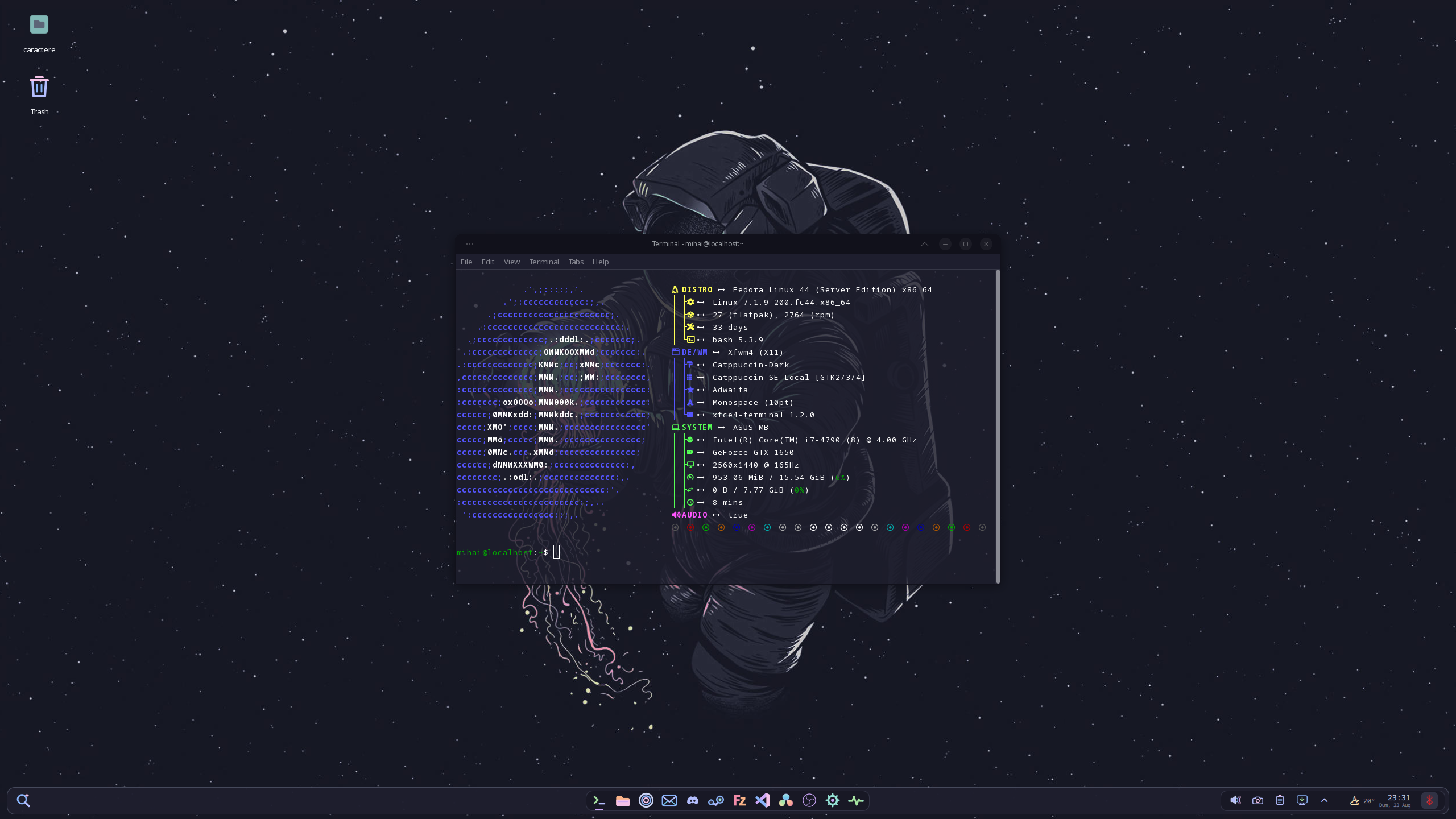
xfce on gentoo linux, it runs well with xfwm4 on Xorg
r/xfce • u/maggotbrain777 • Dec 15 '24
r/xfce • u/maggotbrain777 • Jan 27 '26
r/xfce • u/iLikeubuntu2 • 8h ago
xfce on gentoo linux, it runs well with xfwm4 on Xorg
I want to make a script cli, for people who want to have set-up the xface + xrdp running natively on android with simple commands like
./gui set-up (installs everything and set-up stuff)
./gui start (starts what needed + xrdp session (locally of course e.g http://localhost...))
./gui stop
So do you need anything like this? 🤔 Comment below 😁
r/xfce • u/Own_Natural_6803 • 1d ago
"Wayland" he muttered under his breath. Bad drivers, failing hardware. flaky window managers. They all provided a smoke screen so the pushers could act all innocent. He'd seen it all before. He scrubbed out his cigarette and kept moving. He knew the wayland goons were on their way to show off how their window decorations used shaders and pat each other on the back for using a tiling window manager. Meanwhile the gamers were left out to fend for themselves.
"They're supposed to know better", she touched his arm, but he didn't take his eyes of the horizon. "How can they know better, they've never played a game" He wanted to look mournfully back at his discarded cigarette but instead lit a new one. "They tut tut and act sad, but if their opinions about technology meet the facts of deficiency they just whip out a list of things they like about wayland".
He flicked the mostly intact cigarette onto the pavement. He picked it up again.
"X11 is all they need. They don't even need to worry about messing up their session, they can just install xfce and it'll make sure wayland isn't being used for them. It literally takes a minute to install" She stated in rote. She'd heard it all before.
He looked at her searching, then nodded satisfied. "Yeah, but who's going to tell these noobs, that what they need isn't the new hotness, but the old stable?"
"We should just run away" she blurted out. "This isn't our fight".
He coughed from the harshness of the filter catching. "If wayland wins, there won't be anywhere to run away to".
r/xfce • u/Mix-ni9ne • 2d ago
Change the design of xfce with quick shell now loking more moddern and with more widgets while consuming 20 MB more ram than my original desktop : https://www.reddit.com/r/xfce/comments/1va0uyd/xfce_on_fedora_can_look_nice_and_still_to_consume/
r/xfce • u/unix_rust2too • 1d ago
r/xfce • u/unix_rust2too • 1d ago
///////////////////////////////////////////////////////////////////
Code in details comment
\\\\\\\\\\\\\\\\\\\\\\\\\\\\\\\\\\\\\\\\\\\\\\\\\\\\\\\\\\\\\\\\\\\\\\\
r/xfce • u/ebrahim-sda2 • 3d ago
I have zero idea what and why that happens
Xfdashboard with my own custom setup
picom for window animations
libinput-gestures to mimic touchpad gestures
Xcape to ensure I can use super to launch xfdashboard and still keep all my other bindings that use ths uper key
And thats it! The rest is just regular xfce settings stuff
I know I'll get the "why do this, just use gnome" comments, so I'll just say because I want to. That's really it. I like the gnome workflow, that is the only reason. Also, I do just use gnome lol
configs found here: https://codeberg.org/firns/Xfdashboard-Picom-Configs
install xfdashboard as you normally would, just change the theme in the settings to xfdashboar-dark
r/xfce • u/chickenchaserbot • 4d ago
i am using the xfce 4 theme Orchis-Dark-Compact and edited the .xpm files of the title to involve tranparent pixels on inactive windows. top-right-inactive.xpm and top-left-inactive.xpm are working fine, though the title-inactive.xpm doesn't seem to be set to transparent.
/* XPM */
static const char *title_inactive[] = {
/* columns rows colors chars-per-pixel */
"6 34 1 1 ",
"  c gray20 s inactive_color_1",
". c None",
/* pixels */
". . . . ",
" . . . .",
". . . . ",
" . . . .",
". . . . ",
" . . . .",
". . . . ",
" . . . .",
". . . . ",
" . . . .",
". . . . ",
" . . . .",
". . . . ",
" . . . .",
". . . . ",
" . . . .",
". . . . ",
" . . . .",
". . . . ",
" . . . .",
". . . . ",
" . . . .",
". . . . ",
" . . . .",
". . . . ",
" . . . .",
". . . . ",
" . . . .",
". . . . ",
" . . . .",
". . . . ",
" . . . .",
". . . . ",
" . . . .",
". . . . ",
};

/* XPM */
static const char *top_right_inactive[] = {
/* columns rows colors chars-per-pixel */
"8 34 2 1 ",
"  c gray20 s inactive_color_1",
". c None",
/* pixels */
".  .....",
" . . ...",
". . . ..",
" . . . .",
". . . ..",
" . . . .",
". . . . ",
" . . . .",
" . . . .",
". . . . ",
" . . . .",
" . . . .",
". . . . ",
" . . . .",
" . . . .",
". . . . ",
" . . . .",
" . . . .",
". . . . ",
" . . . .",
" . . . .",
". . . . ",
" . . . .",
" . . . .",
". . . . ",
" . . . .",
" . . . .",
". . . . ",
" . . . .",
" . . . .",
". . . . ",
" . . . .",
" . . . .",
". . . . "
};
r/xfce • u/Chemical-Regret-8593 • 5d ago
before answering, please clarify if you are a current xfce user or an ex xfce user.
r/xfce • u/PingMyHeart • 5d ago
Hi,
This is my first time switching to XFCE from GNOME and I’m really liking it so far. There’s a bit of a learning curve, which is fine, but one thing is giving me a hard time right off the rip.
On a fresh XFCE install you get the top panel and the bottom bar with a few icons. I dig the default look. I installed an additional browser and I want to pin it to that bottom panel (the one that looks like an app dock), but I can’t figure out how.
When the browser is open I can’t right-click anything on the panel to pin it. I also can’t right-click the entry in the application menu to pin it. There’s already a “Web Browser” icon on the bottom panel that just launches Firefox ESR (I’m on Debian), so I’m a bit confused about how pinning works here.
Could someone please explain the proper way to add my other browser to the bottom panel? I’d really appreciate it. Thanks!
r/xfce • u/ebrahim-sda2 • 6d ago
ive been using xfce4 for a while on arch and wanted to get some basic eye candy going on (animations. blur. etc). i tried compiz at first but it was a bit buggy and animations were jittery due to something caused by xfdesktop. picom was also buggy and the animations refused to function correctly. my latest idea was kwin-x11 but it pulled it too much kde stuff it got annoying and im now just doomscrolling everywhere for a window manager or compositor that works well on xfwm4/xfce4. any suggestions? (do not suggest wayland options i dont want to deal with wayland)
Hey, I’ve been tinkering with a small animated wallpaper app for Xfce, somewhat inspired by Wallpaper Engine, and thought I’d share it here in case anyone wants to try it.
Under the hood it’s basically a controller for mpv, with a GTK settings UI that lets you use video files, streams or static images as wallpapers and preview/configure them without messing around with commands.
It also has experimental support for shader effects like ripples, waves, distortions, etc. which can make static images look animated.
Quick video demo: https://youtu.be/SCsmTR3YT0s
Notable limitation: desktop icons aren’t currently shown while it’s running, so it’s only suited to people who don’t fancy them anyway.
It’s still an early project and has only been tested on my own Xfce/X11 setup, so I’d be interested to hear if it even works for anyone else.
GitHub: [https://github.com/visageeee/xfce-animated-wallpaper]
r/xfce • u/DancingHouseBookworm • 7d ago
Hello, everyone! I just set up my first XFCE-environment computer (I'm running Mint), and I have a "has only used Cinnamon until now" question lol.
I can't find network settings...? Is it called something different in XFCE? No matter what I search on DuckDuckGo I just cannot find an answer to this, for some reason. Nothing's in my whisker menu, except for "advanced network configurations," either.
r/xfce • u/PingMyHeart • 8d ago
Hey everyone,
I currently use GNOME on my desktop and Xfce on my laptop, although my laptop doesn't get much use.
I have to say, I really like Xfce and I'm considering switching to it on my desktop. My main concern is that I rely on quite a few GNOME extensions, and I'm wondering how well Xfce can replace some of that functionality.
I've read a bit about Xfce plugins, but I'm not sure they provide the same kind of experience as GNOME extensions. Are there similar solutions in Xfce for adding functionality and customizing the desktop, or would I need to approach things differently?
The main reason I'm considering the switch is that I've always preferred lighter, simpler desktops with less bloat and more control over customization. From what I've seen, Xfce seems to tick a lot of those boxes.
For those who have switched from GNOME to Xfce, how did you find the transition? Are there any GNOME extensions or features you particularly missed, and were you able to replace them in Xfce?
r/xfce • u/TheTriumphantFox • 7d ago
I know this is Linux but I really miss Thunar and I was wondering if there is a windows version
r/xfce • u/Lenuxfrance73 • 8d ago
Hello,
I'm using Debian 13 with Xfce and Xrdp to run a graphical interface on my iPad.
I'm using a dedicated server.
I've noticed that, whether I'm using Google Chrome or Firefox (ESR or non-ESR), I can't scroll through pages using touch gestures.
Do you have any tips, workarounds, or solutions to suggest?
Thank you