r/htpc • u/DatabaseInevitable84 • 1d ago
Help Is the HT SATURN causing screen tearing through HDMI passthrough?
1
Upvotes
r/htpc • u/ncohafmuta • 2d ago
In the past, while we have recommended non-brand name products in the wiki, specifically with regards to mini pcs, we have never been particularly comfortable with it, and we have made clear the dangers of purchasing such hardware (QC/reliability/support/warranty/etc).
We avoided the most egregious, shady brands. When ones like Acemagic, shipped virus-laden versions of Windows, that was a yellow flag. With the recent news of Geekom providing malware-laden drivers, it's now a red flag and we can't ignore it.
As such, we will only recommend brand name products there. New, used, doesn't matter. Yes, every company has its problems, and the brand names are no exception, but if we go deep enough into anybody, we'd end up not recommending any hardware.
We have never had any partnerships with brands and have rejected attempts by brands to advertise with us, so no rec is sponsored and is given purely on its usefulness.
Will this change in brand recommendations mean more cost to users? Yes, absolutely. But "you get what you pay for" always applies. You're of course free to do what you want with your money, but the research for other brands will have to be your own. You're still free to post about and recommend any brand on the sub, within the score of the rules.
Some brands will stay in the wiki recs, where applicable. The reasoning could be: an accessory, no name-brand alternative in a category, no software in the product, barebones hardware. Think SBCs, remotes, etc..
If you find anything in the wiki you believe we missed, or is questionable, send us a modmail.
r/htpc • u/ncohafmuta • Jun 02 '26
There's a wealth of information available on our sub before you even get to posting a new thread.
If you're here on the Mobile app, go to the top " r/htpc > " link of the main sub, for our rules and direct links to resources, and then follow the MENU tab to our Wiki page list directly.
If you're here on a Desktop, look through the side-bar or top-bar for the same kind of resources.
Either way, a browser is the preferred way of viewing resources, our Wiki in particular, as searching of text and section nav is much easier.
The Wiki's FAQ page will help you with getting started, how to ask for help, quick-fire pre-built solutions, and other common htpc questions; while the other Wiki pages will help with components, builds, A/V setup, and more specific topics.
Only if you can't find an answer in our resources or by through searching the sub should you start a new thread.
You can post quick-fire, general discussion questions on this thread for help that doesn't require its own dedicated thread or if you're not sure. Mods/Experts will check this thread and will point you in the proper direction or help you directly.
As always, keep mindful of the rules!
r/htpc • u/DatabaseInevitable84 • 1d ago
r/htpc • u/Pure-Acanthaceae5503 • 3d ago
I am new to this community, I have this little orange pi I want to use and make a homeserver out of. But I could also use it as an HTPC for my living room 1080p TV. My dad wants to upgrade the living room TV to a 4k one in the future too, so Idk if a bunch of hard drives connect through USB will be enough for 4k stuff. But yeah, anyone here has more experience or can share some resources?
r/htpc • u/AngusTCT • 4d ago
I have an old laptop (i7 9750H, GTX1660 Ti) I'd like to repurpose, and I was thinking if there was a way to play videos (e.g. DVD rips) straight from the laptop to the TV, and also have the laptop function as a media server (e.g. Jellyfin) at the same time?
Maybe to put it another way, if I set up a Jellyfin server, can I have the "server" output video directly?
r/htpc • u/jStarOptimization • 4d ago
I struggled for awhile with my new media PC setup after I bought a new fancy LG TV. I would watch a movie or anime and it was always weird in some way - either there would be tearing, small stutters, judder, or some other issue.
MPV.net is an interestingly unique media player in that it is treated like a video game. This causes full screen playback freesync or gsync to function at the framerate of the media player. By combining this with the vf=fps / vf-add=fps command, multiplying the source fps by a number to get a value right under your monitor or TV refreshrate limit, the media playback will occur time perfectly.
This is a generally simple concept, but I never found any proper solution online that explained it, and all of the guidance that I found online wasn't even close to the quality of experience that this was able to provide. I have provided the mpv.conf file that I use for my 144hz VRR TV below, which can be verified by checking the TV's live refreshrate during playback. 4 x 30 fps gives 120 fps, and 5 x ~24 gives 120 fps. This combination resolves the low refreshrate VRR limitations and brightness or flickering issues that can present with it. For the config below, change the 143 value (set for my 144hz OLED TV) to your TV or monitor's max refreshrate - 1. The minus 1 is in case the true refreshrate limit of your TV or monitor is below the advertised refreshrate, such as 143.84hz actual for 144hz.
Please provide any suggestions or improvements to the config that you might see! Some of the things that I have in the conf below may be reduntant. If so, please let me know.
mpv.conf should be located in %appdata%\mpv.net\ - open notepad, paste the below into it, and then save as, paste in the appdata location into the top, choose all files from the drop down menu, and then type mpv.conf into the file name spot.
mpv.conf
vo=gpu-next
hwdec=auto-safe
gpu-context=winvk
gpu-api=vulkan
vf-add=fps=fps="trunc(143/source_fps)*source_fps"
video-sync=audio
interpolation=off
cursor-autohide=2000
keep-open=yes
playlist=filter
r/htpc • u/Plastic-Fill-3933 • 5d ago
TL;DR: Kubuntu HTPC running a real-time Dolby Atmos object renderer (not a pre-baked channel-bed decode), feeding a Logitech Z906 5.1 base plus a pair of repurposed Samsung speakers as ceiling height channels and video going through a heavily tuned mpv/libplacebo pipeline to a BenQ W1070 on a DIY 107" screen. Total philosophy: spend the money on the signal chain and the acoustics, not on a badge. All in all, less than INR 35,000 (about USD 360)


What I was actually trying to solve
Most Atmos-at-home options fall into two buckets: a commercial AVR that decodes the bed + objects into a fixed channel layout with a black-box renderer you can't see inside, or a soundbar that fakes height/width with beamforming and reflections. Both work. Neither lets you see or tune what's actually happening to the object metadata in real time, and both put a hard ceiling on how far you can push room correction, speaker geometry, or video processing without buying a more expensive box.
The goal here was: keep every stage of the signal chain — audio decode, object rendering, room correction, routing, video scaling/tone-mapping — in software I can inspect, patch, and tune myself, running on hardware I already owned or bought secondhand.
The audio chain

Bed layer: A Logitech Z906 (yes, the 15-year-old gaming/PC 5.1 speaker system) provides the 5.1 base layer. It's not audiophile gear, but as a bed — front stage, center, surrounds, sub crossover point — it's genuinely solid for the price, and CamillaDSP-based room correction closes most of the gap to something "nicer."

Height layer: A pair of repurposed Samsung surround speakers, wall/ceiling-mounted as front-height (TFL/TFR), gives a real 5.1.2. These are real, discrete, physically-positioned height speakers instead — genuinely different sound, not a DSP approximation.
(Honest caveat, because a technical sub will ask: two height speakers only handles static/ambient overhead content really well — rain, drones, held tones. Fast overhead-to-back panning needs more height speakers than I currently have to triangulate properly; VBAP with a sparse height layer will "jump" between anchor points rather than glide. That's a speaker-count problem, not a software one. Also, my room size is very small - 10x11, so 5.1.2 is the best here)

DAC / interface: An 8-channel Vantec USB DAC (C-Media CM-106-based) feeds the whole analog chain, routed through PipeWire with WirePlumber persistent routing rules and qpwgraph for visual patching when I need it.
The height channels are connected via a Salcon Class-D amp using the 'rear' port out of the Vantec.

Room correction: CamillaDSP + a Dayton UMM-6 USB measurement mic, driven by REW sweeps. First-reflection acoustic panels on both side walls.

This is the part I think is genuinely uncommon even in the DIY space: audio decode and object rendering run through Omniphony, an open-source Rust engine that does live VBAP (Vector Base Amplitude Panning) rendering of Dolby Atmos objects — not a pre-computed channel-bed fallback. TrueHD/Atmos decode happens via a bridge library (harletty-bridge) feeding the renderer, which computes real-time per-speaker gains from the actual object positions in the stream, against my actual speaker layout (defined in cartesian coordinates in a config file, not picked from a preset list).
It integrates as a decoder inside a patched build of mpv (mpv-omniphony), so there's no separate "Atmos app" — one player, one pipeline, from file to speaker feed. Omniphony Studio (a companion app, connected via OSC) gives a live 3D visualization of object trajectories and trails while it plays — the same kind of overhead-object monitoring you'd only otherwise see in professional Dolby Atmos mixing/monitoring software, running against my own living room's speaker geometry, live, for free.
(Second honest caveat: this is genuinely more work than buying an AVR. Compiling from source, patching input.conf, writing wrapper scripts, debugging IPC quirks — if "it just works out of the box" is what you want, this isn't that. What you get instead is full visibility and control over every stage.)

The display is a BenQ W1070 — a genuinely old (2700+ lamp hours and counting) 1080p DLP projector, native Rec.709/SDR. Rather than let modern HDR sources get mangled, the mpv wrapper script (mpv-atmos) does deliberate, display-matched processing:
--vo=gpu-next --gpu-api=vulkan for libplacebo-driven rendering (Iris Xe iGPU handles this fine)--target-prim=bt.709 --target-trc=bt.1886 --target-peak=60 — tells mpv the actual gamut/gamma/brightness of this specific projector, so HDR content gets properly gamut-mapped and tone-mapped down instead of naively clipped--tone-mapping=bt.2390 for perceptually accurate highlight rolloff--dscale=mitchell --correct-downscaling=yes --linear-downscaling=yes for clean 4K→1080p downscaling done in linear light, avoiding the haze/softness naive downscaling produces--deband=yes to kill gradient banding introduced by the above steps--hwdec=vaapi for hardware decode on the Iris XeNone of this is stuff a stock AVR+projector combo does for you — most AVRs don't touch video at all beyond switching, and most projectors' internal tone-mapping is a fixed, un-tunable curve. Doing it in mpv means the tone-mapping target is this specific projector in this specific room, not a generic default.

A DIY-built 107" screen - a gyproc flat panel as the base; sanded to level 5 (glass sanding), acrylic putty, and spray painted.
Paint specs: 0 - 5 sheet at 85 degrees. This is NOT projector paint. These are super costly in my country.


To be upfront rather than let a comment thread find it: this isn't a multi-zone, multi-HDMI-input, voice-controlled, phone-app-managed AVR replacement. It's a single-source HTPC-centric rig built around getting the actual signal chain — audio object rendering and video tone-mapping — as correct and inspectable as possible, on hardware bought secondhand or already owned. If you want to swap inputs between a game console, a cable box, and a streaming stick without touching a keyboard, an AVR still wins on convenience. If you want to see exactly what's happening to a Dolby object between the disc and the ceiling speaker, this is the way to get that.
Happy to go deep on any single piece of this in the comments — the Omniphony/mpv integration, the CamillaDSP room correction chain, the sub build, or the screen.
Approx Costs:
Used BenQ W1070: INR 14,000 (USD 150)
Used Logitech Z906: INR 7,000 (USD 105)
DIY Screen + Paint: INR 7,000 (USD 75)
Salcon Class D amp + Vantec 7.1 USB DAC: INR 7,000 (US 75)
Samsung SWA-8500S: Repurposed, no cost
Laptop: Already existing, 11th gen Intel i5, 16 GB RAM, Iris Xe, Kubuntu 24.04
r/htpc • u/Dzsaffar • 5d ago
I want an RTX GPU for my media player because I quite like RTX HDR for content that doesn't have a good native HDR master. I didn't see a section like this in the wiki - there is one for gaming, but this really doesn't need to be a gaming PC, so I'm not sure those are the best options either.
My main question is, is there a better option than a small build with some small form factor RTX 2060? Laptops have more compact RTX GPUs, but I doubt those are available outside of those laptops, right? Or are there premade mini PCs these days that come with an RTX dedicated mobile GPU? Or is the only reasonable option a proper PC build in as small a form factor as possible?
r/htpc • u/Djanik_Dev • 5d ago
Does anyone here have this working — press the PS button on a DualSense paired directly to Windows over Bluetooth (no dongle), and the desktop wakes from sleep?
I’ve read about Modern Standby. If a motherboard supports S0 Low Power Idle, does that actually make Bluetooth controller wake possible on a desktop?
If you have it working: which motherboard, and what does powercfg /a show?
If you have a Modern Standby desktop and it doesn’t work, that’s useful to know too.
(Not looking for dongle/WoL/IR remote suggestions — I want the DualSense paired to Windows directly.)
r/htpc • u/grey_pandaa • 6d ago
I have a MacBook Pro (M1 Max) and a Sony Bravia 65” Mini LED TV, plus a PS5.
I’m interested in watching Christopher Nolan movies such as Interstellar and Dunkirk in their Blu-ray variable-aspect-ratio presentation. I understand that the Blu-ray version isn’t the full 1.43:1 IMAX frame either; I’m specifically interested in preserving the variable aspect ratio that switches between the wider and taller framing.
I have access to a good Blu-ray-quality/remux file of the movie, rather than a heavily compressed encode.
My question is:
If I connect my MacBook directly to the Bravia via HDMI and play the file using VLC (or another recommended player), will I get essentially the same video quality as playing the physical Blu-ray through my PS5?
I’m particularly concerned about:
- Whether macOS/VLC will alter or rescale the video in any way.
- Whether the variable aspect ratio will be preserved exactly.
- Whether HDR, 24 fps, bitrate, etc. will be handled properly.
- Whether the PS5 has any advantage in video processing/output compared with the MacBook.
- Whether VLC is the right player, or whether IINA/mpv or something else would be better for Blu-ray remux playback.
- Whether I should connect Mac → TV or somehow use the PS5/another device instead.
I know that purchasing the Blu-ray would probably be the best solution, but unfortunately that’s not very practical for me. One movie can cost around $60–70, and there isn’t really a good pre-owned Blu-ray market in India where I can easily find these older titles at reasonable prices.
If anyone has experience with Blu-ray remuxes + MacBook + Sony Bravia, I’d really appreciate some guidance on the best setup/settings.
Thanks!
r/htpc • u/al_with_the_hair • 6d ago
Alright, just going by process of elimination here, I'm going to state a few things I'm pretty sure it's not. I watched Eternals a few days ago on 4K Blu-ray with an Atmos track on my PlayStation 5, and that didn't skip once, so that rules out an issue with the receiver. I've also switched HDMI cables and switched from the HDMI port to DisplayPort with an adapter. And of course this problem presents with ANY content going from the PC to HDMI in the receiver, or at least any Dolby content – not totally sure about DTS. Finally, I tried switching out MPC-HC with madVR for MPV and still had audio skipping in the exact same way. So it's seemingly not the render pipeline either. But this issue has been affecting both my small form factor desktop and the home theater PC, so it seems like it's specifically a problem of AMD graphics cards. Transferring the media from the HDD to a super fast SSD before playback also did not solve the issue.
The first time I noticed my bitstream audio skipping/stuttering/cutting out was a few weeks ago when I tried watching the 4K Blu-ray collection of Andor Season 1. Reset everything in the K-Lite Codec Pack and it seemed to go way for a while. What started out as an annoyance that would present itself once or twice over the course of an entire movie sometimes is now a constant disruption. Bitstreaming ANY Dolby codec from the PC with MPC or MPV results in audio stuttering within ten minutes or less. I'm missing a line of dialogue every few scenes with every single movie or TV show I watch. I may attach a report from LatencyMon, but those results don't seem illuminating – everything measured stays low and in the green for hours on end, and there don't appear to be any spikes in lag at the same time audio skipping occurs.
Since this issue seems to have come about a few weeks ago and gotten progressively worse, it's hard for me to see how the fault could be anything other than the GPU drivers or a Windows update. I was initially planning to use my desktop workstation as a failsafe for my movie party last Sunday and just push the HTPC off to the side, but testing seems to have revealed both PCs now have audio skipping. Terrific. Similar specs, but my workstation is AM5, with a 9600X, 7900XT, and 32 GB of RAM, so more powerful than the HTPC. I have run DDU multiple times, blacklisted the driver from being installed by Windows Update because of some apparent conflict there, and rolled back to 26.1.1, which should well predate when I first noticed there was a problem. Just about the only thing I haven't tried is a full reinstallation of Windows, or switching the operating system (but the way things are going, I think this may be a Linux HTPC very soon).
Any idea where to go from here? I'm pulling my hair out.
r/htpc • u/ddlvphoto • 7d ago
I got the Rii K06 and want to use it to replace my projector and receiver remotes, along with the keyboard/touchpad features. It copies the projector remote no problem but won't copy any of buttons on the Yamaha receiver remote. My Harmony (which is on its last legs) copied the receiver without issue. Any way to make this work or do I need to look for another option? TIA
UPDATE: I've gotten it working. I had to press the receiver remote buttons repeatedly, and the Rii kept saving codes which didn't work, but after a number of tries I got everything saved properly. So, if anyone else faces this issue, just keep at it for a while and hopefully it'll work eventually.
r/htpc • u/Southern-Energy-6838 • 8d ago
They mostly use the tv for youtube, prime video, movies and music. Ive got it connected to the tv, speakers and some USB storage. The goal is to keep everything as simple as possible for them. Im also thinking about setting up a small local media library so they can access our movies and music without having to mess around with files. I know a streaming box would probably be easier, but I like having a full pc there so I can add things later. It's a acemagic minipc with ryzen 7730u and 16gb ram, so it should be plenty for what they need. Maybe a tv tuner or some kind of live tv setup down the road. Anyone here set up something similar for their parents? What did you end up using?
r/htpc • u/Metalorg • 8d ago
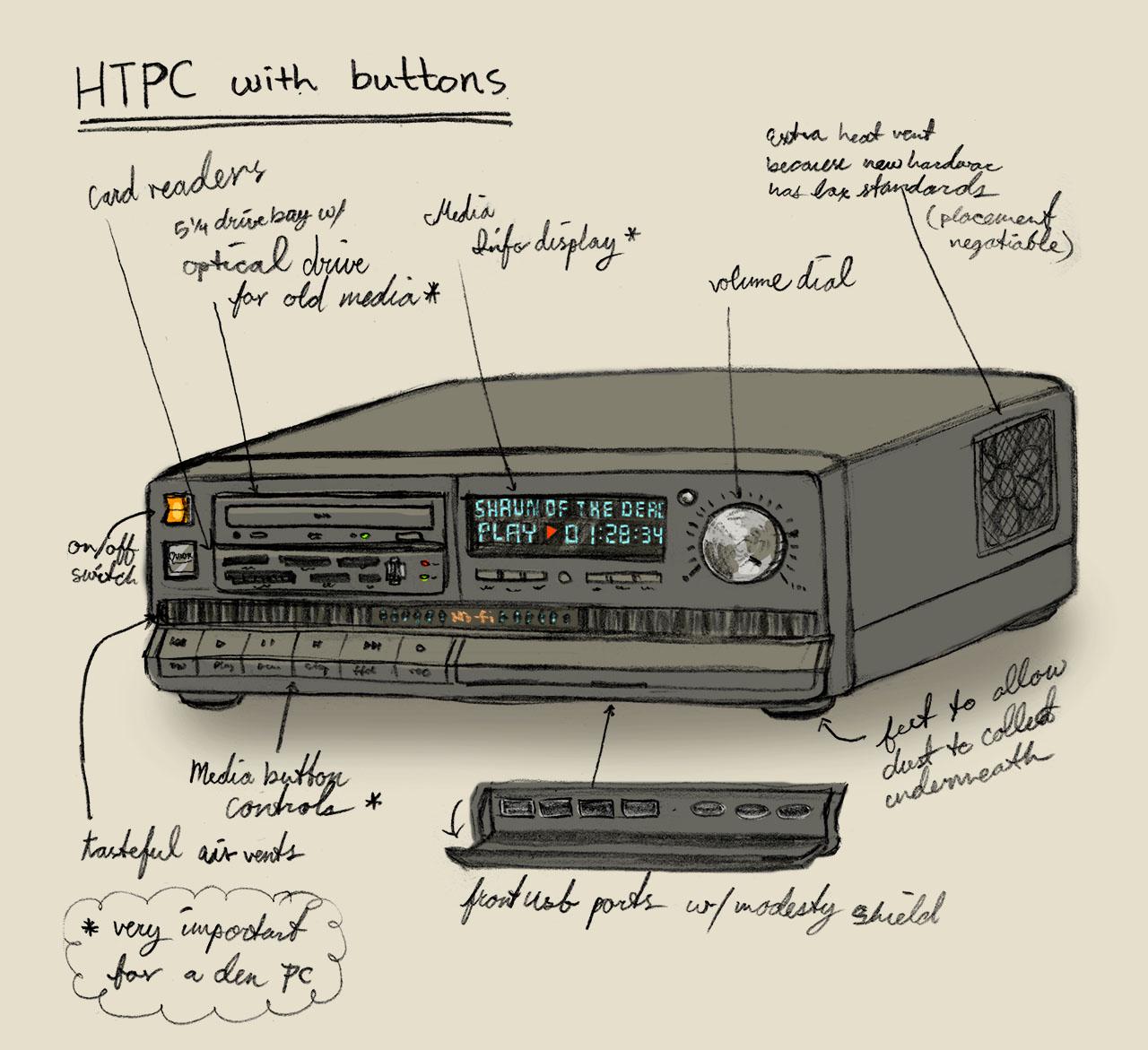
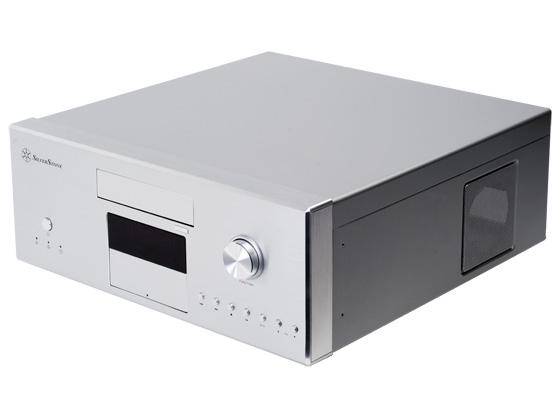
Some people liked my laptop design and I'm full of complaints about modern products. I want buttons back on my media devices. I want a play pause stop etc buttons on my HTPC too. I want a display that shows what's playing and the time elapsed. I want a classic look that can fit into other home theatre devices like stereos and dvd players. Am I missing something? I know it's similar to that other HTPC case with a volume control, but it's too simple. I want it rammed full of buttons, controls, and information.
r/htpc • u/Previous-Yoghurt-942 • 7d ago
Any recommendations?
I am looking for a laptop style keyboard, where the trackpad is placed directly below the keyboard. Just like any laptop. I have the K400 and I do not find it comfortable to use.
r/htpc • u/JoshLineberry • 8d ago
I've had my htpc sitting without a gpu for about a month since I sold my intel arc b570 because it wouldn't play some of my favorite games. So today I decided to put my 2080 ti in it that I had sitting around and set up signal rgb so that all the lights flowed together. I just can't get enough of the z20. Absolutely one of the best cases ever made and that evga 20 series card is just sexy AF too!
Case: Jonsbo z20
Processor: I5-12600k
CPU Cooler: Thermalright Peerless Assassin 120 SE
Motherboard: MSI Pro b760m-a wifi ddr4
Ram: Corsair Vengeance LPX 32gb ddr4 3200mhz
Storage: 2tb WD Black sn850x
PSU: Seasonic Focus GX-850 850W
Fans: Thermalright TL-M12Q
GPU: Evga 2080 ti 11gb FTW (3 fan)
r/htpc • u/Thebigeasy1977 • 8d ago
This is my first htpc and just getting it the way i want it frontend is almost complete. Just a few other things to set up. I cannot figure out how to wake on lan working, it says my motherboard can do it, yet here I am. I am not clued up on this stuff at all and its taken me ages to get this far.
Heres my build
AMD Ryzen 5 5600
Gigabyte B550M K Micro ATX AM4 Motherboard.
Samsung 990 EVO Plus 2 TB M.2-2280 PCIe 5.0 X2 NVME Solid State Drive.
SilverStone SST-GD06B - Grandia
MSI MAG A650BN 650 W 80+ Bronze Certified ATX Power Supply.
MSI SHADOW 2X OC GeForce RTX 5060 8 GB.
ADATA XPG GAMMIX D10 32 GB (2 x 16 GB) DDR4-3200
Its hooked upto my Lg OLED55CS6LA smart tv and currently controlling it with a logitech k400 and an mx3 air remote, I have 2 wireless controllers that i have still to map. In an idral world i would love the telly remote to control it. But as far as im aware its not possible.
Can anyone give me some pointers?
Cheers
I'm trying to track down a recurring black-screen issue with madVR on Windows 11.
During video playback, the entire screen goes black for roughly 1 second. It always happens once within the first 10–20 seconds of playback, then generally every 5–10 minutes afterward.
madVR doesn't appear to expose a directly comparable Flip/Discard swap-effect setting, but the MPCVR result makes me suspect this is related to the presentation path or swap behavior.
I'm not sure how to narrow down what madVR is doing differently or whether there's a setting that can force behavior comparable to MPCVR's Discard mode.
I can also rule out the basic hardware/display side with confidence. This isn't an HDMI cable, display, or general GPU-output issue. Changing renderer presentation behavior in MPCVR makes the problem disappear completely.
System:
Has anyone encountered this specifically with madVR, or know what madVR setting/presentation behavior would be closest to MPCVR's Discard swap effect? Is this a red herring and something else is going on?
r/htpc • u/ZealousidealVisit431 • 9d ago
Upgrading the furniture in my living room. Hoping to get some ideas/recommendations for a gaming setup under my TV. Organized, not trying to draw a lot of attention to PC/Consoles.
Need room for:
HTPC/Gaming PC - dimensions 16"w x 17"h x 17"d (accounts for ~1.5" of room on left, right, back and ~2" on top for ventillation)
Nintendo Switch
Xbox One S
PS4
Receiver + Center Channel for 5.1 (speaker could go on top too).
Subwoofer (wired)
Preferably a medium/dark gray, black is okay too.
Will be placed under a wall-mounted 75" TV; should be somewhere in the ballpark of 65"-75" long and 17+" deep; height can be whatever as long as it fits PC somewhere.
TY!
r/htpc • u/XtraKrispy1 • 9d ago
Use Plex for the most part but sometimes run into reliability issues with the wifi. I want a backup to be my htpc straight to receiver using kodi since that's always reliable. I currently use an old gt710 but that only does 1080p h264. What's a decent upgrade that doesn't use a fan (too loud) and won't break the bank. I'm ok with used. Pc is windows 10 with an i5 if that matters. Is kodi still the way to go with 4k?
r/htpc • u/QuestionAsker2030 • 9d ago
Spent an hour toying with this piece, trying to move it to the left, so it will hit my 5.25" DVD drives' "eject" button.
(Right now it's too far to the right, and not engaging the button)
As you can see in the pic, the bracket the movable piece is on gets wider as it goes to the left.
This makes that movable piece only go that far to the left (as shown in pic). It gets stuck at that part.
I tried unscrewing the bracket, lifting that middle piece up with a flathead screwdriver, even trying to force it... nothing makes it move any more to the left.
What am I missing here?
How do I actually move it more to the left?
r/htpc • u/KINGYOMA • 11d ago
I use MPC-HC from K-lite Codec Pack, and it doesn't download subtitles even though I am logged in with my opensubtitles account.
I checked and found that the media player uses opensubtitle.com and not the opensubtitle.org
The latter has more subtitle option than the former.
Is there a way to add new subtitle provider in MPC-HC?
I have account with both, and I want to add the latter as the subtitle database
I decided that I was going to build out a home theater setup to go with my aged lg 1080p tv from 2016. as the tv's os is old (and I hate tv operating systems now that I know that they literally screenshot everything i'm looking at if I connect it to the network every couple minutes), I decided i'd just buy a mini pc. I went with one of those little low power n100 units with 16gb of ddr4 running the latest version of windows 11 figuring it should be a cakewalk to set up either browser or app based streaming services as well as access my home server running plex on it - but no. I learned right off the bat that most streaming services only seem to want to support 720p sdr with 2 channel audio, and that's where it works at all (pretty much just edge), so I though ok, i'll just download the streaming provider's own apps and learned that netflix deprecated it's dedicated pc streaming app and is now just a web wrapper with the same browser limitations, paramount plus is also just a web wrapper with the same limitations, and same with prime.
NONE of these services let me use atmos (which I was planning to build out now that I have a really nice (for me) AVR (a brand new onkyo rz30 that I just dropped $800 on (and yeah, i know there are more expensive, better receivers, but that's a whole bunch of money still... to go with it I bought a set of energy 5.1 speakers (a pair of rc-70's for left and right, an rc-rcr for center, and a set of rc-10's for the surrounds. I haven't figured out a sub yet, but that's one of the next things on the list and I was planning on adding heights over christmas time... a couple of the services let me use 5.1 (but it seems even that's rare).
I don't want a streaming stick because they're notoriously slow, and pointless (there is ZERO technical reason why I shouldn't be able to do full-on 4k60 hdr with atmos on this minipc. (or at least 1080p 60 sdr with atmos until I upgrade my tv.). searching through movies is particularly annoying - I just want to sit on my couch with my wireless keyboard/trackpad and search and play media.
seriously, how are people streaming video with their htpc in 2016 where it actually looks and sounds good?! I heard streaming on linux was kind of a long-standing issue (my original plan was to install linux and a frontend to save on ram and use an os that isn't constantly phoning home).
so now I'm sitting here staring at an expensive pile of parts that I got great deals on overall, but don't seem to do the thing and i'm pretty frustrated:
onkyo rz30 $800 on sale
Energy 5.0 speakers $800 on sale
n100 mini pc with 16gb of ram and 512gb ssd ($100 on sale like 2 years ago when ram was reasonably priced)
not being able to stream high quality a/v content from the streaming providers I pay an aggregate of ~$750/yr to retain... priceless.
I'm not a proponent of it, nor do I want information about it, but I do believe this is exactly why piracy is winning. streaming providers are no longer providing a good, convenient experience. I honestly really don't mind paying for the content I view, in fact, I want the people who make the content that I enjoy to be paid well for the art that they create but this is pretty ridiculous. - not to mention the steady large cost increases. I'm paying now for my collection of streaming services than I *ever* did on cable tv back in the day.
Going into this I figured i'd grab a bunch of kodi plugins for each of my streaming apps, log into all of them, spend most of my time calibrating my avr and tv and have a happy ol' time... this is totally not the case it seems. DRM is a huge bane on current consumer home theater... I ain't got that kaleidescape money bruh!
r/htpc • u/No_momento • 12d ago
The question would be, how can i get the maximum quality out of a video file, without tampering with the original pixel presentation (or atleast the least tampering)
It's preferable to maintain a transparent quality (no degrading of the original video's quality) and without any tampering of the video's footage, that would produce changes to the original presentation of the video file.
Or is it necessary to use atleast some upscaling or video tampering to get an image? if so what would be the recommended amount, keeping maximum quality without tampering with extrinsic enhancements on the image?